Solved Win 7 64bit prof. can only personalize two backgrounds not others

SteveKG

New member
Local time
6:40 PM
Messages
29
I am running windows 7 64bit professional. I typically change my desktop background seasonally. Went to switch from Spring to Summer and it failed - desktop background would not change. Clicked on Windows 7 default screen and that worked. Clicked on my Spring background and it also worked. Clicked on all my other backgrounds and no change. I have read and followed EVERY suggestion I can find via Google searches and none of them work; system restore, service.msc, transparency enabled check, sfc /scannow (4 times), Malicious Software Removal Tool, updated all my drivers, tried to do a repair from my installation DVD but the system said it couldn't recognize the DVD (don't ask my why, it its the same one I installed Win 7 with)! I have tried every single suggestion out there... all to no avail. I am at a loss. I have no idea why I can change 2 background images, but not any of the other ones that I used to change all the time. Oh, and a full re-install is not an option as the customization and program re-installs would take me months to remember how I did them in the first place and re-create them... especially all my custom icons. Help. Please.
 

My Computer My Computer

At a glance

Windows 7 Professional 64 bitIntel Core i-5 459016 GB Corsair VengeanceEVGA GeForce GTX 970
Computer type
PC/Desktop
Computer Manufacturer/Model Number
Custom Build
OS
Windows 7 Professional 64 bit
CPU
Intel Core i-5 4590
Motherboard
ASUS H97-Plus
Memory
16 GB Corsair Vengeance
Graphics Card(s)
EVGA GeForce GTX 970
Hard Drives
WD 500 GB Blue
WD 1 TB Black
Browser
Sea Monkey
Hi

download and run KB947821 from the MS catalog
 

My Computer My Computer

At a glance

W7 home premium 32bit/W7HP 64bit/w10 tp insid...E5300 dual core3gbNvidia Geforce 7100 Nforce 630i
Computer type
PC/Desktop
Computer Manufacturer/Model Number
medionl/Aspire 6930G/acer x55a
OS
W7 home premium 32bit/W7HP 64bit/w10 tp insider ring
CPU
E5300 dual core
Motherboard
medion MS7366
Memory
3gb
Graphics Card(s)
Nvidia Geforce 7100 Nforce 630i
Monitor(s) Displays
avixc
Internet Speed
n (isp resticted to 72)
Antivirus
mse/pands
Browser
palemoon
Other Info
Belkin Fd7050 n USB using Railink RT2870 drivers, more upto date
Thanks, Torchwood.
I'll Let you know how it plays out. Regardless of the outcome, thank you SO MUCH for taking the time to respond!

- - - Updated - - -

Hi Torchwood,
Here are the results of running KB947821:
Summary:
Seconds executed: 557
Found 605 errors
Fixed 605 errors
CSI Payload File Missing Total count: 552
Fixed: CSI Payload File Missing. Total count: 552
CSI Store Directory Missing Total count: 53
Fixed: CSI Store Directory Missing. Total count: 53

My Personalize problem remains unchanged. However, with these errors fixed, perhaps an Installation Disk Repair might now work where as before it gagged on recognizing it as the original install disk. Worth a try. I appreciate your help.

- - - Updated - - -

Tried to run Repair from my Installation Disk:
IMG-7145.jpg
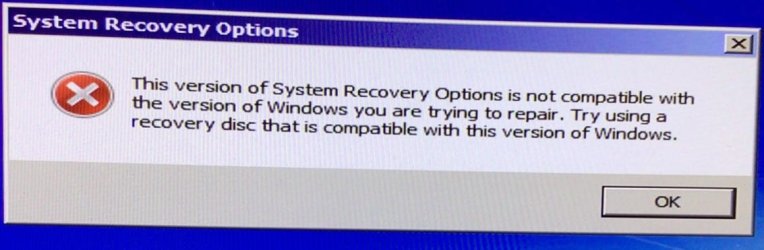
I received the following message:
IMG-7143.jpg
I'm at a loss to understand as this IS my Installation Disc.
I'm beginning to suspect that my only option is to re-install Windows 7 on a larger hard drive and suffer through the months of re-installing all my programs and custom icons, etc. Not looking forward to that at all. Hopefully, additional suggestions will get posted. And yes, I also tried deleting the TranscodedWallpaper.jpg file.
 

My Computer My Computer

At a glance

Windows 7 Professional 64 bitIntel Core i-5 459016 GB Corsair VengeanceEVGA GeForce GTX 970
Computer type
PC/Desktop
Computer Manufacturer/Model Number
Custom Build
OS
Windows 7 Professional 64 bit
CPU
Intel Core i-5 4590
Motherboard
ASUS H97-Plus
Memory
16 GB Corsair Vengeance
Graphics Card(s)
EVGA GeForce GTX 970
Hard Drives
WD 500 GB Blue
WD 1 TB Black
Browser
Sea Monkey

My Computer My Computer

At a glance

W7 home premium 32bit/W7HP 64bit/w10 tp insid...E5300 dual core3gbNvidia Geforce 7100 Nforce 630i
Computer type
PC/Desktop
Computer Manufacturer/Model Number
medionl/Aspire 6930G/acer x55a
OS
W7 home premium 32bit/W7HP 64bit/w10 tp insider ring
CPU
E5300 dual core
Motherboard
medion MS7366
Memory
3gb
Graphics Card(s)
Nvidia Geforce 7100 Nforce 630i
Monitor(s) Displays
avixc
Internet Speed
n (isp resticted to 72)
Antivirus
mse/pands
Browser
palemoon
Other Info
Belkin Fd7050 n USB using Railink RT2870 drivers, more upto date
Hello back,
I will run scannow and delve into the link you suggest. Today being Mother's Day it will likely have to be tomorrow to do it.
Again, I totally appreciate all your thoughts and suggestions!! If you have any idea as to why my attempt at an installation repair failed, I will be in your debt. Thanks again, Torchwood. I will post the results when I get them.
-Steve
 

My Computer My Computer

At a glance

Windows 7 Professional 64 bitIntel Core i-5 459016 GB Corsair VengeanceEVGA GeForce GTX 970
Computer type
PC/Desktop
Computer Manufacturer/Model Number
Custom Build
OS
Windows 7 Professional 64 bit
CPU
Intel Core i-5 4590
Motherboard
ASUS H97-Plus
Memory
16 GB Corsair Vengeance
Graphics Card(s)
EVGA GeForce GTX 970
Hard Drives
WD 500 GB Blue
WD 1 TB Black
Browser
Sea Monkey
its possible that SURT(kb947821) repaired what was causing the repair to fail
note should allways run sfc/scannow after the above

please reboot after sfc and then run the BSOD gatherer


Roy
 

My Computer My Computer

At a glance

W7 home premium 32bit/W7HP 64bit/w10 tp insid...E5300 dual core3gbNvidia Geforce 7100 Nforce 630i
Computer type
PC/Desktop
Computer Manufacturer/Model Number
medionl/Aspire 6930G/acer x55a
OS
W7 home premium 32bit/W7HP 64bit/w10 tp insider ring
CPU
E5300 dual core
Motherboard
medion MS7366
Memory
3gb
Graphics Card(s)
Nvidia Geforce 7100 Nforce 630i
Monitor(s) Displays
avixc
Internet Speed
n (isp resticted to 72)
Antivirus
mse/pands
Browser
palemoon
Other Info
Belkin Fd7050 n USB using Railink RT2870 drivers, more upto date
Roy,
I ran the sfc /scannow and the only files it was unable to repair were 2 Windows Media files: 1) WMPSideShowGadget.exe and 2) Setup_wm.exe.
I rna the BSOD and will upload the zip file.
-Steve

- - - Updated - - -

Please find the BSOD zip file attached below:
TESSERACT-Sun_05_14_2023_210748_08.zip
 

Attachments

My Computer My Computer

At a glance

Windows 7 Professional 64 bitIntel Core i-5 459016 GB Corsair VengeanceEVGA GeForce GTX 970
Computer type
PC/Desktop
Computer Manufacturer/Model Number
Custom Build
OS
Windows 7 Professional 64 bit
CPU
Intel Core i-5 4590
Motherboard
ASUS H97-Plus
Memory
16 GB Corsair Vengeance
Graphics Card(s)
EVGA GeForce GTX 970
Hard Drives
WD 500 GB Blue
WD 1 TB Black
Browser
Sea Monkey
Steve,

we need to check your disk....bad blocks reported
1) standard MS option chkdsk /r
2) see you have Samsung Magician please run thier disk status check option

intermmitant errors are showing on your cd rom drive
disk F is also showing paging file errors
please check your Nvidea drivers are upto date
Do not use DriverBooster -- Nvidea home page for that card

Windows media player
Fix & Repair Windows Media Player with Fix WMP Utility
 

My Computer My Computer

At a glance

W7 home premium 32bit/W7HP 64bit/w10 tp insid...E5300 dual core3gbNvidia Geforce 7100 Nforce 630i
Computer type
PC/Desktop
Computer Manufacturer/Model Number
medionl/Aspire 6930G/acer x55a
OS
W7 home premium 32bit/W7HP 64bit/w10 tp insider ring
CPU
E5300 dual core
Motherboard
medion MS7366
Memory
3gb
Graphics Card(s)
Nvidia Geforce 7100 Nforce 630i
Monitor(s) Displays
avixc
Internet Speed
n (isp resticted to 72)
Antivirus
mse/pands
Browser
palemoon
Other Info
Belkin Fd7050 n USB using Railink RT2870 drivers, more upto date
Roy,
Here is the Chkdsk result for my C drive (Window 7)

Checking file system on C:
The type of the file system is NTFS.

A disk check has been scheduled.
Windows will now check the disk.

CHKDSK is verifying files (stage 1 of 5)...
279040 file records processed.

File verification completed.
1176 large file records processed.

0 bad file records processed.

2 EA records processed.

41 reparse records processed.

CHKDSK is verifying indexes (stage 2 of 5)...
345678 index entries processed.

Index verification completed.
0 unindexed files scanned.

0 unindexed files recovered.

CHKDSK is verifying security descriptors (stage 3 of 5)...
279040 file SDs/SIDs processed.

Cleaning up 112 unused index entries from index $SII of file 0x9.
Cleaning up 112 unused index entries from index $SDH of file 0x9.
Cleaning up 112 unused security descriptors.
Security descriptor verification completed.
33320 data files processed.

CHKDSK is verifying Usn Journal...
35514280 USN bytes processed.

Usn Journal verification completed.
CHKDSK is verifying file data (stage 4 of 5)...
279024 files processed.

File data verification completed.
CHKDSK is verifying free space (stage 5 of 5)...
25363473 free clusters processed.

Free space verification is complete.
Windows has checked the file system and found no problems.

349447699 KB total disk space.
247485800 KB in 190315 files.
115392 KB in 33321 indexes.
0 KB in bad sectors.
392615 KB in use by the system.
65536 KB occupied by the log file.
101453892 KB available on disk.

The Samsung Magician checked out clean - no problems or errors.

I downloaded the latest Nvidia driver for my GeForce GTX 970 graphics card. However, I am extremely reluctant to load it because past Nvidia driver installs have caused a serious "Green Dot" problem on my display. The process of installing an Nvidia driver update is very extensive and involves a great deal of finagling to get it to work without a Green Dot problem. Years ago, I switched from using the GTX 970 graphics card to using the intel HD Graphics 4600 included in the Core i5 4590 processor so as to completely avoid the Green Dots problem. The GTX 970 card is physically connected to the motherboard via PCI slot, but it is not technically installed nor enabled in the BIOS.

I will check the F disk and the D disk shortly and post the results.
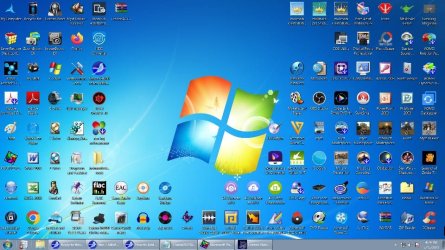
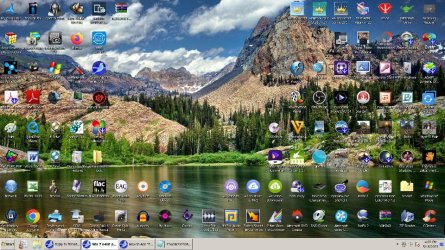
As of this reply I am still unable to change the desktop background to any one other than these 2:
Win 7.jpg

Mountains.jpg

Thanks for all your help, Roy. It is GREATLY appreciated!!
-Steve
 

My Computer My Computer

At a glance

Windows 7 Professional 64 bitIntel Core i-5 459016 GB Corsair VengeanceEVGA GeForce GTX 970
Computer type
PC/Desktop
Computer Manufacturer/Model Number
Custom Build
OS
Windows 7 Professional 64 bit
CPU
Intel Core i-5 4590
Motherboard
ASUS H97-Plus
Memory
16 GB Corsair Vengeance
Graphics Card(s)
EVGA GeForce GTX 970
Hard Drives
WD 500 GB Blue
WD 1 TB Black
Browser
Sea Monkey
Hi Steve,

based on what we've done so far, your OS is in good health

so we have to go into fishing mode

That leaves us with 3rd party program interferrance to user profiles
top of my list are Classic shell and Iconxp, dont know much about either:(
Ccleaner - do hope you didn't use the Registry cleanup function

i do have other comments
you have a number of programme services set to dissabled
Aomei Pro
Mozilla update... for Seamonkey

No AV
lightest i know of Bitdefender free..
if your not going to use 1 then i suggest you run a couple of one-off scans
Eset and Malwarebytes. (run in scan mode only they WILL flag some of your progs as PUP's)

Nvidea... couple of services still running and ingrained in your >> Variables path DO NOT touch this <<
 

My Computer My Computer

At a glance

W7 home premium 32bit/W7HP 64bit/w10 tp insid...E5300 dual core3gbNvidia Geforce 7100 Nforce 630i
Computer type
PC/Desktop
Computer Manufacturer/Model Number
medionl/Aspire 6930G/acer x55a
OS
W7 home premium 32bit/W7HP 64bit/w10 tp insider ring
CPU
E5300 dual core
Motherboard
medion MS7366
Memory
3gb
Graphics Card(s)
Nvidia Geforce 7100 Nforce 630i
Monitor(s) Displays
avixc
Internet Speed
n (isp resticted to 72)
Antivirus
mse/pands
Browser
palemoon
Other Info
Belkin Fd7050 n USB using Railink RT2870 drivers, more upto date
Hi Roy,
I agree with your assessment: (3rd party program interference to user profiles), just don't know which one. I think my best approach will be to look at all my programs installed or updated since Jan 1, 2021 and start uninstalling them one at a time until the personalize backgrounds starts working again. As for the Classic Shell and IconFx programs, I have had them installed since my original build in 2017 and my background changes worked fine back then so I suspect they are ok, but will not exclude any programs in my fishing expedition just because I "THINK" they are not the problem.
My reason for having a number of programs disabled at startup is that I do not use them very often and it's easy enough to engage them when needed instead of them hogging space when I'm not using them.
Yes, I am aware of the risk that not having any anti-virus software running poses. The last one I had was bitdefender and it created havoc all the time. The interference was so annoying that I uninstalled it and let windows defender handle things. My internet connection is via Ethernet cable and password protected, cable connected modem. However, I will look into your suggestions for scans.

I don't know how much longer you are willing to consider my problem. Especially since we agree that the source is likely to be program interference. So... if you decide to move on to other problems, let me express to you a HUGE THANK YOU!!! You have advised me on suggestions that I was completely unaware of and have helped me to get my OS into a healthy state. Your expertise has made a gigantic difference. And I will miss speaking with you. If, on the other hand, you decide to stick around... well, my gain.
Either way, Thanks, Roy (Torchwood). Stay safe and take care.
-Steve
 

My Computer My Computer

At a glance

Windows 7 Professional 64 bitIntel Core i-5 459016 GB Corsair VengeanceEVGA GeForce GTX 970
Computer type
PC/Desktop
Computer Manufacturer/Model Number
Custom Build
OS
Windows 7 Professional 64 bit
CPU
Intel Core i-5 4590
Motherboard
ASUS H97-Plus
Memory
16 GB Corsair Vengeance
Graphics Card(s)
EVGA GeForce GTX 970
Hard Drives
WD 500 GB Blue
WD 1 TB Black
Browser
Sea Monkey

My Computers My Computers

  • At a glance

    7 X64i5 84002x8gb 3200mhz
    Computer type
    PC/Desktop
    OS
    7 X64
    CPU
    i5 8400
    Motherboard
    gigabyte b365m ds3h
    Memory
    2x8gb 3200mhz
    Hard Drives
    various
    PSU
    pure power 11 400w cm
    Case
    Coolermaster
    Cooling
    cryorig m9i
  • At a glance

    7x64g54008gb ddr4 2400
    Computer type
    PC/Desktop
    OS
    7x64
    CPU
    g5400
    Motherboard
    ga b365m ds3h
    Memory
    8gb ddr4 2400
    PSU
    xfx pro 450w
Good Question! No reason. Downloading now. Thanks for the tip!
 

My Computer My Computer

At a glance

Windows 7 Professional 64 bitIntel Core i-5 459016 GB Corsair VengeanceEVGA GeForce GTX 970
Computer type
PC/Desktop
Computer Manufacturer/Model Number
Custom Build
OS
Windows 7 Professional 64 bit
CPU
Intel Core i-5 4590
Motherboard
ASUS H97-Plus
Memory
16 GB Corsair Vengeance
Graphics Card(s)
EVGA GeForce GTX 970
Hard Drives
WD 500 GB Blue
WD 1 TB Black
Browser
Sea Monkey
Im still fishing,

I cannot check the following on W7 dont have it anymore, and might not be the same as this for w10
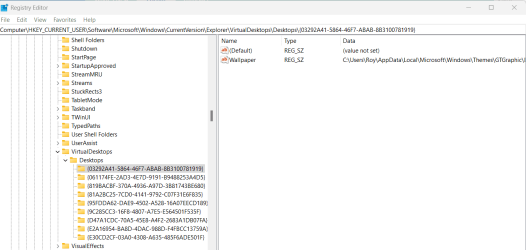
please open registry editor and navigate to here
HKEY_CURRENT_USER\Software\Microsoft\Windows\CurrentVersion\Explorer\VirtualDesktops\Desktops


it will list all current available themes, see screenshot.. (my W11)
right hand pane shows my GTgraphics option, left hand pane shows the options within it
if it only lists default and Spring then something has removed the registry key link, (Ccleaner?)
(i dont think its Iconxp as its unlikely its been updated for a while whereas Classic shell likely has)
If it does list multiple option then something is wrong with the default values in the RIGHT hand pane
you will have to compare the working to non working values.


Regarding the dissabled options personally, in your take, i would set them to manual so that they would only be live for that session when called on
of these Aeomi is a different kettle of fish.....no im not an Angler, Any OS has a 2 phase mode - setup and operational
Aeomi, and other imaging programs, introduce changes within the setup phase, (bcd) it creates additional boot entries, whereas the others only hit the operational phase.
Do you have an old backup when the screenchanger option works

and i really appreciate the fact that you ran and provided ALL the requests i made:picnic:
 

Attachments

  • steve.png
    steve.png
    23.3 KB · Views: 0
Last edited:

My Computer My Computer

At a glance

W7 home premium 32bit/W7HP 64bit/w10 tp insid...E5300 dual core3gbNvidia Geforce 7100 Nforce 630i
Computer type
PC/Desktop
Computer Manufacturer/Model Number
medionl/Aspire 6930G/acer x55a
OS
W7 home premium 32bit/W7HP 64bit/w10 tp insider ring
CPU
E5300 dual core
Motherboard
medion MS7366
Memory
3gb
Graphics Card(s)
Nvidia Geforce 7100 Nforce 630i
Monitor(s) Displays
avixc
Internet Speed
n (isp resticted to 72)
Antivirus
mse/pands
Browser
palemoon
Other Info
Belkin Fd7050 n USB using Railink RT2870 drivers, more upto date
Thanks, Roy.
I'll get right on it and let you know what I find in the Register. Sounds promising. Hope it works.
And I'll look into the "manual" option. I appreciate the heads up on it.
Talk soon.
-Steve

- - - Updated - - -

Roy,
Just checked the Register. I do not have the Virtual Desktops and the Desktops entries under explorer.
-Steve
 

My Computer My Computer

At a glance

Windows 7 Professional 64 bitIntel Core i-5 459016 GB Corsair VengeanceEVGA GeForce GTX 970
Computer type
PC/Desktop
Computer Manufacturer/Model Number
Custom Build
OS
Windows 7 Professional 64 bit
CPU
Intel Core i-5 4590
Motherboard
ASUS H97-Plus
Memory
16 GB Corsair Vengeance
Graphics Card(s)
EVGA GeForce GTX 970
Hard Drives
WD 500 GB Blue
WD 1 TB Black
Browser
Sea Monkey
Oh silly me

should have looked at Brinks tutorials for Personalisation..

then check the entries under MY/Aero and Basic and High
to Unhide Control Panel >> folder View ..Show hidden


  • My Themes is your current theme. These .theme files are located in the hidden C:\Users\User-Name\AppData\Local\Microsoft\Windows\Themes folder.
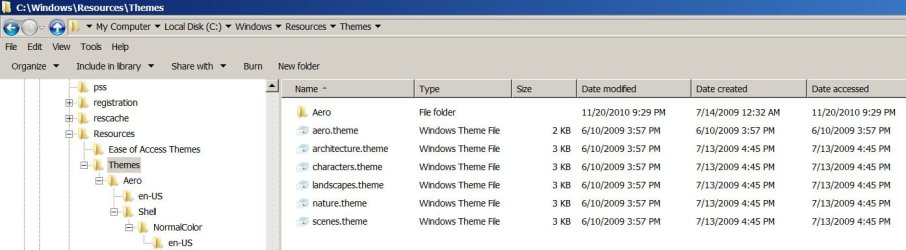
  • Aero Themes are the Windows Aero themes. They are located in the C:\Windows\Resources\Themes folder.
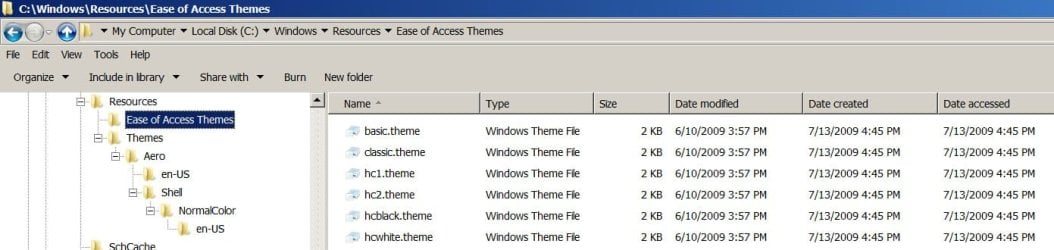
  • Basic and High Contrast Themes are the Windows 7 Basic, Windows Classic, High Contrast #1, High Contrast #2, High Contrast Black, and High Contrast White themes. They are located in the C:\Windows\Resources\Ease of Access Themes folder.


Theme - Change or Save
 

My Computer My Computer

At a glance

W7 home premium 32bit/W7HP 64bit/w10 tp insid...E5300 dual core3gbNvidia Geforce 7100 Nforce 630i
Computer type
PC/Desktop
Computer Manufacturer/Model Number
medionl/Aspire 6930G/acer x55a
OS
W7 home premium 32bit/W7HP 64bit/w10 tp insider ring
CPU
E5300 dual core
Motherboard
medion MS7366
Memory
3gb
Graphics Card(s)
Nvidia Geforce 7100 Nforce 630i
Monitor(s) Displays
avixc
Internet Speed
n (isp resticted to 72)
Antivirus
mse/pands
Browser
palemoon
Other Info
Belkin Fd7050 n USB using Railink RT2870 drivers, more upto date
Hi Roy,
Here are the entries in
C:\Users\POPS\AppData\Local\Microsoft\Windows\Themes folder. (Sorry the jpg is so freakin' small). Will post the others shortly.
[TABLE="align: left"]
[TR]
[TD="width: 40"]Themes.jpg
[/TD]
[/TR]
[TR]
[TD][/TD]
[TD][/TD]
[/TR]
[/TABLE]

- - - Updated - - -

Here is what I have in Aero Themes:
Aero Themes.jpg

- - - Updated - - -

Here are the Ease of Access listed themes:
Ease of Access Themes.jpg

- - - Updated - - -

Thi is what I have loaded into TranscodedWallpaper:
TranscodedWallpaper.jpg
and I have Full Control permission on the file.

- - - Updated - - -

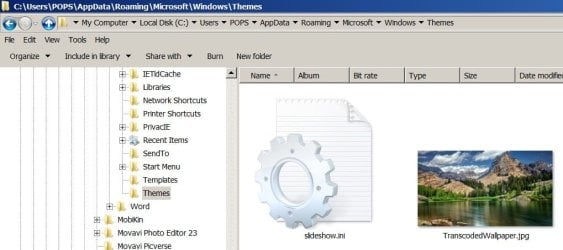
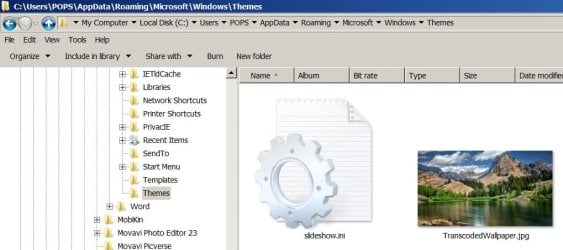
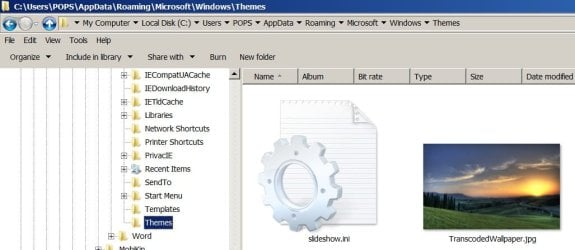
I went into C:\Users\POPS\AppData\Roaming\Microsoft\Windows\Themes and screen printed TranscodedWallpaper.jpg:
TranscodedWallpaper.jpg
Then changed it to one of the backgrounds that I am unable to save:
Edited & Changed file.jpg
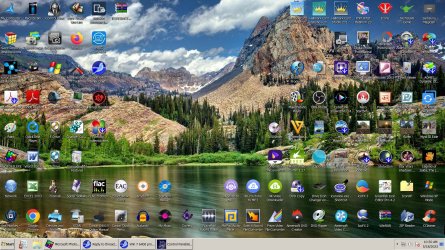
When I Restart I get this background:
After Change.jpg
Then if I try to Personalize, I get the Mountains background again:
Mts.jpg
Don't know if any of this helps.
I'm giving some serious thought to starting over with larger HDD's, new install of 7 and clone of my D drive (where I keep everything other than Windows) and suffer through the re-building of MBR and indexes, re-loading applications & programs, etc. Not ready to jump off the cliff just yet, but I am giving it some thought. I have a cancer procedure on June 10th which may give me some time to delve into a re-build. Don't know. Just pondering. Anyway, your help is greatly appreciated, Roy!!
 

My Computer My Computer

At a glance

Windows 7 Professional 64 bitIntel Core i-5 459016 GB Corsair VengeanceEVGA GeForce GTX 970
Computer type
PC/Desktop
Computer Manufacturer/Model Number
Custom Build
OS
Windows 7 Professional 64 bit
CPU
Intel Core i-5 4590
Motherboard
ASUS H97-Plus
Memory
16 GB Corsair Vengeance
Graphics Card(s)
EVGA GeForce GTX 970
Hard Drives
WD 500 GB Blue
WD 1 TB Black
Browser
Sea Monkey
I'm giving some serious thought to starting over with larger HDD's, new install of 7 and clone of my D drive (where I keep everything other than Windows) and suffer through the re-building of MBR and indexes, re-loading applications & programs, etc.

why do you need larger HDDs, SteveKG?
how big or large is your existing HDD?
 

My Computer My Computer

At a glance

Windows 7 SP1 Home Premium 64bit [x64]Intel(R) Core(TM) i5-2310 CPU @ 2.90GHz6 GBIntel HD Graphics 2000
Computer type
PC/Desktop
Computer Manufacturer/Model Number
Dell Inspiron 620
OS
Windows 7 SP1 Home Premium 64bit [x64]
CPU
Intel(R) Core(TM) i5-2310 CPU @ 2.90GHz
Memory
6 GB
Graphics Card(s)
Intel HD Graphics 2000
Sound Card
Conexant CX20641 HD Audio
Hard Drives
Western Digital 1TB (1024GB) WD10EALX-759BA1
Internet Speed
Spectrum Cable Internet up to 100Mbps
Hi,
My C drive (Windows 7) is 500GB and 72% full. My D drive (my programs, downloads, videos, and extensive music library) is 1TB and 99% full.
So... kinda leaning towards a 1TB C drive and a 2TB D drive, then clean up and use my older ones as image backups (something I should have done more often in the past, and would not now be in such trouble).
 

My Computer My Computer

At a glance

Windows 7 Professional 64 bitIntel Core i-5 459016 GB Corsair VengeanceEVGA GeForce GTX 970
Computer type
PC/Desktop
Computer Manufacturer/Model Number
Custom Build
OS
Windows 7 Professional 64 bit
CPU
Intel Core i-5 4590
Motherboard
ASUS H97-Plus
Memory
16 GB Corsair Vengeance
Graphics Card(s)
EVGA GeForce GTX 970
Hard Drives
WD 500 GB Blue
WD 1 TB Black
Browser
Sea Monkey
Although my problem has not been resolved, I am closing out this thread. I want to express my deepest appreciation to Torchwood (Roy) for his outstanding assistance and support. While we weren't able to carve out the root cause, his advice was able to resolve many side issues. I will always be grateful for his constant attention to my problem and his excellent thought process.
 

My Computer My Computer

At a glance

Windows 7 Professional 64 bitIntel Core i-5 459016 GB Corsair VengeanceEVGA GeForce GTX 970
Computer type
PC/Desktop
Computer Manufacturer/Model Number
Custom Build
OS
Windows 7 Professional 64 bit
CPU
Intel Core i-5 4590
Motherboard
ASUS H97-Plus
Memory
16 GB Corsair Vengeance
Graphics Card(s)
EVGA GeForce GTX 970
Hard Drives
WD 500 GB Blue
WD 1 TB Black
Browser
Sea Monkey
Back
Top