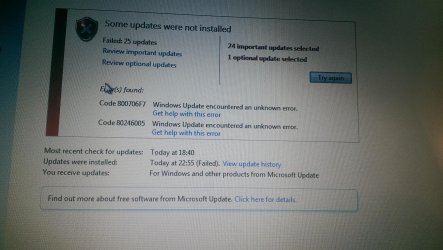
Can anybody help me solve 0x8004fe21 error

i'll have a nosey, but think I checked that one.....
 

My Computer My Computer

At a glance

Windows 7 Home Premium SP1 64bitintel core2 duo4gbati mobility radeon HD 4570
Computer type
PC/Desktop
Computer Manufacturer/Model Number
acer
OS
Windows 7 Home Premium SP1 64bit
CPU
intel core2 duo
Motherboard
t6600
Memory
4gb
Graphics Card(s)
ati mobility radeon HD 4570
Hard Drives
320gb
Antivirus
norton internet security
Browser
internet explorer
No only this side of Christmas unfortunately.
 

My Computer My Computer

At a glance

Windows 7 Home Premium SP1 64bitintel core2 duo4gbati mobility radeon HD 4570
Computer type
PC/Desktop
Computer Manufacturer/Model Number
acer
OS
Windows 7 Home Premium SP1 64bit
CPU
intel core2 duo
Motherboard
t6600
Memory
4gb
Graphics Card(s)
ati mobility radeon HD 4570
Hard Drives
320gb
Antivirus
norton internet security
Browser
internet explorer
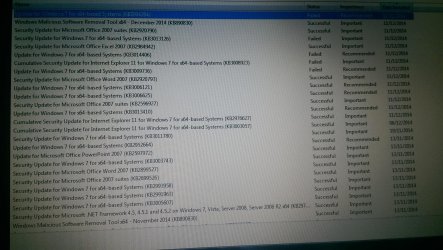
new error code popped up if its any help:
IMAG0916.jpg
 

Attachments

  • IMAG0915.jpg
    IMAG0915.jpg
    473.8 KB · Views: 0

My Computer My Computer

At a glance

Windows 7 Home Premium SP1 64bitintel core2 duo4gbati mobility radeon HD 4570
Computer type
PC/Desktop
Computer Manufacturer/Model Number
acer
OS
Windows 7 Home Premium SP1 64bit
CPU
intel core2 duo
Motherboard
t6600
Memory
4gb
Graphics Card(s)
ati mobility radeon HD 4570
Hard Drives
320gb
Antivirus
norton internet security
Browser
internet explorer

My Computer My Computer

At a glance

Win 7 x64 Home Premium (and x86 VirtualBox VM...i3 370M/i7 6500U8GB - finally :)/8GBit's an i3, dude!/dual Intel&nVidia
Computer type
Laptop
Computer Manufacturer/Model Number
Asus K52F or Lenovo B51-80
OS
Win 7 x64 Home Premium (and x86 VirtualBox VM)/Win10
CPU
i3 370M/i7 6500U
Motherboard
Asus/Lenovo
Memory
8GB - finally :)/8GB
Graphics Card(s)
it's an i3, dude!/dual Intel&nVidia
Sound Card
onboard
Monitor(s) Displays
15.6" built-in
Screen Resolution
1366x768/1920x1080
Hard Drives
750GB Seagate internal
Sundry external drives attached to other computers on the local network
1TB SSD on the Lenovo
PSU
n/a
Internet Speed
as much as I can get - usually on a dongle/phone, so <1MB/s
Antivirus
MSE/Defender
Browser
IE11/12/Edge/Chrome/FF(if I must)
....so, tried that set of instructions you supplied which seemed to be successful I suppose, in that on updating, that second error code didn't resurface. All updates failed as usual though, so I googled the remaining error code (800706F7) on Microsoft, which led me to instructions to do a "chkdsk c:/r" procedure, then the familiar sfs scannow procedure, to which I have attached the cbs log details which includes two latest cbs persist files. Remaining cbs persist files to follow. If any of this brings any new info please let me know. In the meantime, I have the next set of instructions to follow which is to do with the rapid storage tech drivers (again.. think you covered that one!)
View attachment 352574
 

My Computer My Computer

At a glance

Windows 7 Home Premium SP1 64bitintel core2 duo4gbati mobility radeon HD 4570
Computer type
PC/Desktop
Computer Manufacturer/Model Number
acer
OS
Windows 7 Home Premium SP1 64bit
CPU
intel core2 duo
Motherboard
t6600
Memory
4gb
Graphics Card(s)
ati mobility radeon HD 4570
Hard Drives
320gb
Antivirus
norton internet security
Browser
internet explorer
Have you run out of ideas on on this one?
 

My Computer My Computer

At a glance

Windows 7 Home Premium SP1 64bitintel core2 duo4gbati mobility radeon HD 4570
Computer type
PC/Desktop
Computer Manufacturer/Model Number
acer
OS
Windows 7 Home Premium SP1 64bit
CPU
intel core2 duo
Motherboard
t6600
Memory
4gb
Graphics Card(s)
ati mobility radeon HD 4570
Hard Drives
320gb
Antivirus
norton internet security
Browser
internet explorer
Sorry - I got heavily backlogged :(
The are some interesting error codes in the logs - notably 0x80070013, which implies that some files have a read-only status when they shouldn't have.

Let's try a blanket reset of the Windows folder...


Open Windows Explorer (Computer)

Navigate to the C:\Windows folder and right-click on it
select Properties
Clear the 'blob' from the 'Read-only (Only applies to files in folder)' box by clicking on it until it's plain white.
Click on Apply.
Make sure that the radio button for 'Apply changes to this folder, subfolders and files' is set, and click OK.
Accept the Administrator prompt. After a couple of seconds, you'll be told there is an error - click on the 'Ignore all' button.
Wait for it to finish - it could take a couple of minutes.
OK out, and exit Windows Explorer.
Reboot twice, then try Windows Update again.
 

My Computer My Computer

At a glance

Win 7 x64 Home Premium (and x86 VirtualBox VM...i3 370M/i7 6500U8GB - finally :)/8GBit's an i3, dude!/dual Intel&nVidia
Computer type
Laptop
Computer Manufacturer/Model Number
Asus K52F or Lenovo B51-80
OS
Win 7 x64 Home Premium (and x86 VirtualBox VM)/Win10
CPU
i3 370M/i7 6500U
Motherboard
Asus/Lenovo
Memory
8GB - finally :)/8GB
Graphics Card(s)
it's an i3, dude!/dual Intel&nVidia
Sound Card
onboard
Monitor(s) Displays
15.6" built-in
Screen Resolution
1366x768/1920x1080
Hard Drives
750GB Seagate internal
Sundry external drives attached to other computers on the local network
1TB SSD on the Lenovo
PSU
n/a
Internet Speed
as much as I can get - usually on a dongle/phone, so <1MB/s
Antivirus
MSE/Defender
Browser
IE11/12/Edge/Chrome/FF(if I must)
Hi noel. Thanks for getting back to me. So i tried the reset instructions, all went well, two reboots to finish, but same windows update failure unfortunately, 800706F7. Any suggestions from here on?
 

My Computer My Computer

At a glance

Windows 7 Home Premium SP1 64bitintel core2 duo4gbati mobility radeon HD 4570
Computer type
PC/Desktop
Computer Manufacturer/Model Number
acer
OS
Windows 7 Home Premium SP1 64bit
CPU
intel core2 duo
Motherboard
t6600
Memory
4gb
Graphics Card(s)
ati mobility radeon HD 4570
Hard Drives
320gb
Antivirus
norton internet security
Browser
internet explorer
Let's have a look at the Event logs...

Open Event Viewer
click on the Windows logs entry in the left pane to expand it.
Now click on the Application entry - wait while it loads.
Click on 'File' in the menu bar and select Save...
Save the file as Appevt.evtx
Repeat for the System log
then zip both, and upload them.
 

My Computer My Computer

At a glance

Win 7 x64 Home Premium (and x86 VirtualBox VM...i3 370M/i7 6500U8GB - finally :)/8GBit's an i3, dude!/dual Intel&nVidia
Computer type
Laptop
Computer Manufacturer/Model Number
Asus K52F or Lenovo B51-80
OS
Win 7 x64 Home Premium (and x86 VirtualBox VM)/Win10
CPU
i3 370M/i7 6500U
Motherboard
Asus/Lenovo
Memory
8GB - finally :)/8GB
Graphics Card(s)
it's an i3, dude!/dual Intel&nVidia
Sound Card
onboard
Monitor(s) Displays
15.6" built-in
Screen Resolution
1366x768/1920x1080
Hard Drives
750GB Seagate internal
Sundry external drives attached to other computers on the local network
1TB SSD on the Lenovo
PSU
n/a
Internet Speed
as much as I can get - usually on a dongle/phone, so <1MB/s
Antivirus
MSE/Defender
Browser
IE11/12/Edge/Chrome/FF(if I must)

My Computer My Computer

At a glance

Windows 7 Home Premium SP1 64bitintel core2 duo4gbati mobility radeon HD 4570
Computer type
PC/Desktop
Computer Manufacturer/Model Number
acer
OS
Windows 7 Home Premium SP1 64bit
CPU
intel core2 duo
Motherboard
t6600
Memory
4gb
Graphics Card(s)
ati mobility radeon HD 4570
Hard Drives
320gb
Antivirus
norton internet security
Browser
internet explorer
YOu appear to be having repeated problems with overheating, leading to sudden emergency shutdowns.
You should clean out the vents on your machine, and make sure that the cooling fan is operating properly.

You appear to have had major problems with services on 26th March - possibly as a result of one of these crashes.

Going back to December, the System log shows multiple problems - Windows Search, Shadow Copy, and
ShellHWDetection detection services all timed out before they could start, and the WU errors appear to have started.

I'm beginning to think that until you can get the overheating under control, there's not a lot we can really do on the software side - and that even then, your best option may be a repair install.
 

My Computer My Computer

At a glance

Win 7 x64 Home Premium (and x86 VirtualBox VM...i3 370M/i7 6500U8GB - finally :)/8GBit's an i3, dude!/dual Intel&nVidia
Computer type
Laptop
Computer Manufacturer/Model Number
Asus K52F or Lenovo B51-80
OS
Win 7 x64 Home Premium (and x86 VirtualBox VM)/Win10
CPU
i3 370M/i7 6500U
Motherboard
Asus/Lenovo
Memory
8GB - finally :)/8GB
Graphics Card(s)
it's an i3, dude!/dual Intel&nVidia
Sound Card
onboard
Monitor(s) Displays
15.6" built-in
Screen Resolution
1366x768/1920x1080
Hard Drives
750GB Seagate internal
Sundry external drives attached to other computers on the local network
1TB SSD on the Lenovo
PSU
n/a
Internet Speed
as much as I can get - usually on a dongle/phone, so <1MB/s
Antivirus
MSE/Defender
Browser
IE11/12/Edge/Chrome/FF(if I must)
re the overheating, tell me about it! not sure how to clean the vents out though. the battery isn't holding charge and is due for a new one, but in light of the problems, I was reluctant to buy the battery if I couldn't get the laptop back on track. on the over heating side, this tends to be on the left hand side of the laptop where it gets really warm. I used to think it was the battery getting warm but on inspection battery is more back left. I better post this message before carry on as it tends to die mid some irrecoverable task i'm performing!
 

My Computer My Computer

At a glance

Windows 7 Home Premium SP1 64bitintel core2 duo4gbati mobility radeon HD 4570
Computer type
PC/Desktop
Computer Manufacturer/Model Number
acer
OS
Windows 7 Home Premium SP1 64bit
CPU
intel core2 duo
Motherboard
t6600
Memory
4gb
Graphics Card(s)
ati mobility radeon HD 4570
Hard Drives
320gb
Antivirus
norton internet security
Browser
internet explorer
do u think a new battery would cure the overheating in any way, or how to clean up the vents maybe, assuming that means going inside?
 

My Computer My Computer

At a glance

Windows 7 Home Premium SP1 64bitintel core2 duo4gbati mobility radeon HD 4570
Computer type
PC/Desktop
Computer Manufacturer/Model Number
acer
OS
Windows 7 Home Premium SP1 64bit
CPU
intel core2 duo
Motherboard
t6600
Memory
4gb
Graphics Card(s)
ati mobility radeon HD 4570
Hard Drives
320gb
Antivirus
norton internet security
Browser
internet explorer
From the sound of it, it's the CPU overheating rather than the battery.
There are any number of tutorials/videos available through Google on how to clean the vents, and the fan, on laptops. If you're not entirely comfortable attempting the job yourself, it shouldn't be an expensive job in a small repair shop (avoid the big chain-stores!)
 

My Computer My Computer

At a glance

Win 7 x64 Home Premium (and x86 VirtualBox VM...i3 370M/i7 6500U8GB - finally :)/8GBit's an i3, dude!/dual Intel&nVidia
Computer type
Laptop
Computer Manufacturer/Model Number
Asus K52F or Lenovo B51-80
OS
Win 7 x64 Home Premium (and x86 VirtualBox VM)/Win10
CPU
i3 370M/i7 6500U
Motherboard
Asus/Lenovo
Memory
8GB - finally :)/8GB
Graphics Card(s)
it's an i3, dude!/dual Intel&nVidia
Sound Card
onboard
Monitor(s) Displays
15.6" built-in
Screen Resolution
1366x768/1920x1080
Hard Drives
750GB Seagate internal
Sundry external drives attached to other computers on the local network
1TB SSD on the Lenovo
PSU
n/a
Internet Speed
as much as I can get - usually on a dongle/phone, so <1MB/s
Antivirus
MSE/Defender
Browser
IE11/12/Edge/Chrome/FF(if I must)
Hi Noel
Thought I'd just update. My laptop seems to be back up and running well now. I resorted to digging out the factory restore cd I created on first startup all those years ago. Not before sorting out that overheating cpu though. Followed a couple of you tube clips on that one as you suggested , bought myself some thermal paste and away I went. My new battery is on order (and somewhat delayed) but the overheating has ceased, had it on a good week now so all good. Spent a good week getting it back up to date though, with antivirus, Microsoft office, explorer 11 all reinstalled, and it took numerous attempts to get the 242 windows updates to successfully install and reconfigure. But so far so good, fully updated.
 

My Computer My Computer

At a glance

Windows 7 Home Premium SP1 64bitintel core2 duo4gbati mobility radeon HD 4570
Computer type
PC/Desktop
Computer Manufacturer/Model Number
acer
OS
Windows 7 Home Premium SP1 64bit
CPU
intel core2 duo
Motherboard
t6600
Memory
4gb
Graphics Card(s)
ati mobility radeon HD 4570
Hard Drives
320gb
Antivirus
norton internet security
Browser
internet explorer
Great news! - good luck with it!
 

My Computer My Computer

At a glance

Win 7 x64 Home Premium (and x86 VirtualBox VM...i3 370M/i7 6500U8GB - finally :)/8GBit's an i3, dude!/dual Intel&nVidia
Computer type
Laptop
Computer Manufacturer/Model Number
Asus K52F or Lenovo B51-80
OS
Win 7 x64 Home Premium (and x86 VirtualBox VM)/Win10
CPU
i3 370M/i7 6500U
Motherboard
Asus/Lenovo
Memory
8GB - finally :)/8GB
Graphics Card(s)
it's an i3, dude!/dual Intel&nVidia
Sound Card
onboard
Monitor(s) Displays
15.6" built-in
Screen Resolution
1366x768/1920x1080
Hard Drives
750GB Seagate internal
Sundry external drives attached to other computers on the local network
1TB SSD on the Lenovo
PSU
n/a
Internet Speed
as much as I can get - usually on a dongle/phone, so <1MB/s
Antivirus
MSE/Defender
Browser
IE11/12/Edge/Chrome/FF(if I must)
Back
Top