Solved Can I change text size in the taskbar?

bluedragon14

New member
Member
Local time
7:46 PM
Messages
26
Location
Ohio
I've noticed that the font size of text in the taskbar can be changed in the classic theme by changing the font size of the "Active Title Bar" setting in Windows Color and Appearance window. Is there any way to change the font size of text in the taskbar when using the Aero theme? I've seen the font color changed (like changing the color from something other than white) by altering aero.msstyles using a hex editor, but I've yet to find anything about changing text size (which by default is 9). I'd like to make the date and time much more noticeable, by changing it to at least 10 (11 would be best).
 

My Computer My Computer

At a glance

Windows 7 Home Premium x64
Computer type
PC/Desktop
Computer Manufacturer/Model Number
Acer
OS
Windows 7 Home Premium x64
Internet Speed
20 Mbps
Browser
Firefox
If you are using the default aero theme I can change that for you, using Windows Style Builder and post it here in a zip folder.
If you are using a custom theme you will need to ask the theme maker. It's not cool to change someone else work.
&
This will be a custom theme and you will need to do 1 of these 2 ways of Enabling custom themes for it to work.
http://www.sevenforums.com/tutorials/34579-enabling-custom-themes-windows-7-a.html
Or
http://www.sevenforums.com/tutorials/28377-theme-how-apply-custom-themes.html?filter

Let me know.
Jerry
 

My Computer My Computer

At a glance

Win 7 Pro x64 / Win 10 ProIntel(R) Core(TM) i7-3630QM CPU @ 2.40GHz12 GB(1) Intel(R) HD Graphics 4000 (2) NVIDIA GeFo...
Computer type
Laptop
Computer Manufacturer/Model Number
Sager NP9170
OS
Win 7 Pro x64 / Win 10 Pro
CPU
Intel(R) Core(TM) i7-3630QM CPU @ 2.40GHz
Motherboard
CLEVO P170EM
Memory
12 GB
Graphics Card(s)
(1) Intel(R) HD Graphics 4000 (2) NVIDIA GeForce GTX 675M
Sound Card
(1) Realtek High Definition Audio (2) Intel(R) Display Aud
Monitor(s) Displays
17.3
Screen Resolution
1920x1080
Hard Drives
(1) Samsung 860 EVO 500GB(OS) (1) Samsung 860 EVO 500GB(Data)
Keyboard
Backlite
Antivirus
MSE, Malwarebytes Pro
Browser
Firefox
Other Info
DESKTOP: Custom-built.
OS: Win 10 Pro x64.
CASE: Rosewill R5.
CPU: Intel I5 4670K CPU @ 3.40GHz.
CPU COOLER: Cool Master Hyper 212 EVO.
MOTHERBOARD: Asus Z87-A.
MEMORY: Kingston HyperX 2x4 GB.
GPU: Nvidia Geforce 650 TI.
PSU: Corsair TX750.
DRIVES: (1) Samsung 840 120 GB SSD (2) Western Digital blue 500 GB 7200 RPM.
I am using my own theme, but it's been heavily modified to mimick the look of Windows 8. (I've spent quite a few hours on it) All the image #s are the same, none are added, but the size of the file is significantly smaller than the default aero.msstyles, which is why I don't know where to find the correct address in a hex editor like HxD.

The zipped folder is in the attachment. Thank you for responding. If you know how to change the text size, I'd really like the text size to be increased to 11. But 10 is okay.

Edit: Also, I've already patched my system, so I can already use custom themes.
 

Attachments

My Computer My Computer

At a glance

Windows 7 Home Premium x64
Computer type
PC/Desktop
Computer Manufacturer/Model Number
Acer
OS
Windows 7 Home Premium x64
Internet Speed
20 Mbps
Browser
Firefox
You done a nice job editing so far, I know nothing about hex editing but I admire anybody that can do it, that's why I use Windows Style Builder it's very easy to edit the .msstyles text colors, fonts, images with a nice GUI.

Below in the zip folder is your .msstyles with the clock font at size 11, I hope you are done editing that .msstyles because Windows style builder changes the image # after it has been saved (there are several images that are shared in default .msstyles window style builder separates those images and then rename them) if you are not done that you can post back when you are done or let me know what you're trying to find and I will give you the new image #.

Just for your information here's how to start a new theme and how to name it look at Post #38 Here it will show you how.

Jerry
 

Attachments

My Computer My Computer

At a glance

Win 7 Pro x64 / Win 10 ProIntel(R) Core(TM) i7-3630QM CPU @ 2.40GHz12 GB(1) Intel(R) HD Graphics 4000 (2) NVIDIA GeFo...
Computer type
Laptop
Computer Manufacturer/Model Number
Sager NP9170
OS
Win 7 Pro x64 / Win 10 Pro
CPU
Intel(R) Core(TM) i7-3630QM CPU @ 2.40GHz
Motherboard
CLEVO P170EM
Memory
12 GB
Graphics Card(s)
(1) Intel(R) HD Graphics 4000 (2) NVIDIA GeForce GTX 675M
Sound Card
(1) Realtek High Definition Audio (2) Intel(R) Display Aud
Monitor(s) Displays
17.3
Screen Resolution
1920x1080
Hard Drives
(1) Samsung 860 EVO 500GB(OS) (1) Samsung 860 EVO 500GB(Data)
Keyboard
Backlite
Antivirus
MSE, Malwarebytes Pro
Browser
Firefox
Other Info
DESKTOP: Custom-built.
OS: Win 10 Pro x64.
CASE: Rosewill R5.
CPU: Intel I5 4670K CPU @ 3.40GHz.
CPU COOLER: Cool Master Hyper 212 EVO.
MOTHERBOARD: Asus Z87-A.
MEMORY: Kingston HyperX 2x4 GB.
GPU: Nvidia Geforce 650 TI.
PSU: Corsair TX750.
DRIVES: (1) Samsung 840 120 GB SSD (2) Western Digital blue 500 GB 7200 RPM.
Wow, that's such an improvement! Thank you so much! Makes it much easier to see the time when I have an almost white background. Don't worry, I wasn't planning on changing the theme anymore.

Now I'm somewhat tempted to try and tinker with the size a little more. It looks like Windows Style Builder heavily modified the images themselves in addition to the #s.
 

My Computer My Computer

At a glance

Windows 7 Home Premium x64
Computer type
PC/Desktop
Computer Manufacturer/Model Number
Acer
OS
Windows 7 Home Premium x64
Internet Speed
20 Mbps
Browser
Firefox
You're welcome

Just out of curiosity can you tell me what other modifications were done to the images?
 

My Computer My Computer

At a glance

Win 7 Pro x64 / Win 10 ProIntel(R) Core(TM) i7-3630QM CPU @ 2.40GHz12 GB(1) Intel(R) HD Graphics 4000 (2) NVIDIA GeFo...
Computer type
Laptop
Computer Manufacturer/Model Number
Sager NP9170
OS
Win 7 Pro x64 / Win 10 Pro
CPU
Intel(R) Core(TM) i7-3630QM CPU @ 2.40GHz
Motherboard
CLEVO P170EM
Memory
12 GB
Graphics Card(s)
(1) Intel(R) HD Graphics 4000 (2) NVIDIA GeForce GTX 675M
Sound Card
(1) Realtek High Definition Audio (2) Intel(R) Display Aud
Monitor(s) Displays
17.3
Screen Resolution
1920x1080
Hard Drives
(1) Samsung 860 EVO 500GB(OS) (1) Samsung 860 EVO 500GB(Data)
Keyboard
Backlite
Antivirus
MSE, Malwarebytes Pro
Browser
Firefox
Other Info
DESKTOP: Custom-built.
OS: Win 10 Pro x64.
CASE: Rosewill R5.
CPU: Intel I5 4670K CPU @ 3.40GHz.
CPU COOLER: Cool Master Hyper 212 EVO.
MOTHERBOARD: Asus Z87-A.
MEMORY: Kingston HyperX 2x4 GB.
GPU: Nvidia Geforce 650 TI.
PSU: Corsair TX750.
DRIVES: (1) Samsung 840 120 GB SSD (2) Western Digital blue 500 GB 7200 RPM.
I just quickly glanced at the .msstyles file, but it seems to add around 150 images, going up to 1265 instead of 1108. Many seem to be duplicates, and the order of the images is changed around, but the organization of the images appears to be the same. (like images related to the start menu still being grouped together)
 

My Computer My Computer

At a glance

Windows 7 Home Premium x64
Computer type
PC/Desktop
Computer Manufacturer/Model Number
Acer
OS
Windows 7 Home Premium x64
Internet Speed
20 Mbps
Browser
Firefox
Just a quick question. I just got Windows Style Builder 1.5. I'm a bit busy at the moment with graduation stuff. Can you tell me where you went to change the text size of the time (clock) on the taskbar?
 

My Computer My Computer

At a glance

Windows 7 Home Premium x64
Computer type
PC/Desktop
Computer Manufacturer/Model Number
Acer
OS
Windows 7 Home Premium x64
Internet Speed
20 Mbps
Browser
Firefox
Ya it adds images, if you look at the default .msstyles at the taskbar at Taskbar & System Tray > TaskBand > Aero > TaskBand > BackgroundBottom and Taskbar & System Tray > TaskBand > Aero > TaskBand (SmallIcons) > BackgroundBottom they use image #1028 but after saving with WSB those 2 areas will have different numbers.

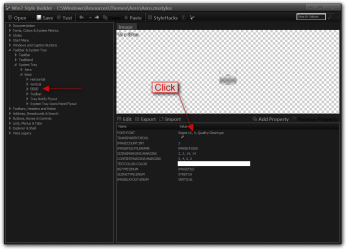
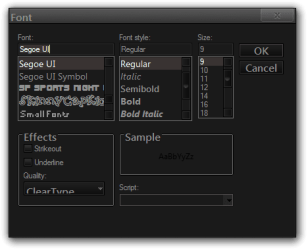
Clock font:
Taskbar & System Tray > System Tray > Basic > Clock > FONT:FONT click on it and a windows opens to change it.
1.png2.png

Jerry
 

My Computer My Computer

At a glance

Win 7 Pro x64 / Win 10 ProIntel(R) Core(TM) i7-3630QM CPU @ 2.40GHz12 GB(1) Intel(R) HD Graphics 4000 (2) NVIDIA GeFo...
Computer type
Laptop
Computer Manufacturer/Model Number
Sager NP9170
OS
Win 7 Pro x64 / Win 10 Pro
CPU
Intel(R) Core(TM) i7-3630QM CPU @ 2.40GHz
Motherboard
CLEVO P170EM
Memory
12 GB
Graphics Card(s)
(1) Intel(R) HD Graphics 4000 (2) NVIDIA GeForce GTX 675M
Sound Card
(1) Realtek High Definition Audio (2) Intel(R) Display Aud
Monitor(s) Displays
17.3
Screen Resolution
1920x1080
Hard Drives
(1) Samsung 860 EVO 500GB(OS) (1) Samsung 860 EVO 500GB(Data)
Keyboard
Backlite
Antivirus
MSE, Malwarebytes Pro
Browser
Firefox
Other Info
DESKTOP: Custom-built.
OS: Win 10 Pro x64.
CASE: Rosewill R5.
CPU: Intel I5 4670K CPU @ 3.40GHz.
CPU COOLER: Cool Master Hyper 212 EVO.
MOTHERBOARD: Asus Z87-A.
MEMORY: Kingston HyperX 2x4 GB.
GPU: Nvidia Geforce 650 TI.
PSU: Corsair TX750.
DRIVES: (1) Samsung 840 120 GB SSD (2) Western Digital blue 500 GB 7200 RPM.
Thank you so much. I'll definitely have to explore this program, since it allows me to do much more (and quite quickly) than what I could with just a hex editor.
 

My Computer My Computer

At a glance

Windows 7 Home Premium x64
Computer type
PC/Desktop
Computer Manufacturer/Model Number
Acer
OS
Windows 7 Home Premium x64
Internet Speed
20 Mbps
Browser
Firefox
Back
Top