- Local time
- 4:47 PM
- Messages
- 53
I have a custom app which is pinned to my task bar.
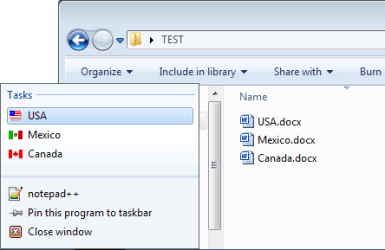
For tha app, I also have 5 Word (.doc) files pinned to it, so that these docs appear in the app's jump list.
Is it possible for me to specify an icon for each of the pinned docs? For example, each document is for a country and I'd like to have the country's flag as an icon for the pinned document.
Is it possible to do this?
Because it is a custom .EXE app, right now I'm not even getting the Word file icon but the icon that shows up when there is no icon for a file. Even if I were getting the Word icon, that still wouldn't help because what I want is to have a customized icon for each file that I have pinned to the app.
If you know of a way I can do this, please let me know.
Thanks!
For tha app, I also have 5 Word (.doc) files pinned to it, so that these docs appear in the app's jump list.
Is it possible for me to specify an icon for each of the pinned docs? For example, each document is for a country and I'd like to have the country's flag as an icon for the pinned document.
Is it possible to do this?
Because it is a custom .EXE app, right now I'm not even getting the Word file icon but the icon that shows up when there is no icon for a file. Even if I were getting the Word icon, that still wouldn't help because what I want is to have a customized icon for each file that I have pinned to the app.
If you know of a way I can do this, please let me know.
Thanks!
My Computer
At a glance
Windows 7 Ultimate x64
- OS
- Windows 7 Ultimate x64