
Can I delete these folders? (Space issues!)

lister

New member
Power User
Local time
10:16 AM
Messages
259
My C Drive has only about 800 MB and it is creaking at the seams.

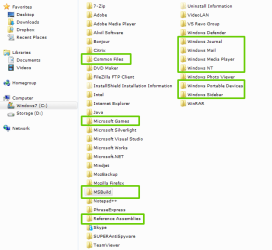
Do you reckon I can delete these folders in the screenshot?

To make it easier I listed the folders below so that perhaps someone could just quote my message? THANKS!

Common Files * Are these just surplus files?
Microsoft Games * Never use these
MSBuild * Are these older builds that can be deleted?
Reference Assemblies * Not sure what this is....
Windows Journal * Not sure what this is....
Windows Mail * Never use these
Windows Media Player * Never use these
Windows NT * Not sure what this is....
Windows Portable Devices * Never use these
Windows Sidebar * Never use these

THANKS!
 

Attachments
  • Remove.png
    Remove.png
    26.7 KB · Views: 61

My Computer My Computer

Computer Manufacturer/Model Number
Panasonic Toughbook CF F9
OS
Windows 7 Panasonic CF F9 (used to have CF F8)
No and deleting them would not bring any more space.
 

My Computer My Computer

Computer type
PC/Desktop
Computer Manufacturer/Model Number
Alienware Aurora ALX R4
OS
Windows 10 Pro (x64)
CPU
Intel Core i7-3930K (3.2GHz - 4.5GHz)
Motherboard
Alienware Aurora-R4 x79
Memory
4x Samsung 4GB PC3-12800 DDR3 (16GB 1600MHz)
Graphics Card(s)
Nvidia Geforce GTX 690
Sound Card
SteelSeries Siberia Elite
Monitor(s) Displays
Dell UltraSharp U3011
Screen Resolution
2560x1600
Hard Drives
Samsung 850 Pro 256 GB, Seagate 1TB Desktop Hybrid HDD, 2x Western Digital 4TB Green HDD
PSU
875W Some Dell PSU <.<
Case
Alienware Aurora ALX
Cooling
Custom Liquid Cooling (EK CPU & GPU blocks) dual EK 480RAD
Keyboard
Logitech G710+ Mechanical
Mouse
Logitech G700s
Internet Speed
Verizon Fios (50 mbps average)
Other Info
Server: Intel NUC D54250WYK: i5-4250U, 16GB, 256 GB mSATA, Windows Server 2012 R2
Lister,
What you can do is:
Control Panel | Programs and Feature
Now uninstall any programs you don't want or need.

Control Panel | Programs and Features | in the left-hand pane, click on Turn Windows Features on or off
Turn off that which you do not use.

WIN | type DISK CLEANUP | ENTER
WIN is the key with the wavy flag.

WIN E key combo | Open the C drive | in that long bar at the top, type %TEMP% | select all | delete all
If Win 7 complains that a file can't be deleted, then just skip the file.

Download, install and run the most popular free software, namely, CCleaner:
CCleaner
 
Last edited:

My Computer My Computer

Computer Manufacturer/Model Number
Toshiba Satellite S875D-S7239 laptop
OS
MS Windows 7 Ultimate SP1 64-bit
CPU
AMD A10-4600M
Motherboard
AMD Pumori (Socket FT1)
Memory
6.00 GB Dual-Channel DDR3 @ 798MHz (11-11-12-28)
Graphics Card(s)
AMD Radeon HD 7660G
Sound Card
High Definition Audio Device
Monitor(s) Displays
Generic PnP Monitor (1600x900@60Hz)
Screen Resolution
1600x900@60Hz
Hard Drives
SSD 119GB Corsair CSSD-V128GB2 ATA Device
Keyboard
Standard PS/2 Keyboard
Mouse
HP Wireless Optical Mobile Mouse Model FHA-3410
Internet Speed
What the local pub, local coffee shop offers.
Other Info
Optical Drive:MATSHITA BD-CMB UJ160B ATA Device


Also have an Asus ha1002xp netbook with Win 7 Ultimate installed.
Back
Top