Solved Can I determine which process has put something on the desktop?

simonc8

New member
Member
VIP
Local time
11:32 PM
Messages
18
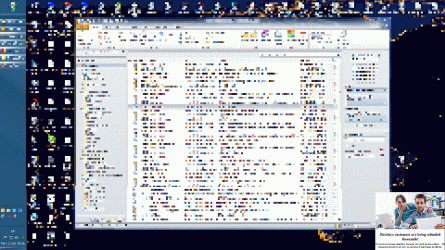
I have some adware on my system which all scans using various malware detection programmes have so far failed to find. It periodically puts a small ad on the bottom right corner of the desktop which is placed on top, so it's impossible to put anything in front of it. The ad (most often for an article about bitcoins) has a hyperlink associated (the mouse cursor changes to a pointing finger when over it) and a cross with REMOVE AD in the top right corner (which I have avoided clicking on). After say 40 minutes or so it disappears.

Is it possible to determine from looking at computer diagnostics which process has taken over this bit of the desktop? This would be as a way to try and identify the adware.

Once, this ad appeared while I was downloading a large file and the appearance of the ad was slowed, and it showed the word LOADING, so I assume the adware is making contact with the internet. Is there any way of tracking this contact, again as a way to try and identify the adware?

Grateful for assistance.
 
Last edited:

My Computer My Computer

At a glance

Windows 7 64 bit ProfessionalIntel Core i7-3770K 3.5GHz16GBGigabyte 3072MB GDDR5 AMD ATI Radeon HD 7950
Computer type
PC/Desktop
Computer Manufacturer/Model Number
custom build
OS
Windows 7 64 bit Professional
CPU
Intel Core i7-3770K 3.5GHz
Motherboard
Asus Sabertooth Z77
Memory
16GB
Graphics Card(s)
Gigabyte 3072MB GDDR5 AMD ATI Radeon HD 7950
Hard Drives
Seagate 750GB Momentus XT Serial 2.5 inch 7200 RPM 32MB 6GB/S
Antivirus
Microsoft Security Essentials
Browser
Firefox, Opera, Internet Explorer

My Computer My Computer

At a glance

Microsoft Windows 7 Home Premium Build 7601 3...Intel Pentium-M 735 Dothan - 1.7Ghz2GB DDR2-SDRAMIntel 82915GMx Graphics Controller 0 [B-1/C-0...
Computer type
Laptop
Computer Manufacturer/Model Number
Dell B130
OS
Microsoft Windows 7 Home Premium Build 7601 32bit
CPU
Intel Pentium-M 735 Dothan - 1.7Ghz
Motherboard
DELL 0RJ272 / Intel 915GM (Alviso-GM) + ICH6-M
Memory
2GB DDR2-SDRAM
Graphics Card(s)
Intel 82915GMx Graphics Controller 0 [B-1/C-0] [DELL]
Screen Resolution
1280x800
Hard Drives
Seagate ST9408114A - 40GB
Antivirus
Microsoft Scurity Essentials
Browser
Firefox
Thanks for this suggestion. I have it running at the moment - now I just need the adware to kick in to see if it leaves a trace. I'll let you know...
 

My Computer My Computer

At a glance

Windows 7 64 bit ProfessionalIntel Core i7-3770K 3.5GHz16GBGigabyte 3072MB GDDR5 AMD ATI Radeon HD 7950
Computer type
PC/Desktop
Computer Manufacturer/Model Number
custom build
OS
Windows 7 64 bit Professional
CPU
Intel Core i7-3770K 3.5GHz
Motherboard
Asus Sabertooth Z77
Memory
16GB
Graphics Card(s)
Gigabyte 3072MB GDDR5 AMD ATI Radeon HD 7950
Hard Drives
Seagate 750GB Momentus XT Serial 2.5 inch 7200 RPM 32MB 6GB/S
Antivirus
Microsoft Security Essentials
Browser
Firefox, Opera, Internet Explorer
Did you have this problem before you started using (bitcoins)?

Go into 'msconfig' Startup and Non Microsoft Services and see if anything concerning 'bitcoin' is there. If so, uncheck them. Reboot and see how things go.
I'm thinking 'bitcoin' is calling home or 'mining'.

Jack
 

My Computer My Computer

At a glance

Windows 10 Pro. 64/ version 1709 Windows 7 Pr...Intel i7-6800K @ 4.3Corsair Platinum 16 gig @2400EVGA GTX 1070 OC
Computer type
PC/Desktop
Computer Manufacturer/Model Number
Home made Desktop
OS
Windows 10 Pro. 64/ version 1709 Windows 7 Pro/64
CPU
Intel i7-6800K @ 4.3
Motherboard
ASUS X-99 Deluxe II
Memory
Corsair Platinum 16 gig @2400
Graphics Card(s)
EVGA GTX 1070 OC
Monitor(s) Displays
Asus 27" LED LCD/VE278Q
Screen Resolution
1920-1080 or 1280-720 HDMI
Hard Drives
INTEL SSD 730-240 Gb Sata 3.0/
PSU
EVGA Platium 1200W
Case
Phanteks Luxe Tempered Glass 8 fans/ one radiator
Cooling
XSPC/ Water Cooled CPU
Keyboard
Das 4 Professional
Mouse
Logitech M705/MX Anywhere 2-S
Internet Speed
100 mbits
Antivirus
Microsoft Security Essentials/ Malwarebytes Premium 3.0/ SAS
Browser
I.E. 11 default/Firefox/ ISP Time Warner Cable/Spectrum
Other Info
LG BluRay Burner/
Sound system-KLipsch-THX/
Icy Dock ssd Hot Swap bays.
You could go into Task Manager and make a list of all the processes which are running. Do this both when the ad is present and when it is not present. Then compare the two lists.
 

My Computer My Computer

At a glance

Linux Mint 18.2 xfce 64-bit (VMWare host) / W...Haswell4 GB
Computer type
PC/Desktop
Computer Manufacturer/Model Number
Dell
OS
Linux Mint 18.2 xfce 64-bit (VMWare host) / Windows 8.1 Pro 32-bit (VMWare guest)
CPU
Haswell
Memory
4 GB
Monitor(s) Displays
Acer 23"
Screen Resolution
1920 x 1080
Hard Drives
Two hard drives, 1TB each: One for Linux, one for my data.
Keyboard
IBM Model M
Antivirus
Sophos (Linux), Trend Micro (Windows)
Browser
Firefox, Opera
Other Info
I use Samba to share my data drive with the other computers at my house and with my guest session in VMWare Workstation Player.
Re post #5: When this first happened I immediately started Task Manager and had a look at all the processes and didn't spot anything unusual. It made me think does the adware have to be running all the time the ad is on the screen? Is it possible that the adware runs momentarily when placing the ad and then closes down, so it won't appear in the list?
 

My Computer My Computer

At a glance

Windows 7 64 bit ProfessionalIntel Core i7-3770K 3.5GHz16GBGigabyte 3072MB GDDR5 AMD ATI Radeon HD 7950
Computer type
PC/Desktop
Computer Manufacturer/Model Number
custom build
OS
Windows 7 64 bit Professional
CPU
Intel Core i7-3770K 3.5GHz
Motherboard
Asus Sabertooth Z77
Memory
16GB
Graphics Card(s)
Gigabyte 3072MB GDDR5 AMD ATI Radeon HD 7950
Hard Drives
Seagate 750GB Momentus XT Serial 2.5 inch 7200 RPM 32MB 6GB/S
Antivirus
Microsoft Security Essentials
Browser
Firefox, Opera, Internet Explorer
Note: I will be using the term malware in the generic sense as referring to all forms of malicious software including viruses and adware.

Is it possible to determine what process placed something on the desktop? Possibly if the software were legitimate but in the case of malware, not likely. Not that I would be able to do this.

Is it possible that the adware runs momentarily when placing the ad and then closes down, so it won't appear in the list? This is possible.

There are all kinds of ways a malware process can hide itself. Don't expect it will advertise it's presence with with some suspicious looking process name. Or it may not be a process at all. It could be a thread that has been injected into a legitimate process, such as explorer.exe. This process is responsible for displaying the desktop, start menu, and more, Windows Explorer being only a part of it's activities. Sophisticated malware, and these days most of it is, can manipulate the information displayed by Task Manager and similar utilities.
 

My Computer My Computer

At a glance

Windows 7 Pro 64 bitXeon W35208 GBNvidia Geforce 210
Computer type
PC/Desktop
Computer Manufacturer/Model Number
HP
OS
Windows 7 Pro 64 bit
CPU
Xeon W3520
Memory
8 GB
Graphics Card(s)
Nvidia Geforce 210
I agree with LMiller7: it can disguise itself so you can't find it the way I described.

There is another possible way to catch it: Run msconfig, and go to the Services tab. Hide all the Microsoft services, and then disable all the non-Microsoft services (the ones still showing after you hid the Microsoft services). Reboot, and use the computer for a while, to see if the ad comes back.

If the ad never comes back after using the computer for a while, then it was one of the non-Microsoft services that was putting it on your screen. Go back into msconfig and re-enable one service at a time, rebooting after each one, then using the computer for a while. See if the ad comes back. If it doesn't come back, then re-enable another one, and another one, till either the ad comes back or until you have re-enabled all of them.

However, if the ad comes back with all of the non-Microsoft services being disabled, then this method won't solve it for you.
 

My Computer My Computer

At a glance

Linux Mint 18.2 xfce 64-bit (VMWare host) / W...Haswell4 GB
Computer type
PC/Desktop
Computer Manufacturer/Model Number
Dell
OS
Linux Mint 18.2 xfce 64-bit (VMWare host) / Windows 8.1 Pro 32-bit (VMWare guest)
CPU
Haswell
Memory
4 GB
Monitor(s) Displays
Acer 23"
Screen Resolution
1920 x 1080
Hard Drives
Two hard drives, 1TB each: One for Linux, one for my data.
Keyboard
IBM Model M
Antivirus
Sophos (Linux), Trend Micro (Windows)
Browser
Firefox, Opera
Other Info
I use Samba to share my data drive with the other computers at my house and with my guest session in VMWare Workstation Player.
Thanks to LMiller7 and mrjimphelps for helpful comments.

Out of interest how/where is the desktop display managed? It seems to me like a multilayer graphics file where you can alter the order of the layers and there is one layer (the top layer) which can't be moved. Which bit of Windows actually populates these layers?

Since the ad clearly has an associated hyperlink how could I determine where this is pointing to without actually clicking on it? (My assumption is that if I clicked on the link it would send all sorts of compromising information about my system to some internet location.)

In the meantime I'll persevere with running Process Monitor, even though it slows down the machine a bit, and hope it shows some activity when the ad appears. It hasn't for more than a day. Maybe it knows it's being hunted down!
 

My Computer My Computer

At a glance

Windows 7 64 bit ProfessionalIntel Core i7-3770K 3.5GHz16GBGigabyte 3072MB GDDR5 AMD ATI Radeon HD 7950
Computer type
PC/Desktop
Computer Manufacturer/Model Number
custom build
OS
Windows 7 64 bit Professional
CPU
Intel Core i7-3770K 3.5GHz
Motherboard
Asus Sabertooth Z77
Memory
16GB
Graphics Card(s)
Gigabyte 3072MB GDDR5 AMD ATI Radeon HD 7950
Hard Drives
Seagate 750GB Momentus XT Serial 2.5 inch 7200 RPM 32MB 6GB/S
Antivirus
Microsoft Security Essentials
Browser
Firefox, Opera, Internet Explorer
Did you do as I posted 4?

You could also use Malwarebytes, AdwCleaner, Eset free online scanner and Super Anti Spyware.
I have used these programs many times.
Using them have never caused me a problem

Jack
 

My Computer My Computer

At a glance

Windows 10 Pro. 64/ version 1709 Windows 7 Pr...Intel i7-6800K @ 4.3Corsair Platinum 16 gig @2400EVGA GTX 1070 OC
Computer type
PC/Desktop
Computer Manufacturer/Model Number
Home made Desktop
OS
Windows 10 Pro. 64/ version 1709 Windows 7 Pro/64
CPU
Intel i7-6800K @ 4.3
Motherboard
ASUS X-99 Deluxe II
Memory
Corsair Platinum 16 gig @2400
Graphics Card(s)
EVGA GTX 1070 OC
Monitor(s) Displays
Asus 27" LED LCD/VE278Q
Screen Resolution
1920-1080 or 1280-720 HDMI
Hard Drives
INTEL SSD 730-240 Gb Sata 3.0/
PSU
EVGA Platium 1200W
Case
Phanteks Luxe Tempered Glass 8 fans/ one radiator
Cooling
XSPC/ Water Cooled CPU
Keyboard
Das 4 Professional
Mouse
Logitech M705/MX Anywhere 2-S
Internet Speed
100 mbits
Antivirus
Microsoft Security Essentials/ Malwarebytes Premium 3.0/ SAS
Browser
I.E. 11 default/Firefox/ ISP Time Warner Cable/Spectrum
Other Info
LG BluRay Burner/
Sound system-KLipsch-THX/
Icy Dock ssd Hot Swap bays.
The desktop is managed by then explorer.exe and dwm.exe (Desktop Window Manager) processes. The code is contained in the process exe and the many DLLs they load. This is all very complex.

As to where the ad is ultimately pointing to, this is something the adware developers really don't want you to know and have devoted considerable effort to ensure you don't. There are many ways of doing this.
 

My Computer My Computer

At a glance

Windows 7 Pro 64 bitXeon W35208 GBNvidia Geforce 210
Computer type
PC/Desktop
Computer Manufacturer/Model Number
HP
OS
Windows 7 Pro 64 bit
CPU
Xeon W3520
Memory
8 GB
Graphics Card(s)
Nvidia Geforce 210
Hi simonc8,

You said you ran various malware detection programmes. Which ones did you run?

Could you grab a screen shot of this ad that pops up that includes the link and attach in reply? https://www.sevenforums.com/members/simonc8.html
 

My Computer My Computer

At a glance

Win7 64-bit, Vista 32-bit, XP 32-bit, W2K 32-...
Computer type
Laptop
OS
Win7 64-bit, Vista 32-bit, XP 32-bit, W2K 32-bit (VM)
Antivirus
Avast, MSE
Browser
Firefox
Other Info
Multiple systems. Too many specs to name.
Hi simonc8,

You said you ran various malware detection programmes. Which ones did you run?

Could you grab a screen shot of this ad that pops up that includes the link and attach in reply?

1. I attach a screen grab showing the ad (I reduced the image size and pixelated my email programme) but you can see where the ad is - this one was for something to do with mis-selling by Barclays bank.
2. The programmes I've tried are Microsoft Security Essentials, Malwarebytes (free edition) and RogueKiller.

However thanks to running Process Manager as suggested by WinDozeUser at #2 I may have isolated the problem. The ad disappeared shortly after a call to wpscenter.exe which is something installed with KingSoft WPS Office which I have on my machine although I rarely use it. I've set up a Windows firewall block on that programme, so let's see what happens...
 

Attachments

  • adware ad.gif
    adware ad.gif
    161.6 KB · Views: 0

My Computer My Computer

At a glance

Windows 7 64 bit ProfessionalIntel Core i7-3770K 3.5GHz16GBGigabyte 3072MB GDDR5 AMD ATI Radeon HD 7950
Computer type
PC/Desktop
Computer Manufacturer/Model Number
custom build
OS
Windows 7 64 bit Professional
CPU
Intel Core i7-3770K 3.5GHz
Motherboard
Asus Sabertooth Z77
Memory
16GB
Graphics Card(s)
Gigabyte 3072MB GDDR5 AMD ATI Radeon HD 7950
Hard Drives
Seagate 750GB Momentus XT Serial 2.5 inch 7200 RPM 32MB 6GB/S
Antivirus
Microsoft Security Essentials
Browser
Firefox, Opera, Internet Explorer
Fascinating that because an ad appeared on my screen relating to Bitcoin people immediately assume I'm a Bitcoin user!

The answer is: I had installed WPS Office, a free alternative to Microsoft Office, on my system. It turns out it generates ads and puts them on your desktop. By disabling one of the installed programmes, called wpscloudsvr.exe which will be found somewhere in C:\Users\your user name\AppData\Local\Kingsoft\WPS Office I stopped these ads appearing.
 

My Computer My Computer

At a glance

Windows 7 64 bit ProfessionalIntel Core i7-3770K 3.5GHz16GBGigabyte 3072MB GDDR5 AMD ATI Radeon HD 7950
Computer type
PC/Desktop
Computer Manufacturer/Model Number
custom build
OS
Windows 7 64 bit Professional
CPU
Intel Core i7-3770K 3.5GHz
Motherboard
Asus Sabertooth Z77
Memory
16GB
Graphics Card(s)
Gigabyte 3072MB GDDR5 AMD ATI Radeon HD 7950
Hard Drives
Seagate 750GB Momentus XT Serial 2.5 inch 7200 RPM 32MB 6GB/S
Antivirus
Microsoft Security Essentials
Browser
Firefox, Opera, Internet Explorer
Sorry about that - Spammer got to post as I was dealing with them, as soon as you mention a "popular" subject these days, they appear, but we normally get them before members see them ;)
 

My Computers My Computers

  • At a glance

    Windows 11 Pro x64 [Latest Release and Releas...Ryzen 9 5950X, 3.8 - 5.2 MHz64GB [2 x 32GB] DDR4 3200MHz4GB NVIDIA GEFORCE GTX 1650 Ti
    Computer type
    PC/Desktop
    Computer Manufacturer/Model Number
    ChillBlast - Custom to my design
    OS
    Windows 11 Pro x64 [Latest Release and Release Preview]
    CPU
    Ryzen 9 5950X, 3.8 - 5.2 MHz
    Motherboard
    Asus Prime X570-Pro
    Memory
    64GB [2 x 32GB] DDR4 3200MHz
    Graphics Card(s)
    4GB NVIDIA GEFORCE GTX 1650 Ti
    Sound Card
    On-board SPDIF to 5.1 System + HDMI [5.1 system]
    Monitor(s) Displays
    32" UHD 32 Bit HDR Monitor + 43" UHD 4K 32Bit HDR TV
    Screen Resolution
    2 x 3840 x 2160 @60Hz
    Hard Drives
    1TB M2 SSD OS, 500GB Fast Access SSD, 2 x 8TB Data + Various Externals from 1TB to 4TB, 10TB NAS
    PSU
    NZXT C750 80 PLUS Gold 750W Modular PSU
    Case
    Workstation Case [Matt Black]
    Cooling
    NZXT Kraken X63 280mm CPU Cooler +2x Quiet Case fans
    Keyboard
    Logitech Wireless MX Keys & K400 + others
    Mouse
    Logitech Wireless MX Master 3S
    Internet Speed
    920 MB Down 50 MB Up
    Antivirus
    BitDefender Total Security Pro
    Browser
    Chrome (always run latest Non-Beta)
    Other Info
    Also run ...
    Laptop - Quad 8GB - Windows 10 Pro x64
    Nexus 7 Android tablet x2
    Samsung 10.2" tablet
    Blackview TAB 8 4G Android Tablet c/w Keyboard
    Wacom Intuos Pro Medium Pen Pad
    Wacom Intuos Pro Small Pen Pad
    Wacom Expresskeys Remote
    Loopdeck+ Graphics Controller
    Shuttle Pro v2 Control
  • At a glance

    Windows 11 Pro x64 Latest RPIntel I7 10750H 5.0GHz32GB [2x16GB] DDR4 2933 MHznVidia GTX1650Ti 4 GB GDDR6
    Computer type
    Laptop
    System Manufacturer/Model Number
    Dell XPS 17 10750H
    OS
    Windows 11 Pro x64 Latest RP
    CPU
    Intel I7 10750H 5.0GHz
    Motherboard
    Dell XPS
    Memory
    32GB [2x16GB] DDR4 2933 MHz
    Graphics Card(s)
    nVidia GTX1650Ti 4 GB GDDR6
    Sound Card
    Stock [Realtek] 4 Speaker
    Monitor(s) Displays
    17" IPS UHD+ Infinity Edge Touchscreen
    Screen Resolution
    3840 x 2400
    Hard Drives
    2TB M2 NVMe, 4TB External + various 500GB & 1TB External NVMe (also have access to spinner HDD from
    PSU
    Stock
    Case
    Stock XPS Aluminium & Carbon Fibre
    Cooling
    Stock - Active Fan Control
    Keyboard
    Backlit + Various Logitech
    Mouse
    Stock Track Pad + Logitech MX Trackball
    Internet Speed
    72 MB Down 18MB Up
    Browser
    Chrome
    Other Info
    Also run ...
    Laptop - Quad 8GB - Windows 10 Pro x64
    Nexus 7 Android tablet x2
    10.2" tablet
    Sony Z3 Android Smartphone
    Wacom Intuos Pro Medium Pen Pad
    Wacom Intuos Pro Small Pen Pad
    Wacom Expresskeys Remote
    Loopdeck+ Graphics Controller
    Shuttle Pro v2 Control Pad
    10TB NAS
Back
Top