Solved Can I make my Gadgets opacity 0% ?

ahamprema

New member
Local time
1:13 AM
Messages
23
Would like to know if there is any way to make my gadgets 0% opaque until I mouse over them because I like to see a clean desktop and my wallpaper unobstructed? Anyone know a way to do this?

Thanks WSF
 

My Computer My Computer

At a glance

Windows 7 Ultimate 32bitIntel Core Duo T5250
Computer Manufacturer/Model Number
HP Pavilion DV6600 Laptop
OS
Windows 7 Ultimate 32bit
CPU
Intel Core Duo T5250
0% would be invisible!
 

My Computer My Computer

At a glance

Windows 7 Ultimate 64 bit Steve Ballmer Signa...Intel Core 2 Quad - Q9550 - 2.83GHz stock - O...4GB DDR2 800MHz (PC6400) OCZ ReaperNvidia GE Force 8800 GTS
Computer Manufacturer/Model Number
Homebrew PC - "Alpha_Dawg"
OS
Windows 7 Ultimate 64 bit Steve Ballmer Signature Edition
CPU
Intel Core 2 Quad - Q9550 - 2.83GHz stock - OC'd to 3.6GHz
Motherboard
Gigabyte EP45-UD3P
Memory
4GB DDR2 800MHz (PC6400) OCZ Reaper
Graphics Card(s)
Nvidia GE Force 8800 GTS
Sound Card
Asus Xonar DX
Monitor(s) Displays
Samsung SyncMaster 2333HD
Screen Resolution
1920 x 1080
Hard Drives
WD Caviar Black 750GB - 7200RPM - 32MB cache
WD Caviar Green 1.5TB - 5400RPM - 64MB cache
WD Caviar Green 2.0TB - 5400RPM - 64MB cache
PSU
PC Power & Cooling Silencer 750
Case
Gigabyte 3D Aurora
Cooling
Case is Air - 5ea. 120mm fans (mix of Arctic and Xigmatec)
Keyboard
MS Natural Wireless KB
Mouse
MS Wireless Mouse
Internet Speed
50 mbps down/5 mbps up
Other Info
AVerMedia - AVerTVHD G2 Dual Tuner Card
I don't see the point of having a gadget with the opacity set to 0%. :confused: Better off, don't use any gadgets.
 

My Computer My Computer

At a glance

Win 7 Ultimate SP1 x64Intel Pentium Dual Core E5300 OC'd @ 3GHzKingston 2x2GB DDR2-800 Dual Channel SDRAMIntegrated Intel GMA X4500
Computer Manufacturer/Model Number
D3f's Customs
OS
Win 7 Ultimate SP1 x64
CPU
Intel Pentium Dual Core E5300 OC'd @ 3GHz
Motherboard
Asus P5G41-M LE
Memory
Kingston 2x2GB DDR2-800 Dual Channel SDRAM
Graphics Card(s)
Integrated Intel GMA X4500
Sound Card
Realtek 5.1 HD Audio (ALC887)
Monitor(s) Displays
LG Flatron W1943S @ 60Hz
Screen Resolution
1360 x 768
Hard Drives
Internal - WD Caviar Blue 500GB, External - WD My Passport Essential 500GB
PSU
Headway 450w PSU
Case
Pixxo Slim Black mATX Case
Cooling
Stock Cpu Fan, 1 x Top Case Fan
Keyboard
Logitech K120
Mouse
Logitech LS1 Laser Mouse
Internet Speed
17.66Mb/s Down, 0.82Mb/s Up
Other Info
Creative SBS A300 2.1 Speaker System, LG GH22NS50 22x Internal Super-Multi DVD-RW, 2Wire 5012NV Wireless Modem Router
I dont know of a method to switch from 0% to 100% on mouseover, but here's the opacity:

1. Right-click a gadget.
2. Point at Opacity.
3. Select the amount of opacity.
 

My Computer My Computer

At a glance

W7 Ult. x64 | OS XIntel Mobile Core 2 Duo 2.93Ghz [T9800 Penryn]4096MB Samsung DDR3 Dual Channel [PC3-8500F 1...NVIDIA GeForce 9600M GT 512MB [G96M Rev. C1]
Computer Manufacturer/Model Number
Apple Macbook Pro (April 2009)
OS
W7 Ult. x64 | OS X
CPU
Intel Mobile Core 2 Duo 2.93Ghz [T9800 Penryn]
Motherboard
NVIDIA nForce 730i Rev. B1 [Mac-F2268EC8 (U2E1)]
Memory
4096MB Samsung DDR3 Dual Channel [PC3-8500F 1066Mhz]
Graphics Card(s)
NVIDIA GeForce 9600M GT 512MB [G96M Rev. C1]
Sound Card
SB X-Fi Surround 5.1 USB | Onboard Realtek (Disabled)
Monitor(s) Displays
Acer x223wbd 22" | Apple Anti-Glare 17" (Disabled)
Screen Resolution
{Current} 1440x900 {Acer} 1680x1050 {Apple} 1920x1200
Hard Drives
{Internal}
Seagate Momentus 320GB 2.5" 7200RPM [ST9320421AS]

{Externals}
LaCie 320GB USB 2.0 HDD [301284UR]
LaCie 750GB USB 2.0 FW400 eSATA HDD [301314U]
LaCie 1TB USB 2.0 HDD [301304UR]
PSU
Magsafe
Case
Aluminum/Unibody (MBP52)
Cooling
2 x 6000 RPM Fans
Keyboard
Logitech G-15v2 [PN 920-000379]
Mouse
Logitech G-9 [PN 910-000338]
Internet Speed
12Mbps/2.5Mbps w/ 24Mbps Speed Boost [Comcast]
Other Info
Logitech X-540 Speakers [PN 970223-0122]
Sennheiser PC-151 Headset
Give this a shot

As the opacity setting is intergrated in the gadget, it's hard to change to 10% or 5% via the opacity setting. I found an useful link for you,

Let The User Choose Your Gadget's Opacity
Let The User Choose Your Gadget's Opacity - Google Desktop APIs - Google Code

After reading this website, you should know it's hard to modify the opacity setting to 10% unless you modify the program codes. While if you just want to decrease to less opaque, you can choose 90% or 100% in the opaque setting.

I hope this can help you.

Brett M,
Windows Outreach Team
 

My Computer My Computer

At a glance

Windows7
OS
Windows7
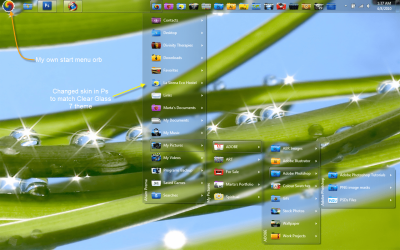
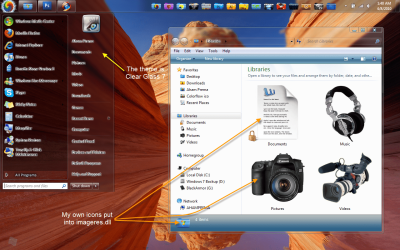
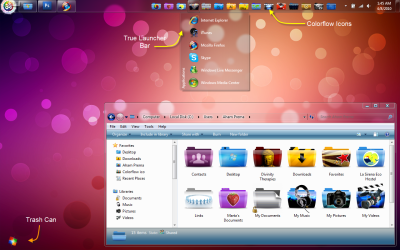
Thanks Everyone, & Brett for the link. I would like to make the opacity 0% I read the link and went to where the gadgets are but can't see the info that they show in the link may be a little out of my league unless someone can explain what I need to do. I have been working on the visual appearance of my laptop and love the glass as you can see. This is one of the few tasks felt I would love to incorporate. Thanks again everyone for you support and to all the artist who assisted in creating my style!!!
 

Attachments

  • Desktop 1.png
    Desktop 1.png
    377.7 KB · Views: 206
  • Desktop 2.png
    Desktop 2.png
    320.6 KB · Views: 135
  • Desktop 3.png
    Desktop 3.png
    629.7 KB · Views: 129

My Computer My Computer

At a glance

Windows 7 Ultimate 32bitIntel Core Duo T5250
Computer Manufacturer/Model Number
HP Pavilion DV6600 Laptop
OS
Windows 7 Ultimate 32bit
CPU
Intel Core Duo T5250
I think I remember reading somewhere that windows sidebar gadgets don't allow for 0 opacity (complete transparency). If it's true or not, can't say as I don't have a clue where I read that before. Even if it was possible, you'd have to get into the individual gadgets code, and change it yourself. I haven't seen any instructions anywhere on how to get complete transparency with sidebar gadgets.

Might look into using something like rainmeter instead, where you get different skins that have things like clocks, dates, weather, news, processes, drive capacities, etc that just show the information on your desktop and no backgrounds. And also has he ability to change the transparency of the displayed information on your desktop.
Rainmeter.net
 

My Computer My Computer

At a glance

Windows 7 Ultimate x64 SP1Core i7 920 (D0) @ 4Ghz, *26c idle *65c full ...12GB DDR3 Corsair Dominator -CMD12GX3M6A1600C...Zotac Geforce GTX 770
Computer type
PC/Desktop
Computer Manufacturer/Model Number
Airbot 2.0
OS
Windows 7 Ultimate x64 SP1
CPU
Core i7 920 (D0) @ 4Ghz, *26c idle *65c full load on air
Motherboard
Asus P6X58D Premium - Sata 6Gb/s - USB 3.0
Memory
12GB DDR3 Corsair Dominator -CMD12GX3M6A1600C8 at 1600MHz
Graphics Card(s)
Zotac Geforce GTX 770
Sound Card
ASUS Xonar D2X
Monitor(s) Displays
1 LG 24" Flatron W2453V-PF 1 Samsung 24" P2450H both 2ms RT
Screen Resolution
1920x1080@60hz
Hard Drives
1 Samsung 250GB 840 Evo SSD
1 OCZ Vertex2 180GB SSD
1 TB Samsung Spinpoint F1 7200RPM 32MB cache
2 500GB WD Caviar Blacks 7200RPM 32MB cache (WD5001AALS)

Pioneer DVD Burner DVR-S18M
PSU
Corsair HX1000W
Case
Cooler Master HAF 932
Cooling
Case Fans *3 230mm, *1 140mm/CPU - *Tuniq Tower 120 Extreme
Keyboard
Logitech Wireless MK700
Mouse
Logitech Wireless MK700
Internet Speed
DL 15 Mbps UL 0.98 Mbps
Antivirus
None
Browser
Firefox Nightly
Other Info
Processor-7.7 *RAM- 7.9 *Graphics-7.9 *Gaming Graphics- 7.9 *SSD- 7.8 W.E.I final score= 7.7
*Phone- LG Nexus 5
Ok just to be clear YES anything is possible and YES I woulld like to make my gadgets 0% opaque. Does anyone have the knowledge, links or skills to pull this off. I would love to do it myself but it may be beyond my belief and skills that make it possible for me. Anyhoo This can't be that hard it looked farely easy from the link Brett provided I was just not sure from the article where the file was located that needed to be changed, the info seems to present it as being easy enough.
 

My Computer My Computer

At a glance

Windows 7 Ultimate 32bitIntel Core Duo T5250
Computer Manufacturer/Model Number
HP Pavilion DV6600 Laptop
OS
Windows 7 Ultimate 32bit
CPU
Intel Core Duo T5250
The link he gave you is for google desktop, not windows sidebar gadgets.
 

My Computer My Computer

At a glance

Windows 7 Ultimate x64 SP1Core i7 920 (D0) @ 4Ghz, *26c idle *65c full ...12GB DDR3 Corsair Dominator -CMD12GX3M6A1600C...Zotac Geforce GTX 770
Computer type
PC/Desktop
Computer Manufacturer/Model Number
Airbot 2.0
OS
Windows 7 Ultimate x64 SP1
CPU
Core i7 920 (D0) @ 4Ghz, *26c idle *65c full load on air
Motherboard
Asus P6X58D Premium - Sata 6Gb/s - USB 3.0
Memory
12GB DDR3 Corsair Dominator -CMD12GX3M6A1600C8 at 1600MHz
Graphics Card(s)
Zotac Geforce GTX 770
Sound Card
ASUS Xonar D2X
Monitor(s) Displays
1 LG 24" Flatron W2453V-PF 1 Samsung 24" P2450H both 2ms RT
Screen Resolution
1920x1080@60hz
Hard Drives
1 Samsung 250GB 840 Evo SSD
1 OCZ Vertex2 180GB SSD
1 TB Samsung Spinpoint F1 7200RPM 32MB cache
2 500GB WD Caviar Blacks 7200RPM 32MB cache (WD5001AALS)

Pioneer DVD Burner DVR-S18M
PSU
Corsair HX1000W
Case
Cooler Master HAF 932
Cooling
Case Fans *3 230mm, *1 140mm/CPU - *Tuniq Tower 120 Extreme
Keyboard
Logitech Wireless MK700
Mouse
Logitech Wireless MK700
Internet Speed
DL 15 Mbps UL 0.98 Mbps
Antivirus
None
Browser
Firefox Nightly
Other Info
Processor-7.7 *RAM- 7.9 *Graphics-7.9 *Gaming Graphics- 7.9 *SSD- 7.8 W.E.I final score= 7.7
*Phone- LG Nexus 5
Thanks Airbot that would explain alot....
 

My Computer My Computer

At a glance

Windows 7 Ultimate 32bitIntel Core Duo T5250
Computer Manufacturer/Model Number
HP Pavilion DV6600 Laptop
OS
Windows 7 Ultimate 32bit
CPU
Intel Core Duo T5250

My Computer My Computer

At a glance

Windows 7 Ultimate x64AMD Athlon X3Crucial 2x2 GBEVGA GeForce G210 512MB DDR2
Computer Manufacturer/Model Number
Owner Built
OS
Windows 7 Ultimate x64
CPU
AMD Athlon X3
Motherboard
Biostar TA785G3HD
Memory
Crucial 2x2 GB
Graphics Card(s)
EVGA GeForce G210 512MB DDR2
Sound Card
Integrated
Monitor(s) Displays
Samsung Syncmaster 955DF, Viewsonic A95f
Hard Drives
Seagate 750GB SATA 300
PSU
Chiefmax 550 Watt
Case
Midsize
Cooling
Standard
function setGadgetOpacity(opacity)
{
System.Gadget.Settings.write("PrivateSetting_GadgetOpacity", opacity);
}

call that function from anywhere in the gadget javascript file
setGadgetOpacity('0');
 

My Computer My Computer

At a glance

windows7
OS
windows7
I think I remember reading somewhere that windows sidebar gadgets don't allow for 0 opacity
Right, 20% is the lowest opacity. But that is nearly invisible.
 

My Computer My Computer

At a glance

Vista, Windows7, Mint Mate, Zorin, Windows 8from 1.6GHz Duo to i7
Computer Manufacturer/Model Number
HP, Dell, Gateway, Toshiba - 4 laptops and 2 desktops
OS
Vista, Windows7, Mint Mate, Zorin, Windows 8
CPU
from 1.6GHz Duo to i7
Monitor(s) Displays
2x HP w2207
Hard Drives
5x HDD, 7x SSD, 12x Externals
Keyboard
with trackball - no mices
Mouse
Trackball mice
Internet Speed
DSL 6000
Back
Top