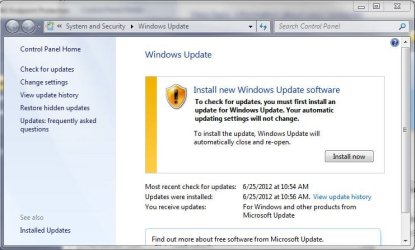
Can I manually update?

Marscaleb

New member
Local time
2:50 PM
Messages
23
I just installed a copy of Windows 7 onto an old laptop. This is a fresh install, I believe it has SP1 included.
But it seems I can no longer connect to the windows server to get any other updates. Is it possible to apply the other service packs and updates manually?
Is there any trusted source to get the updates from?
 

My Computer

Computer type
PC/Desktop
Computer Manufacturer/Model Number
Custom
OS
Windows 7 Professional 64-bit
CPU
AMD FX-8350 Eight Core
Memory
32 GB
Browser
Chrome
Marscaleb:

You didn't say which version(Home Premium, Professional, Ultimate, etc.) and which bit number(32, 64) of Windows 7 you installed in your old laptop, and if it includes Service Pack 1.

You also didn't describe your old laptop(brand name, model name, model number, etc.), so we don't know which primary device drivers(chipset, graphics, audio, ethernet, wireless, etc.) it needs.

Use the link that SIW2 provided in post #2 so you can download and save the Simplix installer tool.
Once you double-click that tool to run it, it will detect and download the June 2022 update pack - which is 808 MB in size.
After that 808 MB size file is downloaded and saved, copy it to a USB thumb drive.

Once you have the June 2022 update pack and the primary device drivers for your old laptop downloaded and saved, do the following in the order listed:
1. Do a clean install of Windows 7 SP1.
2. Run the June 2022 update pack - which may take an hour or longer to complete.
3. Install the primary device drivers.
4. Obtain a working internet connection.
5. Load Windows Update, then do a "check for updates" scan.
 

My Computer

Computer type
PC/Desktop
Computer Manufacturer/Model Number
Dell OptiPlex 9020
OS
Windows 7 Professional SP1 64-bit
CPU
Intel Core i7-4790 3.60 GHz
Memory
32 GB DDR3-1600 MHz
Graphics Card(s)
Integrated Intel HD Graphics 4600
Monitor(s) Displays
Viewsonic 32" LCD
Hard Drives
Kingston SATA 3 240 GB SSD
Internet Speed
Spectrum Internet 1000 Mbps

My Computers

System One System Two

  • Computer type
    PC/Desktop
    OS
    7 X64
    CPU
    i5 8400
    Motherboard
    gigabyte b365m ds3h
    Memory
    2x8gb 3200mhz
    Hard Drives
    various
    PSU
    pure power 11 400w cm
    Case
    Coolermaster
    Cooling
    cryorig m9i
  • Computer type
    PC/Desktop
    OS
    7x64
    CPU
    g5400
    Motherboard
    ga b365m ds3h
    Memory
    8gb ddr4 2400
    PSU
    xfx pro 450w
you can update, you will need to go to

Microsoft Update Catalog

and install

KB3138612

KB4490628

KB4474419

KB3179573

you don't have to restart after installing each update, you can restart after installing all 4 updates, but after you do that windows update will work
 

My Computers

System One System Two

  • Computer type
    PC/Desktop
    Computer Manufacturer/Model Number
    ASUS
    OS
    Windows 7 Home Premium x64
    CPU
    i5 9400F
    Motherboard
    ASUS Prime Z390-P
    Memory
    16GB DDR4 4X4GB 3200MHz
    Graphics Card(s)
    Nvidia GeForce GTX 970
    Monitor(s) Displays
    Dell Ultrasharp 2007WFPb
    Screen Resolution
    1600x1200
    Hard Drives
    1TB Samsung 870 evo
    PSU
    EVGA Supernova 1000 GT
    Case
    Viper GX ATX
    Cooling
    Noctua NH-D15
    Keyboard
    Frutiger Aero
    Mouse
    HP M-UAE96
    Internet Speed
    900 MBPS download l 880 MBPS upload
    Antivirus
    Microsoft Security Essentials
    Browser
    Supermium
  • Computer type
    PC/Desktop
Marscaleb:
You didn't say which version(Home Premium, Professional, Ultimate, etc.) and which bit number(32, 64) of Windows 7 you installed in your old laptop, and if it includes Service Pack 1.
You also didn't describe your old laptop(brand name, model name, model number, etc.), so we don't know which primary device drivers(chipset, graphics, audio, ethernet, wireless, etc.) it needs.

Sure.
Windows 7 Professional, Service Pack 1, 64-bit
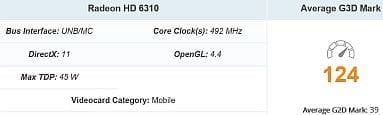
installed on Acer 5253-BZ661; AMD Dual Core E-350 & AMD Radeon HD 6310.
It originally had Win 7 Home, but I foolishly took the free update to Windows 10. I have an image of the old hard drive but I'd like to not revert to it since it ran so poorly.

At the moment the only driver that is giving me problems is the wired ethernet (wireless is fine.)
 

My Computer

Computer type
PC/Desktop
Computer Manufacturer/Model Number
Custom
OS
Windows 7 Professional 64-bit
CPU
AMD FX-8350 Eight Core
Memory
32 GB
Browser
Chrome
So you have fixed Windows Update in the meantime.
 

My Computer

Computer type
PC/Desktop
OS
Windows 7 Home Premium
Today it is normal to do a new install of Windows 7 and have Windows update not working. However, after you manually install updates to a certain point automatic updates will start working again.

I have an 18 year old HP Pavilion laptop that I upgraded to Windows 7 Home 32-bit. Right now automatic Windows update is working fine. Of course there are very few updates now but it occasionally gets some.
 

My Computers

System One System Two

  • Computer type
    PC/Desktop
    Computer Manufacturer/Model Number
    Custom build
    OS
    Windows 7 Home Premium 64-bits
    CPU
    AMD FX-8350
    Motherboard
    Gigabyte GA-990FXA-UD3 (AM3+)
    Memory
    GSKILL Ripjaw-X PC3 12800 8GB (2x4GB)
    Graphics Card(s)
    ASUS ROG STRIX GTX 1060 6GB
    Sound Card
    Integrated
    Monitor(s) Displays
    Asus VE228H (21.5-in)
    Screen Resolution
    1920x1080 60Hz
    Hard Drives
    SAMSUNG 870 EVO 2.5 Inch SATA SSD (1TB)
    SAMSUNG 870 EVO 2.5 Inch SATA SSD (1TB)
    SAMSUNG 870 EVO 2.5 Inch SATA SSD (1TB)
    PSU
    Corsair RM750x (750 watts)
    Case
    Corsair Carbide Series 200R
    Cooling
    Corsair Hydro Series H60 (CWCH60)
    Keyboard
    Logitech Elite
    Mouse
    Logitech M510 Wireless Mouse
    Internet Speed
    Comcast Gigabit Extra (1200Mbps down / 35Mbps up)
    Antivirus
    Malwarebytes
    Browser
    Firefox, Edge, Chrome
    Other Info
    ASUS DRW-24B1ST DVD-RW (24X) optical drive
    Seagate Expansion Desk (5TB) external SATA/USB HDD
    Comcast XB8 Internet Gateway
  • Computer type
    PC/Desktop
    System Manufacturer/Model Number
    Custom
    OS
    Windows 7 Pro (64-bit)
    CPU
    AMD Phenom II 960T X4
    Motherboard
    ASUS M4N82 Deluxe
    Memory
    Corsair XMS2 DDR2-800 8GB (4x2GB)
    Graphics Card(s)
    ASUS ENGTX560 DCII OC/2DI/1GD5 1GB
    Monitor(s) Displays
    Samsung 930B 19-inch LCD
    Screen Resolution
    1280x1024
    Hard Drives
    Samsung SSD 870 EVO 1000 GB (Windows 10)
    Seagate ST1000DM003 1000 GB (Windows 7)
    PSU
    Antec TruePower (new) TP-650
    Case
    Antec Three Hundred
    Cooling
    AMD stock cooler from FX8350
    Mouse
    Logitech M100
    Internet Speed
    Xfinity Gigabit Extra 1200/35 Mbps
As old and slow as that laptop is, good luck with re-installing and running Windows 7 SP1 64-bit in it.
It is going to have the speed and performance of a turtle.
 

Attachments

  • cpu.JPG
    cpu.JPG
    13.7 KB · Views: 14
  • gpu.JPG
    gpu.JPG
    15.1 KB · Views: 14

My Computer

Computer type
PC/Desktop
Computer Manufacturer/Model Number
Dell OptiPlex 9020
OS
Windows 7 Professional SP1 64-bit
CPU
Intel Core i7-4790 3.60 GHz
Memory
32 GB DDR3-1600 MHz
Graphics Card(s)
Integrated Intel HD Graphics 4600
Monitor(s) Displays
Viewsonic 32" LCD
Hard Drives
Kingston SATA 3 240 GB SSD
Internet Speed
Spectrum Internet 1000 Mbps
I have a Thinkpad x120e with the exact same CPU/GPU (AMD E-350/Radeon HD 6310), 4 GB RAM, Windows 7 x64 Ultimate SP1.
It runs a little slow but is perfect for web browsing, 1080P video viewing and older 3D Gaming (Counter Strike Source, Unreal Tournament 2004, Treadmarks, Call of Duty 4 etc.).

I wouldn't recommend it for video editing/conversion but otherwise works well with Windows 7 x64 for casual usage. Definitely wouldn't recommend this machine for Windows 10!
 

My Computer

Computer type
PC/Desktop
OS
Windows 7 Pro x64
So I ran that simplex thing but nothing happened. When I go to windows update it still gives me the same message. Was this program supposed to trick windows into thinking I have a new update ready to install?
I have a Thinkpad x120e with the exact same CPU/GPU (AMD E-350/Radeon HD 6310), 4 GB RAM, Windows 7 x64 Ultimate SP1.
It runs a little slow but is perfect for web browsing, 1080P video viewing and older 3D Gaming (Counter Strike Source, Unreal Tournament 2004, Treadmarks, Call of Duty 4 etc.).

I wouldn't recommend it for video editing/conversion but otherwise works well with Windows 7 x64 for casual usage. Definitely wouldn't recommend this machine for Windows 10!

UT hyyYPE!! WOOT!!
Honestly I'm amused that you brought that up because retro gaming is the primary reason I'm keeping this around, and UT2K4 is the most demanding title I'm trying to run. Although I've mostly been using this laptop to host the servers for the other machines.
As old and slow as that laptop is, good luck with re-installing and running Windows 7 SP1 64-bit in it.
It is going to have the speed and performance of a turtle.
It is going to have the same speed and performance that it has always had. It is going to run the programs it was designed to run just as well as it always had.
Are you new to working on old computers?
 

My Computer

Computer type
PC/Desktop
Computer Manufacturer/Model Number
Custom
OS
Windows 7 Professional 64-bit
CPU
AMD FX-8350 Eight Core
Memory
32 GB
Browser
Chrome
I believe it has SP1 included.

"I believe". How about knowing? Simplix not running indicates you haven't included SP1. Dou you understand Windows Update cannot be fixed without SP1? Are you here you accomplish something or keep us in suspense?
 

My Computer

Computer type
PC/Desktop
OS
Windows 7 Home Premium
Back
Top