Can i recover deleted files from an external hard drive?

Double

New member
Member
VIP
Local time
1:46 PM
Messages
140
Hi :) Is it possible to recover deleted files from an external hard drive or flash memory? If so, can someone explain how this is possible? I thought that once you had deleted a file, that was it..?
 

My Computer My Computer

At a glance

Windows 10 Home 64-bitIntel Core i5 430M @2.27GHz6.00GB Dual-Channel DDR3 @532MHz512MB NVIDIA GeForce G105M
Computer type
Laptop
Computer Manufacturer/Model Number
HP Pavilion dv7-3188cl
OS
Windows 10 Home 64-bit
CPU
Intel Core i5 430M @2.27GHz
Motherboard
Hewlett-Packard 365C
Memory
6.00GB Dual-Channel DDR3 @532MHz
Graphics Card(s)
512MB NVIDIA GeForce G105M
Sound Card
IDT High Definition Audio CODEC
Monitor(s) Displays
Generic PnP Monitor
Screen Resolution
1600x900 @60Hz
Hard Drives
298GB Hitachi
PSU
AC 100-240V~1.6A 50-60Hz, DC 19V 4.7A
Mouse
Razer DeathAdder Left-Hander
Antivirus
Avast Free
Browser
Google Chrome
Other Info
Malwarebytes Pro, Malwarebytes Anti-Exploit, uBlock Origin
Hi :) Is it possible to recover deleted files from an external hard drive or flash memory

Not with certainty. It's hit and miss. Don't count on it.

"Deleting" in effect removes the file from the drive's "index" so it can't be found by standard means.

Specialized software may still be able to locate and recover the file if that space on the hard drive has not actually been overwritten and occupied by another file.

Recuva and GetDataBack are two such programs.

Some free software will tell you if the file can be recovered, but may make you pay to actually recover it.

The original file name may be lost.

Then there are professional data recovery services that examine the drive in a laboratory for a high fee--$1000 or more. Such services may have a higher degree of success.

I've fiddled with the free software a few times, but never had much luck.
 

My Computer My Computer

At a glance

Windows 7 Home Premium SP1, 64-bitIntel Skylake i5-6600K, not overclocked8 GB HyperX DDR4-2666 (2 x 4 GB)none; graphics are integrated on CPU
Computer type
PC/Desktop
Computer Manufacturer/Model Number
Ignatz Special; 4 speed manual gearbox; factory air conditioning; one of one
OS
Windows 7 Home Premium SP1, 64-bit
CPU
Intel Skylake i5-6600K, not overclocked
Motherboard
AsRock Z170M Extreme 4, micro ATX
Memory
8 GB HyperX DDR4-2666 (2 x 4 GB)
Graphics Card(s)
none; graphics are integrated on CPU
Sound Card
onboard: Realtek ALC1150; external: USB Behringer UF0-202
Monitor(s) Displays
Dell S2340M 23 inch IPS
Screen Resolution
1600 x 900
Hard Drives
System: Crucial MX100 series SSD, 128 GB;
Data: Samsung Spinpoint 103SJ, 1 TB;
Backup: WD Caviar Green WD30EZRX-00D8PB0, 3 TB
PSU
Rosewill SilentNight 500 watt fanless, semi-modular
Case
Antec Solo II
Cooling
Noctua NH-U12S; Noctua F12 intake, Noctua S12A exhaust
Keyboard
Microsoft 200 6JH-00001 USB
Mouse
Dell or Microsoft optical wired; USB
Antivirus
Microsoft Security Essentials and Malwarebytes Premium
Browser
Pale Moon
Other Info
All fans PWM; speeds at idle: CPU circa 500 rpm; intake circa 600 rpm; exhaust circa 600 rpm; CPU temps 27 idle and 47 C load in a warm room (27 C/81 F) when running Intel Extreme Tuning Utility stress test.
Last edited:

My Computer My Computer

At a glance

Windows 7 Pro 32bitDual Core
Computer type
PC/Desktop
Computer Manufacturer/Model Number
HP
OS
Windows 7 Pro 32bit
CPU
Dual Core
Antivirus
Trend Micro
Deleted files are still there.
Recuva is free software. There are more of these programs available for free.
Is shows a list of recoverable files and their conditions.
As long as they are not overwritten, most files can be recovered. (even after formatting)
Flashdrives USB sticks, can't be recovered.
 

My Computer My Computer

At a glance

Microsoft Windows 7 Ultimate 64-bits 7601 Mul...Intel(R) Core(TM)2 Duo CPU E8400 @ 3.00GHz8,00 GB(1) Intel(R) G41 Express Chipset (2) Intel(R)...
Computer type
PC/Desktop
OS
Microsoft Windows 7 Ultimate 64-bits 7601 Multiprocessor Free Service Pack 1
CPU
Intel(R) Core(TM)2 Duo CPU E8400 @ 3.00GHz
Motherboard
ASRock G41MH/USB3.
Memory
8,00 GB
Graphics Card(s)
(1) Intel(R) G41 Express Chipset (2) Intel(R) G41 Express
Sound Card
(1) VIA High Definition Audio (2) Intel(R) High Definition
Monitor(s) Displays
S24B350 Samsung
Screen Resolution
1920 x 1080 x 32 bits (4294967296 colors) @ 60 Hz
Hard Drives
(1) ST31000528AS ATA Device (2) Generic- Compact Flash USB Device (3) Generic- MS/MS-Pro USB Device (4) Generic- SD/MMC USB Device (5) Generic- SM/xD-Picture USB Device
Antivirus
ZoneAlarm Free Antivirus + Firewall version: 12.0.104.000 Vs
using Active file Recovery, it can recover flash drives, micro-SD, SD cards. external HDDs.
You can also try File Scavenger
 

My Computer My Computer

At a glance

Windows 7 Pro 32bitDual Core
Computer type
PC/Desktop
Computer Manufacturer/Model Number
HP
OS
Windows 7 Pro 32bit
CPU
Dual Core
Antivirus
Trend Micro
You don't mess with the external at all, you might write to it and lose data. I would run Recuva then have it search your drive of concern, it will take a long time; if a large disk, go to bed. I couldn't find a select all so clicked on files well a long time. I had formatted the drive before I understood you don't run a UEFI drive on a BIOS system, it took the first drive position and I was clean installing Win7, very little was recovered.
 

My Computer My Computer

At a glance

Win7 but all from NT to Win95 to 7i7 - 950well a bit but age is taking it's tollEVGA-570
Computer type
PC/Desktop
Computer Manufacturer/Model Number
Mine creation
OS
Win7 but all from NT to Win95 to 7
CPU
i7 - 950
Motherboard
asus p6x58 qpi Three data paths
Memory
well a bit but age is taking it's toll
Graphics Card(s)
EVGA-570
Monitor(s) Displays
SamSung 32F6300 HDTV claims of 240 hz taken as ridiculous
Screen Resolution
From one side to the other
Hard Drives
Yes
Keyboard
Logitech G19
Mouse
lots of G500's gamings my thing and they wear out
Internet Speed
I've honestly never seen it move
Antivirus
Comodo Firewall and common sense.
Browser
Opera 12 yes one can get flash to work with it.
......Flashdrives USB sticks, can't be recovered.

Wrong..... Wrong..... Wrong.....

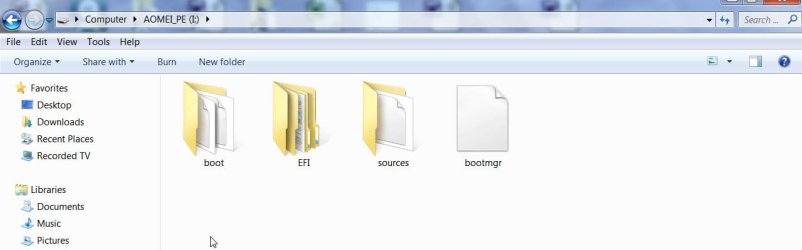
Even deleted files on a flash drive can be recovered ....as long as they had not been overwritten. And yes you may lose the folder structure and filenames with most recovery.

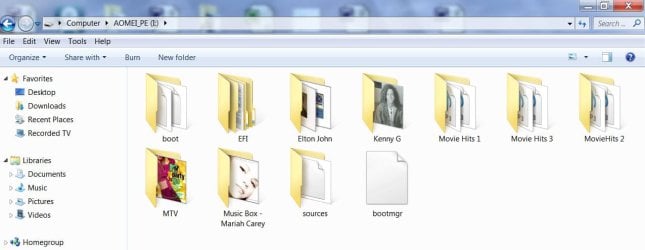
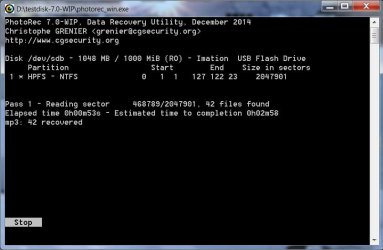
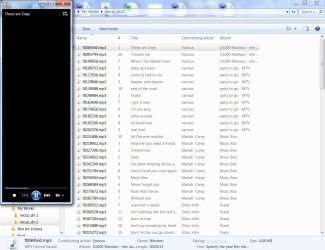
A quick demo on my 1GB pen drive.

mp3 albums on the pen drive

A21-02-2015 16-45-43.jpg

....deleted :banghead:

B21-02-2015 16-48-45.jpg

PhotoRec in action - ordered to recover only mp3 file format

C21-02-2015 17-08-17.jpg

Recovered files playing on WMP :thumbsup:

D21-02-2015 17-20-48.jpg
 

My Computer My Computer

At a glance

Windows 7 Home Premium 32 bit
OS
Windows 7 Home Premium 32 bit
Thanks guys, I tried Disk Digger and in seconds it found over 100,000 files on my external hard drive.. awesome! :)

About 10,000 of the files it found also seem to be broken.. some have 556 bytes in them, some 26 bytes. This is probably normal, as these sections may have been overwritten. Is there a program to help clean these files up?
 

My Computer My Computer

At a glance

Windows 10 Home 64-bitIntel Core i5 430M @2.27GHz6.00GB Dual-Channel DDR3 @532MHz512MB NVIDIA GeForce G105M
Computer type
Laptop
Computer Manufacturer/Model Number
HP Pavilion dv7-3188cl
OS
Windows 10 Home 64-bit
CPU
Intel Core i5 430M @2.27GHz
Motherboard
Hewlett-Packard 365C
Memory
6.00GB Dual-Channel DDR3 @532MHz
Graphics Card(s)
512MB NVIDIA GeForce G105M
Sound Card
IDT High Definition Audio CODEC
Monitor(s) Displays
Generic PnP Monitor
Screen Resolution
1600x900 @60Hz
Hard Drives
298GB Hitachi
PSU
AC 100-240V~1.6A 50-60Hz, DC 19V 4.7A
Mouse
Razer DeathAdder Left-Hander
Antivirus
Avast Free
Browser
Google Chrome
Other Info
Malwarebytes Pro, Malwarebytes Anti-Exploit, uBlock Origin
Thanks guys, I tried Disk Digger and in seconds it found over 100,000 files on my external hard drive.. awesome! :)

About 10,000 of the files it found also seem to be broken.. some have 556 bytes in them, some 26 bytes. This is probably normal, as these sections may have been overwritten. Is there a program to help clean these files up?

Drop em in a text editor if it looks like garbage it is, garbage is no text is found. One piece of text almost every file has is VERSION (which you can search for). If you've ever dropped a normal file in to a text editor your able to read the text and can tell what's hex, a POS file is obvious.

Each file has a header that explains it's self if no text but maybe small black hearts fill it up, garbage as there's no way it can be recovered.

Of course there's an exception to everything in this case there being no text but starts with a MZ (first two digits) is an executable file or meant to be you would have to go further in to find text and a good time to test the VERSION text. but you also have to consider the size of the file, it plays a lot into being a file or pieces of junk.

PK is also one, being a zip file just the fact it's compressed will be little if an text, but the first two digits will be PK.

That said I should of added the first two digits in some files are important, if no text yet the first two digits are letters it's quite likely to be a file of some nature, being a good file is another matter.

More than two digits of letters, say there are three first digits, I would consider a bad file
 
Last edited:

My Computer My Computer

At a glance

Win7 but all from NT to Win95 to 7i7 - 950well a bit but age is taking it's tollEVGA-570
Computer type
PC/Desktop
Computer Manufacturer/Model Number
Mine creation
OS
Win7 but all from NT to Win95 to 7
CPU
i7 - 950
Motherboard
asus p6x58 qpi Three data paths
Memory
well a bit but age is taking it's toll
Graphics Card(s)
EVGA-570
Monitor(s) Displays
SamSung 32F6300 HDTV claims of 240 hz taken as ridiculous
Screen Resolution
From one side to the other
Hard Drives
Yes
Keyboard
Logitech G19
Mouse
lots of G500's gamings my thing and they wear out
Internet Speed
I've honestly never seen it move
Antivirus
Comodo Firewall and common sense.
Browser
Opera 12 yes one can get flash to work with it.
Back
Top