get rid of primary partition

haha12

New member
Local time
11:54 PM
Messages
5
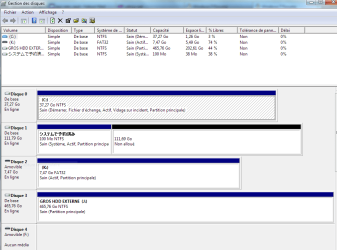
I have reinstalled Windows 7 on my HDD, and now I have 2 active partitions, on C:/ and D:/
I deleted the D:/Windows folder, then tried to delete the D:/ partition, but no luck using Disk Management.

The problem D:/ disk is using 72,5 Go and C: only 37,5 out of a total of 110Go?
So C:/, the actual disk I am using is almost full! :(
 

My Computer My Computer

At a glance

windows 7 pro 64Intel
OS
windows 7 pro 64
CPU
Intel
Motherboard
ASUS P5E-V
Welcome aboard :)

First of all, post a full window snipshot of your disk management window, so that the situation could be understood in a better way.
 

My Computer My Computer

At a glance

Microsoft Windows 10 Pro Insider Preview 64-bitIntel(R) Core(TM) i3-4130 CPU @ 3.40GHzCorsair Vengence 4GB x2 (8.00GB Dual-Channel ...2047MB GeForce GTS 450 (ZOTAC International)
Computer type
PC/Desktop
Computer Manufacturer/Model Number
Self Assembled
OS
Microsoft Windows 10 Pro Insider Preview 64-bit
CPU
Intel(R) Core(TM) i3-4130 CPU @ 3.40GHz
Motherboard
Gigabyte Technology Co., Ltd. B85M-D3H
Memory
Corsair Vengence 4GB x2 (8.00GB Dual-Channel DDR3 @ 798MHz)
Graphics Card(s)
2047MB GeForce GTS 450 (ZOTAC International)
Sound Card
Onboard (Realtek High Definition Audio)
Monitor(s) Displays
LG Flatron E2040T
Screen Resolution
1600x900
Hard Drives
Western Digital 1 TB
Seagate 500 GB
PSU
Corsair VS550
Case
Cooler Master K380
Cooling
Cooler Master Seidon 120V Plus
Keyboard
Logitech MK260r
Mouse
Logitech MK260r
Internet Speed
PMPL Broadband
Antivirus
Windows Defender + MBAM
Browser
Firefox
Other Info
Dell Studio 15" Laptop
Her you go! Thank you.
I have removed D active partition using Easeus partition Master;

Now how to transfer free space to C:/ ??? :o
 

Attachments

  • Disk Manag.PNG
    Disk Manag.PNG
    27.2 KB · Views: 58

My Computer My Computer

At a glance

windows 7 pro 64Intel
OS
windows 7 pro 64
CPU
Intel
Motherboard
ASUS P5E-V
You can`t just transfer the space, as they are 2 different physical discs. You could get rid of the 37 GB drive and install windows on the 111 GB drive.
 

My Computer My Computer

At a glance

Windows 7 Ultimate 64BitC2D E82008GB PNY PC2-6400BFG 9600GT x 2
Computer Manufacturer/Model Number
Myself
OS
Windows 7 Ultimate 64Bit
CPU
C2D E8200
Motherboard
XFX 750i
Memory
8GB PNY PC2-6400
Graphics Card(s)
BFG 9600GT x 2
Sound Card
Stock XFX Optical
Monitor(s) Displays
Gateway 22" HD Display
Hard Drives
C: 1 TB G: 500 GB H: 500 GB
PSU
Ultra LSP 550 Pro Lifetime Series
Case
Xion2
Cooling
ThermalTake
I see.. I forgot I had a second drive in that machine...

I found why... my previous Win 7 is on C, that is why it takes somuch space. It is called Windols.old. Can I just delete it?
 

Attachments

  • Capture C.PNG
    Capture C.PNG
    30.2 KB · Views: 11

My Computer My Computer

At a glance

windows 7 pro 64Intel
OS
windows 7 pro 64
CPU
Intel
Motherboard
ASUS P5E-V

My Computer My Computer

At a glance

Windows 7 Ultimate x86DualCore AMD Athlon 64 X2, 2600 MHz 5200+Samsung 2GB DDR2Onboard NVIDIA GeForce 6150SE nForce 430
Computer Manufacturer/Model Number
HP m8000n
OS
Windows 7 Ultimate x86
CPU
DualCore AMD Athlon 64 X2, 2600 MHz 5200+
Motherboard
Asus M2N68-LA (Narra)
Memory
Samsung 2GB DDR2
Graphics Card(s)
Onboard NVIDIA GeForce 6150SE nForce 430
Sound Card
Onboard nVIDIA nForce 6100-430 (MCP61P)
Monitor(s) Displays
Westinghouse 19" LED
Screen Resolution
1280x1024
Hard Drives
SATA II Seagate Barracuda 500GB
USB II WD Elements 500GB
USB II WD My Book 1TB
USB II WD My Book 2TB
PSU
Stock (HP)
Case
Stock (HP)
Cooling
Stock
Keyboard
Logitech Classic KB 200
Mouse
Standard HP opticle USB mouse
  • Like
Reactions: Arc
Thank you! I will!
 

My Computer My Computer

At a glance

windows 7 pro 64Intel
OS
windows 7 pro 64
CPU
Intel
Motherboard
ASUS P5E-V
My Windows folder is 15.7 Go. Is that average?
 

My Computer My Computer

At a glance

windows 7 pro 64Intel
OS
windows 7 pro 64
CPU
Intel
Motherboard
ASUS P5E-V
Mine is 15.6GB so yeah that's average I would say. It differs with the amount and usage of screen savers, themes and the likes.

-DG
 

My Computer My Computer

At a glance

Windows 7 Ultimate x86DualCore AMD Athlon 64 X2, 2600 MHz 5200+Samsung 2GB DDR2Onboard NVIDIA GeForce 6150SE nForce 430
Computer Manufacturer/Model Number
HP m8000n
OS
Windows 7 Ultimate x86
CPU
DualCore AMD Athlon 64 X2, 2600 MHz 5200+
Motherboard
Asus M2N68-LA (Narra)
Memory
Samsung 2GB DDR2
Graphics Card(s)
Onboard NVIDIA GeForce 6150SE nForce 430
Sound Card
Onboard nVIDIA nForce 6100-430 (MCP61P)
Monitor(s) Displays
Westinghouse 19" LED
Screen Resolution
1280x1024
Hard Drives
SATA II Seagate Barracuda 500GB
USB II WD Elements 500GB
USB II WD My Book 1TB
USB II WD My Book 2TB
PSU
Stock (HP)
Case
Stock (HP)
Cooling
Stock
Keyboard
Logitech Classic KB 200
Mouse
Standard HP opticle USB mouse
Mine is 12.8 GB . It is home premium, so it contains less stuff , and I am the only user .
 

My Computer My Computer

At a glance

Microsoft Windows 10 Pro Insider Preview 64-bitIntel(R) Core(TM) i3-4130 CPU @ 3.40GHzCorsair Vengence 4GB x2 (8.00GB Dual-Channel ...2047MB GeForce GTS 450 (ZOTAC International)
Computer type
PC/Desktop
Computer Manufacturer/Model Number
Self Assembled
OS
Microsoft Windows 10 Pro Insider Preview 64-bit
CPU
Intel(R) Core(TM) i3-4130 CPU @ 3.40GHz
Motherboard
Gigabyte Technology Co., Ltd. B85M-D3H
Memory
Corsair Vengence 4GB x2 (8.00GB Dual-Channel DDR3 @ 798MHz)
Graphics Card(s)
2047MB GeForce GTS 450 (ZOTAC International)
Sound Card
Onboard (Realtek High Definition Audio)
Monitor(s) Displays
LG Flatron E2040T
Screen Resolution
1600x900
Hard Drives
Western Digital 1 TB
Seagate 500 GB
PSU
Corsair VS550
Case
Cooler Master K380
Cooling
Cooler Master Seidon 120V Plus
Keyboard
Logitech MK260r
Mouse
Logitech MK260r
Internet Speed
PMPL Broadband
Antivirus
Windows Defender + MBAM
Browser
Firefox
Other Info
Dell Studio 15" Laptop
You have the System boot files on another HD in the 100mb System REserved Partition, which can present problems down the line.

It would be best to move the System boot files into C by marking C Active, then booting the DVD or REpair CD to run Startup Repair - Run 3 Separate Times.
Partition - Mark as Active

You may need to unplug the other HD's to successfully write the System boot files to C, so that they don't interfere. Then you can delete the 100mb partition, or wipe the HD with Diskpart Clean command: Clean and Clean All with Diskpart Command

I would also use Method Two in the Mark Active tutorial to mark the data partition Inactive so it never interferes.
 
  • Like
Reactions: Arc
Back
Top