Can I store/employ a system image on the internal hard-drive ?

BuckSkin

Member
Power User
VIP
Local time
5:44 PM
Messages
523
Can I store/employ a system image on the internal hard-drive under a letter different than C: ?

If so, how do I go about creating this new letter and how much space should I allocate ?

Thanks for reading.
 

My Computer My Computer

At a glance

Windows 7 Pro x64Intel Core Two Duo E8600 3.33 ghz8GBGigabyte Radeon R7 240
Computer type
PC/Desktop
Computer Manufacturer/Model Number
Dell Optiplex 780m "mini-tower"
OS
Windows 7 Pro x64
CPU
Intel Core Two Duo E8600 3.33 ghz
Motherboard
Whatever DELL put in it
Memory
8GB
Graphics Card(s)
Gigabyte Radeon R7 240
Monitor(s) Displays
HP 2159m
PSU
750 Watt Corsair CX750
Keyboard
Logitech Wireless
Mouse
Logitech Wireless
Browser
Chrome, Firefox, IE
Yes, it's possible.

Post a maximized/resized screen print of Disk Management using these instructions to show ALL info:
Disk Management - Post a Screen Capture Image

Some people consider a different partition on a single hard drive as a different drive than , some don't. If you have only one [B]physical[/B] drive and need to resize the [C] OS partition, it gets risky-er imho. Backups (images) should also be saved to a different device for safety.
 

My Computer My Computer

At a glance

Multi-Boot W7_Pro_x64 W8.1_Pro_x64 W10_Pro_x6...AMD Athlon II x4 6206GB GSkill DDR2 800AMD 4670 GPU + AMD 4200 IGP
Computer type
PC/Desktop
Computer Manufacturer/Model Number
home built
OS
Multi-Boot W7_Pro_x64 W8.1_Pro_x64 W10_Pro_x64 +Linux_VMs +Chromium_VM
CPU
AMD Athlon II x4 620
Motherboard
Gigabyte GA-MA785G-UD3H
Memory
6GB GSkill DDR2 800
Graphics Card(s)
AMD 4670 GPU + AMD 4200 IGP
Sound Card
on board Realtek ALC889A
Monitor(s) Displays
RCA 40" LCD TV, Insignia 32" LCD TV, HP 15" LCD monitor
Screen Resolution
1680 x 1050
Hard Drives
OCZ Vertex 3 120GB,
Samsung F3 1TB (3),
Several others - WD, Seagate, Hitachi, ...
PSU
Corsair 500 W
Case
Rosewill mid tower
Cooling
CM 90mm rifle
Keyboard
Gyration wireless, Logitech wireless, Dell USB wired
Mouse
Gyration wireless, Logitech wireless, V7 USB wired
Internet Speed
Spectrum - 100Mbps D / 10Mbps U
Antivirus
Avast, MBAM3, EMET, WinPatrol
Browser
Pale Moon, Firefox, IE
Other Info
2 multi-boot PC's
Mainly HTPC/Office/Gen purpose (no gaming).
Trendnet USB KVM.
LG DVD burner/Blue Ray Player.
Tray system for removable SATA backup drives.

Not currently OCd, under-volted.
I use Hybrid sleep, rarely re-boot or shutdown.

Hauppauge HD-PVR, Avermedia PCIe TV Tuner, Hauppauge PCI TV Tuner.
What will you do if your internal HD or your Windows goes down? Best to have full images of your OS partition and your data partition on reliable external media.
 

My Computer My Computer

At a glance

Windows 7 Professional 64-bitDesktop i5; Acers i5 & i7desktop 16GB; 1 Acer 8GB & 1 Acer 16GB
Computer type
PC/Desktop
Computer Manufacturer/Model Number
Antec desktop; Acer Aspire laptops
OS
Windows 7 Professional 64-bit
CPU
Desktop i5; Acers i5 & i7
Memory
desktop 16GB; 1 Acer 8GB & 1 Acer 16GB
Hard Drives
1TB split into 2 equal partitions [OS and data] usable by RJS
Internet Speed
AT&T DSL
Browser
FF, GChrome, msIE
Other Info
Windows 7 Firewall, Emsisoft AM/AV, MSE [scan-only], SpywareBlaster, Ruiware/BillP combine
Thanks, DavidE and RolandJS.
I do store infrequent system images on the only NTFS formatted ext-drive that I currently have; I switch it back and forth between four machines.
I fully appreciate the fact that, when the internal drive crashes, one had better have a system image stored somewhere else.
However, in 95% of situations, it is not a hard-drive failure that warrants the need of a system image; it is more likely some corruption of software or data that creates a catastrophe.

What I would like is to create a space in each machine where I could have a program automatically save an image at set intervals, thus keeping any program or driver additions up to date.

If I had a major crash, I would have my not-so-frequent image stored on the ext-drive to fall back on; and, if it were some system nightmare that was causing me grief, I would have an up-to-date version ready and waiting.

Thanks for reading.
 

My Computer My Computer

At a glance

Windows 7 Pro x64Intel Core Two Duo E8600 3.33 ghz8GBGigabyte Radeon R7 240
Computer type
PC/Desktop
Computer Manufacturer/Model Number
Dell Optiplex 780m "mini-tower"
OS
Windows 7 Pro x64
CPU
Intel Core Two Duo E8600 3.33 ghz
Motherboard
Whatever DELL put in it
Memory
8GB
Graphics Card(s)
Gigabyte Radeon R7 240
Monitor(s) Displays
HP 2159m
PSU
750 Watt Corsair CX750
Keyboard
Logitech Wireless
Mouse
Logitech Wireless
Browser
Chrome, Firefox, IE
The only program I know of that just might allow you to make a full image of the partition you mentioned and save it onto the same physical hard-drive is TeraByte Unlimited's Image for Windows; which comes with a 30-day trial version if wanting to test it. I'm pretty sure Macrium Reflect won't -- others here can correct me if/where I'm wrong. :)

Addendum: DavidE, in the very next post, gave this excellent correction:
Macrium and AOEMI can create/save a backup image to a different partition on the same physical drive.
I expect most backup imaging utilities can do this.
Thanks DavidE :)
 
Last edited:

My Computer My Computer

At a glance

Windows 7 Professional 64-bitDesktop i5; Acers i5 & i7desktop 16GB; 1 Acer 8GB & 1 Acer 16GB
Computer type
PC/Desktop
Computer Manufacturer/Model Number
Antec desktop; Acer Aspire laptops
OS
Windows 7 Professional 64-bit
CPU
Desktop i5; Acers i5 & i7
Memory
desktop 16GB; 1 Acer 8GB & 1 Acer 16GB
Hard Drives
1TB split into 2 equal partitions [OS and data] usable by RJS
Internet Speed
AT&T DSL
Browser
FF, GChrome, msIE
Other Info
Windows 7 Firewall, Emsisoft AM/AV, MSE [scan-only], SpywareBlaster, Ruiware/BillP combine
Macrium and AOEMI can create/save a backup image to a different partition on the same physical drive.
I expect most backup imaging utilities can do this.
You need to be careful how many primary partitions you have, with Legacy BIOS/MBR you can have 3 primary and unlimited logical or max 4 primary per drive.

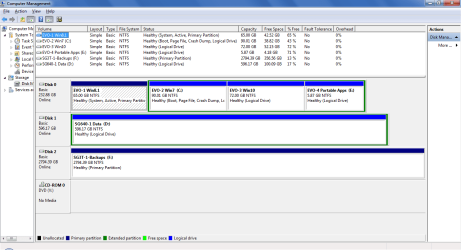
On my test box shown below i can create a backup image of any OS and save it on the Data partition or a Backups drive (that is usually offline).

DiskMgt.png

EDIT:
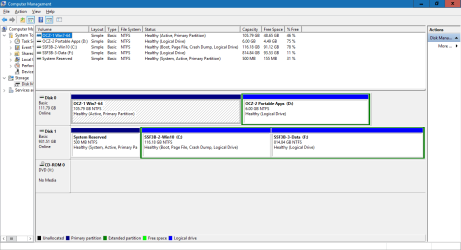
here's a snip of another pc where an OS and data partitions are on the same physical drive:

DiskMgt_02.png
 
Last edited:

My Computer My Computer

At a glance

Multi-Boot W7_Pro_x64 W8.1_Pro_x64 W10_Pro_x6...AMD Athlon II x4 6206GB GSkill DDR2 800AMD 4670 GPU + AMD 4200 IGP
Computer type
PC/Desktop
Computer Manufacturer/Model Number
home built
OS
Multi-Boot W7_Pro_x64 W8.1_Pro_x64 W10_Pro_x64 +Linux_VMs +Chromium_VM
CPU
AMD Athlon II x4 620
Motherboard
Gigabyte GA-MA785G-UD3H
Memory
6GB GSkill DDR2 800
Graphics Card(s)
AMD 4670 GPU + AMD 4200 IGP
Sound Card
on board Realtek ALC889A
Monitor(s) Displays
RCA 40" LCD TV, Insignia 32" LCD TV, HP 15" LCD monitor
Screen Resolution
1680 x 1050
Hard Drives
OCZ Vertex 3 120GB,
Samsung F3 1TB (3),
Several others - WD, Seagate, Hitachi, ...
PSU
Corsair 500 W
Case
Rosewill mid tower
Cooling
CM 90mm rifle
Keyboard
Gyration wireless, Logitech wireless, Dell USB wired
Mouse
Gyration wireless, Logitech wireless, V7 USB wired
Internet Speed
Spectrum - 100Mbps D / 10Mbps U
Antivirus
Avast, MBAM3, EMET, WinPatrol
Browser
Pale Moon, Firefox, IE
Other Info
2 multi-boot PC's
Mainly HTPC/Office/Gen purpose (no gaming).
Trendnet USB KVM.
LG DVD burner/Blue Ray Player.
Tray system for removable SATA backup drives.

Not currently OCd, under-volted.
I use Hybrid sleep, rarely re-boot or shutdown.

Hauppauge HD-PVR, Avermedia PCIe TV Tuner, Hauppauge PCI TV Tuner.
Thanks to you both !

I barely understand what I am looking at in those disk management snips; on the top one, if I understand what I see, you have three OS, Win 7, Win 8.1, and Win 10.

If I understand, you said a system image could be saved in the data partition; is that also where the libraries reside ?
If so, would you just save the image in "documents" or some such ?

Please enlighten me on this three OS business; let's say you are doing something in Win 7 and then you need to do something else in Win 10, how do you switch from one OS to another ?

I figure you have to have separate license keys for all three.


Back to my original question, what would I need do to create the partition for AOMEI to save the image in ?

Thanks for reading.
 

My Computer My Computer

At a glance

Windows 7 Pro x64Intel Core Two Duo E8600 3.33 ghz8GBGigabyte Radeon R7 240
Computer type
PC/Desktop
Computer Manufacturer/Model Number
Dell Optiplex 780m "mini-tower"
OS
Windows 7 Pro x64
CPU
Intel Core Two Duo E8600 3.33 ghz
Motherboard
Whatever DELL put in it
Memory
8GB
Graphics Card(s)
Gigabyte Radeon R7 240
Monitor(s) Displays
HP 2159m
PSU
750 Watt Corsair CX750
Keyboard
Logitech Wireless
Mouse
Logitech Wireless
Browser
Chrome, Firefox, IE
I would suggest creating a seperate partition for those images with minitool partition wizard or any other software and use macrium or easeus todo to create and store the backup to that partition.you can hide that partition if you want to protect the data in it
 

My Computer My Computer

At a glance

Windows 7 home basics x64intel core i5 2430M @2.40GHz4gb samsung/hynixintel integrated hd graphics 3000
Computer type
PC/Desktop
Computer Manufacturer/Model Number
Fujitsu
OS
Windows 7 home basics x64
CPU
intel core i5 2430M @2.40GHz
Motherboard
fujitsu
Memory
4gb samsung/hynix
Graphics Card(s)
intel integrated hd graphics 3000
Sound Card
realtek HD audio
Monitor(s) Displays
lcd
Hard Drives
seagate momentus thin 250gb @5400rpm
Cooling
air cooling
Keyboard
QWERTY
Mouse
synaptic touchpad and wireless LOGITECH mouse
Internet Speed
upto 2MBps
Antivirus
kaspersky
Browser
mozilla
I agree with using MiniTool Partition Wizard.
I would use the bootable CD, I don't like making disk structure changes to the OS drive while Windows is running.
MiniTool Free Bootable Partition Manager | Partition Wizard Bootable CD

To change the OS, i re-boot and select the OS i want to run.
Yes, each OS has it's own license.

I have folders for documents, music, videos, etc. in the Data partition and then include those folders in the appropriate Library.
I don't store user data in the OS partition. I also have a Backups folder in the Data partition, but you could create a separate partition just for Backups if you want to. It's up to each user how they want to organize and structure things. I prefer fewer partitions, so i don't run into problems later where i learn some partition is too small and i have to do some resizing. I don't suggest my way is the best for anyone else, it works for me and i understand it.
 

My Computer My Computer

At a glance

Multi-Boot W7_Pro_x64 W8.1_Pro_x64 W10_Pro_x6...AMD Athlon II x4 6206GB GSkill DDR2 800AMD 4670 GPU + AMD 4200 IGP
Computer type
PC/Desktop
Computer Manufacturer/Model Number
home built
OS
Multi-Boot W7_Pro_x64 W8.1_Pro_x64 W10_Pro_x64 +Linux_VMs +Chromium_VM
CPU
AMD Athlon II x4 620
Motherboard
Gigabyte GA-MA785G-UD3H
Memory
6GB GSkill DDR2 800
Graphics Card(s)
AMD 4670 GPU + AMD 4200 IGP
Sound Card
on board Realtek ALC889A
Monitor(s) Displays
RCA 40" LCD TV, Insignia 32" LCD TV, HP 15" LCD monitor
Screen Resolution
1680 x 1050
Hard Drives
OCZ Vertex 3 120GB,
Samsung F3 1TB (3),
Several others - WD, Seagate, Hitachi, ...
PSU
Corsair 500 W
Case
Rosewill mid tower
Cooling
CM 90mm rifle
Keyboard
Gyration wireless, Logitech wireless, Dell USB wired
Mouse
Gyration wireless, Logitech wireless, V7 USB wired
Internet Speed
Spectrum - 100Mbps D / 10Mbps U
Antivirus
Avast, MBAM3, EMET, WinPatrol
Browser
Pale Moon, Firefox, IE
Other Info
2 multi-boot PC's
Mainly HTPC/Office/Gen purpose (no gaming).
Trendnet USB KVM.
LG DVD burner/Blue Ray Player.
Tray system for removable SATA backup drives.

Not currently OCd, under-volted.
I use Hybrid sleep, rarely re-boot or shutdown.

Hauppauge HD-PVR, Avermedia PCIe TV Tuner, Hauppauge PCI TV Tuner.
If you could completely fill in your (My System Specs) it would be helpful.

Like David posted; everybody has their own method of backing up and using more than one operating system. Dual boot or triple boot.

My method.

1. Every operating system has it's own drive.
2. All Backup, Images, or Clones are stored on a removable drive. I store those drives in a safe place. Unless I need those drives they say unhooked from my computer.
That way if one drive or the system does a belly up I'm still in business.
Fix the problem and pop in the Images or Clone and happy computing again.

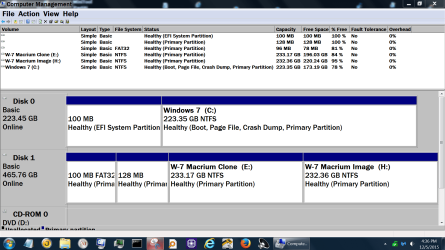
I also use MiniTool Partition Wizard in conjunction with Macrium Reflect. Then I use Windows 7 to name all drives and partition so I can find things later.

Here is a small example from my system.

Disk Management Dec 5 2015.PNG


Jack
 

My Computer My Computer

At a glance

Windows 10 Pro. 64/ version 1709 Windows 7 Pr...Intel i7-6800K @ 4.3Corsair Platinum 16 gig @2400EVGA GTX 1070 OC
Computer type
PC/Desktop
Computer Manufacturer/Model Number
Home made Desktop
OS
Windows 10 Pro. 64/ version 1709 Windows 7 Pro/64
CPU
Intel i7-6800K @ 4.3
Motherboard
ASUS X-99 Deluxe II
Memory
Corsair Platinum 16 gig @2400
Graphics Card(s)
EVGA GTX 1070 OC
Monitor(s) Displays
Asus 27" LED LCD/VE278Q
Screen Resolution
1920-1080 or 1280-720 HDMI
Hard Drives
INTEL SSD 730-240 Gb Sata 3.0/
PSU
EVGA Platium 1200W
Case
Phanteks Luxe Tempered Glass 8 fans/ one radiator
Cooling
XSPC/ Water Cooled CPU
Keyboard
Das 4 Professional
Mouse
Logitech M705/MX Anywhere 2-S
Internet Speed
100 mbits
Antivirus
Microsoft Security Essentials/ Malwarebytes Premium 3.0/ SAS
Browser
I.E. 11 default/Firefox/ ISP Time Warner Cable/Spectrum
Other Info
LG BluRay Burner/
Sound system-KLipsch-THX/
Icy Dock ssd Hot Swap bays.
I totally agree Jack, but someone may have a system that doesn't work the way i use/understand.
I have an old XP era pc (my snip 1) that is now "migrated and transformed" from a single boot XP to a triple boot with w7, w8.1, and w10
It works for me, how i use it, and what i use it for.
A lot of that setup is due to the ports/cables/psu power available, and my ability...

I probably shouldn't have posted my DM snips, it may be taking the OP off topic, and confusing things.
I just posted them as an example of what is possible - ANYTHING (imho).

I think BuckSkin knows and understands using offline backups is important based on post #4.

if BuckSkin has only a 500 GB MBR drive always online that is 90% used including user data, and wants to save a BU image to that same drive, it ain't gonna work.
that's why i asked for a DM screen print - i just gave some examples of what is possible.
there are too many possible situations/PC's/Configs to give an answer without more info, seeing DM would help
if BuckSkin has a 3TB GPT drive that is 10% used, that's a different scenario.

I'll quit posting, without knowing what BuckSkin has, i can't even try to help any-more.
I'll just watch and learn.
 

My Computer My Computer

At a glance

Multi-Boot W7_Pro_x64 W8.1_Pro_x64 W10_Pro_x6...AMD Athlon II x4 6206GB GSkill DDR2 800AMD 4670 GPU + AMD 4200 IGP
Computer type
PC/Desktop
Computer Manufacturer/Model Number
home built
OS
Multi-Boot W7_Pro_x64 W8.1_Pro_x64 W10_Pro_x64 +Linux_VMs +Chromium_VM
CPU
AMD Athlon II x4 620
Motherboard
Gigabyte GA-MA785G-UD3H
Memory
6GB GSkill DDR2 800
Graphics Card(s)
AMD 4670 GPU + AMD 4200 IGP
Sound Card
on board Realtek ALC889A
Monitor(s) Displays
RCA 40" LCD TV, Insignia 32" LCD TV, HP 15" LCD monitor
Screen Resolution
1680 x 1050
Hard Drives
OCZ Vertex 3 120GB,
Samsung F3 1TB (3),
Several others - WD, Seagate, Hitachi, ...
PSU
Corsair 500 W
Case
Rosewill mid tower
Cooling
CM 90mm rifle
Keyboard
Gyration wireless, Logitech wireless, Dell USB wired
Mouse
Gyration wireless, Logitech wireless, V7 USB wired
Internet Speed
Spectrum - 100Mbps D / 10Mbps U
Antivirus
Avast, MBAM3, EMET, WinPatrol
Browser
Pale Moon, Firefox, IE
Other Info
2 multi-boot PC's
Mainly HTPC/Office/Gen purpose (no gaming).
Trendnet USB KVM.
LG DVD burner/Blue Ray Player.
Tray system for removable SATA backup drives.

Not currently OCd, under-volted.
I use Hybrid sleep, rarely re-boot or shutdown.

Hauppauge HD-PVR, Avermedia PCIe TV Tuner, Hauppauge PCI TV Tuner.
Can I use that system specs thingie that I downloaded from here to list the specs of all four of our machines, or is it specific to only a single machine?
The fact that I may be asking about one machine and my system specs be about another is why I have hesitated to run that deal; I was afraid it may create confusion.

I ever so much appreciate you guys helping me.
 

My Computer My Computer

At a glance

Windows 7 Pro x64Intel Core Two Duo E8600 3.33 ghz8GBGigabyte Radeon R7 240
Computer type
PC/Desktop
Computer Manufacturer/Model Number
Dell Optiplex 780m "mini-tower"
OS
Windows 7 Pro x64
CPU
Intel Core Two Duo E8600 3.33 ghz
Motherboard
Whatever DELL put in it
Memory
8GB
Graphics Card(s)
Gigabyte Radeon R7 240
Monitor(s) Displays
HP 2159m
PSU
750 Watt Corsair CX750
Keyboard
Logitech Wireless
Mouse
Logitech Wireless
Browser
Chrome, Firefox, IE
AH, i understand your dilemma, and that is great question(s).
Yes, the system specs thing is only good for 1 PC, each PC can be different.
As far i know it, SF specs only allow for entering specs for 1 PC.

So, you have multiple (4) PC's with different specs, but the same "question/issue" for each of the PC's.
Yes, it does get confusing.
Each of these PC's may have a better answer depending on specs/setup/disk-usage.

I still believe you can create a backup image on the same drive for each PC, depending on that PC setup/config/disk space ...

If i had your issue,
I would create 4 different SF threads, 1 thread for each PC
- list the specific specs for that PC/thread
- include a DM screen print for that PC/thread

Maybe i could better help with 1 or more systems, and others may be able to better help with other systems.
We are all just volunteers here, trying to help.

As you see with my specs/DM snips my situation is unusual/confusing.
When i have a problem and ask for help, i post any/all specific info as best i can to help solve the issue.
For me, i may have to create a thread in Eight Forums or Ten Forums, if appropriate, because of my multi-boot.

I don't like to post about my personal tech problems,
most forum helpers would say i'm a lunatic for doing what i do with pc setup,
and i can't disagree with that :o ;) :eek:

I also help others and post threads/questions about their system and include specific info about their PC/setup as needed.
I always post in the thread/PC it is not about what is in my forum specs, i give the problem PC specs/info as best i can.
 

My Computer My Computer

At a glance

Multi-Boot W7_Pro_x64 W8.1_Pro_x64 W10_Pro_x6...AMD Athlon II x4 6206GB GSkill DDR2 800AMD 4670 GPU + AMD 4200 IGP
Computer type
PC/Desktop
Computer Manufacturer/Model Number
home built
OS
Multi-Boot W7_Pro_x64 W8.1_Pro_x64 W10_Pro_x64 +Linux_VMs +Chromium_VM
CPU
AMD Athlon II x4 620
Motherboard
Gigabyte GA-MA785G-UD3H
Memory
6GB GSkill DDR2 800
Graphics Card(s)
AMD 4670 GPU + AMD 4200 IGP
Sound Card
on board Realtek ALC889A
Monitor(s) Displays
RCA 40" LCD TV, Insignia 32" LCD TV, HP 15" LCD monitor
Screen Resolution
1680 x 1050
Hard Drives
OCZ Vertex 3 120GB,
Samsung F3 1TB (3),
Several others - WD, Seagate, Hitachi, ...
PSU
Corsair 500 W
Case
Rosewill mid tower
Cooling
CM 90mm rifle
Keyboard
Gyration wireless, Logitech wireless, Dell USB wired
Mouse
Gyration wireless, Logitech wireless, V7 USB wired
Internet Speed
Spectrum - 100Mbps D / 10Mbps U
Antivirus
Avast, MBAM3, EMET, WinPatrol
Browser
Pale Moon, Firefox, IE
Other Info
2 multi-boot PC's
Mainly HTPC/Office/Gen purpose (no gaming).
Trendnet USB KVM.
LG DVD burner/Blue Ray Player.
Tray system for removable SATA backup drives.

Not currently OCd, under-volted.
I use Hybrid sleep, rarely re-boot or shutdown.

Hauppauge HD-PVR, Avermedia PCIe TV Tuner, Hauppauge PCI TV Tuner.
I've been multi-booting and VM'ing for so many years.
For me it's a fun thing to play with and learn :p
I always have a full reliable backup/restore available - i learned that lesson eons ago !
 

My Computer My Computer

At a glance

Multi-Boot W7_Pro_x64 W8.1_Pro_x64 W10_Pro_x6...AMD Athlon II x4 6206GB GSkill DDR2 800AMD 4670 GPU + AMD 4200 IGP
Computer type
PC/Desktop
Computer Manufacturer/Model Number
home built
OS
Multi-Boot W7_Pro_x64 W8.1_Pro_x64 W10_Pro_x64 +Linux_VMs +Chromium_VM
CPU
AMD Athlon II x4 620
Motherboard
Gigabyte GA-MA785G-UD3H
Memory
6GB GSkill DDR2 800
Graphics Card(s)
AMD 4670 GPU + AMD 4200 IGP
Sound Card
on board Realtek ALC889A
Monitor(s) Displays
RCA 40" LCD TV, Insignia 32" LCD TV, HP 15" LCD monitor
Screen Resolution
1680 x 1050
Hard Drives
OCZ Vertex 3 120GB,
Samsung F3 1TB (3),
Several others - WD, Seagate, Hitachi, ...
PSU
Corsair 500 W
Case
Rosewill mid tower
Cooling
CM 90mm rifle
Keyboard
Gyration wireless, Logitech wireless, Dell USB wired
Mouse
Gyration wireless, Logitech wireless, V7 USB wired
Internet Speed
Spectrum - 100Mbps D / 10Mbps U
Antivirus
Avast, MBAM3, EMET, WinPatrol
Browser
Pale Moon, Firefox, IE
Other Info
2 multi-boot PC's
Mainly HTPC/Office/Gen purpose (no gaming).
Trendnet USB KVM.
LG DVD burner/Blue Ray Player.
Tray system for removable SATA backup drives.

Not currently OCd, under-volted.
I use Hybrid sleep, rarely re-boot or shutdown.

Hauppauge HD-PVR, Avermedia PCIe TV Tuner, Hauppauge PCI TV Tuner.
What specs would be relevant to this particular thread and I may be able to list them manually.

The internal drive on all of our machines is 500-GB; on considering some of the things I have gleaned thus far, I may be better off to wait until I install 3TB secondary drives and then come at this from that angle.

From what I gather, in Win7, a 3TB drive cannot be formatted NTFS, but GPT?? some-such-or-other, so that may bring even another wrinkle in the horn.


Further musing leads me to even another question; the system images I have saved thus far have included not only the OS and all of my installed programs, but the contents of Libraries as well.

I keep all of the library stuff backed up via file synchronization, so there is really no need for all that extra baggage to be included in a system image.

Maybe this question warrants a thread of it's own; can I limit my system images to only the OS and program files; and, if so, is this something I can simply opt for in AOMEI, or do I need to repartition things in disk management ?

I really appreciate you guys patience in dealing with my unlearnedness and never ending stream of questions.
 

My Computer My Computer

At a glance

Windows 7 Pro x64Intel Core Two Duo E8600 3.33 ghz8GBGigabyte Radeon R7 240
Computer type
PC/Desktop
Computer Manufacturer/Model Number
Dell Optiplex 780m "mini-tower"
OS
Windows 7 Pro x64
CPU
Intel Core Two Duo E8600 3.33 ghz
Motherboard
Whatever DELL put in it
Memory
8GB
Graphics Card(s)
Gigabyte Radeon R7 240
Monitor(s) Displays
HP 2159m
PSU
750 Watt Corsair CX750
Keyboard
Logitech Wireless
Mouse
Logitech Wireless
Browser
Chrome, Firefox, IE
From what I gather, in Win7, a 3TB drive cannot be formatted NTFS, but GPT?? some-such-or-other, so that may bring even another wrinkle in the horn.

A W7 drive > 2.2 GB must be initialized as GPT, it can be formatted as NTFS.

A drive is initialized as MBR or GPT, NTFS formatting is not relevant to initializing.
See my first screen print in post #6.
My Backups 3TB drive (Disk 2) is initialized as GPT and formatted as NTFS.
 
Last edited:

My Computer My Computer

At a glance

Multi-Boot W7_Pro_x64 W8.1_Pro_x64 W10_Pro_x6...AMD Athlon II x4 6206GB GSkill DDR2 800AMD 4670 GPU + AMD 4200 IGP
Computer type
PC/Desktop
Computer Manufacturer/Model Number
home built
OS
Multi-Boot W7_Pro_x64 W8.1_Pro_x64 W10_Pro_x64 +Linux_VMs +Chromium_VM
CPU
AMD Athlon II x4 620
Motherboard
Gigabyte GA-MA785G-UD3H
Memory
6GB GSkill DDR2 800
Graphics Card(s)
AMD 4670 GPU + AMD 4200 IGP
Sound Card
on board Realtek ALC889A
Monitor(s) Displays
RCA 40" LCD TV, Insignia 32" LCD TV, HP 15" LCD monitor
Screen Resolution
1680 x 1050
Hard Drives
OCZ Vertex 3 120GB,
Samsung F3 1TB (3),
Several others - WD, Seagate, Hitachi, ...
PSU
Corsair 500 W
Case
Rosewill mid tower
Cooling
CM 90mm rifle
Keyboard
Gyration wireless, Logitech wireless, Dell USB wired
Mouse
Gyration wireless, Logitech wireless, V7 USB wired
Internet Speed
Spectrum - 100Mbps D / 10Mbps U
Antivirus
Avast, MBAM3, EMET, WinPatrol
Browser
Pale Moon, Firefox, IE
Other Info
2 multi-boot PC's
Mainly HTPC/Office/Gen purpose (no gaming).
Trendnet USB KVM.
LG DVD burner/Blue Ray Player.
Tray system for removable SATA backup drives.

Not currently OCd, under-volted.
I use Hybrid sleep, rarely re-boot or shutdown.

Hauppauge HD-PVR, Avermedia PCIe TV Tuner, Hauppauge PCI TV Tuner.
Further musing leads me to even another question; the system images I have saved thus far have included not only the OS and all of my installed programs, but the contents of Libraries as well.

I keep all of the library stuff backed up via file synchronization, so there is really no need for all that extra baggage to be included in a system image.

Maybe this question warrants a thread of it's own; can I limit my system images to only the OS and program files; and, if so, is this something I can simply opt for in AOMEI, or do I need to repartition things in disk management ?

Yea, you have a lot of different questions, and that is good imho.

For help with what i bolded, you should tell us what imaging program you use.
I'm using Macrium Reflect free now, and i can browse a backup image in Windows (file) Explorer to see what is in the image.
I expected you have user data in , i tried to point that out earlier, i don't save user (library) data in the OS partition. To "fix" the issue with saving user data in the OS partition is completely different than your original question about creating a system image on your (only) disk drive.
 

My Computer My Computer

At a glance

Multi-Boot W7_Pro_x64 W8.1_Pro_x64 W10_Pro_x6...AMD Athlon II x4 6206GB GSkill DDR2 800AMD 4670 GPU + AMD 4200 IGP
Computer type
PC/Desktop
Computer Manufacturer/Model Number
home built
OS
Multi-Boot W7_Pro_x64 W8.1_Pro_x64 W10_Pro_x64 +Linux_VMs +Chromium_VM
CPU
AMD Athlon II x4 620
Motherboard
Gigabyte GA-MA785G-UD3H
Memory
6GB GSkill DDR2 800
Graphics Card(s)
AMD 4670 GPU + AMD 4200 IGP
Sound Card
on board Realtek ALC889A
Monitor(s) Displays
RCA 40" LCD TV, Insignia 32" LCD TV, HP 15" LCD monitor
Screen Resolution
1680 x 1050
Hard Drives
OCZ Vertex 3 120GB,
Samsung F3 1TB (3),
Several others - WD, Seagate, Hitachi, ...
PSU
Corsair 500 W
Case
Rosewill mid tower
Cooling
CM 90mm rifle
Keyboard
Gyration wireless, Logitech wireless, Dell USB wired
Mouse
Gyration wireless, Logitech wireless, V7 USB wired
Internet Speed
Spectrum - 100Mbps D / 10Mbps U
Antivirus
Avast, MBAM3, EMET, WinPatrol
Browser
Pale Moon, Firefox, IE
Other Info
2 multi-boot PC's
Mainly HTPC/Office/Gen purpose (no gaming).
Trendnet USB KVM.
LG DVD burner/Blue Ray Player.
Tray system for removable SATA backup drives.

Not currently OCd, under-volted.
I use Hybrid sleep, rarely re-boot or shutdown.

Hauppauge HD-PVR, Avermedia PCIe TV Tuner, Hauppauge PCI TV Tuner.
What specs would be relevant to this particular thread and I may be able to list them manually.
i tried to answer that as best i can in post #13 with this:
If i had your issue,
I would create 4 different SF threads, 1 thread for each PC
- list the specific specs for that PC/thread
- include a DM screen print for that PC/thread
 

My Computer My Computer

At a glance

Multi-Boot W7_Pro_x64 W8.1_Pro_x64 W10_Pro_x6...AMD Athlon II x4 6206GB GSkill DDR2 800AMD 4670 GPU + AMD 4200 IGP
Computer type
PC/Desktop
Computer Manufacturer/Model Number
home built
OS
Multi-Boot W7_Pro_x64 W8.1_Pro_x64 W10_Pro_x64 +Linux_VMs +Chromium_VM
CPU
AMD Athlon II x4 620
Motherboard
Gigabyte GA-MA785G-UD3H
Memory
6GB GSkill DDR2 800
Graphics Card(s)
AMD 4670 GPU + AMD 4200 IGP
Sound Card
on board Realtek ALC889A
Monitor(s) Displays
RCA 40" LCD TV, Insignia 32" LCD TV, HP 15" LCD monitor
Screen Resolution
1680 x 1050
Hard Drives
OCZ Vertex 3 120GB,
Samsung F3 1TB (3),
Several others - WD, Seagate, Hitachi, ...
PSU
Corsair 500 W
Case
Rosewill mid tower
Cooling
CM 90mm rifle
Keyboard
Gyration wireless, Logitech wireless, Dell USB wired
Mouse
Gyration wireless, Logitech wireless, V7 USB wired
Internet Speed
Spectrum - 100Mbps D / 10Mbps U
Antivirus
Avast, MBAM3, EMET, WinPatrol
Browser
Pale Moon, Firefox, IE
Other Info
2 multi-boot PC's
Mainly HTPC/Office/Gen purpose (no gaming).
Trendnet USB KVM.
LG DVD burner/Blue Ray Player.
Tray system for removable SATA backup drives.

Not currently OCd, under-volted.
I use Hybrid sleep, rarely re-boot or shutdown.

Hauppauge HD-PVR, Avermedia PCIe TV Tuner, Hauppauge PCI TV Tuner.
Maybe this question warrants a thread of it's own; can I limit my system images to only the OS and program files; and, if so, is this something I can simply opt for in AOMEI, or do I need to repartition things in disk management ?
Yea, that's a separate question imho.

I don't know if AOMEI can do this easily or at all.

I can exclude files/folders in Macrium, but it is not a Macrium supported feature.
It does require manually editing the registry, not something i recommend or suggest.
I do it, but i have tested my registry changes and backups/restores, to do what i want without errors.

EDIT:
Adding info for MR reg keys to exclude files as requested

Key data i added:

$AllVolumes$\hiberfil.sys /s
$AllVolumes$\pagefile.sys /s
$AllVolumes$\swapfile.sys /s

MacriumRegKeys.png
 
Last edited:

My Computer My Computer

At a glance

Multi-Boot W7_Pro_x64 W8.1_Pro_x64 W10_Pro_x6...AMD Athlon II x4 6206GB GSkill DDR2 800AMD 4670 GPU + AMD 4200 IGP
Computer type
PC/Desktop
Computer Manufacturer/Model Number
home built
OS
Multi-Boot W7_Pro_x64 W8.1_Pro_x64 W10_Pro_x64 +Linux_VMs +Chromium_VM
CPU
AMD Athlon II x4 620
Motherboard
Gigabyte GA-MA785G-UD3H
Memory
6GB GSkill DDR2 800
Graphics Card(s)
AMD 4670 GPU + AMD 4200 IGP
Sound Card
on board Realtek ALC889A
Monitor(s) Displays
RCA 40" LCD TV, Insignia 32" LCD TV, HP 15" LCD monitor
Screen Resolution
1680 x 1050
Hard Drives
OCZ Vertex 3 120GB,
Samsung F3 1TB (3),
Several others - WD, Seagate, Hitachi, ...
PSU
Corsair 500 W
Case
Rosewill mid tower
Cooling
CM 90mm rifle
Keyboard
Gyration wireless, Logitech wireless, Dell USB wired
Mouse
Gyration wireless, Logitech wireless, V7 USB wired
Internet Speed
Spectrum - 100Mbps D / 10Mbps U
Antivirus
Avast, MBAM3, EMET, WinPatrol
Browser
Pale Moon, Firefox, IE
Other Info
2 multi-boot PC's
Mainly HTPC/Office/Gen purpose (no gaming).
Trendnet USB KVM.
LG DVD burner/Blue Ray Player.
Tray system for removable SATA backup drives.

Not currently OCd, under-volted.
I use Hybrid sleep, rarely re-boot or shutdown.

Hauppauge HD-PVR, Avermedia PCIe TV Tuner, Hauppauge PCI TV Tuner.
Back
Top