

I thought I was on to something following the instructions in this thread
http://www.sevenforums.com/general-discussion/184232-new-icon-appears-taskbar.html
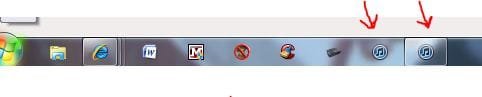
to eliminate the second iTunes icon that opens on the taskbar but then I realized doing so leaves me with the icon labeled "iTunes(2)". Is there a way to rename it?
http://www.sevenforums.com/general-discussion/184232-new-icon-appears-taskbar.html
to eliminate the second iTunes icon that opens on the taskbar but then I realized doing so leaves me with the icon labeled "iTunes(2)". Is there a way to rename it?
Attachments
My Computer
- Computer Manufacturer/Model Number
- HP p6608f
- OS
- Win 7 Home Premium x64
- CPU
- Intel Core i3-540 3.07 GHz
- Motherboard
- MS-7613 (Iona-GL8E)
- Memory
- 4 GB (2 X 2) Dual-Channel PC-10600 DDR3 @ 665MHz (9-9-9-24)
- Graphics Card(s)
- Integrated Intel H57
- Sound Card
- Integrated Realtek ALC888S Audio
- Monitor(s) Displays
- 17" SDM-HS73 (a vestige from my old computer)
- Screen Resolution
- 1280 X 1024
- Hard Drives
- 750GB SATA 7200 RPM
- PSU
- 250W
- Keyboard
- HP USB keyboard
- Mouse
- HP USB optical mouse
- Internet Speed
- 15Mbps/1Mbps




