Solved Suspicious Icon in Taskbar!

Wayfarerman

New member
Local time
8:43 AM
Messages
10
Hi to all.

Sometimes when I take a look at taskbar, I could find a suspicious icon which when I try to point to it with mouse, it disappears immediately! I attached a picture to this post about this damn icon. I appreciate if any one could aware me about its identity and about how to remove it if it is harmful.

Thanks.

23533280649603303484.jpg
 

My Computer

OS
Windows 7 64 bit Enterprise
That looks like Windows 7 Magnifier. If so it's not harmful.
That little Icon is also part of the selection of Icons that come with Windows 7.
Have you applied that Icon to any program?
 

My Computer

Computer type
PC/Desktop
Computer Manufacturer/Model Number
Home made Desktop
OS
Windows 10 Pro. 64/ version 1709 Windows 7 Pro/64
CPU
Intel i7-6800K @ 4.3
Motherboard
ASUS X-99 Deluxe II
Memory
Corsair Platinum 16 gig @2400
Graphics Card(s)
EVGA GTX 1070 OC
Monitor(s) Displays
Asus 27" LED LCD/VE278Q
Screen Resolution
1920-1080 or 1280-720 HDMI
Hard Drives
INTEL SSD 730-240 Gb Sata 3.0/
PSU
EVGA Platium 1200W
Case
Phanteks Luxe Tempered Glass 8 fans/ one radiator
Cooling
XSPC/ Water Cooled CPU
Keyboard
Das 4 Professional
Mouse
Logitech M705/MX Anywhere 2-S
Internet Speed
100 mbits
Antivirus
Microsoft Security Essentials/ Malwarebytes Premium 3.0/ SAS
Browser
I.E. 11 default/Firefox/ ISP Time Warner Cable/Spectrum
Other Info
LG BluRay Burner/
Sound system-KLipsch-THX/
Icy Dock ssd Hot Swap bays.
i dont think magnifier puts a icon in the systems tray.
i just tested it and could only see one on the taskbar, also ,it is similar but not the exact same icon.

may be a third party magnifier though.

what about checking in task manager to see what is running. if any kind of magnifier is mentioned.
or look in msconfig too
 

My Computer

Computer Manufacturer/Model Number
Hewlett packard/p6512uk
OS
Microsoft Windows 7 Home Premium 64-bit 7600
CPU
IIx4 amd athelon 635 processor
Motherboard
FOXCONN 2AA9
Memory
2x2gb
Graphics Card(s)
ati radeon HD 5450
Sound Card
(1) Realtek High Definition Audio (2) AMD High Definition
Monitor(s) Displays
samsung lcd tv 32"
Screen Resolution
1360x 768
Hard Drives
(1) WDC WD10 01FAES-60Z2A0 SATA Disk Device (2) Maxtor OneTouch USB Device (3) ST310003 33AS USB Device (4) WD My Book 1111 USB Device
PSU
?
Cooling
air!
Keyboard
wireless hp
Mouse
wireless Hp,optical
Internet Speed
1.10mb/s
Antivirus
MSE
Browser
Firefox
You are correct boohbah.
I have been trying to get the Icon on the Tray and can't.

Update:
If I give a program that Icon I can put it on the System Tray.
 

My Computer

Computer type
PC/Desktop
Computer Manufacturer/Model Number
Home made Desktop
OS
Windows 10 Pro. 64/ version 1709 Windows 7 Pro/64
CPU
Intel i7-6800K @ 4.3
Motherboard
ASUS X-99 Deluxe II
Memory
Corsair Platinum 16 gig @2400
Graphics Card(s)
EVGA GTX 1070 OC
Monitor(s) Displays
Asus 27" LED LCD/VE278Q
Screen Resolution
1920-1080 or 1280-720 HDMI
Hard Drives
INTEL SSD 730-240 Gb Sata 3.0/
PSU
EVGA Platium 1200W
Case
Phanteks Luxe Tempered Glass 8 fans/ one radiator
Cooling
XSPC/ Water Cooled CPU
Keyboard
Das 4 Professional
Mouse
Logitech M705/MX Anywhere 2-S
Internet Speed
100 mbits
Antivirus
Microsoft Security Essentials/ Malwarebytes Premium 3.0/ SAS
Browser
I.E. 11 default/Firefox/ ISP Time Warner Cable/Spectrum
Other Info
LG BluRay Burner/
Sound system-KLipsch-THX/
Icy Dock ssd Hot Swap bays.
Layback Bear & boohbah,
Thanks for your comments.

It doesn't seem to be a magnifying program. I checked the task manager several times, but I couldn't find any thing in this case. The odd things about this icon are:
1- It is hidden at about all times!
2- Sometimes when it barely appears in system tray, it disappears immediately when I try to point to it with mouse!​
 

My Computer

OS
Windows 7 64 bit Enterprise
Have you clicked on customize to see if it's listed there?
 

My Computer

Computer type
PC/Desktop
Computer Manufacturer/Model Number
custom build
OS
Windows 7 Professional 64bit
CPU
Intel i7-5960X
Motherboard
EVGA X99 Classified
Memory
64GB Corsair Dominator 2400MHz
Graphics Card(s)
3 EVGA GTX980's
Sound Card
on board
Monitor(s) Displays
3 Dell E2715H 27"
Screen Resolution
1920x1080 (5760x1080)
Hard Drives
Samsung 950 Pro 1TB M.2 SSD,
Western Digital Black 2TB HDD's x5
Western Digital Black 1TB HDD's x3
PSU
Corsair AX1200i
Case
Corsair 750D
Cooling
Corsair H110i GT
Keyboard
Corsair K70
Mouse
Corsair M45
Internet Speed
250 down/10 up
Antivirus
Microsoft Security Essentials
Browser
IE 11, Google Chrome
right click on it & see what happens even if it disappears !!
 

My Computer

Computer type
Laptop
Computer Manufacturer/Model Number
Asus
OS
Windows 7 Ultimate x86
CPU
Intel® Pentium® Dual Core CPU B950 @ 2.10GHz
Motherboard
Asustek Computer Inc.
Memory
2GB DDR3
Graphics Card(s)
Intel® HD Graphics
Sound Card
Realtek High Definition Audio(ALC269) With Sonic Master
Screen Resolution
1366x768
Hard Drives
320GB Seagate
Keyboard
Keyboard Device Filter (Provider-ATK)
Mouse
HID-compliant mouse,Microsoft PS2/Mouse
Internet Speed
Very Slow
Antivirus
Kaspersky Internet Security 2013/Malwarebytes Anti-Malware
Browser
Goggle Chrome
@ HAVOC: Yes, I previously have done this, but it was not listed there.

@ Mysterious: The last time when this icon appeared, I tried "right clicking" on it (on its vacant place!), but nothing happened.
 

My Computer

OS
Windows 7 64 bit Enterprise
I was thinking that the Icon looked like the Windows Search one?
 

My Computer

Computer type
Laptop
Computer Manufacturer/Model Number
Asus K52F or Lenovo B51-80
OS
Win 7 x64 Home Premium (and x86 VirtualBox VM)/Win10
CPU
i3 370M/i7 6500U
Motherboard
Asus/Lenovo
Memory
8GB - finally :)/8GB
Graphics Card(s)
it's an i3, dude!/dual Intel&nVidia
Sound Card
onboard
Monitor(s) Displays
15.6" built-in
Screen Resolution
1366x768/1920x1080
Hard Drives
750GB Seagate internal
Sundry external drives attached to other computers on the local network
1TB SSD on the Lenovo
PSU
n/a
Internet Speed
as much as I can get - usually on a dongle/phone, so <1MB/s
Antivirus
MSE/Defender
Browser
IE11/12/Edge/Chrome/FF(if I must)
Hmm...do one thing..type msconfig in search bar & hit enter.
In services tab check hide all microsoft services & disable all the rest.then in startup tab disable all & click apply,then ok.then it'll ask u for reboot,reboot u'r computer.to know which is the culprit,enable them one by one :)
 

My Computer

Computer type
Laptop
Computer Manufacturer/Model Number
Asus
OS
Windows 7 Ultimate x86
CPU
Intel® Pentium® Dual Core CPU B950 @ 2.10GHz
Motherboard
Asustek Computer Inc.
Memory
2GB DDR3
Graphics Card(s)
Intel® HD Graphics
Sound Card
Realtek High Definition Audio(ALC269) With Sonic Master
Screen Resolution
1366x768
Hard Drives
320GB Seagate
Keyboard
Keyboard Device Filter (Provider-ATK)
Mouse
HID-compliant mouse,Microsoft PS2/Mouse
Internet Speed
Very Slow
Antivirus
Kaspersky Internet Security 2013/Malwarebytes Anti-Malware
Browser
Goggle Chrome
@Mysterious,
Yes, I also think that it may work. But there is still a problem: The issue that this icon is almost hidden all the time! So if I do what you say I would not be so sure that if the program related to this icon is running or not.
 

My Computer

OS
Windows 7 64 bit Enterprise

Hmm...do one thing..type msconfig in search bar & hit enter.
In services tab check hide all microsoft services & disable all the rest.then in startup tab disable all & click apply,then ok.then it'll ask u for reboot,reboot u'r computer.to know which is the culprit,enable them one by one :)

The difference between what I mentioned in post #6 and what Mysterious mentioned in post #11 is the scheme used to re-enable the apps that are starting. "Half splitting" is more efficient than re-enabling each app one at a time. Especially since you will have to run the computer for a while to see if the icon appears.

That said, I agree with Noel, so this troubleshooting method might not work at all.

@Mysterious,
Yes, I also think that it may work. But there is still a problem: The issue that this icon is almost hidden all the time! So if I do what you say I would not be so sure that if the program related to this icon is running or not.

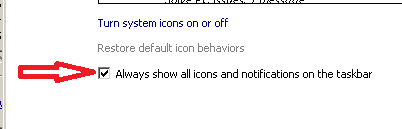
I would suggest showing all icons all of the time while you are chasing down this issue.

icons.png


It also sounds like the app is crashing* - so you might look in the Windows event logs for a clue.

*e.g. leaves an icon in the system tray (notification area) that goes away as soon as you mouse-over it.
 

My Computer

Computer type
Laptop
Computer Manufacturer/Model Number
Employer provided Dell Latitude
OS
W7 Pro SP1 64bit
CPU
i7
Memory
8GB
Graphics Card(s)
Intel HD Graphics
Hard Drives
crappy SSD
Antivirus
Employer mandated Symantec Endpoint Protection
Browser
Pale Moon 64bit, IE11 64bit & Chrome 64bit
You can try running Process Explorer for a while.

Download the zipped (compressed) file
Open the zipped (compressed) file (folder)
Copy the files somewhere
Run the exe as admin
Agree to the EULA

Change this setting:
Select Options from the Menu Bar
Select Difference Highlight Duration... from the menu
Change that to 9 seconds
"OK" your way out of that settings window.

Then just watch processes start (green line) and end (red line) for a while and see if you can find the app of interest.

Personally, I would turn off all columns except these:

PM.png

For this issue, you could even do without the columns named Integrity and Image Type.
 

My Computer

Computer type
Laptop
Computer Manufacturer/Model Number
Employer provided Dell Latitude
OS
W7 Pro SP1 64bit
CPU
i7
Memory
8GB
Graphics Card(s)
Intel HD Graphics
Hard Drives
crappy SSD
Antivirus
Employer mandated Symantec Endpoint Protection
Browser
Pale Moon 64bit, IE11 64bit & Chrome 64bit
@UsernameIssues,

Thank you for your solutions. I'll test these and will inform you about the outcome.
 

My Computer

OS
Windows 7 64 bit Enterprise
This appears to be simple and obvious - no need for guessing games.

Immediately below the cluster of icons shown in the first post is a LINK, the blue word CUSTOMIZE

When I click that link a window pops up with 20 different items

On the right is a Behaviors column which allows me to configure whether and when an icon is shown
On the left are 20 names of applications together with any icon which the application may be using.
Of my 20 items, 11 have icons because the application is running,
and 9 have no icons because then have not been launched since Windows was last booted.

Regards
Alan
 

My Computer

Computer Manufacturer/Model Number
ASUSTeK Computer INC. M3A32-MVP DELUXE (CPU 1)
OS
Windows 7 Ultimate 64 bit SP1 x64
CPU
AMD Phenom X4 9500
Motherboard
ASUSTeK M3A32-MVP Deluxe (CPU 1)
Memory
8 GB
Graphics Card(s)
ATI Radeon HD 4600 Series
Sound Card
AMD High Definition Audio Device
Monitor(s) Displays
SyncMaster (1680x1050@60Hz)
Hard Drives
59GB OCZ-VERTEX2 ATA Device
+
977GB SAMSUNG HD103SJ ATA Device
+
625GB WDC WD6401AALS-00L3B2 ATA Device

My Computer

Computer Manufacturer/Model Number
Hewlett packard/p6512uk
OS
Microsoft Windows 7 Home Premium 64-bit 7600
CPU
IIx4 amd athelon 635 processor
Motherboard
FOXCONN 2AA9
Memory
2x2gb
Graphics Card(s)
ati radeon HD 5450
Sound Card
(1) Realtek High Definition Audio (2) AMD High Definition
Monitor(s) Displays
samsung lcd tv 32"
Screen Resolution
1360x 768
Hard Drives
(1) WDC WD10 01FAES-60Z2A0 SATA Disk Device (2) Maxtor OneTouch USB Device (3) ST310003 33AS USB Device (4) WD My Book 1111 USB Device
PSU
?
Cooling
air!
Keyboard
wireless hp
Mouse
wireless Hp,optical
Internet Speed
1.10mb/s
Antivirus
MSE
Browser
Firefox
alan10, simple as it is it has been asked and tried already which has led to the original post and the subsequent guessing,
I saw the question but was not satisfied that by subsequent answers.

Out of 20 items, only 11 had icons.
I clicked desktop shortcuts to 2 of the items without icons,
and the customize Window showed 2 more icons for these 2 running applications.
I closed those two applications and their icons remained
I closed the customize window and relaunched it and the 2 late arrivals persisted.

Is it possible that the customize LINK is not working for Wayfarerman,
and perhaps he did not know what it should do ?

Perhaps something in Windows is broken - possibly unrelated to the strange icon.

Regards
Alan
 

My Computer

Computer Manufacturer/Model Number
ASUSTeK Computer INC. M3A32-MVP DELUXE (CPU 1)
OS
Windows 7 Ultimate 64 bit SP1 x64
CPU
AMD Phenom X4 9500
Motherboard
ASUSTeK M3A32-MVP Deluxe (CPU 1)
Memory
8 GB
Graphics Card(s)
ATI Radeon HD 4600 Series
Sound Card
AMD High Definition Audio Device
Monitor(s) Displays
SyncMaster (1680x1050@60Hz)
Hard Drives
59GB OCZ-VERTEX2 ATA Device
+
977GB SAMSUNG HD103SJ ATA Device
+
625GB WDC WD6401AALS-00L3B2 ATA Device
Wayfarerman,

At your convenience, please consider posting a screenshot of the Notification Area Icons screen

Control Panel > All Control Panel Items > Notification Area Icons

It might take a few screenshots to show the entire list.

My list does not act exactly like alan10 describes...
...9 have no icons because then have not been launched since Windows was last booted.
I have Task Manager running - but it has no icon listed beside it in that list. This probably has to do with the way that I launch Task Manger at startup with elevated privileges. If I exit Task Manager and start it again, it will be listed with an icon. A few other things act like this too.

If (as I suspect) this app is starting and then immediately crashing, I would not expect it to make it to the Notification Area Icons list.
 

My Computer

Computer type
Laptop
Computer Manufacturer/Model Number
Employer provided Dell Latitude
OS
W7 Pro SP1 64bit
CPU
i7
Memory
8GB
Graphics Card(s)
Intel HD Graphics
Hard Drives
crappy SSD
Antivirus
Employer mandated Symantec Endpoint Protection
Browser
Pale Moon 64bit, IE11 64bit & Chrome 64bit
Thnaks every one. At last I found what is this icon for:

Winzip Driver Updater
 

My Computer

OS
Windows 7 64 bit Enterprise
Back
Top