
Can not access to a SD card

khoshtipi

New member
VIP
Local time
10:59 AM
Messages
238
Location
Kurdistan
Hi all,

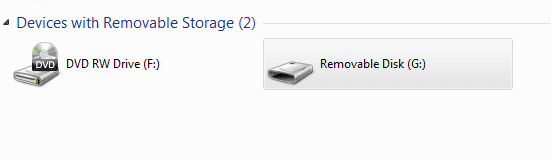
I have a Micro SD card (4GB). When I put it to my computer (windows 7 ultimate 32-bit) from USB port, I can't access into it. And writes "Removable disk G:" (like below image) and doesn't show other specifications of that volume. I used some commands line "chkdsk /f G:" in command prompt window, but it also writes "can not open volume for direct access". And also right click does not work on that volume for format it. In the command prompt also formatting results the same for chkdsk /f g: as message unfortunately.

Is there any way to access into that volume?
Thank you.
 

Attachments
  • Capture.PNG
    Capture.PNG
    4 KB · Views: 21

My Computer My Computer

OS
windows 7 Ultimate X86
Hi all,

I have a Micro SD card (4GB). When I put it to my computer (windows 7 ultimate 32-bit) from USB port, I can't access into it. And writes "Removable disk G:" (like below image) and doesn't show other specifications of that volume. I used some commands line "chkdsk /f G:" in command prompt window, but it also writes "can not open volume for direct access". And also right click does not work on that volume for format it. In the command prompt also formatting results the same for chkdsk /f g: as message unfortunately.

Is there any way to access into that volume?
Thank you.

Hi khoshtipi,

You should try this card on a different system and also check with different card reader if you are using one.

First you need to isolate if this is an issue with the card,reader or windows and then only you can try to fix it.

If you have any queries feel free to let us know.
 

My Computer My Computer

Computer type
PC/Desktop
OS
Winndows 7 32 bit
@sandeepP: This card has same problem in it's mobile phone so I tried to fix it on my PC. I again tried to format or use chkdsk command on another OS (I have XP, 8, and ubuntu virtually on my computer) but the results were same again:(.
 

My Computer My Computer

OS
windows 7 Ultimate X86
I had that problem before on my SD, and there's an error. I reformat it, and it's okay.
 

My Computer My Computer

Computer type
PC/Desktop
OS
Windows 7 Ultimate x64
No one knows how to fix my problem!? :rolleyes: :shock:
 

My Computer My Computer

OS
windows 7 Ultimate X86
Have you tried using other SD cards to see if your laptop detects them at all?
There are different types of classes of SD card, and your card reader on your laptop might no support them all.
Secure Digital - Wikipedia, the free encyclopedia
First you need to determine what type of SD card you have, then go to your laptop producers homepage and see what type of SD card classes your laptop supports. If its not listed there then you'll need a separate SD card reader which will help you to connect it through USB.
 

My Computer My Computer

Computer type
Laptop
Computer Manufacturer/Model Number
Acer Aspire 5750G
OS
Windows 7 Home Premium x64, Windows 8 Pro
CPU
i5-2430M
Motherboard
Acer JE50_HR
Memory
8 Gb
Graphics Card(s)
nVidia GeForce 610M
Sound Card
Realtek High Definition Audio
Antivirus
Avast
Browser
Chrome
@mach04: I use card reader for connecting my sd card through USB. I have tested many cards before to connect them this way to my machine. All worked fine, But I don't know what is the problem/death with this sd card. Is it possible that it is so-called burned!?
 

My Computer My Computer

OS
windows 7 Ultimate X86
Hi khoshtipi, Have you tried running H2testw on the sdcard Google Translate :)
 

My Computer My Computer

Computer type
PC/Desktop
Computer Manufacturer/Model Number
self build
OS
win 7 ultimate32bit, Win8.1pro wmc 32bit
CPU
amd phenom x4 9600
Motherboard
asus m2n32-sli deluxe
Memory
corsair twinxs 2x2gb
Graphics Card(s)
2x nvidia 1gb 8500gt
Sound Card
onboard
Monitor(s) Displays
23" PB Viseo 233d
Screen Resolution
1920x1080
Hard Drives
maxtor sata 500gb
maxtor sata 320gb
fujitsu sata200gb
PSU
oryxx tornado 750w
Case
thermaltake xaser lll
Cooling
artic freezer64 pro + 7 case fans
I tested the sd card by the H2testw tool. It writes "error accessing target"!!

What is the problem!!?
 

My Computer My Computer

OS
windows 7 Ultimate X86
Hi khoshtipi, There could be 2 reasons -#1 the card is dead #2 the card reader you are using does not support SDHD cards :)
 

My Computer My Computer

Computer type
PC/Desktop
Computer Manufacturer/Model Number
self build
OS
win 7 ultimate32bit, Win8.1pro wmc 32bit
CPU
amd phenom x4 9600
Motherboard
asus m2n32-sli deluxe
Memory
corsair twinxs 2x2gb
Graphics Card(s)
2x nvidia 1gb 8500gt
Sound Card
onboard
Monitor(s) Displays
23" PB Viseo 233d
Screen Resolution
1920x1080
Hard Drives
maxtor sata 500gb
maxtor sata 320gb
fujitsu sata200gb
PSU
oryxx tornado 750w
Case
thermaltake xaser lll
Cooling
artic freezer64 pro + 7 case fans
Hi dear pebbly. I think the second has been occurred. Because I have tested many cards by my card reader and all have worked fine. Thank you very much for your replies:)
 

My Computer My Computer

OS
windows 7 Ultimate X86
Now that you know the failure is because your card belongs to a different class than your card reader supports, there is only one option left, and that is getting a new card reader that supports that specific class.
 

My Computer My Computer

Computer type
Laptop
Computer Manufacturer/Model Number
Acer Aspire 5750G
OS
Windows 7 Home Premium x64, Windows 8 Pro
CPU
i5-2430M
Motherboard
Acer JE50_HR
Memory
8 Gb
Graphics Card(s)
nVidia GeForce 610M
Sound Card
Realtek High Definition Audio
Antivirus
Avast
Browser
Chrome
Unless there is valuable data on that card, I would consider it a dead card and just get another as cheap as they are today.
I've had several sd and micro sd's go bad and just like with any media, if the data is important then you must back it up !
 

My Computer My Computer

Computer type
PC/Desktop
Computer Manufacturer/Model Number
A blend of brains, brawn and dumb luck.
OS
Windows 7 Ultimate 64
CPU
i7 3770k OC'd 4.6 @ 1.17v, also FX 8120 & i5 miniITX
Motherboard
MSI P67A-GD80 b3
Memory
32 gb G.Skill Sniper DDR3 10-12-12-31 @ 2133
Graphics Card(s)
XFX Radeon 7870 2GB DDR5
Sound Card
Sound Blaster Z Series Card
Monitor(s) Displays
(2) LG LED 23" 1920 x 1080 2ms Monitors via mini d-port
Screen Resolution
1680 X 1050 p
Hard Drives
Samsung 256 gb 830 SSD sata III
(1) 1 tb WD Black
(2) 1 tb Hitachi deskmates/sata II
(2) 1 tb WD green/sata II
(2) 3 tb Seagate Barracuda
(1) 120 gb OCZ Vertex SS
(1) Drobo 5N w/5 Seagate 3tb
PSU
EVGA modular 1000G2 80% gold rating & APC 1200 RS
Case
CoolerMaster Storm Styker
Cooling
7 case fans 140mm & 120mm, NZXT Kraken X60
Keyboard
(2) Logitech Illuminated Keyboards (1) usb (1) wireless
Mouse
Logitech G700 & T-BC21 - nano nx for the laptop
Internet Speed
Basic 120mbps down
Antivirus
Trend Micro Titanium Max Security & Malwarebytes Premium
Browser
Chrome and IE 10
Other Info
5 Noctua case fans + 3 Noctua in p/p on NZXT cooler
Integrated hot swap drive bays for 2.5" Drives
(2) Lite-on dvd/cd/Blu Ray optical 22X
Integrated fan controller and led on/off
HP Officejet Pro 8630 all-n-one
Hot-swappable 3.5" hard drive bay
Netgear Nighthawk router
Asus USB 3 & sata 6 PCIe card
Vantec IDE to sata adptr./Ultra sata adptr
Lenovo L420 i5 lappy with m sata
Drobo 5N advanced NAS
Now that you know the failure is because your card belongs to a different class than your card reader supports, there is only one option left, and that is getting a new card reader that supports that specific class.
No, the problem doesn't belong to my card reader, as I told above, I have tested many such card by my card reader and all were fine. The problem whatever is, it belongs to card.
 

My Computer My Computer

OS
windows 7 Ultimate X86
Hi dear pebbly. I think the second has been occurred. Because I have tested many cards by my card reader and all have worked fine. Thank you very much for your replies:)

As you self mentioned it you pointed to the incompatibility of your card reader. If it can't read the contents of that SD card then its because that class is not supported by your card reader, even though you could have used many other cards. Those special SD card classes are mostly used by professional photographers, thats why its not so common in those card readers usually sold in the stores or those already existing in our laptops to support all kinds of classes. Just mentioning it so in the future you won't get confused if you can't see the contents of a SD card.
Good luck with it.
 

My Computer My Computer

Computer type
Laptop
Computer Manufacturer/Model Number
Acer Aspire 5750G
OS
Windows 7 Home Premium x64, Windows 8 Pro
CPU
i5-2430M
Motherboard
Acer JE50_HR
Memory
8 Gb
Graphics Card(s)
nVidia GeForce 610M
Sound Card
Realtek High Definition Audio
Antivirus
Avast
Browser
Chrome
No, I have read many cards of that class by that card reader. The card reader does not have/had any problem, And I mentioned that issue above. Anyway thank you.
 

My Computer My Computer

OS
windows 7 Ultimate X86
No, I have read many cards of that class by that card reader. The card reader does not have/had any problem, And I mentioned that issue above. Anyway thank you.

Hi khoshtipi,

Its great to hear that you have isolated that it is faulty card. If it under warranty you can get it replaced otherwise you can discard it safely.

Hope you found all the information useful.
 

My Computer My Computer

Computer type
PC/Desktop
OS
Winndows 7 32 bit
Back
Top