Can not reinstaill nor activate Windows

Mitch if you plug back in the SSD you only need to make sure that Win7 drive remains the Primary hard drive set first to boot in BIOS setup. If the SSD is blocking Win7 boot it's because it may be set to as Primary or as first to boot in BIOS setup. If so then boot into BIOS setup and look for a setting to make the hard drive Primary under Storage drives, or it that's not offered set the hard drive first drive to boot in BIOS Boot Priority Order.

The iOS partition is likely not displayed in Disk Mgmt because it isn't read by it. Try Partition Wizard
boot disk which has greater capabilities to read other OS partitions like Linux or iOS.

Once you get SSD plugged in and not interfering any longer with Win7 boot, you can ask in a iOS forums for how to repair it if it won't start on its own when booted via the BIOS Boot menu key. There is also a program called Boot Camp which allows Dual Booting iOS' with Windows.
 
So it wont muck up my windows boot?
Like i havnt formated the SSD, so it still has that EFI system partition


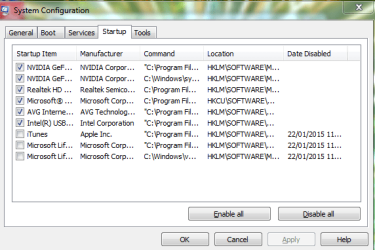
Edit: Also any suggestions on what to remove from startup?
 

Attachments

  • Capture.PNG
    Capture.PNG
    18.9 KB · Views: 14

My Computer My Computer

At a glance

Windows 7 Professional 64bitIntel Core i5 - 2500K @ 3.30GHz4GB DDR3EVGA Nvidia GeForce GT 740 2GB DDR3
Computer type
PC/Desktop
Computer Manufacturer/Model Number
Custom Build
OS
Windows 7 Professional 64bit
CPU
Intel Core i5 - 2500K @ 3.30GHz
Motherboard
Gigabyte Z77-HD3
Memory
4GB DDR3
Graphics Card(s)
EVGA Nvidia GeForce GT 740 2GB DDR3
Screen Resolution
1680 x 1050
Hard Drives
1T Samaung HD/ 1T toshiba external drive/ 1T western digital external drive/ 2T seagate external drive/ 250gb samaung SSD
PSU
Antec 430W
Keyboard
Microsoft Wireless Keyboard 800
Mouse
Microsoft Wireless Mouse 1000
Antivirus
AVG
Browser
Internet Explorer
You don't need any of those, and especially need to replace AVG bloatware with MSE or Panda Cloud. Use the special tool to get all of AVG out of the registry: AVG uninstaller | Download tools and utilities

That's not all of them either. Click the Services Tab, tick the box to Hide All MS Services, then uncheck all of those too, Apply and reboot.
 
Last edited:
So when I plug the SSD in, I get an error saying windows can't not boot because the require drive is inaccessible. I'm assuming that means the SSD is the primary boot partition. I haven't change the boot order yet.


Why did the SSD block instaill before and prevent boo


Edit: i think I want to ditch OSX and just have windows. I see the only way to do that is clone my drive, but what program do I use?
What happens if I do something wrong when transferring the image to the clone. Will my windows be buggered?
 
Last edited:

My Computer My Computer

At a glance

Windows 7 Professional 64bitIntel Core i5 - 2500K @ 3.30GHz4GB DDR3EVGA Nvidia GeForce GT 740 2GB DDR3
Computer type
PC/Desktop
Computer Manufacturer/Model Number
Custom Build
OS
Windows 7 Professional 64bit
CPU
Intel Core i5 - 2500K @ 3.30GHz
Motherboard
Gigabyte Z77-HD3
Memory
4GB DDR3
Graphics Card(s)
EVGA Nvidia GeForce GT 740 2GB DDR3
Screen Resolution
1680 x 1050
Hard Drives
1T Samaung HD/ 1T toshiba external drive/ 1T western digital external drive/ 2T seagate external drive/ 250gb samaung SSD
PSU
Antec 430W
Keyboard
Microsoft Wireless Keyboard 800
Mouse
Microsoft Wireless Mouse 1000
Antivirus
AVG
Browser
Internet Explorer

My Computer My Computer

At a glance

Windows 10 Pro x64Intel Core i7 6700KGSkill TridentZ RGB 16GB 3600 16-16-16-36EVGA GTX 980 Ti SC x2
Computer type
PC/Desktop
Computer Manufacturer/Model Number
Skylake Special #666
OS
Windows 10 Pro x64
CPU
Intel Core i7 6700K
Motherboard
Asus Sabertooth Z170 Mark 1
Memory
GSkill TridentZ RGB 16GB 3600 16-16-16-36
Graphics Card(s)
EVGA GTX 980 Ti SC x2
Sound Card
Realtek High Definition
Monitor(s) Displays
AOC G2460PG
Screen Resolution
1920 x 1080 144Hz
Hard Drives
Samsung 860 Pro 256GB, Seagate Barracuda 4TB x2
PSU
EVGA 1000 P2, EVGA White Custom Braided Cables
Case
Corsair Vengeance C70 Gunmetal Black
Cooling
Corsair H100i v2, Corsair ML120 x2, Thermal Grizzly Kryonaut
Keyboard
Logitech G910 Orion Spectrum
Mouse
Logitech G700s
Internet Speed
Verizon Fios Quantum Gateway 75/75
Antivirus
Windows Defender, Malwarebytes Free 3.8.3
Browser
Chrome
Other Info
Corsair SP120 x4, LG Blu-ray Drive, Durabrand HT-395 100 Watt Dolby Digital Amp, Corsair H2100 Wireless 7.1 Headset
As I already said earlier, the SSD has an EFI System partition which means it is installed to UEFI BIOS. If the BIOS settings were changed or WIndows Boot Manager is not the first device set to boot in BIOS setup then the drive will not boot no matter what.

If you clone the HD over to the SSD use Macrium Imaging - Windows 7 Help Forums.

Once the SSD is deleted down to nothing in the Macrium app, drag the partitions you want from the HD to the SSD, highlight the C partition to resize it the way you want it to end up on the SSD using the link below it to make the adjustments. It should automatically set it to transfer MBR, Track0 and Active flag.

Once it's cloned, set the SSD as first drive to boot in BIOS setup. If it won't boot, unplug the hard drive, confirm the Partition Marked Active then run Startup Repair - Run 3 Separate Times. Make sure not to boot the disk as EFI device.
 
As I already said earlier, the SSD has an EFI System partition which means it is installed to UEFI BIOS. If the BIOS settings were changed or WIndows Boot Manager is not the first device set to boot in BIOS setup then the drive will not boot no matter what.

If you clone the HD over to the SSD use Macrium Imaging - Windows 7 Help Forums.

Once the SSD is deleted down to nothing in the Macrium app, drag the partitions you want from the HD to the SSD, highlight the C partition to resize it the way you want it to end up on the SSD using the link below it to make the adjustments. It should automatically set it to transfer MBR, Track0 and Active flag.

Once it's cloned, set the SSD as first drive to boot in BIOS setup. If it won't boot, unplug the hard drive, confirm the Partition Marked Active then run Startup Repair - Run 3 Separate Times. Make sure not to boot the disk as EFI device.


I would do a clean install but I have everything set up. I'm thinking I might put windows 8 on the SSD. If I put 8 on the SSD, and delete windows 7 once set up how do I go about having my user files on the hard drive and windows on SSD
 

My Computer My Computer

At a glance

Windows 7 Professional 64bitIntel Core i5 - 2500K @ 3.30GHz4GB DDR3EVGA Nvidia GeForce GT 740 2GB DDR3
Computer type
PC/Desktop
Computer Manufacturer/Model Number
Custom Build
OS
Windows 7 Professional 64bit
CPU
Intel Core i5 - 2500K @ 3.30GHz
Motherboard
Gigabyte Z77-HD3
Memory
4GB DDR3
Graphics Card(s)
EVGA Nvidia GeForce GT 740 2GB DDR3
Screen Resolution
1680 x 1050
Hard Drives
1T Samaung HD/ 1T toshiba external drive/ 1T western digital external drive/ 2T seagate external drive/ 250gb samaung SSD
PSU
Antec 430W
Keyboard
Microsoft Wireless Keyboard 800
Mouse
Microsoft Wireless Mouse 1000
Antivirus
AVG
Browser
Internet Explorer
After you install 8 on the ssd you just format the hard drive, then you can start storing your data on it.

Have you ever even tried Windows 8, you`ll probably hate it. Do you own Windows 8 ?

All that work and now you`re just gonna give up ? :shock:

Windows 7 is so much better, just clone 7 to the ssd as Greg suggests.
 

My Computer My Computer

At a glance

Windows 10 Pro x64Intel Core i7 6700KGSkill TridentZ RGB 16GB 3600 16-16-16-36EVGA GTX 980 Ti SC x2
Computer type
PC/Desktop
Computer Manufacturer/Model Number
Skylake Special #666
OS
Windows 10 Pro x64
CPU
Intel Core i7 6700K
Motherboard
Asus Sabertooth Z170 Mark 1
Memory
GSkill TridentZ RGB 16GB 3600 16-16-16-36
Graphics Card(s)
EVGA GTX 980 Ti SC x2
Sound Card
Realtek High Definition
Monitor(s) Displays
AOC G2460PG
Screen Resolution
1920 x 1080 144Hz
Hard Drives
Samsung 860 Pro 256GB, Seagate Barracuda 4TB x2
PSU
EVGA 1000 P2, EVGA White Custom Braided Cables
Case
Corsair Vengeance C70 Gunmetal Black
Cooling
Corsair H100i v2, Corsair ML120 x2, Thermal Grizzly Kryonaut
Keyboard
Logitech G910 Orion Spectrum
Mouse
Logitech G700s
Internet Speed
Verizon Fios Quantum Gateway 75/75
Antivirus
Windows Defender, Malwarebytes Free 3.8.3
Browser
Chrome
Other Info
Corsair SP120 x4, LG Blu-ray Drive, Durabrand HT-395 100 Watt Dolby Digital Amp, Corsair H2100 Wireless 7.1 Headset
After you install 8 on the ssd you just format the hard drive, then you can start storing your data on it.

Have you ever even tried Windows 8, you`ll probably hate it.

I have for about 6 months.... Needed a fresh install on windows and was kind of annoyed with it and put 7 back on. It's not too bad.


So if I put seven or 8
Just format SSD, make sure it's first to boot, format old HDD and store data on it.
Is there a way to tell windows that my data is stored on HDD, so when I click my documents, my documents will be there and I don't have to fish through the HDD
 

My Computer My Computer

At a glance

Windows 7 Professional 64bitIntel Core i5 - 2500K @ 3.30GHz4GB DDR3EVGA Nvidia GeForce GT 740 2GB DDR3
Computer type
PC/Desktop
Computer Manufacturer/Model Number
Custom Build
OS
Windows 7 Professional 64bit
CPU
Intel Core i5 - 2500K @ 3.30GHz
Motherboard
Gigabyte Z77-HD3
Memory
4GB DDR3
Graphics Card(s)
EVGA Nvidia GeForce GT 740 2GB DDR3
Screen Resolution
1680 x 1050
Hard Drives
1T Samaung HD/ 1T toshiba external drive/ 1T western digital external drive/ 2T seagate external drive/ 250gb samaung SSD
PSU
Antec 430W
Keyboard
Microsoft Wireless Keyboard 800
Mouse
Microsoft Wireless Mouse 1000
Antivirus
AVG
Browser
Internet Explorer
Yep, there is a tutorial here, I don`t get into that.

I just make folders on my data drives called Documents, or Software, or Disk Images etc.
 

My Computer My Computer

At a glance

Windows 10 Pro x64Intel Core i7 6700KGSkill TridentZ RGB 16GB 3600 16-16-16-36EVGA GTX 980 Ti SC x2
Computer type
PC/Desktop
Computer Manufacturer/Model Number
Skylake Special #666
OS
Windows 10 Pro x64
CPU
Intel Core i7 6700K
Motherboard
Asus Sabertooth Z170 Mark 1
Memory
GSkill TridentZ RGB 16GB 3600 16-16-16-36
Graphics Card(s)
EVGA GTX 980 Ti SC x2
Sound Card
Realtek High Definition
Monitor(s) Displays
AOC G2460PG
Screen Resolution
1920 x 1080 144Hz
Hard Drives
Samsung 860 Pro 256GB, Seagate Barracuda 4TB x2
PSU
EVGA 1000 P2, EVGA White Custom Braided Cables
Case
Corsair Vengeance C70 Gunmetal Black
Cooling
Corsair H100i v2, Corsair ML120 x2, Thermal Grizzly Kryonaut
Keyboard
Logitech G910 Orion Spectrum
Mouse
Logitech G700s
Internet Speed
Verizon Fios Quantum Gateway 75/75
Antivirus
Windows Defender, Malwarebytes Free 3.8.3
Browser
Chrome
Other Info
Corsair SP120 x4, LG Blu-ray Drive, Durabrand HT-395 100 Watt Dolby Digital Amp, Corsair H2100 Wireless 7.1 Headset
Can this also be done with programs? Or can they only be on SSD


Edit: I'm pretty sure I made it so HHD is first boot, but I still get that the required drive is inaccessible :/


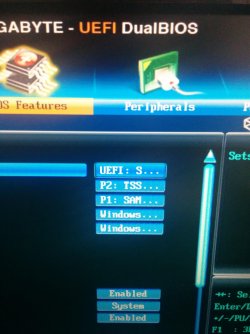
Actually the boot order is changed when I plug the SSD in.
This is what it looks like when I plug SSD in, I don't know what goes where.

TSS I think is CD drive, P1 is HDD and the last two are windows boot manger
 

Attachments

  • image.jpg
    image.jpg
    620.4 KB · Views: 0
Last edited:

My Computer My Computer

At a glance

Windows 7 Professional 64bitIntel Core i5 - 2500K @ 3.30GHz4GB DDR3EVGA Nvidia GeForce GT 740 2GB DDR3
Computer type
PC/Desktop
Computer Manufacturer/Model Number
Custom Build
OS
Windows 7 Professional 64bit
CPU
Intel Core i5 - 2500K @ 3.30GHz
Motherboard
Gigabyte Z77-HD3
Memory
4GB DDR3
Graphics Card(s)
EVGA Nvidia GeForce GT 740 2GB DDR3
Screen Resolution
1680 x 1050
Hard Drives
1T Samaung HD/ 1T toshiba external drive/ 1T western digital external drive/ 2T seagate external drive/ 250gb samaung SSD
PSU
Antec 430W
Keyboard
Microsoft Wireless Keyboard 800
Mouse
Microsoft Wireless Mouse 1000
Antivirus
AVG
Browser
Internet Explorer
I have already told you that to boot an EFI drive which the SSD is now having a EFI System partition, that you must have Windows Boot Manager as the first device to boot.

Only an MBR drive like your hard drive with its System Active C partition will boot by setting the hard drive first.

So you'd delete all partitions on the SSD to clone or install Win7 to it from the hard drive, then set the SSD first to boot since it is no longer an EFI bootable drive so no longer needs Windows Boot Manager in first position to boot it, but can have the SSD in first position to boot itself.

Confused? Ask any questions until you get it straight.
 
Ok, we'll I'm at uni now so can't do anything, but I have two windows boot mangers.... Just put the one after each other?

Then once cloned (think I'm going with this option) just put SSD first.
Then format old HDD into like a NTFS and change library location.


If I clone the OS will i need to run startup repair?

Anyway just put the two windows boot mangers first
 

My Computer My Computer

At a glance

Windows 7 Professional 64bitIntel Core i5 - 2500K @ 3.30GHz4GB DDR3EVGA Nvidia GeForce GT 740 2GB DDR3
Computer type
PC/Desktop
Computer Manufacturer/Model Number
Custom Build
OS
Windows 7 Professional 64bit
CPU
Intel Core i5 - 2500K @ 3.30GHz
Motherboard
Gigabyte Z77-HD3
Memory
4GB DDR3
Graphics Card(s)
EVGA Nvidia GeForce GT 740 2GB DDR3
Screen Resolution
1680 x 1050
Hard Drives
1T Samaung HD/ 1T toshiba external drive/ 1T western digital external drive/ 2T seagate external drive/ 250gb samaung SSD
PSU
Antec 430W
Keyboard
Microsoft Wireless Keyboard 800
Mouse
Microsoft Wireless Mouse 1000
Antivirus
AVG
Browser
Internet Explorer
Sometimes cloning has problems but these can be worked around by saving a backup image to apply if necessary.

Yes, if it won't start then confirm the Partition Marked Active is correct and run Startup Repair - Run 3 Separate Times until it starts. Make sure the SSD is set first to boot by name and not Windows Boot Manager which is only for EFI System Partition drives.

I'd keep the old HD until you're sure you are happy with the clone.
 
Sometimes cloning has problems but these can be worked around by saving a backup image to apply if necessary.

Yes, if it won't start then confirm the Partition Marked Active is correct and run Startup Repair - Run 3 Separate Times until it starts. Make sure the SSD is set first to boot by name and not Windows Boot Manager which is only for EFI System Partition drives.

I'd keep the old HD until you're sure you are happy with the clone.

So I can actually boot into windows and format SSD, put my HDD first and leave the boot manger at the bottom from the above screen shot?
 

My Computer My Computer

At a glance

Windows 7 Professional 64bitIntel Core i5 - 2500K @ 3.30GHz4GB DDR3EVGA Nvidia GeForce GT 740 2GB DDR3
Computer type
PC/Desktop
Computer Manufacturer/Model Number
Custom Build
OS
Windows 7 Professional 64bit
CPU
Intel Core i5 - 2500K @ 3.30GHz
Motherboard
Gigabyte Z77-HD3
Memory
4GB DDR3
Graphics Card(s)
EVGA Nvidia GeForce GT 740 2GB DDR3
Screen Resolution
1680 x 1050
Hard Drives
1T Samaung HD/ 1T toshiba external drive/ 1T western digital external drive/ 2T seagate external drive/ 250gb samaung SSD
PSU
Antec 430W
Keyboard
Microsoft Wireless Keyboard 800
Mouse
Microsoft Wireless Mouse 1000
Antivirus
AVG
Browser
Internet Explorer
If you want to boot the HD, then set it first.

If you want to boot the SSD as it is now, set Windows Boot Manager first.

If you want to boot the SSD after installing, cloning or imaging WIn7 onto it, set the SSD first to boot.

Macrium will let you format the SSD from its app or boot disk. You can actually install Macrium to the HD to clone the HD to the SSD. Follow Macrium Imaging - Windows 7 Help Forums
 
ok,
I think I know what im doing now.
Shall try cloning on the weekend
 

My Computer My Computer

At a glance

Windows 7 Professional 64bitIntel Core i5 - 2500K @ 3.30GHz4GB DDR3EVGA Nvidia GeForce GT 740 2GB DDR3
Computer type
PC/Desktop
Computer Manufacturer/Model Number
Custom Build
OS
Windows 7 Professional 64bit
CPU
Intel Core i5 - 2500K @ 3.30GHz
Motherboard
Gigabyte Z77-HD3
Memory
4GB DDR3
Graphics Card(s)
EVGA Nvidia GeForce GT 740 2GB DDR3
Screen Resolution
1680 x 1050
Hard Drives
1T Samaung HD/ 1T toshiba external drive/ 1T western digital external drive/ 2T seagate external drive/ 250gb samaung SSD
PSU
Antec 430W
Keyboard
Microsoft Wireless Keyboard 800
Mouse
Microsoft Wireless Mouse 1000
Antivirus
AVG
Browser
Internet Explorer
Ok,
it seems like the process is kinda fast. Epically since I only have 60Gb on the HD.
I think im going to use a different program, but do I need to initialize the SSD before I do the clone?


Edit: Tried two separate cloning softwares and get error
 

Attachments

  • Capture.PNG
    Capture.PNG
    24.6 KB · Views: 3
Last edited:

My Computer My Computer

At a glance

Windows 7 Professional 64bitIntel Core i5 - 2500K @ 3.30GHz4GB DDR3EVGA Nvidia GeForce GT 740 2GB DDR3
Computer type
PC/Desktop
Computer Manufacturer/Model Number
Custom Build
OS
Windows 7 Professional 64bit
CPU
Intel Core i5 - 2500K @ 3.30GHz
Motherboard
Gigabyte Z77-HD3
Memory
4GB DDR3
Graphics Card(s)
EVGA Nvidia GeForce GT 740 2GB DDR3
Screen Resolution
1680 x 1050
Hard Drives
1T Samaung HD/ 1T toshiba external drive/ 1T western digital external drive/ 2T seagate external drive/ 250gb samaung SSD
PSU
Antec 430W
Keyboard
Microsoft Wireless Keyboard 800
Mouse
Microsoft Wireless Mouse 1000
Antivirus
AVG
Browser
Internet Explorer
So kept trying to and eventually it worked. I used the Samsung migration Tool.
Like Woah! on the boot screen it managed to do the windows animation and then Boom! Logged in!

Now I got to work out how to transfer my files and changes library paths.


Edit: new problem. SSD doesn't want to appear in BIOS.
I can only boot into it if I press F13 and allow boot manger to appear, but can't set it in boot order.

My bios is up to date
 
Last edited:

My Computer My Computer

At a glance

Windows 7 Professional 64bitIntel Core i5 - 2500K @ 3.30GHz4GB DDR3EVGA Nvidia GeForce GT 740 2GB DDR3
Computer type
PC/Desktop
Computer Manufacturer/Model Number
Custom Build
OS
Windows 7 Professional 64bit
CPU
Intel Core i5 - 2500K @ 3.30GHz
Motherboard
Gigabyte Z77-HD3
Memory
4GB DDR3
Graphics Card(s)
EVGA Nvidia GeForce GT 740 2GB DDR3
Screen Resolution
1680 x 1050
Hard Drives
1T Samaung HD/ 1T toshiba external drive/ 1T western digital external drive/ 2T seagate external drive/ 250gb samaung SSD
PSU
Antec 430W
Keyboard
Microsoft Wireless Keyboard 800
Mouse
Microsoft Wireless Mouse 1000
Antivirus
AVG
Browser
Internet Explorer
Is it a new drive ?

Yes it has to be initialized, it should have given you a pop up window, if you want to use to clone the hard drive it has to be initialized the same as it, most likely MBR.

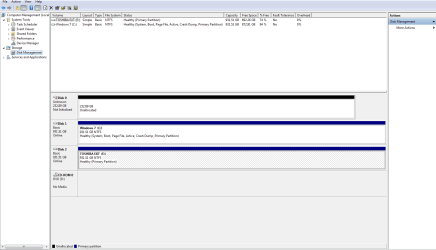
If you right click on the drive where I have circled, then choose properties, then volume it will tell you if the drive is setup as MBR or GPT.

Post your latest shot of Disk management.
 
Last edited:

My Computer My Computer

At a glance

Windows 10 Pro x64Intel Core i7 6700KGSkill TridentZ RGB 16GB 3600 16-16-16-36EVGA GTX 980 Ti SC x2
Computer type
PC/Desktop
Computer Manufacturer/Model Number
Skylake Special #666
OS
Windows 10 Pro x64
CPU
Intel Core i7 6700K
Motherboard
Asus Sabertooth Z170 Mark 1
Memory
GSkill TridentZ RGB 16GB 3600 16-16-16-36
Graphics Card(s)
EVGA GTX 980 Ti SC x2
Sound Card
Realtek High Definition
Monitor(s) Displays
AOC G2460PG
Screen Resolution
1920 x 1080 144Hz
Hard Drives
Samsung 860 Pro 256GB, Seagate Barracuda 4TB x2
PSU
EVGA 1000 P2, EVGA White Custom Braided Cables
Case
Corsair Vengeance C70 Gunmetal Black
Cooling
Corsair H100i v2, Corsair ML120 x2, Thermal Grizzly Kryonaut
Keyboard
Logitech G910 Orion Spectrum
Mouse
Logitech G700s
Internet Speed
Verizon Fios Quantum Gateway 75/75
Antivirus
Windows Defender, Malwarebytes Free 3.8.3
Browser
Chrome
Other Info
Corsair SP120 x4, LG Blu-ray Drive, Durabrand HT-395 100 Watt Dolby Digital Amp, Corsair H2100 Wireless 7.1 Headset
Back
Top