
Can not update Flash Player

crgibson

New member
Member
VIP
Local time
11:59 AM
Messages
145
Location
Southern Oregon
I have Flash Player on my laptop and desktop PC's. My laptop has no problems updating FP. My desktop just will not update. I download the file (install_flashplayer15x32_mssd_aaa_aih) from Adobe but all I get is the black box with heading Adobe Flash Player Installer. It does nothing.

I have to uninstall FP from my pc and then go get a new version from Adobe and reinstall it. Any ideas as to why this is happening?

Thanks for any help.
 

My Computer

Computer type
PC/Desktop
Computer Manufacturer/Model Number
Custom
OS
Win 7 HP 64bit w/SP1
CPU
AMD Athlon 64 X2 5200+
Motherboard
Gigabyte Technology Co., Ltd. GA-MA770-UD3 (Socket M2)
Memory
6.0GB Dual-Channel DDR2 @ 387MHz (5-5-5-18)
Graphics Card(s)
Acer AL1906 @ 1280x1024 512MB GeForce 9500 GT (XFX Pine Grou
Sound Card
Realtek High Definition Audio
Monitor(s) Displays
Acer Generic PnP Monitor
Hard Drives
Crucial 128 gig M4 SSD
Seagate Backup 5T
Seagate GoFlex 2T
WDC WD1600JS-00NCB1 USB 1500 Gig
Seagate Backup 3T
Keyboard
Logitech HID-Compliant Keyboard
Mouse
PS/2 Compatible Mouse
Internet Speed
Cable broadband (up to 50Mbps)
Other Info
Nightly runs of Super AntiSpyware, CCleaner and Malware Anti-Malware and System Restore.
Flash Player issues

A couple of questions for you?

What browsers are installed? (or portable browsers)

Do you have any other software installed that might be using flash? Secunia PSI is a good example.

Also try the direct download links:

For Internet Explorer (ActiveX version Flash Player): http://download.macromedia.com/pub/flashplayer/current/support/install_flash_player_ax.exe

For Mozilla Firefox, Opera and other NPAPI-based browsers (NPAPI version Flash Player): http://download.macromedia.com/pub/flashplayer/current/support/install_flash_player.exe

It's actually best practice to fully remove old versions using the Flash Player Removal Tool before installing the updated version(s).

Removal Tool: https://helpx.adobe.com/flash-player/kb/uninstall-flash-player-windows.html

Note: Follow all steps including the last one which is reboot!
 
Last edited:

My Computer

Computer type
Laptop
Computer Manufacturer/Model Number
ASUS
OS
Microsoft Windows 7 Home Premium 64-bit 7601 Multiprocessor Free Service Pack 1
CPU
AMD C-60 APU with Radeon(tm) HD Graphics
Motherboard
ASUSTeK COMPUTER INC. X501U
Memory
4.00 GB
Graphics Card(s)
AMD Radeon HD 6290 Graphics
Sound Card
(1) AMD High Definition Audio Device (2) Realtek High Defi
Screen Resolution
1366 x 768 x 32 bits (4294967296 colors) @ 60 Hz
Hard Drives
Hitachi HTS545050A7E380 SATA Disk Device
Antivirus
Comodo CIS & FW, SecureAplus App Whitelisting, Threatfire
Browser
Cyberfox 64bit, Opera 64bit, Airfox
Other Info
Spy-The-Spy, HitmanPro.Alert, Norton Connect Safe, MJRegWatcher, BitDefender TrafficLight, Voodoo Shield, Zemana AntiMalware
Callender - Thanks for the reply.

1 - I have Firefox and Internet Explorer (which I never use) installed on both PC's.
2 - I have no idea what other software I have that might be using FP (and don't know how to find out).

I use Hippo Update Checker find updates and on my laptop I just download the suggested file and it updates. I was hoping to get my desktop to do the same thing but I guess that I'll keep doing what I was doing (remove and install).

One question: Your "Note: Follow all steps including the last one which is reboot!" No where in the removal tool OR the install did I come across anything about rebooting. I always reboot after any uninstall but not after a new install. Is this the correct way?

Thanks for your help.
 

My Computer

Computer type
PC/Desktop
Computer Manufacturer/Model Number
Custom
OS
Win 7 HP 64bit w/SP1
CPU
AMD Athlon 64 X2 5200+
Motherboard
Gigabyte Technology Co., Ltd. GA-MA770-UD3 (Socket M2)
Memory
6.0GB Dual-Channel DDR2 @ 387MHz (5-5-5-18)
Graphics Card(s)
Acer AL1906 @ 1280x1024 512MB GeForce 9500 GT (XFX Pine Grou
Sound Card
Realtek High Definition Audio
Monitor(s) Displays
Acer Generic PnP Monitor
Hard Drives
Crucial 128 gig M4 SSD
Seagate Backup 5T
Seagate GoFlex 2T
WDC WD1600JS-00NCB1 USB 1500 Gig
Seagate Backup 3T
Keyboard
Logitech HID-Compliant Keyboard
Mouse
PS/2 Compatible Mouse
Internet Speed
Cable broadband (up to 50Mbps)
Other Info
Nightly runs of Super AntiSpyware, CCleaner and Malware Anti-Malware and System Restore.
Flash Player

The problem with updating flash player rather than clean installing it is that sometimes traces of the old version are left behind and can cause problems.

Removal Tool instructions state:

Step 4. Verify that uninstallation is complete

Restart your computer.

or

Open your browser and check the status of Flash Player.


Restarting your computer flushes the system cache and is the best way to do it!

So If you ran the removal tool, deleted the files and folders shown and rebooted then used the direct download links to install Flash Player (both versions) it should install.

Reading your original post again you're saying that every time an update is available you need to remove flash player? Removing it fully is the correct way anyway rather than simply updating.

The only thing I can think of is that you've got another program running that's using flash. Take a look at the icons in your system tray to see what's running. If you're using an instant messaging client that could cause the problem.

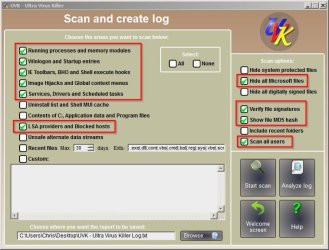
If you like you could download the portable version of UVK: UVK - Ultra Virus Killer

Portable download links are shown near the bottom of the page. If you run the program and choose "Scan and create log" using the following options:

UVK - Ultra Virus Killer.jpg

You could upload the log and attach it to your next post and I'll take a look at what's running on your machine.
 

My Computer

Computer type
Laptop
Computer Manufacturer/Model Number
ASUS
OS
Microsoft Windows 7 Home Premium 64-bit 7601 Multiprocessor Free Service Pack 1
CPU
AMD C-60 APU with Radeon(tm) HD Graphics
Motherboard
ASUSTeK COMPUTER INC. X501U
Memory
4.00 GB
Graphics Card(s)
AMD Radeon HD 6290 Graphics
Sound Card
(1) AMD High Definition Audio Device (2) Realtek High Defi
Screen Resolution
1366 x 768 x 32 bits (4294967296 colors) @ 60 Hz
Hard Drives
Hitachi HTS545050A7E380 SATA Disk Device
Antivirus
Comodo CIS & FW, SecureAplus App Whitelisting, Threatfire
Browser
Cyberfox 64bit, Opera 64bit, Airfox
Other Info
Spy-The-Spy, HitmanPro.Alert, Norton Connect Safe, MJRegWatcher, BitDefender TrafficLight, Voodoo Shield, Zemana AntiMalware
Another idea

I've had another idea. You can still post the requested log if you like.

The next time a flash player update is available - don't update it using File Hippo Update Checker or manually. Try downloading PatchMyPC and letting that take care of it. Report back if there are problems using this method.

Link to download: https://patchmypc.net/download

It runs without installation.
 

My Computer

Computer type
Laptop
Computer Manufacturer/Model Number
ASUS
OS
Microsoft Windows 7 Home Premium 64-bit 7601 Multiprocessor Free Service Pack 1
CPU
AMD C-60 APU with Radeon(tm) HD Graphics
Motherboard
ASUSTeK COMPUTER INC. X501U
Memory
4.00 GB
Graphics Card(s)
AMD Radeon HD 6290 Graphics
Sound Card
(1) AMD High Definition Audio Device (2) Realtek High Defi
Screen Resolution
1366 x 768 x 32 bits (4294967296 colors) @ 60 Hz
Hard Drives
Hitachi HTS545050A7E380 SATA Disk Device
Antivirus
Comodo CIS & FW, SecureAplus App Whitelisting, Threatfire
Browser
Cyberfox 64bit, Opera 64bit, Airfox
Other Info
Spy-The-Spy, HitmanPro.Alert, Norton Connect Safe, MJRegWatcher, BitDefender TrafficLight, Voodoo Shield, Zemana AntiMalware
Callender I'll try the "Patchmypc" the next time there is a update for Flash Player. If it works, I won't post the log. I'll let you know.

Thanks for the reply and suggestion.
 

My Computer

Computer type
PC/Desktop
Computer Manufacturer/Model Number
Custom
OS
Win 7 HP 64bit w/SP1
CPU
AMD Athlon 64 X2 5200+
Motherboard
Gigabyte Technology Co., Ltd. GA-MA770-UD3 (Socket M2)
Memory
6.0GB Dual-Channel DDR2 @ 387MHz (5-5-5-18)
Graphics Card(s)
Acer AL1906 @ 1280x1024 512MB GeForce 9500 GT (XFX Pine Grou
Sound Card
Realtek High Definition Audio
Monitor(s) Displays
Acer Generic PnP Monitor
Hard Drives
Crucial 128 gig M4 SSD
Seagate Backup 5T
Seagate GoFlex 2T
WDC WD1600JS-00NCB1 USB 1500 Gig
Seagate Backup 3T
Keyboard
Logitech HID-Compliant Keyboard
Mouse
PS/2 Compatible Mouse
Internet Speed
Cable broadband (up to 50Mbps)
Other Info
Nightly runs of Super AntiSpyware, CCleaner and Malware Anti-Malware and System Restore.
Flash Player update

Callender I'll try the "Patchmypc" the next time there is a update for Flash Player. If it works, I won't post the log. I'll let you know.

Thanks for the reply and suggestion.

Patchmypc installs updates silently (no user interaction required - other than running the program) so if it encounters a problem - post the error message!

Let's hope it works.
 

My Computer

Computer type
Laptop
Computer Manufacturer/Model Number
ASUS
OS
Microsoft Windows 7 Home Premium 64-bit 7601 Multiprocessor Free Service Pack 1
CPU
AMD C-60 APU with Radeon(tm) HD Graphics
Motherboard
ASUSTeK COMPUTER INC. X501U
Memory
4.00 GB
Graphics Card(s)
AMD Radeon HD 6290 Graphics
Sound Card
(1) AMD High Definition Audio Device (2) Realtek High Defi
Screen Resolution
1366 x 768 x 32 bits (4294967296 colors) @ 60 Hz
Hard Drives
Hitachi HTS545050A7E380 SATA Disk Device
Antivirus
Comodo CIS & FW, SecureAplus App Whitelisting, Threatfire
Browser
Cyberfox 64bit, Opera 64bit, Airfox
Other Info
Spy-The-Spy, HitmanPro.Alert, Norton Connect Safe, MJRegWatcher, BitDefender TrafficLight, Voodoo Shield, Zemana AntiMalware

My Computer

Computer type
PC/Desktop
OS
Windows 10 Home x64
CPU
INTEL Core i5-750 Quad-Core 3.37GHz
Motherboard
ASUS P7P55D
Memory
HyperX Fury Black Series 8GB (2 x 4GB) 1866Mhz
Graphics Card(s)
EVGA GeForce GTX 750 Superclocked 1GB 128-Bit GDDR5
Monitor(s) Displays
LG 32MA68HY 32" IPS
Screen Resolution
1920 x 1080
Hard Drives
Samsung 840 Evo 120GB, SEAGATE 500GB Barracuda® 7200.12, SATA 3 Gb/s, 7200 RPM, 16MB cache
PSU
ANTEC TruePower New TP-550, 80 PLUS, 550W
Case
ANTEC Three Hundred Illusion
Cooling
COOLER MASTER Hyper 212 Plus, 4 x 120mm 1 x 140mm Noctua's
Internet Speed
85 + Mbps
Antivirus
Avast
Browser
Vivaldi
I've updated all Adobe Flash Player updates for years from FileHippo which goes to the Adobe site. When you try to install/update it says I need to uninstall previous version first. Why do you need to uninstall now when all previous versions install the update without uninstalling, that seems crazy to me.

Updates can come out weekly so its an unnecessary thing to uninstall first. The fact that updates come out that often tells me they have cocked up on previous updates. That's like FireFox can be updated weekly and the new version works just the same as the old one.
 

My Computer

Computer type
Laptop
Computer Manufacturer/Model Number
Samsung won't charge Now Dell Inspiron 17 3793
OS
Windows 7 Professional 32bit SP1, Windows 10 Home 64-bit at the moment
CPU
Intel Pentium B970 @ 2.30GHz, DELL DELL Intel 3793 Core i5 1
Motherboard
DELL 0C9WH2
Memory
8GB
Graphics Card(s)
NVIDIA GeForce MX230 (Dell)
Sound Card
Realtek High Definition Audio
Monitor(s) Displays
17.3" HD+ LED Display
Screen Resolution
1920x1040
Hard Drives
99GB (RAID SHIT SSD), Seagate 1TB SATA III DATA

Seagate ST1000LM048-2E7172 (SATA III)
Mouse
USB remote
Antivirus
Avast Free Antivirus 20.10.2442
Browser
Internet Explorer 11, FireFox
Other Info
DELL shit Its the worst laptop design ever made the laptop battery is inbuilt who the hell makes a laptop battery inbuilt DELL shit does, can't wait until the 1TB HDD is replaced and RAID shit is removed
Update Flash Player

Why do you need to uninstall now when all previous versions install the update without uninstalling, that seems crazy to me.

Well the updater doesn't remove the old versions and eventually it will cause problems.

See this old article. The principle is still the same:

Update your Flash player now--and do it right

Quote: "Installing the latest version of Flash has never uninstalled the old buggy versions. From my Defensive Computing standpoint, I want to always ensure that old buggy software is fully removed."

Edit:

Quote: "Run the Secunia Software Inspector and turn on the checkbox for a "thorough system inspection." This is a great way to ensure there are none of the old, vulnerable versions of the Flash player anywhere on your computer, even in nonstandard locations."

Direct download link for Secunia Software Inspector:

Warning - Clicking this link will initiate a download

https://secunia.com/PSI2Setup.exe
 
Last edited:

My Computer

Computer type
Laptop
Computer Manufacturer/Model Number
ASUS
OS
Microsoft Windows 7 Home Premium 64-bit 7601 Multiprocessor Free Service Pack 1
CPU
AMD C-60 APU with Radeon(tm) HD Graphics
Motherboard
ASUSTeK COMPUTER INC. X501U
Memory
4.00 GB
Graphics Card(s)
AMD Radeon HD 6290 Graphics
Sound Card
(1) AMD High Definition Audio Device (2) Realtek High Defi
Screen Resolution
1366 x 768 x 32 bits (4294967296 colors) @ 60 Hz
Hard Drives
Hitachi HTS545050A7E380 SATA Disk Device
Antivirus
Comodo CIS & FW, SecureAplus App Whitelisting, Threatfire
Browser
Cyberfox 64bit, Opera 64bit, Airfox
Other Info
Spy-The-Spy, HitmanPro.Alert, Norton Connect Safe, MJRegWatcher, BitDefender TrafficLight, Voodoo Shield, Zemana AntiMalware
Back
Top