
Windows 7 can not update: Error code 800B0100

toast01

New member
Local time
11:34 PM
Messages
33
Hello Everyone,

Everytime I shutdown my pc, it downloads and installs about 50 updates.
Everytime I boot my pc, it uninstalls these updates and reboots.
This is going on for the past few months, and now I finally got some time to try to fix it.

So, the error code I got from windows update is 800B0100.
I googled the error code, ran the system update readiness tool about 4 or 5 times, which didn't get me any results. I also ran the SFC Scan a couple of times without any results.

I also ran a WindowsUpdateDiagnostic, which gave the the following results:
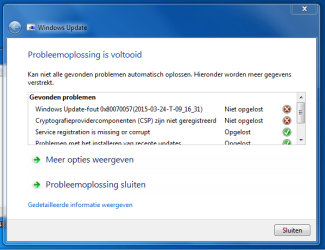
Knipsel.PNG
For everyone who doesn't understand dutch:
The two errors are in english:
Windows Update-error 0x80070057(2015-03-24-T-09_16_31)
Cryptographicserviceprovider components not registered.

I attached the log file of the SFC scan. I tried to upload the whole CBS map like the tutorial says,
but that was an upload of 180 mb (after zipping), so I just got you the log file. If you need anything else, please let me know!

I hope anyone can help me.

Thank you in advance.
 
Last edited:

My Computer

Computer type
PC/Desktop
Computer Manufacturer/Model Number
custom build
OS
Windows 7 Home Premium x64
CPU
Intel Core i7 2600K @3.40Ghz
Motherboard
Asus Maximus IV Extreme
Memory
16 GB DDR3 dual channel @700Mhz
Graphics Card(s)
Nvidia Geforce GTX 580
Hard Drives
SSD - 250 GB
HDD - 1 TB
OCZ Revodrive - 250 GB
Antivirus
Kaspersky PURE 3.0
Browser
Chrome & Firefox
Try running system file checker,

type CMD in the start menu search, right click the result and run as administrator

Type "sfc /scannow" without the quotes.

Follow the instructions until it has finished.

Restart.

Try windows update manually, do not install all the updates at once, try doing a few at a time, wait until you have all the recommended updates before starting any optional ones.
 

My Computer

Computer type
PC/Desktop
Computer Manufacturer/Model Number
Self Build
OS
Windows 7 Ultimate x64
CPU
Intel Core2 Quad Q8300 2.5Ghz
Motherboard
Asus P5QD Turbo
Memory
Kingston HyperX 4x1GB DDR2 1066Mhz
Graphics Card(s)
Asus/Nvidia 9500GT 1GB
Sound Card
On-Board HD
Monitor(s) Displays
22" Widescreen TFT
Screen Resolution
1920x1080
Hard Drives
2x 320Gb Seagate SATAII RAID 0
2x 80Gb Seagate SATAII RAID 0
1x 1tb hybrid (8gb ssd)
PSU
650w
Case
ATX
Cooling
140mm front, 120mm Rear, 80mm Chipset + stock CPU and GPU
Keyboard
Plastic one
Mouse
Plastic one
Internet Speed
4Mbps
Other Info
Laptop: HP Elitebook 2560p
i5 @2.7Ghz 4GB DDR3
Thanks for your reply,

I ran the system file checker already like 4 to 5 times. I even uploaded the log from the scan in my topic post...

I just tried updating manually, but that is very time consuming, as after every update my PC has to reboot, find out that the updates are not "configured correctly", uninstall the just installed updates, reboot, enz.

I just got the update counter down to 38, but i discovered there are definitely more than three corrupt updates! Tomorrow I will try to install some more updates
 

My Computer

Computer type
PC/Desktop
Computer Manufacturer/Model Number
custom build
OS
Windows 7 Home Premium x64
CPU
Intel Core i7 2600K @3.40Ghz
Motherboard
Asus Maximus IV Extreme
Memory
16 GB DDR3 dual channel @700Mhz
Graphics Card(s)
Nvidia Geforce GTX 580
Hard Drives
SSD - 250 GB
HDD - 1 TB
OCZ Revodrive - 250 GB
Antivirus
Kaspersky PURE 3.0
Browser
Chrome & Firefox
Your CBS.log file shows the following problems...
Code:
 Line 5474: 2015-03-24 20:42:25, Info                  CSI    000002d2 [SR] Beginning Verify and Repair transaction
 Line 5477: 2015-03-24 20:42:26, Info                  CSI    000002d4 [SR] Cannot repair member file [l:50{25}]"msmpeg2vdec-ppdlic.xrm-ms" of Microsoft-Windows-MSMPEG2VDEC, Version = 7.1.7601.18519, pA = PROCESSOR_ARCHITECTURE_INTEL (0), Culture neutral, VersionScope = 1 nonSxS, PublicKeyToken = {l:8 b:31bf3856ad364e35}, Type neutral, TypeName neutral, PublicKey neutral in the store, hash mismatch
 Line 5480: 2015-03-24 20:42:26, Info                  CSI    000002d6 [SR] Cannot repair member file [l:30{15}]"msmpeg2vdec.dll" of Microsoft-Windows-MSMPEG2VDEC, Version = 7.1.7601.18519, pA = PROCESSOR_ARCHITECTURE_INTEL (0), Culture neutral, VersionScope = 1 nonSxS, PublicKeyToken = {l:8 b:31bf3856ad364e35}, Type neutral, TypeName neutral, PublicKey neutral in the store, hash mismatch

... however, it doesn't contain the 'summary' at the end of the SFC scan.

Hopefully this shouldn't pose a problem, so I'll post a fix protocol tomorrow.

The biggest problem is that you haven't included the CheckSUR scan - which may reveal a lot more problems.

Please follow this tutorial and post an MGADiag report - then we can see what the problem is.

http://www.sevenforums.com/windows-updates-activation/234159-windows-genuine-activation-issue-posting-instructions.html

Ignore errors produced when clicking on the Copy button - they simply mean that the tool could not create the backup files for some reason. The data is still copied to the clipboard for pasting to your response.

Please also state the Version and Edition of Windows quoted on your COA sticker (if you have one) on the case of your machine (or inside the battery compartment), but do NOT quote the Key on the sticker!
http://www.microsoft.com/en-us/howtotell/Hardware.aspx
 

My Computer

Computer type
Laptop
Computer Manufacturer/Model Number
Asus K52F or Lenovo B51-80
OS
Win 7 x64 Home Premium (and x86 VirtualBox VM)/Win10
CPU
i3 370M/i7 6500U
Motherboard
Asus/Lenovo
Memory
8GB - finally :)/8GB
Graphics Card(s)
it's an i3, dude!/dual Intel&nVidia
Sound Card
onboard
Monitor(s) Displays
15.6" built-in
Screen Resolution
1366x768/1920x1080
Hard Drives
750GB Seagate internal
Sundry external drives attached to other computers on the local network
1TB SSD on the Lenovo
PSU
n/a
Internet Speed
as much as I can get - usually on a dongle/phone, so <1MB/s
Antivirus
MSE/Defender
Browser
IE11/12/Edge/Chrome/FF(if I must)
Thanks for your reply NoelDP!

Here is the MGADiag report:

Code:
Diagnostic Report (1.9.0027.0):
-----------------------------------------
Windows Validation Data-->

Validation Code: 0
Cached Online Validation Code: 0x0
Windows Product Key: *****-*****-T9PTH-DMR63-993FR
Windows Product Key Hash: jFwAr8qRZaQR6C5uUsN696Kk6Lg=
Windows Product ID: 00359-OEM-8703575-09377
Windows Product ID Type: 3
Windows License Type: OEM System Builder
Windows OS version: 6.1.7601.2.00010300.1.0.003
ID: {E871BD59-2BCB-4077-8B38-8B8D26F1F68D}(1)
Is Admin: Yes
TestCab: 0x0
LegitcheckControl ActiveX: N/A, hr = 0x80070002
Signed By: N/A, hr = 0x80070002
Product Name: Windows 7 Home Premium
Architecture: 0x00000009
Build lab: 7601.win7sp1_gdr.150128-1513
TTS Error: 
Validation Diagnostic: 
Resolution Status: N/A

Vista WgaER Data-->
ThreatID(s): N/A, hr = 0x80070002
Version: N/A, hr = 0x80070002

Windows XP Notifications Data-->
Cached Result: N/A, hr = 0x80070002
File Exists: No
Version: N/A, hr = 0x80070002
WgaTray.exe Signed By: N/A, hr = 0x80070002
WgaLogon.dll Signed By: N/A, hr = 0x80070002

OGA Notifications Data-->
Cached Result: N/A, hr = 0x80070002
Version: N/A, hr = 0x80070002
OGAExec.exe Signed By: N/A, hr = 0x80070002
OGAAddin.dll Signed By: N/A, hr = 0x80070002

OGA Data-->
Office Status: 100 Genuine
Microsoft Office Project Standard 2007 - 100 Genuine
OGA Version: N/A, 0x80070002
Signed By: N/A, hr = 0x80070002
Office Diagnostics: 77F760FE-153-80070002_7E90FEE8-175-80070002_025D1FF3-364-80041010_025D1FF3-229-80041010_025D1FF3-230-1_025D1FF3-517-80040154_025D1FF3-237-80040154_025D1FF3-238-2_025D1FF3-244-80070002_025D1FF3-258-3

Browser Data-->
Proxy settings: N/A
User Agent: Mozilla/4.0 (compatible; MSIE 8.0; Win32)
Default Browser: C:\Program Files (x86)\Mozilla Firefox\firefox.exe
Download signed ActiveX controls: Prompt
Download unsigned ActiveX controls: Disabled
Run ActiveX controls and plug-ins: Allowed
Initialize and script ActiveX controls not marked as safe: Disabled
Allow scripting of Internet Explorer Webbrowser control: Disabled
Active scripting: Allowed
Script ActiveX controls marked as safe for scripting: Allowed

File Scan Data-->

Other data-->
Office Details: <GenuineResults><MachineData><UGUID>{E871BD59-2BCB-4077-8B38-8B8D26F1F68D}</UGUID><Version>1.9.0027.0</Version><OS>6.1.7601.2.00010300.1.0.003</OS><Architecture>x64</Architecture><PKey>*****-*****-*****-*****-993FR</PKey><PID>00359-OEM-8703575-09377</PID><PIDType>3</PIDType><SID>S-1-5-21-3624330826-2273602118-4090061236</SID><SYSTEM><Manufacturer>System manufacturer</Manufacturer><Model>System Product Name</Model></SYSTEM><BIOS><Manufacturer>American Megatrends Inc.</Manufacturer><Version>1303</Version><SMBIOSVersion major="2" minor="6"/><Date>20110328000000.000000+000</Date></BIOS><HWID>28EB3E07018400FE</HWID><UserLCID>0413</UserLCID><SystemLCID>0413</SystemLCID><TimeZone>West-Europa (standaardtijd)(GMT+01:00)</TimeZone><iJoin>0</iJoin><SBID><stat>3</stat><msppid></msppid><name></name><model></model></SBID><OEM/><GANotification/></MachineData><Software><Office><Result>100</Result><Products><Product GUID="{91120000-003A-0000-0000-0000000FF1CE}"><LegitResult>100</LegitResult><Name>Microsoft Office Project Standard 2007</Name><Ver>12</Ver><PidType>0</PidType></Product></Products><Applications><App Id="3A" Version="12" Result="100"/></Applications></Office></Software></GenuineResults>  

Spsys.log Content: 0x80070002

Licensing Data-->
Versie van Software Licensing-service: 6.1.7601.17514

Naam: Windows(R) 7, HomePremium edition
Beschrijving: Windows Operating System - Windows(R) 7, OEM_COA_NSLP channel
Activerings-id: 586bc076-c93d-429a-afe5-a69fbc644e88
Toepassings-id55c92734-d682-4d71-983e-d6ec3f16059f
Uitgebreide PID: 00359-00174-035-709377-02-1043-7601.0000-2172011
Installatie-id008140240003019934659340997112055082421932938035542082
URL van processorcertificaat: http://go.microsoft.com/fwlink/?LinkID=88338
URL van computercertificaat: http://go.microsoft.com/fwlink/?LinkID=88339
URL van gebruikte licentie: http://go.microsoft.com/fwlink/?LinkID=88341
URL van productcodecertificaat: http://go.microsoft.com/fwlink/?LinkID=88340
Gedeeltelijke productcode: 993FR
Licentiestatus: licentie
Resterend aantal nieuwe Windows-activeringen: 3
Vertrouwde tijd: 26-3-2015 18:48:35

Windows Activation Technologies-->
HrOffline: 0x00000000
HrOnline: 0x00000000
HealthStatus: 0x0000000000000000
Event Time Stamp: 3:15:2015 19:08
ActiveX: Registered, Version: 7.1.7600.16395
Admin Service: Registered, Version: 7.1.7600.16395
HealthStatus Bitmask Output:


HWID Data-->
HWID Hash Current: OAAAAAMAAgABAAEAAwABAAAAAgABAAEAHKL0c3cWwM1AT3zpGl2uiAgPrItqGEBqUBpWf+IjLnM=

OEM Activation 1.0 Data-->
N/A

OEM Activation 2.0 Data-->
BIOS valid for OA 2.0: yes, but no SLIC table
Windows marker version: N/A
OEMID and OEMTableID Consistent: N/A
BIOS Information: 
  ACPI Table Name    OEMID Value    OEMTableID Value
  APIC            ALASKA        A M I
  FACP            ALASKA        A M I
  HPET            ALASKA        A M I
  MCFG            ALASKA        A M I
  SSDT            AMICPU        PROC
I made a photo of the COA sticker:
Knipsel2.PNG

Thank you very much in advance!
 

My Computer

Computer type
PC/Desktop
Computer Manufacturer/Model Number
custom build
OS
Windows 7 Home Premium x64
CPU
Intel Core i7 2600K @3.40Ghz
Motherboard
Asus Maximus IV Extreme
Memory
16 GB DDR3 dual channel @700Mhz
Graphics Card(s)
Nvidia Geforce GTX 580
Hard Drives
SSD - 250 GB
HDD - 1 TB
OCZ Revodrive - 250 GB
Antivirus
Kaspersky PURE 3.0
Browser
Chrome & Firefox
Ooops! - sorry - I posted the wrong instructions!

run these instead...

Please download and save the CheckSUR tool from http://support.microsoft.com/kb/947821
(you'll need to look in the details for Windows 7, downloading from the Microsoft Download Center)

Run it - The tool can take anywhere from 5 mins to a couple of hours to run (or 'Install') depending on how much it has to do, and may exit silently - it may appear to freeze for most of that time, but be patient.
The result is logged in the C:\Windows\Logs\CBS\CheckSUR.log file - and an archive …\checksur.persist.log file

Then zip the CheckSUR.log and upload it to your reply.
 

My Computer

Computer type
Laptop
Computer Manufacturer/Model Number
Asus K52F or Lenovo B51-80
OS
Win 7 x64 Home Premium (and x86 VirtualBox VM)/Win10
CPU
i3 370M/i7 6500U
Motherboard
Asus/Lenovo
Memory
8GB - finally :)/8GB
Graphics Card(s)
it's an i3, dude!/dual Intel&nVidia
Sound Card
onboard
Monitor(s) Displays
15.6" built-in
Screen Resolution
1366x768/1920x1080
Hard Drives
750GB Seagate internal
Sundry external drives attached to other computers on the local network
1TB SSD on the Lenovo
PSU
n/a
Internet Speed
as much as I can get - usually on a dongle/phone, so <1MB/s
Antivirus
MSE/Defender
Browser
IE11/12/Edge/Chrome/FF(if I must)
I already ran that tool a couple of times, but I just ran it again just to be sure (I'm glad I saved that file in the first place)

I zipped the CheckSUR.log and the checksur.persist.log files, If you need any other files please let me know.
 

Attachments

My Computer

Computer type
PC/Desktop
Computer Manufacturer/Model Number
custom build
OS
Windows 7 Home Premium x64
CPU
Intel Core i7 2600K @3.40Ghz
Motherboard
Asus Maximus IV Extreme
Memory
16 GB DDR3 dual channel @700Mhz
Graphics Card(s)
Nvidia Geforce GTX 580
Hard Drives
SSD - 250 GB
HDD - 1 TB
OCZ Revodrive - 250 GB
Antivirus
Kaspersky PURE 3.0
Browser
Chrome & Firefox
That's what I needed :)
Here's the error list...
Code:
Summary:
Seconds executed: 531
 Found 68 errors
  CSI Manifest All Zeros Total count: 56
  CBS MUM Corrupt Total count: 6
  CBS Catalog Corrupt Total count: 6
Unavailable repair files:
 winsxs\manifests\amd64_wcf-m_svc_mon_sup_dll_31bf3856ad364e35_6.1.7601.22743_none_046c22977b74e62c.manifest
 winsxs\manifests\msil_smsvchost_b03f5f7f11d50a3a_6.1.7601.22743_none_cfeb95652ab9a380.manifest
 winsxs\manifests\msil_system.runtime.serialization.resources_b77a5c561934e089_6.1.7601.22743_nl-nl_118773bae6ae7acb.manifest
 winsxs\manifests\msil_smdiagnostics.resources_b77a5c561934e089_6.1.7601.18532_nl-nl_e2715bd44c556919.manifest
 winsxs\manifests\msil_system.identitymodel.resources_b77a5c561934e089_6.1.7601.18532_nl-nl_7140fcb2f61fbf81.manifest
 winsxs\manifests\amd64_wcf-smdiagnostics_b03f5f7f11d50a3a_6.1.7601.18532_none_f5ef1e68c06b0983.manifest
 winsxs\manifests\x86_wcf-m_svc_mon_sup_dll_31bf3856ad364e35_6.1.7601.22743_none_a84d8713c31774f6.manifest
 winsxs\manifests\msil_system.runtime.serialization.ref_b77a5c561934e089_6.1.7601.18532_none_a681522274d87bdf.manifest
 winsxs\manifests\x86_wcf-system.runtime.serialization_b03f5f7f11d50a3a_6.1.7601.18532_none_db9f3389dd561754.manifest
 winsxs\manifests\amd64_wcf-system.runtime.serialization.ref_b03f5f7f11d50a3a_6.1.7601.22743_none_424e32868e888704.manifest
 winsxs\manifests\amd64_wcf-smdiagnostics_b03f5f7f11d50a3a_6.1.7601.22743_none_df226106da119cd2.manifest
 winsxs\manifests\amd64_wcf-system.runtime.serialization_b03f5f7f11d50a3a_6.1.7601.22743_none_7d253f50e280819d.manifest
 winsxs\manifests\amd64_wcf-m_svc_mon_sup_dll_31bf3856ad364e35_6.1.7601.18532_none_03ec5388625013f3.manifest
 winsxs\manifests\msil_system.servicemodel.ref_b77a5c561934e089_6.1.7601.22743_none_29f7a0b6e8fbe8a4.manifest
 winsxs\manifests\amd64_wcf-system.identitymodel_b03f5f7f11d50a3a_6.1.7601.18532_none_b259b569e8a367e7.manifest
 winsxs\manifests\amd64_wcf-smsvchost_b03f5f7f11d50a3a_6.1.7601.18532_none_c7c878850b1cbe6b.manifest
 winsxs\manifests\amd64_wcf-system.servicemodel.ref_b03f5f7f11d50a3a_6.1.7601.22743_none_5ec02bad339e1184.manifest
 winsxs\manifests\msil_smdiagnostics_b77a5c561934e089_6.1.7601.18532_none_72f0e00b6ca38779.manifest
 winsxs\manifests\msil_system.runtime.serialization.resources_b77a5c561934e089_6.1.7601.18532_nl-nl_2854311ccd07e77c.manifest
 winsxs\manifests\msil_system.identitymodel_b77a5c561934e089_6.1.7601.22743_none_daec3d651a56707a.manifest
 winsxs\manifests\amd64_wcf-system.runtime.serialization.ref_b03f5f7f11d50a3a_6.1.7601.18532_none_591aefe874e1f3b5.manifest
 winsxs\manifests\msil_system.runtime.serialization_b77a5c561934e089_6.1.7601.22743_none_bff7ca5ab6261061.manifest
 winsxs\manifests\x86_wcf-m_svc_mon_sup_dll_31bf3856ad364e35_6.1.7601.18532_none_a7cdb804a9f2a2bd.manifest
 winsxs\manifests\amd64_wcf-system.runtime.serialization_b03f5f7f11d50a3a_6.1.7601.18532_none_93f1fcb2c8d9ee4e.manifest
 winsxs\manifests\msil_system.servicemodel_b77a5c561934e089_6.1.7601.22743_none_627c1e8360ed619d.manifest
 winsxs\manifests\x86_wcf-system.runtime.serialization_b03f5f7f11d50a3a_6.1.7601.22743_none_c4d27627f6fcaaa3.manifest
 winsxs\manifests\msil_system.servicemodel_b77a5c561934e089_6.1.7601.18532_none_7948dbe54746ce4e.manifest
 winsxs\manifests\msil_smsvchost_b03f5f7f11d50a3a_6.1.7601.18532_none_e6b852c711131031.manifest
 winsxs\manifests\msil_smsvchost.resources_b03f5f7f11d50a3a_6.1.7601.18532_nl-nl_628b56fcd709e995.manifest
 winsxs\manifests\amd64_wcf-system.servicemodel.washosting_b03f5f7f11d50a3a_6.1.7601.22743_none_eb769f0f609f0962.manifest
 winsxs\manifests\x86_wcf-m_sm_mof_31bf3856ad364e35_6.1.7601.18532_none_c6617fc7de79418f.manifest
 winsxs\manifests\msil_smdiagnostics_b77a5c561934e089_6.1.7601.22743_none_5c2422a9864a1ac8.manifest
 winsxs\manifests\amd64_wcf-smsvchost_b03f5f7f11d50a3a_6.1.7601.22743_none_b0fbbb2324c351ba.manifest
 winsxs\manifests\msil_system.servicemodel.washosting_b77a5c561934e089_6.1.7601.18532_none_926d9ec39dfff67f.manifest
 winsxs\manifests\msil_system.runtime.serialization_b77a5c561934e089_6.1.7601.18532_none_d6c487bc9c7f7d12.manifest
 winsxs\manifests\msil_smsvchost.resources_b03f5f7f11d50a3a_6.1.7601.22743_nl-nl_4bbe999af0b07ce4.manifest
 winsxs\manifests\x86_wcf-system.servicemodel_b03f5f7f11d50a3a_6.1.7601.22743_none_d28a8613c1bc6855.manifest
 winsxs\manifests\x86_wcf-system.identitymodel_b03f5f7f11d50a3a_6.1.7601.22743_none_e33a2edf16c6243c.manifest
 winsxs\manifests\amd64_wcf-system.servicemodel.washosting_b03f5f7f11d50a3a_6.1.7601.18532_none_02435c7146f87613.manifest
 winsxs\manifests\amd64_wcf-m_sm_mof_31bf3856ad364e35_6.1.7601.22743_none_22ffea5aaffb84fe.manifest
 winsxs\manifests\x86_wcf-m_sm_mof_31bf3856ad364e35_6.1.7601.22743_none_c6e14ed6f79e13c8.manifest
 winsxs\manifests\amd64_wcf-system.servicemodel_b03f5f7f11d50a3a_6.1.7601.22743_none_8add4f3cad403f4f.manifest
 winsxs\manifests\amd64_wcf-m_sm_mof_31bf3856ad364e35_6.1.7601.18532_none_22801b4b96d6b2c5.manifest
 winsxs\manifests\msil_system.identitymodel_b77a5c561934e089_6.1.7601.18532_none_f1b8fac700afdd2b.manifest
 winsxs\manifests\x86_wcf-system.identitymodel_b03f5f7f11d50a3a_6.1.7601.18532_none_fa06ec40fd1f90ed.manifest
 winsxs\manifests\amd64_wcf-system.servicemodel_b03f5f7f11d50a3a_6.1.7601.18532_none_a1aa0c9e9399ac00.manifest
 winsxs\manifests\amd64_wcf-system.identitymodel_b03f5f7f11d50a3a_6.1.7601.22743_none_9b8cf8080249fb36.manifest
 winsxs\manifests\msil_smdiagnostics.resources_b77a5c561934e089_6.1.7601.22743_nl-nl_cba49e7265fbfc68.manifest
 winsxs\manifests\msil_system.servicemodel.resources_b77a5c561934e089_6.1.7601.22743_nl-nl_a85769d8dd8b715f.manifest
 winsxs\manifests\msil_system.servicemodel.resources_b77a5c561934e089_6.1.7601.18532_nl-nl_bf24273ac3e4de10.manifest
 winsxs\manifests\msil_system.runtime.serialization.ref_b77a5c561934e089_6.1.7601.22743_none_8fb494c08e7f0f2e.manifest
 winsxs\manifests\amd64_wcf-system.servicemodel.ref_b03f5f7f11d50a3a_6.1.7601.18532_none_758ce90f19f77e35.manifest
 winsxs\manifests\msil_system.identitymodel.resources_b77a5c561934e089_6.1.7601.22743_nl-nl_5a743f510fc652d0.manifest
 winsxs\manifests\msil_system.servicemodel.ref_b77a5c561934e089_6.1.7601.18532_none_40c45e18cf555555.manifest
 winsxs\manifests\x86_wcf-system.servicemodel_b03f5f7f11d50a3a_6.1.7601.18532_none_e9574375a815d506.manifest
 winsxs\manifests\msil_system.servicemodel.washosting_b77a5c561934e089_6.1.7601.22743_none_7ba0e161b7a689ce.manifest
 servicing\packages\Package_16_for_KB2973112~31bf3856ad364e35~amd64~~6.1.1.0.mum
 servicing\packages\Package_16_for_KB2973112~31bf3856ad364e35~amd64~~6.1.1.0.mum
 servicing\packages\Package_25_for_KB2973112~31bf3856ad364e35~amd64~~6.1.1.0.mum
 servicing\packages\Package_25_for_KB2973112~31bf3856ad364e35~amd64~~6.1.1.0.mum
 servicing\packages\Package_26_for_KB2973112~31bf3856ad364e35~amd64~~6.1.1.0.mum
 servicing\packages\Package_26_for_KB2973112~31bf3856ad364e35~amd64~~6.1.1.0.mum
 servicing\packages\Package_27_for_KB2973112~31bf3856ad364e35~amd64~~6.1.1.0.mum
 servicing\packages\Package_27_for_KB2973112~31bf3856ad364e35~amd64~~6.1.1.0.mum
 servicing\packages\Package_for_KB2973112_SP1~31bf3856ad364e35~amd64~~6.1.1.0.mum
 servicing\packages\Package_for_KB2973112_SP1~31bf3856ad364e35~amd64~~6.1.1.0.mum
 servicing\packages\Package_for_KB2973112~31bf3856ad364e35~amd64~~6.1.1.0.mum
 servicing\packages\Package_for_KB2973112~31bf3856ad364e35~amd64~~6.1.1.0.mum

I'll post a fix protocol once I've caught up with the backlog!
 

My Computer

Computer type
Laptop
Computer Manufacturer/Model Number
Asus K52F or Lenovo B51-80
OS
Win 7 x64 Home Premium (and x86 VirtualBox VM)/Win10
CPU
i3 370M/i7 6500U
Motherboard
Asus/Lenovo
Memory
8GB - finally :)/8GB
Graphics Card(s)
it's an i3, dude!/dual Intel&nVidia
Sound Card
onboard
Monitor(s) Displays
15.6" built-in
Screen Resolution
1366x768/1920x1080
Hard Drives
750GB Seagate internal
Sundry external drives attached to other computers on the local network
1TB SSD on the Lenovo
PSU
n/a
Internet Speed
as much as I can get - usually on a dongle/phone, so <1MB/s
Antivirus
MSE/Defender
Browser
IE11/12/Edge/Chrome/FF(if I must)
Thank you very much in advance! You have no idea how thankful I am :D
 

My Computer

Computer type
PC/Desktop
Computer Manufacturer/Model Number
custom build
OS
Windows 7 Home Premium x64
CPU
Intel Core i7 2600K @3.40Ghz
Motherboard
Asus Maximus IV Extreme
Memory
16 GB DDR3 dual channel @700Mhz
Graphics Card(s)
Nvidia Geforce GTX 580
Hard Drives
SSD - 250 GB
HDD - 1 TB
OCZ Revodrive - 250 GB
Antivirus
Kaspersky PURE 3.0
Browser
Chrome & Firefox
I've uploaded a file - tt1aa.zip - to my OneDrive at Noel's OneDrive
Please download and save it.
Right-click on the downloaded file, and select Extract all…
Extract to the default location - which will create a new folder tt1aa in the same place.
Open this folder - there should be two folders inside it (Manifests, and Packages)

Copy the content of the Packages folder to the folder
C:\Windows\Temp\CheckSur\Servicing\Packages

And the content of the manifests folder (.manifest files) into this folder:

C:\Windows\Temp\CheckSur\Winsxs\Manifests

Now run the CheckSUR tool again (it may take a while)

Post the new CheckSUR.log file, and the CheckSUR.persist.log file.
 

My Computer

Computer type
Laptop
Computer Manufacturer/Model Number
Asus K52F or Lenovo B51-80
OS
Win 7 x64 Home Premium (and x86 VirtualBox VM)/Win10
CPU
i3 370M/i7 6500U
Motherboard
Asus/Lenovo
Memory
8GB - finally :)/8GB
Graphics Card(s)
it's an i3, dude!/dual Intel&nVidia
Sound Card
onboard
Monitor(s) Displays
15.6" built-in
Screen Resolution
1366x768/1920x1080
Hard Drives
750GB Seagate internal
Sundry external drives attached to other computers on the local network
1TB SSD on the Lenovo
PSU
n/a
Internet Speed
as much as I can get - usually on a dongle/phone, so <1MB/s
Antivirus
MSE/Defender
Browser
IE11/12/Edge/Chrome/FF(if I must)
Hi, I followed your instructions and included the log files to this post.
 

Attachments

My Computer

Computer type
PC/Desktop
Computer Manufacturer/Model Number
custom build
OS
Windows 7 Home Premium x64
CPU
Intel Core i7 2600K @3.40Ghz
Motherboard
Asus Maximus IV Extreme
Memory
16 GB DDR3 dual channel @700Mhz
Graphics Card(s)
Nvidia Geforce GTX 580
Hard Drives
SSD - 250 GB
HDD - 1 TB
OCZ Revodrive - 250 GB
Antivirus
Kaspersky PURE 3.0
Browser
Chrome & Firefox
Lookin' good!
Code:
Summary:
Seconds executed: 291
 Found 62 errors
 Fixed 62 errors
  CSI Manifest All Zeros Total count: 56
  Fixed: CSI Manifest All Zeros.  Total count: 56
  CBS MUM Corrupt Total count: 6
  Fixed: CBS MUM Corrupt.  Total count: 6
  Fixed: CBS Paired File.  Total count: 6

Please reboot and do a Check For Updates - then attempt to install only the oldest found update.
If it fails, post the KB number and error code
If it passes, install the other updates.
 

My Computer

Computer type
Laptop
Computer Manufacturer/Model Number
Asus K52F or Lenovo B51-80
OS
Win 7 x64 Home Premium (and x86 VirtualBox VM)/Win10
CPU
i3 370M/i7 6500U
Motherboard
Asus/Lenovo
Memory
8GB - finally :)/8GB
Graphics Card(s)
it's an i3, dude!/dual Intel&nVidia
Sound Card
onboard
Monitor(s) Displays
15.6" built-in
Screen Resolution
1366x768/1920x1080
Hard Drives
750GB Seagate internal
Sundry external drives attached to other computers on the local network
1TB SSD on the Lenovo
PSU
n/a
Internet Speed
as much as I can get - usually on a dongle/phone, so <1MB/s
Antivirus
MSE/Defender
Browser
IE11/12/Edge/Chrome/FF(if I must)
Hi. I tried to install the oldest update(s), but they will not install. Weird thing is that these do not produce an error code. They just appear in the update list again. If I try to install all remaining updates, I get an error code 8024200D.
KB number of the oldest update is: KB2800095
Other updates with the same date: KB2939576, KB2957189, 2957509
 

My Computer

Computer type
PC/Desktop
Computer Manufacturer/Model Number
custom build
OS
Windows 7 Home Premium x64
CPU
Intel Core i7 2600K @3.40Ghz
Motherboard
Asus Maximus IV Extreme
Memory
16 GB DDR3 dual channel @700Mhz
Graphics Card(s)
Nvidia Geforce GTX 580
Hard Drives
SSD - 250 GB
HDD - 1 TB
OCZ Revodrive - 250 GB
Antivirus
Kaspersky PURE 3.0
Browser
Chrome & Firefox

My Computer

Computer type
Laptop
Computer Manufacturer/Model Number
Asus K52F or Lenovo B51-80
OS
Win 7 x64 Home Premium (and x86 VirtualBox VM)/Win10
CPU
i3 370M/i7 6500U
Motherboard
Asus/Lenovo
Memory
8GB - finally :)/8GB
Graphics Card(s)
it's an i3, dude!/dual Intel&nVidia
Sound Card
onboard
Monitor(s) Displays
15.6" built-in
Screen Resolution
1366x768/1920x1080
Hard Drives
750GB Seagate internal
Sundry external drives attached to other computers on the local network
1TB SSD on the Lenovo
PSU
n/a
Internet Speed
as much as I can get - usually on a dongle/phone, so <1MB/s
Antivirus
MSE/Defender
Browser
IE11/12/Edge/Chrome/FF(if I must)
Well.. I tried the top link in your post, but it uninstalled after reboot, the same as what happened before. Again I can't find an error code, and the update just appears in the update list.

Should I try the other links?
 

My Computer

Computer type
PC/Desktop
Computer Manufacturer/Model Number
custom build
OS
Windows 7 Home Premium x64
CPU
Intel Core i7 2600K @3.40Ghz
Motherboard
Asus Maximus IV Extreme
Memory
16 GB DDR3 dual channel @700Mhz
Graphics Card(s)
Nvidia Geforce GTX 580
Hard Drives
SSD - 250 GB
HDD - 1 TB
OCZ Revodrive - 250 GB
Antivirus
Kaspersky PURE 3.0
Browser
Chrome & Firefox
Hmm- odd.
Please post new SFC and CheckSUR logs, and the C:\Windows\windowsupdate.log
 

My Computer

Computer type
Laptop
Computer Manufacturer/Model Number
Asus K52F or Lenovo B51-80
OS
Win 7 x64 Home Premium (and x86 VirtualBox VM)/Win10
CPU
i3 370M/i7 6500U
Motherboard
Asus/Lenovo
Memory
8GB - finally :)/8GB
Graphics Card(s)
it's an i3, dude!/dual Intel&nVidia
Sound Card
onboard
Monitor(s) Displays
15.6" built-in
Screen Resolution
1366x768/1920x1080
Hard Drives
750GB Seagate internal
Sundry external drives attached to other computers on the local network
1TB SSD on the Lenovo
PSU
n/a
Internet Speed
as much as I can get - usually on a dongle/phone, so <1MB/s
Antivirus
MSE/Defender
Browser
IE11/12/Edge/Chrome/FF(if I must)
I'm sorry it took a while, but here are the logs!
 

Attachments

My Computer

Computer type
PC/Desktop
Computer Manufacturer/Model Number
custom build
OS
Windows 7 Home Premium x64
CPU
Intel Core i7 2600K @3.40Ghz
Motherboard
Asus Maximus IV Extreme
Memory
16 GB DDR3 dual channel @700Mhz
Graphics Card(s)
Nvidia Geforce GTX 580
Hard Drives
SSD - 250 GB
HDD - 1 TB
OCZ Revodrive - 250 GB
Antivirus
Kaspersky PURE 3.0
Browser
Chrome & Firefox
So, my updates are still corrupted.. Do you have time to look at this problem again? or anyone else?

Thank you in advance!
 

My Computer

Computer type
PC/Desktop
Computer Manufacturer/Model Number
custom build
OS
Windows 7 Home Premium x64
CPU
Intel Core i7 2600K @3.40Ghz
Motherboard
Asus Maximus IV Extreme
Memory
16 GB DDR3 dual channel @700Mhz
Graphics Card(s)
Nvidia Geforce GTX 580
Hard Drives
SSD - 250 GB
HDD - 1 TB
OCZ Revodrive - 250 GB
Antivirus
Kaspersky PURE 3.0
Browser
Chrome & Firefox
Sorry! You got lost in the crush. Im on the phone at present. I'll review when I get to a pc.
 

My Computer

Computer type
Laptop
Computer Manufacturer/Model Number
Asus K52F or Lenovo B51-80
OS
Win 7 x64 Home Premium (and x86 VirtualBox VM)/Win10
CPU
i3 370M/i7 6500U
Motherboard
Asus/Lenovo
Memory
8GB - finally :)/8GB
Graphics Card(s)
it's an i3, dude!/dual Intel&nVidia
Sound Card
onboard
Monitor(s) Displays
15.6" built-in
Screen Resolution
1366x768/1920x1080
Hard Drives
750GB Seagate internal
Sundry external drives attached to other computers on the local network
1TB SSD on the Lenovo
PSU
n/a
Internet Speed
as much as I can get - usually on a dongle/phone, so <1MB/s
Antivirus
MSE/Defender
Browser
IE11/12/Edge/Chrome/FF(if I must)
No worries! I am already happy with the work you have done for me so far! Thanks!
 

My Computer

Computer type
PC/Desktop
Computer Manufacturer/Model Number
custom build
OS
Windows 7 Home Premium x64
CPU
Intel Core i7 2600K @3.40Ghz
Motherboard
Asus Maximus IV Extreme
Memory
16 GB DDR3 dual channel @700Mhz
Graphics Card(s)
Nvidia Geforce GTX 580
Hard Drives
SSD - 250 GB
HDD - 1 TB
OCZ Revodrive - 250 GB
Antivirus
Kaspersky PURE 3.0
Browser
Chrome & Firefox
Back
Top