Can one of you gurus help me out ?

ozeegers

New member
Local time
8:30 PM
Messages
4
Can one of you gurus help me out ? I've read several posts now and tried solutions but nothing works. My dealer and notebook manufacturer leave me without help, saying nothing is wrong.
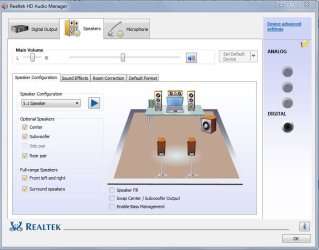
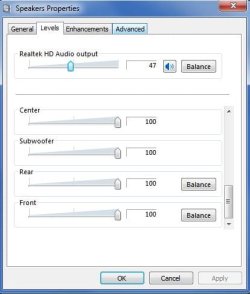
Checking swap center/subwoofer, fill speakers or bass management does not change anything...

i have an integrated Realtek HD audio card on a notebook with the following specs:

BTO 17CL33 (Clevo W87CU)

- Windows 7 Ultimate 64bit
- i7 740QM (1.73Ghz, 6Mb, Quad core)
- 6Gb Corsair RAM
- nVidia GeForce GTX 460M (1.5Gb DDR 5)
- 17 inch FULL HD WUXGA+ Glare TFT (1920x1080)
- OCZ Vertex 2 SSD 160 Gb
- Intel® Cantiga PM55 1333MHz FSB + ICH10M

I have 5 speakers integrated in the case: two front speakers, two speakers next to the keyboard, 1 subwoofer on the bottom of the notebook

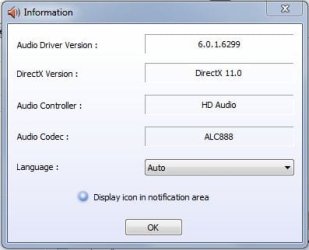
I installed the latest driver from the Realtek site: version 2.57 and have selected 5.1 sound in the sound manager.

With standard windows sounds and with playing music in WMP I only get sound out of the front speakers. This sounds is a little pitchy as if the volume is set too high.
When I play a DVD with 5.1 surround features I get sound out of all speakers but the Center sound is put out to the subwoofer so I cannot understand what actors are saying. I get almost no bass sound. I just sounds not correct...
In the sound manager i can clearly hear the sound coming from underneath my laptop when pressing on the center speaker !

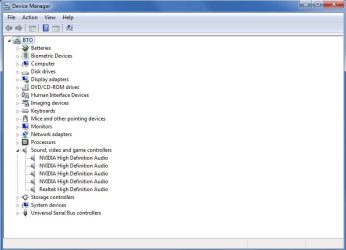
In my device manager I see also Nvidia HD audio listed next to my Realtek card ? See screenshots

thanx a million for your help !!

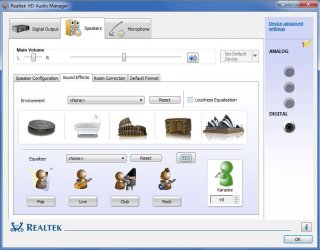
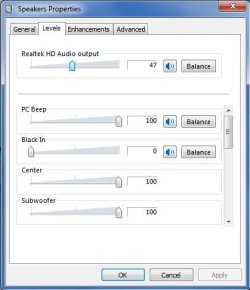
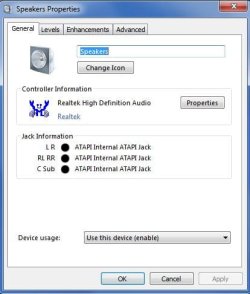
Here I try to give you more information on my setup with screens:
 

Attachments
  • device manager.JPG
    device manager.JPG
    45.1 KB · Views: 10
  • hd audio manager.JPG
    hd audio manager.JPG
    59.4 KB · Views: 42
  • hd audio manager2.JPG
    hd audio manager2.JPG
    62.6 KB · Views: 9
  • hd audio manager3.JPG
    hd audio manager3.JPG
    21.4 KB · Views: 5
  • sound1.JPG
    sound1.JPG
    51.6 KB · Views: 15
  • speakers1.JPG
    speakers1.JPG
    32.2 KB · Views: 3
  • speakers2.JPG
    speakers2.JPG
    31 KB · Views: 3
  • speakers3.JPG
    speakers3.JPG
    33 KB · Views: 2

My Computer My Computer

At a glance

Windows 7 Ultimate 64biti7 740QM (1.73Ghz, 6Mb, Quad core)6Gb CorsairnVidia GeForce GTX 460M (1.5Gb DDR 5)
Computer Manufacturer/Model Number
BTO 17CL33 (Clevo W87CU)
OS
Windows 7 Ultimate 64bit
CPU
i7 740QM (1.73Ghz, 6Mb, Quad core)
Motherboard
?
Memory
6Gb Corsair
Graphics Card(s)
nVidia GeForce GTX 460M (1.5Gb DDR 5)
Sound Card
Reatek integrated (not specified)
Monitor(s) Displays
17 inch FULL HD WUXGA+ Glare TFT (1920x1080)
Hard Drives
OCZ Vertex 2 SSD 160 Gb
PSU
Intel® Cantiga PM55 1333MHz FSB + ICH10M
Hello there.

1st, any stereo file that you play on WMP or any other audio player, will sound in stereo mode, you need to tick the speaker fill option in ScreenShot #2

2nd, probably you connected the outputs in the wrong jack, you could try to swap the black and orange ones to see if that help, or ticking the Swap Center/Sub option on ScreenShot #2

3rd, the drivers are OK, latest version :)

4th, Nvidia i believe it is from the HDMI connector on your card :huh: somebody please correct me if i'm wrong
 

My Computer My Computer

At a glance

Windows
Computer type
PC/Desktop
OS
Windows
Hi, my speakers are integrated so no changing of jacks possible !

When i tick speaker fill nothing changes ? do i have to reboot to hear changes ?

thanx

Hello there.

1st, any stereo file that you play on WMP or any other audio player, will sound in stereo mode, you need to tick the speaker fill option in ScreenShot #2

2nd, probably you connected the outputs in the wrong jack, you could try to swap the black and orange ones to see if that help, or ticking the Swap Center/Sub option on ScreenShot #2

3rd, the drivers are OK, latest version :)

4th, Nvidia i believe it is from the HDMI connector on your card :huh: somebody please correct me if i'm wrong
 

My Computer My Computer

At a glance

Windows 7 Ultimate 64biti7 740QM (1.73Ghz, 6Mb, Quad core)6Gb CorsairnVidia GeForce GTX 460M (1.5Gb DDR 5)
Computer Manufacturer/Model Number
BTO 17CL33 (Clevo W87CU)
OS
Windows 7 Ultimate 64bit
CPU
i7 740QM (1.73Ghz, 6Mb, Quad core)
Motherboard
?
Memory
6Gb Corsair
Graphics Card(s)
nVidia GeForce GTX 460M (1.5Gb DDR 5)
Sound Card
Reatek integrated (not specified)
Monitor(s) Displays
17 inch FULL HD WUXGA+ Glare TFT (1920x1080)
Hard Drives
OCZ Vertex 2 SSD 160 Gb
PSU
Intel® Cantiga PM55 1333MHz FSB + ICH10M
Ohhh i see, i guess i misread and thought you had a desktop PC hehe.

Let's see.. Reboot your PC after ticking and applying the option.

Try also the swap option if the sound isn't changing.
 

My Computer My Computer

At a glance

Windows
Computer type
PC/Desktop
OS
Windows
i'll try to swap and reboot but i would love to see another option than the fill speaker because that would mean simulating ?

Ohhh i see, i guess i misread and thought you had a desktop PC hehe.

Let's see.. Reboot your PC after ticking and applying the option.

Try also the swap option if the sound isn't changing.
 

My Computer My Computer

At a glance

Windows 7 Ultimate 64biti7 740QM (1.73Ghz, 6Mb, Quad core)6Gb CorsairnVidia GeForce GTX 460M (1.5Gb DDR 5)
Computer Manufacturer/Model Number
BTO 17CL33 (Clevo W87CU)
OS
Windows 7 Ultimate 64bit
CPU
i7 740QM (1.73Ghz, 6Mb, Quad core)
Motherboard
?
Memory
6Gb Corsair
Graphics Card(s)
nVidia GeForce GTX 460M (1.5Gb DDR 5)
Sound Card
Reatek integrated (not specified)
Monitor(s) Displays
17 inch FULL HD WUXGA+ Glare TFT (1920x1080)
Hard Drives
OCZ Vertex 2 SSD 160 Gb
PSU
Intel® Cantiga PM55 1333MHz FSB + ICH10M
Unfortunately, as long as you're not playing 5.1 audio files, just stereo files, you'll need the "speaker fill" option because a stereo file has 2 channels, and your speakers are 5 channels. you need to "fill" the audio so the 3 speakers that are not playing any sound, can play it.
 

My Computer My Computer

At a glance

Windows
Computer type
PC/Desktop
OS
Windows
Unfortunately, as long as you're not playing 5.1 audio files, just stereo files, you'll need the "speaker fill" option because a stereo file has 2 channels, and your speakers are 5 channels. you need to "fill" the audio so the 3 speakers that are not playing any sound, can play it.


OK. I cannot get this to work. I checked both Fill Speakers and Swap, but when i play a 5.1 DVD the voices come out of the subwoofer and i cannot understand a word....
In VLC player i can switch between 5.1 and 4 speakers and you clearly hear the voices dissapear... What can i do ??
When i try to let VCL play via DirectAudio there is no sound at all that comes out... When i check witch DxDiag the settings for the sound are OK i think....
 

My Computer My Computer

At a glance

Windows 7 Ultimate 64biti7 740QM (1.73Ghz, 6Mb, Quad core)6Gb CorsairnVidia GeForce GTX 460M (1.5Gb DDR 5)
Computer Manufacturer/Model Number
BTO 17CL33 (Clevo W87CU)
OS
Windows 7 Ultimate 64bit
CPU
i7 740QM (1.73Ghz, 6Mb, Quad core)
Motherboard
?
Memory
6Gb Corsair
Graphics Card(s)
nVidia GeForce GTX 460M (1.5Gb DDR 5)
Sound Card
Reatek integrated (not specified)
Monitor(s) Displays
17 inch FULL HD WUXGA+ Glare TFT (1920x1080)
Hard Drives
OCZ Vertex 2 SSD 160 Gb
PSU
Intel® Cantiga PM55 1333MHz FSB + ICH10M
Back
Top