Can only connect to the internet in Safe Mode

Amishdj

New member
Local time
7:27 PM
Messages
11
Hello,

I'm running a Dell Inspiron 1525 with Windows 7 32 bit and a few weeks ago this laptop ceased to connect to the internet outside of safe mode with networking. I have searched through numerous forums and found many people with similar problems but none of the solutions seemed to work for me. I'll list what I can remember trying to try and help with a solution.

-I have reset IE
-I have tried a clean boot
-I've scanned for malware and viruses in normal and safe mode, all clean

I also have a second laptop running windows 7 64 bit that connects just fine. The Dell that does not work detects the internet in normal mode but gives an error message saying "the device or resource won't accept the connection"

I really appreciate any help that anyone can give.
 

My Computer My Computer

At a glance

Windows 7 32 bit
OS
Windows 7 32 bit
Hello Amisshdj & Welcome to SevenForums :geek:

What kind of software did you scan for Malware?
- I suggest Malwarebytes
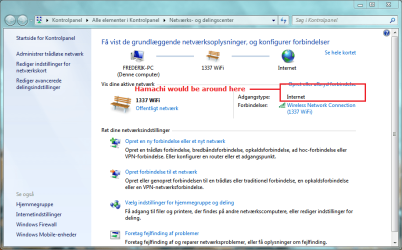
Do you have any virtual private network (VPN) configured? (Programs like Log me in Hamachi, used to connect two (or more) computers while playing on Local Area Network (LAN), which it's actually ain't. It's just a regular network.)

Sharingcenter.PNG

Do you have any software that could block your connection?

Welcome again!
Best Regards,
FredeGail
 

My Computer My Computer

At a glance

Microsoft Windows 7 Ultimate: x64 (SP1)Intel® Core™ i5-2500K ProcessorKingston DDR3 HyperX 1600MHz 8GBASUS GTX 560 TI DirectCU II 900MHz
Computer Manufacturer/Model Number
Brewed
OS
Microsoft Windows 7 Ultimate: x64 (SP1)
CPU
Intel® Core™ i5-2500K Processor
Motherboard
ASUS P8Z68-V PRO
Memory
Kingston DDR3 HyperX 1600MHz 8GB
Graphics Card(s)
ASUS GTX 560 TI DirectCU II 900MHz
Sound Card
Realtek® ALC892 8-Channel High Definition Audio CODEC
Monitor(s) Displays
ACER LCD P246HBD 1920x1080 (24") - Dell 1280x800
Screen Resolution
ACER LCD P246HBD ~ [1920X1080] - DELL ~ [1280x800]
Hard Drives
500 GB WD Caviar SE116 7200rpm SATA2
PSU
Corsair 750W Power Supply
Case
Coolermaster CM Scout
Cooling
Zalman FS-C77 Fatal1ty CPU Cooler
Keyboard
Logitech G15
Mouse
Coolermaster Sentinel Advanced
Internet Speed
[↓ 10 MB/s DL] [↑ 1 MB/s UL]
Other Info
- ROCCAT™ Kave – Solid 5.1 Surround Sound Gaming Headset
- Not overclocking
Malwarebytes is what I have been using. And this computer has never had anything like a hamachi server.
 

My Computer My Computer

At a glance

Windows 7 32 bit
OS
Windows 7 32 bit
My antivirus and firewall are also both shut off.
 

My Computer My Computer

At a glance

Windows 7 32 bit
OS
Windows 7 32 bit
Are you running on cable or wireless?

Best Regards,
FredeGail
 

My Computer My Computer

At a glance

Microsoft Windows 7 Ultimate: x64 (SP1)Intel® Core™ i5-2500K ProcessorKingston DDR3 HyperX 1600MHz 8GBASUS GTX 560 TI DirectCU II 900MHz
Computer Manufacturer/Model Number
Brewed
OS
Microsoft Windows 7 Ultimate: x64 (SP1)
CPU
Intel® Core™ i5-2500K Processor
Motherboard
ASUS P8Z68-V PRO
Memory
Kingston DDR3 HyperX 1600MHz 8GB
Graphics Card(s)
ASUS GTX 560 TI DirectCU II 900MHz
Sound Card
Realtek® ALC892 8-Channel High Definition Audio CODEC
Monitor(s) Displays
ACER LCD P246HBD 1920x1080 (24") - Dell 1280x800
Screen Resolution
ACER LCD P246HBD ~ [1920X1080] - DELL ~ [1280x800]
Hard Drives
500 GB WD Caviar SE116 7200rpm SATA2
PSU
Corsair 750W Power Supply
Case
Coolermaster CM Scout
Cooling
Zalman FS-C77 Fatal1ty CPU Cooler
Keyboard
Logitech G15
Mouse
Coolermaster Sentinel Advanced
Internet Speed
[↓ 10 MB/s DL] [↑ 1 MB/s UL]
Other Info
- ROCCAT™ Kave – Solid 5.1 Surround Sound Gaming Headset
- Not overclocking
I cannot connect either way.
 

My Computer My Computer

At a glance

Windows 7 32 bit
OS
Windows 7 32 bit
What antivirus? yes, I know you said it was off... but AV never really turns off ;)
 

My Computer My Computer

At a glance

7 Pro
OS
7 Pro
Symantec, I would uninstall it but the uninstaller never seems to work
 

My Computer My Computer

At a glance

Windows 7 32 bit
OS
Windows 7 32 bit
Lets check 2 things:

1st: Your proxy settings in IE.
- IE/Tools/Options/Connections/LAN Settings Make sure the proxy server is blank and UNCHECKED.

2nd: We'll check your host file.
- C:\windows\system32\drivers\etc\hosts
(standard installation path)
 

My Computer My Computer

At a glance

7 Pro
OS
7 Pro
The proxy server box was not checked and I found the "hosts" file but what am I doing with it?
 

My Computer My Computer

At a glance

Windows 7 32 bit
OS
Windows 7 32 bit
can you copy the contents of the hosts file into your next post?
 

My Computer My Computer

At a glance

7 Pro
OS
7 Pro
Here you go

# Copyright (c) 1993-2006 Microsoft Corp.
#
# This is a sample HOSTS file used by Microsoft TCP/IP for Windows.
#
# This file contains the mappings of IP addresses to host names. Each
# entry should be kept on an individual line. The IP address should
# be placed in the first column followed by the corresponding host name.
# The IP address and the host name should be separated by at least one
# space.
#
# Additionally, comments (such as these) may be inserted on individual
# lines or following the machine name denoted by a '#' symbol.
#
# For example:
#
# 102.54.94.97 rhino.acme.com # source server
# 38.25.63.10 x.acme.com # x client host

127.0.0.1 localhost
::1 localhost
 

My Computer My Computer

At a glance

Windows 7 32 bit
OS
Windows 7 32 bit
Do you have any google toolbars or any other toolbars on IE?
 

My Computer My Computer

At a glance

7 Pro
OS
7 Pro
I did have a google toolbar but it was removed when I reset IE.
 

My Computer My Computer

At a glance

Windows 7 32 bit
OS
Windows 7 32 bit
it's a startup issue, can't tell what just yet.

Let's try this: type in to the run line: msconfig and hit enter.
You'll see a box popup with a few tabs on it. Select "Start Up" tab
Under this tab, you'll see all the applications/drivers and startup selections checked.
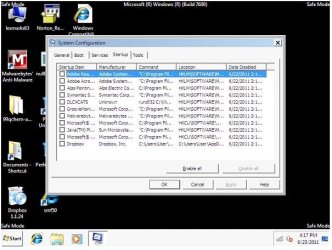
How many do you have checked in this tab? If possible, can you screen shot the startup tab and post it here?
 

My Computer My Computer

At a glance

7 Pro
OS
7 Pro
Here is the startup tab. I wasn't sure how to put the picture in the post so it's just a word file.
 

Attachments

My Computer My Computer

At a glance

Windows 7 32 bit
OS
Windows 7 32 bit
it's not letting me download that attachment, can you try to upload it again?
 

My Computer My Computer

At a glance

7 Pro
OS
7 Pro
i could download -see snip

I had no problem downloading. Maybe this will help:
 

Attachments

  • startup.JPG
    startup.JPG
    53.2 KB · Views: 99

My Computer My Computer

At a glance

Windows 7 64b UltimateI7-2600 3.40GHz - testing various OC levels..2x 4Gb DDR3/1333GTX570 - testing OC levels
Computer Manufacturer/Model Number
custom build
OS
Windows 7 64b Ultimate
CPU
I7-2600 3.40GHz - testing various OC levels..
Motherboard
ASUS Sabretooth
Memory
2x 4Gb DDR3/1333
Graphics Card(s)
GTX570 - testing OC levels
Sound Card
motherboard 7.1 DIG.
Monitor(s) Displays
2x Ilyama 24" E2409HDS-B1 2ms/DVI
Screen Resolution
1920 x 1080
Hard Drives
120 GB Intel Elmcrest SSD
1 TB SATAII 7200RPM/32MB
External 2TB USB3
PSU
Corsair Pro HX850W
Cooling
Coolermaster Hyper V8
Keyboard
Logitech G110
Mouse
Logitech G700
Internet Speed
25Mb
Other Info
CPU: 7,7 RAM: 7,7 GTX: 7,9 GTX 3D : 7,9 SSD 7,6
Overall 7,6 ...... now to speed up the SSD... ;)

Also use a Dell XPS M1710 on Vista 32b
Asus LT on Vista 32
3 older machines still doing fine on Linux/ubuntu but not used much anymore...
Could you expand the Command Column and post again please?
 

My Computer My Computer

At a glance

7 Pro
OS
7 Pro
And a question to Amishdj: just checking to be sure... have you ONLY tried to do something on internet with IE?
In other words, have you checked if non-IE programs, maybe a mailclient or Chrome or Firefox can access internet?
 

My Computer My Computer

At a glance

Windows 7 64b UltimateI7-2600 3.40GHz - testing various OC levels..2x 4Gb DDR3/1333GTX570 - testing OC levels
Computer Manufacturer/Model Number
custom build
OS
Windows 7 64b Ultimate
CPU
I7-2600 3.40GHz - testing various OC levels..
Motherboard
ASUS Sabretooth
Memory
2x 4Gb DDR3/1333
Graphics Card(s)
GTX570 - testing OC levels
Sound Card
motherboard 7.1 DIG.
Monitor(s) Displays
2x Ilyama 24" E2409HDS-B1 2ms/DVI
Screen Resolution
1920 x 1080
Hard Drives
120 GB Intel Elmcrest SSD
1 TB SATAII 7200RPM/32MB
External 2TB USB3
PSU
Corsair Pro HX850W
Cooling
Coolermaster Hyper V8
Keyboard
Logitech G110
Mouse
Logitech G700
Internet Speed
25Mb
Other Info
CPU: 7,7 RAM: 7,7 GTX: 7,9 GTX 3D : 7,9 SSD 7,6
Overall 7,6 ...... now to speed up the SSD... ;)

Also use a Dell XPS M1710 on Vista 32b
Asus LT on Vista 32
3 older machines still doing fine on Linux/ubuntu but not used much anymore...
Back
Top