Can only see half of bottom icons

Marie7

New member
Local time
2:06 PM
Messages
10
Hello. Just upgraded to Windows 7 from Windows XP. Got everything set up and turned on. On bottom of desk top screen, are 4 icons -- start, ie, windows explorer, & windows media player. But only half of the icons can be seen -- the other half disappears. Would like to see all of these 4 icons in full. Can't figure out how to fix it. Talked to 4 different people at Geek Squad phone tech support -- none of them knows how to fix it! Seems like it should be relatively simple to fix, but can't figure it out. I did chose a screen saver photo when setting up computer. Could that be the issue? Thanks for your help.
 

My Computer My Computer

At a glance

Windows 7 Home Premium 32bit
OS
Windows 7 Home Premium 32bit
Last edited by a moderator:

My Computer My Computer

At a glance

Windows 8.1 ; Windows 7 x86 (Dec2008-Jan2013)
Computer type
PC/Desktop
OS
Windows 8.1 ; Windows 7 x86 (Dec2008-Jan2013)
Other Info
"The scale icon at the top right of a post or tutorial is how you can give rep to the member."
Hello. Just upgraded to Windows 7 from Windows XP. Got everything set up and turned on. On bottom of desk top screen, are 4 icons -- start, ie, windows explorer, & windows media player. But only half of the icons can be seen -- the other half disappears. Would like to see all of these 4 icons in full.
Sounds like either a hardware adjustment issue (using controls on your monitor) or a software driver problem.

Can you please provide details on your setup, what monitor, what graphics card, etc.? CRT or LCD? Do you know what desktop resolution and video refresh rate you had specified in the Device Manager -> Display Adapter properties under WinXP?? That would be helpful, to compare against the same values you've got by default (or customized) in Win7.

What desktop resolution are you running on Win7, and what refresh frequency? CRT monitors generally have memories if you've adjusted them in the past (using the controls on the monitor) but those memories are specific to particular resolutions and refresh rates.

If your current default resolution/refresh rate on Win7 is different from what you used on WinXP, chances are you're just seeing the result of that. All you need is to either (a) adjust the monitor again, if you're happy with the current resolution/refresh rate, or (b) change the resolution/refresh rate to what it was under WinXP, and I'll bet your CRT monitor should look the same under Win7 as it did under WinXP.


Also, did you update your video drivers from the manufacturer's site (e.g. ATI or Nvidia), or did you just let Win7 do everything? If the Device Manager -> Display Adapter properties shows you're using the Microsoft generic drivers rather than ATI/Nvidia drivers, you should definitely do a driver update from the latest manufacturer's driver download page.

Start, right-click on Computer, select Properties, select Device Manager, expand Display Adapter, right-click on display adapter shown and select Properties, then Driver tab. What does it show?

Have you done all the Windows Updates (including the "optional" ones, which could well have a driver update for your video card in there)?
 

My Computer My Computer

At a glance

Windows 7 Pro x64 (1), Win7 Pro X64 (2)i5-3350p 3.1Ghz/6MB-cache (1); E8400 3.0Ghz/6...8GB PC3-12800 DDR3 (1); 4GB PC3-10600 DDR3 (2)ATI HD7750 (1), (see TV cards); ATI R7 250 (2)
Computer type
PC/Desktop
Computer Manufacturer/Model Number
Home-built, two systems (1) and (2)
OS
Windows 7 Pro x64 (1), Win7 Pro X64 (2)
CPU
i5-3350p 3.1Ghz/6MB-cache (1); E8400 3.0Ghz/6MB-cache (2)
Motherboard
ASUS P8Z77-V Pro (1); ASUS P5Q3 (2)
Memory
8GB PC3-12800 DDR3 (1); 4GB PC3-10600 DDR3 (2)
Graphics Card(s)
ATI HD7750 (1), (see TV cards); ATI R7 250 (2)
Sound Card
Realtek ALC892 HD Audio (1); Realtek ALC1200 HD Audio (2)
Monitor(s) Displays
Eizo HD2441W LCD, Eizo S2433W (1); Eizo 24" S2433W (2)
Screen Resolution
1920x1200, 1920x1200 (1); 1920x1200 (2)
Hard Drives
(1) 1TB SATA-II (7200RPM), 2x2TB SATA-III (7200RPM), 250GB SATA-III (10000RPM) for OS; 2x2TB external USB 3.0

(2) 320GB SATA-II (7200RPM), 750GB SATA-II (7200RPM), 150GB SATA-II (10000RPM) for OS; 2TB external USB 3.0
PSU
Nesteq ECS-6001 600W (1); Nesteq ECS-5001 500W (2)
Case
Acousti-Case 360 (1) and (2)
Cooling
Noctua NH-U12P SE2 for CPU, 2x120mm case fans (1) and (2)
Keyboard
IBM PS/2 (1) and (2)
Mouse
Logitech MX Revolution wireless (1); Microsoft wired (2)
Internet Speed
100mbps down / 10mbps up
Antivirus
Microsoft Security Essentials; Malwarebyte Anti-Malware Pro
Browser
Firefox
Other Info
Ceton InfiniTV 4-tuner cablecard-enabled TV card as well as Hauppauge HVR-2250 OTA/ATSC 2-tuner TV card in (1), running under Win7 WMC
half icon

under display adapter, it says: ATI Radeon HD 4200. This system was put together at Best Buy, who were supposed to download all of the updates for Windows 7. When I first turned on the machine, the icons were fully displayed at the bottom. I'm not sure what I did to change this -- I tried dragging those icons up to the top part of the screen, but it didn't work.
 

My Computer My Computer

At a glance

Windows 7 Home Premium 32bit
OS
Windows 7 Home Premium 32bit
under display adapter, it says: ATI Radeon HD 4200.
If you then right-click on that "ATI Radeon HD 4200", select Properties, and then select the "Driver" tab.

What does it show? Is the driver from ATI, or is the driver from Microsoft?

driverl.jpg


This system was put together at Best Buy, who were supposed to download all of the updates for Windows 7. When I first turned on the machine, the icons were fully displayed at the bottom. I'm not sure what I did to change this
Well this is an interesting new fact.

What type of monitor do you have? CRT or LCD?

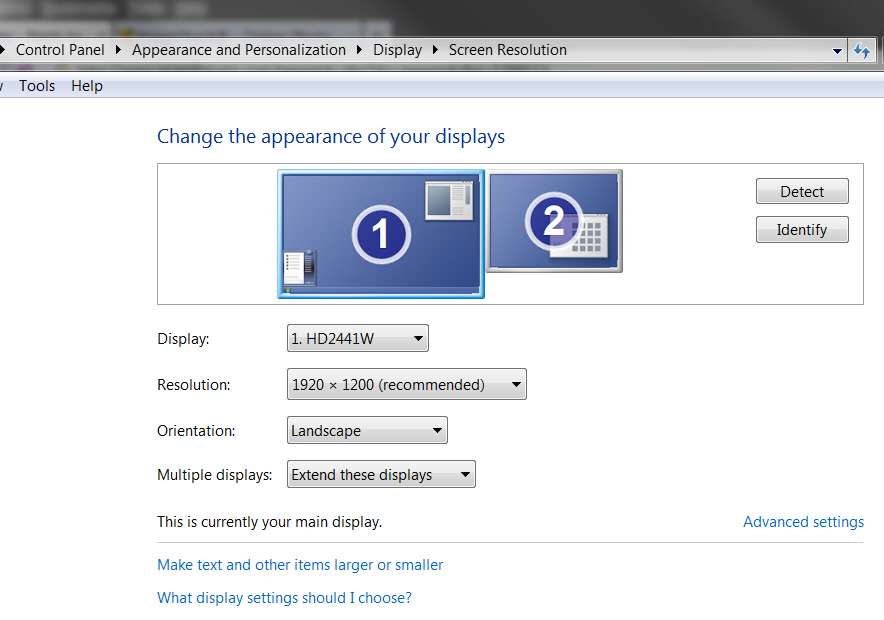
What is the desktop resolution you're running at? Right-click on your desktop, select "Screen resolution", and you'll get something like the following:

resolutionw.jpg


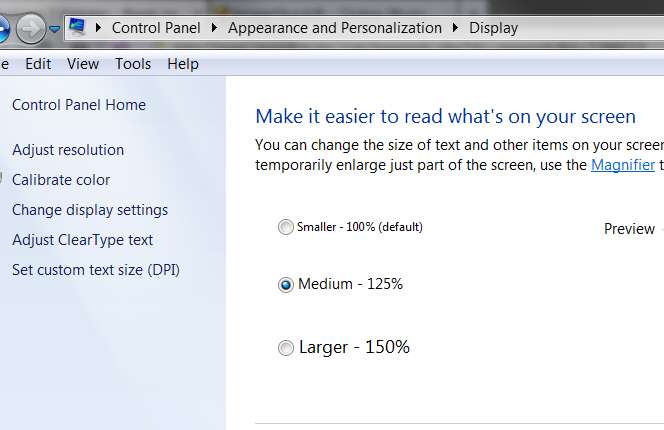
What is the "font size" you're using? Is it 100%, 125%, larger? On the "screen resolution" screen, click on the "make text and other items larger or smaller" link, and you'll get the "font size" screen like the following:

fontsize.jpg


Can you possibly take a screenshot of your desktop (or at least of the bottom taskbar area of your screen) and post it, so that we can hopefully see exactly what you're seeing? It might be much easier for us to spot the likely problem/solution if we can see exactly what you mean by "half cut off".
 

My Computer My Computer

At a glance

Windows 7 Pro x64 (1), Win7 Pro X64 (2)i5-3350p 3.1Ghz/6MB-cache (1); E8400 3.0Ghz/6...8GB PC3-12800 DDR3 (1); 4GB PC3-10600 DDR3 (2)ATI HD7750 (1), (see TV cards); ATI R7 250 (2)
Computer type
PC/Desktop
Computer Manufacturer/Model Number
Home-built, two systems (1) and (2)
OS
Windows 7 Pro x64 (1), Win7 Pro X64 (2)
CPU
i5-3350p 3.1Ghz/6MB-cache (1); E8400 3.0Ghz/6MB-cache (2)
Motherboard
ASUS P8Z77-V Pro (1); ASUS P5Q3 (2)
Memory
8GB PC3-12800 DDR3 (1); 4GB PC3-10600 DDR3 (2)
Graphics Card(s)
ATI HD7750 (1), (see TV cards); ATI R7 250 (2)
Sound Card
Realtek ALC892 HD Audio (1); Realtek ALC1200 HD Audio (2)
Monitor(s) Displays
Eizo HD2441W LCD, Eizo S2433W (1); Eizo 24" S2433W (2)
Screen Resolution
1920x1200, 1920x1200 (1); 1920x1200 (2)
Hard Drives
(1) 1TB SATA-II (7200RPM), 2x2TB SATA-III (7200RPM), 250GB SATA-III (10000RPM) for OS; 2x2TB external USB 3.0

(2) 320GB SATA-II (7200RPM), 750GB SATA-II (7200RPM), 150GB SATA-II (10000RPM) for OS; 2TB external USB 3.0
PSU
Nesteq ECS-6001 600W (1); Nesteq ECS-5001 500W (2)
Case
Acousti-Case 360 (1) and (2)
Cooling
Noctua NH-U12P SE2 for CPU, 2x120mm case fans (1) and (2)
Keyboard
IBM PS/2 (1) and (2)
Mouse
Logitech MX Revolution wireless (1); Microsoft wired (2)
Internet Speed
100mbps down / 10mbps up
Antivirus
Microsoft Security Essentials; Malwarebyte Anti-Malware Pro
Browser
Firefox
Other Info
Ceton InfiniTV 4-tuner cablecard-enabled TV card as well as Hauppauge HVR-2250 OTA/ATSC 2-tuner TV card in (1), running under Win7 WMC
Welcome Marie7. Your problem may be with the display adjustments on your monitor. You will need to find its menu and display options. There should be adjustments for expanding, collapsing, etc, the display picture. It may be that during the switch from XP those setting got changed some. In other words you would have to move the whole picture up or reduce the size vertically to unhide the icons all the way.
 

My Computer My Computer

At a glance

Windows 7 Ultimate X64 SP1Intel i5-2550K, Differing ~4.4-4.8GHz No buil...16GB G.Skill Sniper 1866MHz @ 2133MHz 2x8GBASUS GTX650TIB-DC2OC-2GD5, (650TI Boost)
Computer type
PC/Desktop
Computer Manufacturer/Model Number
Home Built Desktop By DataTech
OS
Windows 7 Ultimate X64 SP1
CPU
Intel i5-2550K, Differing ~4.4-4.8GHz No built in GPU
Motherboard
ASUS P8Z68-V PRO/GEN3
Memory
16GB G.Skill Sniper 1866MHz @ 2133MHz 2x8GB
Graphics Card(s)
ASUS GTX650TIB-DC2OC-2GD5, (650TI Boost)
Sound Card
Onboard Realtek 5-1
Monitor(s) Displays
Samsung P2570HD
Screen Resolution
1920x1080
Hard Drives
Samsung 840 Pro 256GB SSD for OS, 500GB Seagate Constellation (Enterprise drive) for Data
PSU
Corsair HX650W
Case
Inwin Dragon Rider
Cooling
Hyper 212 EVO w/two Noctua fans, push-pull, @1300 RPM
Keyboard
E-Z Eyes, bright yellow keys with large characters
Mouse
steelseries SENSEI Laser Pro Gaming
Internet Speed
48-51Mbs Mbs down, 11 Mbs up Xfinity Cable
Antivirus
Norton Internet Security 2013
Browser
IE 10, Opera, Pale Moon if needed
Other Info
4 case fans, LG BluRay-RE, ASUS DVD-RW, Mr. Fusion power supply, 1.21 gigawatts.
19" LCD Monitor
Text Size set on Larger
1600 x 900 resolution
can't take photo
Set on Medium 125%
 

My Computer My Computer

At a glance

Windows 7 Home Premium 32bit
OS
Windows 7 Home Premium 32bit

My Computer My Computer

At a glance

Windows 7 Ultimate X64 SP1Intel i5-2550K, Differing ~4.4-4.8GHz No buil...16GB G.Skill Sniper 1866MHz @ 2133MHz 2x8GBASUS GTX650TIB-DC2OC-2GD5, (650TI Boost)
Computer type
PC/Desktop
Computer Manufacturer/Model Number
Home Built Desktop By DataTech
OS
Windows 7 Ultimate X64 SP1
CPU
Intel i5-2550K, Differing ~4.4-4.8GHz No built in GPU
Motherboard
ASUS P8Z68-V PRO/GEN3
Memory
16GB G.Skill Sniper 1866MHz @ 2133MHz 2x8GB
Graphics Card(s)
ASUS GTX650TIB-DC2OC-2GD5, (650TI Boost)
Sound Card
Onboard Realtek 5-1
Monitor(s) Displays
Samsung P2570HD
Screen Resolution
1920x1080
Hard Drives
Samsung 840 Pro 256GB SSD for OS, 500GB Seagate Constellation (Enterprise drive) for Data
PSU
Corsair HX650W
Case
Inwin Dragon Rider
Cooling
Hyper 212 EVO w/two Noctua fans, push-pull, @1300 RPM
Keyboard
E-Z Eyes, bright yellow keys with large characters
Mouse
steelseries SENSEI Laser Pro Gaming
Internet Speed
48-51Mbs Mbs down, 11 Mbs up Xfinity Cable
Antivirus
Norton Internet Security 2013
Browser
IE 10, Opera, Pale Moon if needed
Other Info
4 case fans, LG BluRay-RE, ASUS DVD-RW, Mr. Fusion power supply, 1.21 gigawatts.
Text Size set on Larger (150%)

Set on Medium 125%
Which is it? These are two different settings on that same "text size" screen. Which one do you have set?

Also, you didn't answer my question regarding the ATI video drivers installed. See my screenshot above. What version of driver is installed for your ATI HD 4200 (Device Manager, right-click on the expanded display adapter line, select Properties, and then Driver tab... what does it show?)

Personally, in my opinion since you have an LCD screen and not a CRT screen, there would be no relevant "horizontal/vertical size/location" adjustments for you to play with, to better "center" your Win7 desktop so as not to chop off the bottom of the taskbar from view.

I suspect this is a video driver problem. Is 1600x900 the "recommended" resolution for your monitor?


I have experimented on my own system, which has a "double-high" taskbar. Normally I use "small icons" on the taskbar, because I have lots of them there. I use it like the Win7-equivalent of the "Quick Launch" section of the WinXP taskbar.

It looks like this, normally:

taskbarsmall.jpg


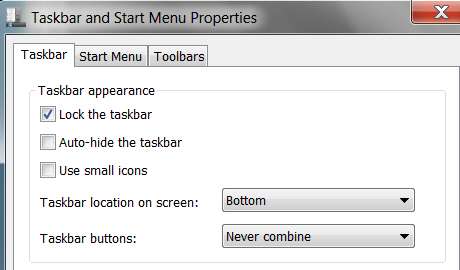
with "use small icons" checked in the taskbar Properties setup:

taskbarsmallproperties.jpg


Note that if I un-check the "use small icons" option, everything gets resized properly to enlarge the taskbar icons, including Windows raising the height of the "double-high" taskbar to accommodate two complete rows of icons.

However since the icon size is now larger, even two rows of icons is insufficient, and an up/down scroller is added on the right side of the taskbar to allow me to get to the third row which is now present. Actually, I should have made the taskbar "triple-high" if I wanted to use these larger icons (which I don't). Obviously, the "use small icons" approach is superior.

taskbarlarge.jpg


and the Properties:

taskbarlargeproperties.jpg


But note that in both cases, the entire icon is visible in each of the two rows presented.

What does yours look like? Can you take a screenshot like I've done and post it here?

 

My Computer My Computer

At a glance

Windows 7 Pro x64 (1), Win7 Pro X64 (2)i5-3350p 3.1Ghz/6MB-cache (1); E8400 3.0Ghz/6...8GB PC3-12800 DDR3 (1); 4GB PC3-10600 DDR3 (2)ATI HD7750 (1), (see TV cards); ATI R7 250 (2)
Computer type
PC/Desktop
Computer Manufacturer/Model Number
Home-built, two systems (1) and (2)
OS
Windows 7 Pro x64 (1), Win7 Pro X64 (2)
CPU
i5-3350p 3.1Ghz/6MB-cache (1); E8400 3.0Ghz/6MB-cache (2)
Motherboard
ASUS P8Z77-V Pro (1); ASUS P5Q3 (2)
Memory
8GB PC3-12800 DDR3 (1); 4GB PC3-10600 DDR3 (2)
Graphics Card(s)
ATI HD7750 (1), (see TV cards); ATI R7 250 (2)
Sound Card
Realtek ALC892 HD Audio (1); Realtek ALC1200 HD Audio (2)
Monitor(s) Displays
Eizo HD2441W LCD, Eizo S2433W (1); Eizo 24" S2433W (2)
Screen Resolution
1920x1200, 1920x1200 (1); 1920x1200 (2)
Hard Drives
(1) 1TB SATA-II (7200RPM), 2x2TB SATA-III (7200RPM), 250GB SATA-III (10000RPM) for OS; 2x2TB external USB 3.0

(2) 320GB SATA-II (7200RPM), 750GB SATA-II (7200RPM), 150GB SATA-II (10000RPM) for OS; 2TB external USB 3.0
PSU
Nesteq ECS-6001 600W (1); Nesteq ECS-5001 500W (2)
Case
Acousti-Case 360 (1) and (2)
Cooling
Noctua NH-U12P SE2 for CPU, 2x120mm case fans (1) and (2)
Keyboard
IBM PS/2 (1) and (2)
Mouse
Logitech MX Revolution wireless (1); Microsoft wired (2)
Internet Speed
100mbps down / 10mbps up
Antivirus
Microsoft Security Essentials; Malwarebyte Anti-Malware Pro
Browser
Firefox
Other Info
Ceton InfiniTV 4-tuner cablecard-enabled TV card as well as Hauppauge HVR-2250 OTA/ATSC 2-tuner TV card in (1), running under Win7 WMC
Back
Top