Can someone tell me if I can change drive letter like this

All we did was asked youu to post a shot of disk management and you couldn`t even do it, it takes 10 seconds.

Why did you even bother asking for help if you`re not gonna cooperate, Have a Good Day.
 

My Computer My Computer

At a glance

Windows 10 Pro x64Intel Core i7 6700KGSkill TridentZ RGB 16GB 3600 16-16-16-36EVGA GTX 980 Ti SC x2
Computer type
PC/Desktop
Computer Manufacturer/Model Number
Skylake Special #666
OS
Windows 10 Pro x64
CPU
Intel Core i7 6700K
Motherboard
Asus Sabertooth Z170 Mark 1
Memory
GSkill TridentZ RGB 16GB 3600 16-16-16-36
Graphics Card(s)
EVGA GTX 980 Ti SC x2
Sound Card
Realtek High Definition
Monitor(s) Displays
AOC G2460PG
Screen Resolution
1920 x 1080 144Hz
Hard Drives
Samsung 860 Pro 256GB, Seagate Barracuda 4TB x2
PSU
EVGA 1000 P2, EVGA White Custom Braided Cables
Case
Corsair Vengeance C70 Gunmetal Black
Cooling
Corsair H100i v2, Corsair ML120 x2, Thermal Grizzly Kryonaut
Keyboard
Logitech G910 Orion Spectrum
Mouse
Logitech G700s
Internet Speed
Verizon Fios Quantum Gateway 75/75
Antivirus
Windows Defender, Malwarebytes Free 3.8.3
Browser
Chrome
Other Info
Corsair SP120 x4, LG Blu-ray Drive, Durabrand HT-395 100 Watt Dolby Digital Amp, Corsair H2100 Wireless 7.1 Headset
I think it would be more helpful if you used this tutorial by Golden to post screen shots of Disk Management.

http://www.sevenforums.com/tutorials/274797-disk-management-post-screen-capture-image.html


This will allow the helping members to better understand this disk management thing you have.
I have had a week of hell starting with my antivirus stop working. I worked with tech support for a week, I finally had to by my choice install Win7 fresh after several years of never having a problem.

I am stressed big time so forgive me if I don't care what you think about how I posted my hard drive images. I did the best I could without spending hours reading the forum to find out the best way. I am sure it is but I did it the best I could. SORRY I TROUBLED YOU

You are not bothering or troubling me.
We are all just trying to help you. We can't help you if you wouldn't let us help you.
Posting requested information in a proper way allows us to help you better.

It's your troubled computer so you can do as you choose.
When it comes to continuing to help you that is the choice of other members.

Let us know your choice.
 

My Computer My Computer

At a glance

Windows 10 Pro. 64/ version 1709 Windows 7 Pr...Intel i7-6800K @ 4.3Corsair Platinum 16 gig @2400EVGA GTX 1070 OC
Computer type
PC/Desktop
Computer Manufacturer/Model Number
Home made Desktop
OS
Windows 10 Pro. 64/ version 1709 Windows 7 Pro/64
CPU
Intel i7-6800K @ 4.3
Motherboard
ASUS X-99 Deluxe II
Memory
Corsair Platinum 16 gig @2400
Graphics Card(s)
EVGA GTX 1070 OC
Monitor(s) Displays
Asus 27" LED LCD/VE278Q
Screen Resolution
1920-1080 or 1280-720 HDMI
Hard Drives
INTEL SSD 730-240 Gb Sata 3.0/
PSU
EVGA Platium 1200W
Case
Phanteks Luxe Tempered Glass 8 fans/ one radiator
Cooling
XSPC/ Water Cooled CPU
Keyboard
Das 4 Professional
Mouse
Logitech M705/MX Anywhere 2-S
Internet Speed
100 mbits
Antivirus
Microsoft Security Essentials/ Malwarebytes Premium 3.0/ SAS
Browser
I.E. 11 default/Firefox/ ISP Time Warner Cable/Spectrum
Other Info
LG BluRay Burner/
Sound system-KLipsch-THX/
Icy Dock ssd Hot Swap bays.
Wow. For what ever your reasons, you sure do have a lot of partitions and drive letter assignments! ;)

  1. Drive letters can be assigned to mass storage devices/volumes (hard disk, USB drives, CD/ROM) and mapped network drives
  2. Drive letter assignments only appear when the associated mass storage device is connected and powered on (so if you've inserted a USB flash and removed it or a hard drive failed, its drive letter would stop appearing. The drive letter would still be assigned - but not appearing)
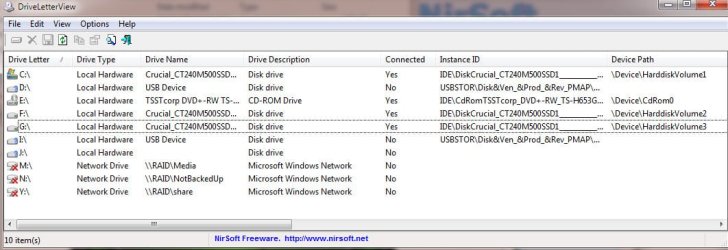
Disk Management won't show letter assignments for disconnected devices. For your case, suggest you download and run DriveLetterView.
> Click Ctl-A to select all items in the display
> Ctl-S to save selected items
> Next, be sure to change the Save As type pull down menu to Tab Delimited Text (.txt) before you save the file!
Then attach the text file

Here;s a sample from my machine. Note letters I and J are assigned but won't appear because the device it was assigned is not currently connected
/* EDIT */
Though note: Please provide a tab delimited text per my request. Not a screen shot as I did for my example
 

Attachments

  • DLV.jpg
    DLV.jpg
    65.5 KB · Views: 2
Last edited:

My Computer My Computer

At a glance

Desk 1: Win 7 Pro x32; Desk 2: Windows 10 x64
Computer type
PC/Desktop
Computer Manufacturer/Model Number
Dell Optiplex 360 and Optiplex 755
OS
Desk 1: Win 7 Pro x32; Desk 2: Windows 10 x64
Hard Drives
500GB Crucial SSD in both Desktops
Other Info
Buffalo 6TB NAS, Raid 1
Back
Top