
Hi guys!
I've been getting glitches, blue screen and AMD/ATI errors for a while now. I'm about to get my hard drive replaced by warranty for free, but they asked a lot of money for cloning my current hard drive, so I figured I'd do it myself as I own an external hard drive. As it turns out, I'm much less tech-savvy than I hoped.
I managed to copy all the files I want to keep manually onto my external, but then wanted to do an actual backup as well, as they required a disc to re-install my OS, which I don't have, cause I never got it.
I've managed to create a system repair disc, but every time I try to do a full backup or a system image, it gets to about 30% and then quits with this error code - 0x80070002.
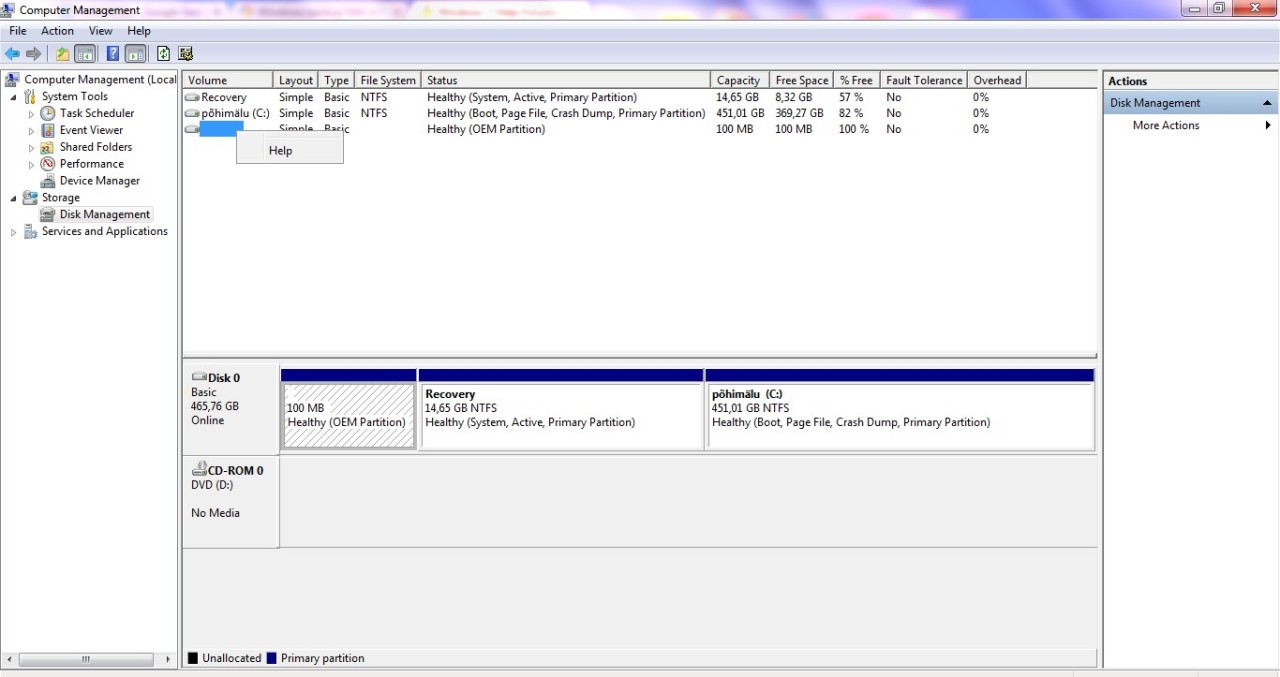
So, I found this - Error code 0x8100002F and or error code 0x80070002 when you back up files in Windows 7 -, and it seems to be scenario 3, that lead me there - You encounter problems when you move data over USB from a Windows 7 or Windows Server 2008 R2-based computer that has an NVIDIA USB EHCI chipset and at least 4GB of RAM -, but after that I got an error saying it's not applicable to my computer. I then found this - http://www.sevenforums.com/backup-restore/297022-error-0x80070002-when-attempting-backup-files.html -, which suggested me to change the letter for the 100MB partition, but as it doesn't have a letter to begin with, it only offers me the 'help' option, rather than the change letter one and now I'm stuck. Is there a way I can change it or is there anything else I can do to backup my OS? I'm not that bothered about anything else (I mean, I'd love to have it but..), as I've got legal copies of Office and necessary Adobe products and I've copied all personal files.
Or, do I even need to bother with this and the warranty IT guy can sort out my OS without an actual disc?
I have a Dell N5010, Windows Home Premium, 2009, SP1, 64bit
You can just link me to a relevant topic, as I'm sure there are many of these, I just can't find the one that would be the right fix for me.
thanks!
I've been getting glitches, blue screen and AMD/ATI errors for a while now. I'm about to get my hard drive replaced by warranty for free, but they asked a lot of money for cloning my current hard drive, so I figured I'd do it myself as I own an external hard drive. As it turns out, I'm much less tech-savvy than I hoped.
I managed to copy all the files I want to keep manually onto my external, but then wanted to do an actual backup as well, as they required a disc to re-install my OS, which I don't have, cause I never got it.
I've managed to create a system repair disc, but every time I try to do a full backup or a system image, it gets to about 30% and then quits with this error code - 0x80070002.
So, I found this - Error code 0x8100002F and or error code 0x80070002 when you back up files in Windows 7 -, and it seems to be scenario 3, that lead me there - You encounter problems when you move data over USB from a Windows 7 or Windows Server 2008 R2-based computer that has an NVIDIA USB EHCI chipset and at least 4GB of RAM -, but after that I got an error saying it's not applicable to my computer. I then found this - http://www.sevenforums.com/backup-restore/297022-error-0x80070002-when-attempting-backup-files.html -, which suggested me to change the letter for the 100MB partition, but as it doesn't have a letter to begin with, it only offers me the 'help' option, rather than the change letter one and now I'm stuck. Is there a way I can change it or is there anything else I can do to backup my OS? I'm not that bothered about anything else (I mean, I'd love to have it but..), as I've got legal copies of Office and necessary Adobe products and I've copied all personal files.
Or, do I even need to bother with this and the warranty IT guy can sort out my OS without an actual disc?
I have a Dell N5010, Windows Home Premium, 2009, SP1, 64bit
You can just link me to a relevant topic, as I'm sure there are many of these, I just can't find the one that would be the right fix for me.
thanks!
My Computer
At a glance
United Kingdom
- Computer type
- Laptop
- Computer Manufacturer/Model Number
- Dell N5010
- OS
- United Kingdom


