Can you index an external hard drive so any computer can search it?

moleman89

New member
Local time
6:59 PM
Messages
3
I have indexed an external hard drive so that it can be searched quickly in Windows 7 search. I want to know if there is a way to setup the drive with the index so I can mail it to someone who can open it on their computer, and then search through it without dealing with the time-consuming process of re-indexing.

I know that once the external hard drive has been indexed, the index file is saved in the location C:\Program Data\Microsoft\. Is it possible to copy the index file into the external hard drive, so that a user on another computer can effectively use/open the already created index file and then use it to search through the files instead of having to re-index?

If I created a new "index location" as the external hard drive, then indexed it, would this work? Windows support recommends against setting index locations in external hard drives.
 

My Computer My Computer

At a glance

Windows 7 Professional x64
OS
Windows 7 Professional x64
Where under C:\ProgramData\Microsoft is this index stored? I can't seem to find it.
 

My Computer My Computer

At a glance

Windows 10 Pro X64Intel Quad Core i7-4770 @ 3.4Ghz16.0GB PC3-12800 DDR3 SDRAM 1600 MHzIntel Integrated HD Graphics
Computer type
PC/Desktop
Computer Manufacturer/Model Number
Lenovo IdeaCenter 450
OS
Windows 10 Pro X64
CPU
Intel Quad Core i7-4770 @ 3.4Ghz
Memory
16.0GB PC3-12800 DDR3 SDRAM 1600 MHz
Graphics Card(s)
Intel Integrated HD Graphics
Sound Card
Realtek HD Audio
Monitor(s) Displays
HP 22" LCD
Screen Resolution
1680 x 1050
Hard Drives
250GB Samsung EVO SATA-3 SSD
2TB Seagate ST2000DM001 SATA-2
1.5TB Seagate ST3150041AS SATA
Keyboard
Dell USB
Mouse
Lenovo USB
Internet Speed
Cable via Road Runner 3MB Upload, 30MB Download
Antivirus
Windows Defender, MBAM Pro, MBAE
Browser
Seamonkey
Other Info
UEFI/GPT
PLDS DVD-RW DH16AERSH
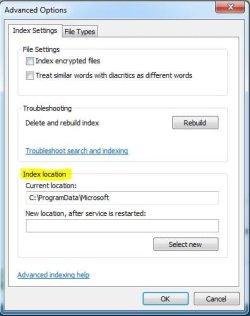
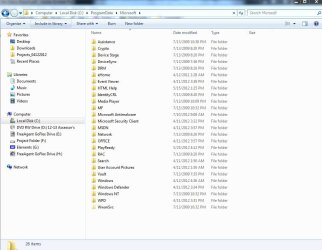
If you search in the Windows 7 start menu for "Indexing Options" ---> "Advanced" ---> "Index Location" this is how I found where the index was stored. To get to the "C:\ProgramData" folder you need to show all hidden files and folders in the control panel settings. Once in the Microsoft folder there are a number of folders, one of which has to be associated with the index files. I'm assuming this is the "Search" folder.
 

Attachments

  • Capture.JPG
    Capture.JPG
    33 KB · Views: 16
  • Capture2.JPG
    Capture2.JPG
    82.1 KB · Views: 18

My Computer My Computer

At a glance

Windows 7 Professional x64
OS
Windows 7 Professional x64
Okay, so I delved deeper into the "Search" folder (see attachment for file structure) and got to the CiFiles (*.ci) that I believe are the index files themselves.

So if I were to reset my computer's index using the "Indexing Options" tool so only the external hard drive is indexed, will that then repopulate the CiFiles folder with only CiFiles pertaining to that hard drive? And if that is the case, can I then copy the CiFiles folder into the external hard drive? But then how will the non-host computer recognize the CiFiles and know to use them as the hard drive index? Hmm.
 

Attachments

  • Capture.JPG
    Capture.JPG
    10.1 KB · Views: 15

My Computer My Computer

At a glance

Windows 7 Professional x64
OS
Windows 7 Professional x64
It would seem the index files have to be in a specific location. Doesn't sound like they are portable in the way you want to use them.
 

My Computer My Computer

At a glance

Windows 10 Pro X64Intel Quad Core i7-4770 @ 3.4Ghz16.0GB PC3-12800 DDR3 SDRAM 1600 MHzIntel Integrated HD Graphics
Computer type
PC/Desktop
Computer Manufacturer/Model Number
Lenovo IdeaCenter 450
OS
Windows 10 Pro X64
CPU
Intel Quad Core i7-4770 @ 3.4Ghz
Memory
16.0GB PC3-12800 DDR3 SDRAM 1600 MHz
Graphics Card(s)
Intel Integrated HD Graphics
Sound Card
Realtek HD Audio
Monitor(s) Displays
HP 22" LCD
Screen Resolution
1680 x 1050
Hard Drives
250GB Samsung EVO SATA-3 SSD
2TB Seagate ST2000DM001 SATA-2
1.5TB Seagate ST3150041AS SATA
Keyboard
Dell USB
Mouse
Lenovo USB
Internet Speed
Cable via Road Runner 3MB Upload, 30MB Download
Antivirus
Windows Defender, MBAM Pro, MBAE
Browser
Seamonkey
Other Info
UEFI/GPT
PLDS DVD-RW DH16AERSH
Back
Top