Can you partition without erasing

April Raine

New member
Member
Local time
5:22 PM
Messages
78
Can you partition a drive that is in use without erasing the contents. Win 7 Home Premium 64 bit and 1 TB disk. The OS and programs are on the same partition so if I reinstall windows I have to wipe the programs too. Can i repartition so the OS is on a different partition and reinstall windows only. Or do I have to wipe everything, partition and reinstall windows on one partition and the rest on the other?
 

My Computer

Computer type
PC/Desktop
Computer Manufacturer/Model Number
Medion
OS
win 7 home premium 64 bit
Motherboard
ms 7616
Memory
16GB
Hard Drives
Two 1 TB
Last edited:

My Computer

Computer type
PC/Desktop
Computer Manufacturer/Model Number
Skylake Special #666
OS
Windows 10 Pro x64
CPU
Intel Core i7 6700K
Motherboard
Asus Sabertooth Z170 Mark 1
Memory
GSkill TridentZ RGB 16GB 3600 16-16-16-36
Graphics Card(s)
EVGA GTX 980 Ti SC x2
Sound Card
Realtek High Definition
Monitor(s) Displays
AOC G2460PG
Screen Resolution
1920 x 1080 144Hz
Hard Drives
Samsung 860 Pro 256GB, Seagate Barracuda 4TB x2
PSU
EVGA 1000 P2, EVGA White Custom Braided Cables
Case
Corsair Vengeance C70 Gunmetal Black
Cooling
Corsair H100i v2, Corsair ML120 x2, Thermal Grizzly Kryonaut
Keyboard
Logitech G910 Orion Spectrum
Mouse
Logitech G700s
Internet Speed
Verizon Fios Quantum Gateway 75/75
Antivirus
Windows Defender, Malwarebytes Free 3.8.3
Browser
Chrome
Other Info
Corsair SP120 x4, LG Blu-ray Drive, Durabrand HT-395 100 Watt Dolby Digital Amp, Corsair H2100 Wireless 7.1 Headset
If you reinstall Windows, you will have to reinstall the programs anyhow.
 

My Computer

Computer Manufacturer/Model Number
HP, Dell, Gateway, Toshiba - 4 laptops and 2 desktops
OS
Vista, Windows7, Mint Mate, Zorin, Windows 8
CPU
from 1.6GHz Duo to i7
Monitor(s) Displays
2x HP w2207
Hard Drives
5x HDD, 7x SSD, 12x Externals
Keyboard
with trackball - no mices
Mouse
Trackball mice
Internet Speed
DSL 6000

My Computer

Computer type
PC/Desktop
Computer Manufacturer/Model Number
Skylake Special #666
OS
Windows 10 Pro x64
CPU
Intel Core i7 6700K
Motherboard
Asus Sabertooth Z170 Mark 1
Memory
GSkill TridentZ RGB 16GB 3600 16-16-16-36
Graphics Card(s)
EVGA GTX 980 Ti SC x2
Sound Card
Realtek High Definition
Monitor(s) Displays
AOC G2460PG
Screen Resolution
1920 x 1080 144Hz
Hard Drives
Samsung 860 Pro 256GB, Seagate Barracuda 4TB x2
PSU
EVGA 1000 P2, EVGA White Custom Braided Cables
Case
Corsair Vengeance C70 Gunmetal Black
Cooling
Corsair H100i v2, Corsair ML120 x2, Thermal Grizzly Kryonaut
Keyboard
Logitech G910 Orion Spectrum
Mouse
Logitech G700s
Internet Speed
Verizon Fios Quantum Gateway 75/75
Antivirus
Windows Defender, Malwarebytes Free 3.8.3
Browser
Chrome
Other Info
Corsair SP120 x4, LG Blu-ray Drive, Durabrand HT-395 100 Watt Dolby Digital Amp, Corsair H2100 Wireless 7.1 Headset
You can install applications on a partition separate from the OS. But applications will also have registry entries, etc in the OS partition. So when you reinstall the OS you have to reinstall the applications as well. There really is no practical way to avoid this.
 

My Computer

Computer type
PC/Desktop
Computer Manufacturer/Model Number
HP
OS
Windows 7 Pro 64 bit
CPU
Xeon W3520
Memory
8 GB
Graphics Card(s)
Nvidia Geforce 210
OK thanks. can you repartition and move data files/photos/movies word processing files etc etc without erasing?
 

My Computer

Computer type
PC/Desktop
Computer Manufacturer/Model Number
Medion
OS
win 7 home premium 64 bit
Motherboard
ms 7616
Memory
16GB
Hard Drives
Two 1 TB
Yes, in fact all your data should be installed on another partition or even a hard drive if you have more then one.

The perfect scenario is to have windows and all your programs on the same partition/drive etc, and your data and what not on another partition/drive etc.

This way you can create proper disk images.

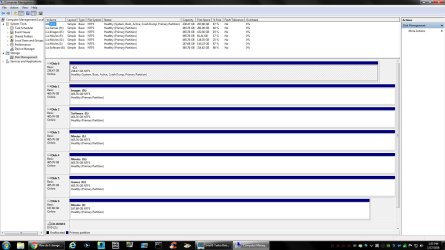
Here`s an example of mine, but everyone has their own way of doing it.
 

Attachments

  • DM.jpg
    DM.jpg
    198.1 KB · Views: 13

My Computer

Computer type
PC/Desktop
Computer Manufacturer/Model Number
Skylake Special #666
OS
Windows 10 Pro x64
CPU
Intel Core i7 6700K
Motherboard
Asus Sabertooth Z170 Mark 1
Memory
GSkill TridentZ RGB 16GB 3600 16-16-16-36
Graphics Card(s)
EVGA GTX 980 Ti SC x2
Sound Card
Realtek High Definition
Monitor(s) Displays
AOC G2460PG
Screen Resolution
1920 x 1080 144Hz
Hard Drives
Samsung 860 Pro 256GB, Seagate Barracuda 4TB x2
PSU
EVGA 1000 P2, EVGA White Custom Braided Cables
Case
Corsair Vengeance C70 Gunmetal Black
Cooling
Corsair H100i v2, Corsair ML120 x2, Thermal Grizzly Kryonaut
Keyboard
Logitech G910 Orion Spectrum
Mouse
Logitech G700s
Internet Speed
Verizon Fios Quantum Gateway 75/75
Antivirus
Windows Defender, Malwarebytes Free 3.8.3
Browser
Chrome
Other Info
Corsair SP120 x4, LG Blu-ray Drive, Durabrand HT-395 100 Watt Dolby Digital Amp, Corsair H2100 Wireless 7.1 Headset
OK thanks folks

@AddRAM . What does the software on your E partition refer to? It is not installed software? I have Paragon Hard Disk manager 14 which will partition. One option to tick is for a logical drive. What is the opposite to a logical drive?

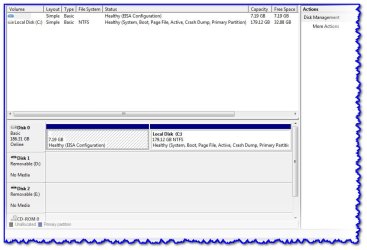
This is my laptop.
 

Attachments

  • April_laptop.jpg
    April_laptop.jpg
    61.5 KB · Views: 2

My Computer

Computer type
PC/Desktop
Computer Manufacturer/Model Number
Medion
OS
win 7 home premium 64 bit
Motherboard
ms 7616
Memory
16GB
Hard Drives
Two 1 TB
It`s software I`ve downloaded over the years, it`s not installed it`s the executable to install the software.

Partition Wizard, VLC, all my ISO files, PowerIso, ImageBurn, all my picture backups, document backups etc, stuff like that.
 

My Computer

Computer type
PC/Desktop
Computer Manufacturer/Model Number
Skylake Special #666
OS
Windows 10 Pro x64
CPU
Intel Core i7 6700K
Motherboard
Asus Sabertooth Z170 Mark 1
Memory
GSkill TridentZ RGB 16GB 3600 16-16-16-36
Graphics Card(s)
EVGA GTX 980 Ti SC x2
Sound Card
Realtek High Definition
Monitor(s) Displays
AOC G2460PG
Screen Resolution
1920 x 1080 144Hz
Hard Drives
Samsung 860 Pro 256GB, Seagate Barracuda 4TB x2
PSU
EVGA 1000 P2, EVGA White Custom Braided Cables
Case
Corsair Vengeance C70 Gunmetal Black
Cooling
Corsair H100i v2, Corsair ML120 x2, Thermal Grizzly Kryonaut
Keyboard
Logitech G910 Orion Spectrum
Mouse
Logitech G700s
Internet Speed
Verizon Fios Quantum Gateway 75/75
Antivirus
Windows Defender, Malwarebytes Free 3.8.3
Browser
Chrome
Other Info
Corsair SP120 x4, LG Blu-ray Drive, Durabrand HT-395 100 Watt Dolby Digital Amp, Corsair H2100 Wireless 7.1 Headset
You've only got 33GB free so you would need to make a small partition say 20GB. Move data into it. Gradually expand the partition and continue the process. Tedious and you need to be careful.

You say you have a desktop but this is a small drive. If you have room for another drive I'd buy something like a 1TB WD Black and use this a data drive.
 

My Computer

Computer type
PC/Desktop
Computer Manufacturer/Model Number
Own build
OS
Windows 7x64 Home Premium SP1
CPU
Intel i7 2600k
Motherboard
ASUS P8Z68 Deluxe
Memory
G.Skill Ripjaws (DDR3-1600) 2x4GB
Graphics Card(s)
Nvidia GeForce GTS 450; Intel HD Graphics 3000(GT2+)
Monitor(s) Displays
Dell Ultrasharp IPS panel U2311H, Samsung SyncMaster P2350
Screen Resolution
1920x1080
Hard Drives
Samsung 850 Pro SSD 256GB, Samsung SSD 840 120GB, Seagates 1TB Barracuda ST31000528AS x2
PSU
Seasonic M12II 520W
Case
Lian Li Lancool PC-K60
Cooling
Case: 1x120mm, 3x140mm CPU: Hyper 212+
Keyboard
Logitech MK520 (wireless)
Mouse
Logitech MK520
Internet Speed
6-7 Mbps
Antivirus
Norton Security Premium, Malwarebytes on 2 (MSE on 3rd PC)
Browser
FireFox
Other Info
Audio: Logitech Z523 2.1
It`s software I`ve downloaded over the years, it`s not installed it`s the executable to install the software.

Partition Wizard, VLC, all my ISO files, PowerIso, ImageBurn, all my picture backups, document backups etc, stuff like that.
Kinda though that. Thanks
 

My Computer

Computer type
PC/Desktop
Computer Manufacturer/Model Number
Medion
OS
win 7 home premium 64 bit
Motherboard
ms 7616
Memory
16GB
Hard Drives
Two 1 TB
You've only got 33GB free so you would need to make a small partition say 20GB. Move data into it. Gradually expand the partition and continue the process. Tedious and you need to be careful.

You say you have a desktop but this is a small drive
. If you have room for another drive I'd buy something like a 1TB WD Black and use this a data drive.
This is my laptop. The desktop has two 1TB disks and is win 7 64 bit. I just uploaded that screenshot as i am thinking of doing the laptop too. I might get a bigger drive. It is a sony vaio vgn nr11z/s and is 7 years old so do not want to spend too much
 

My Computer

Computer type
PC/Desktop
Computer Manufacturer/Model Number
Medion
OS
win 7 home premium 64 bit
Motherboard
ms 7616
Memory
16GB
Hard Drives
Two 1 TB
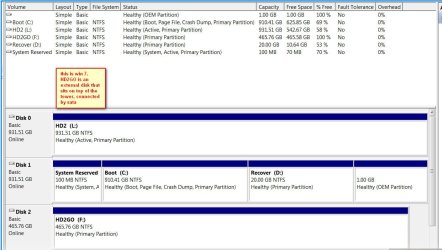
This is my win 7
 

Attachments

  • WIN7_DISKS.jpg
    WIN7_DISKS.jpg
    100.3 KB · Views: 2

My Computer

Computer type
PC/Desktop
Computer Manufacturer/Model Number
Medion
OS
win 7 home premium 64 bit
Motherboard
ms 7616
Memory
16GB
Hard Drives
Two 1 TB
I assumed your focus was the original disk management screenshot. So for the laptop I'd leave it alone or get a larger HDD and use (free) Macrium Reflect to move everything across to the new HDD. A 500 GB drive should leave you plenty of room for a data partition and shouldn't cost that much. You need to be comfortable doing this work.

The OS drive (Disk 1 in the screenshot) of the desktop already has 4 primary partitions. Do not attempt to make a 5th partition because you will end up with a dynamic drive which is not good. The other options are
1) to make the 2nd partition a logical drive and then you can add logical partitions. You should be able to have your OS on a logical partition since you have a separate system reserved. I haven't personally done this so you should get guidance from someone who has carried out this operation.
2) make the 2nd OS partition active and delete the system reserved. This would allow you make a new 4th primary partition.
 

My Computer

Computer type
PC/Desktop
Computer Manufacturer/Model Number
Own build
OS
Windows 7x64 Home Premium SP1
CPU
Intel i7 2600k
Motherboard
ASUS P8Z68 Deluxe
Memory
G.Skill Ripjaws (DDR3-1600) 2x4GB
Graphics Card(s)
Nvidia GeForce GTS 450; Intel HD Graphics 3000(GT2+)
Monitor(s) Displays
Dell Ultrasharp IPS panel U2311H, Samsung SyncMaster P2350
Screen Resolution
1920x1080
Hard Drives
Samsung 850 Pro SSD 256GB, Samsung SSD 840 120GB, Seagates 1TB Barracuda ST31000528AS x2
PSU
Seasonic M12II 520W
Case
Lian Li Lancool PC-K60
Cooling
Case: 1x120mm, 3x140mm CPU: Hyper 212+
Keyboard
Logitech MK520 (wireless)
Mouse
Logitech MK520
Internet Speed
6-7 Mbps
Antivirus
Norton Security Premium, Malwarebytes on 2 (MSE on 3rd PC)
Browser
FireFox
Other Info
Audio: Logitech Z523 2.1

My Computer

Computer Manufacturer/Model Number
HP, Dell, Gateway, Toshiba - 4 laptops and 2 desktops
OS
Vista, Windows7, Mint Mate, Zorin, Windows 8
CPU
from 1.6GHz Duo to i7
Monitor(s) Displays
2x HP w2207
Hard Drives
5x HDD, 7x SSD, 12x Externals
Keyboard
with trackball - no mices
Mouse
Trackball mice
Internet Speed
DSL 6000
When I got the offer for Windows 10 I had Windows 7 x64 on a 300gig H/D so I used Disk Utility and used Shrink to split my drive in half then installed Win 10 on the new partition, thinking back it was a mistake to have the 2 on the same drive. But I think I should have gotten a larger drive for my laptop . I also went back and did it again on each install for my data, I'm not sure if this was the right way to do it.
 

My Computer

Computer type
Laptop
Computer Manufacturer/Model Number
Dell Inspiron
OS
Windows 7 Home Preminiun x64 Windows 10 home x64
CPU
Turion Dual core TL-68
Motherboard
AMD UNKNOW MAKER
Memory
4 gig's DDR2 6400
Graphics Card(s)
ATI 1150
Hard Drives
300 gig's
Antivirus
F-SECURE
Browser
IE 11

My Computer

Computer type
PC/Desktop
Computer Manufacturer/Model Number
Own build
OS
Windows 7x64 Home Premium SP1
CPU
Intel i7 2600k
Motherboard
ASUS P8Z68 Deluxe
Memory
G.Skill Ripjaws (DDR3-1600) 2x4GB
Graphics Card(s)
Nvidia GeForce GTS 450; Intel HD Graphics 3000(GT2+)
Monitor(s) Displays
Dell Ultrasharp IPS panel U2311H, Samsung SyncMaster P2350
Screen Resolution
1920x1080
Hard Drives
Samsung 850 Pro SSD 256GB, Samsung SSD 840 120GB, Seagates 1TB Barracuda ST31000528AS x2
PSU
Seasonic M12II 520W
Case
Lian Li Lancool PC-K60
Cooling
Case: 1x120mm, 3x140mm CPU: Hyper 212+
Keyboard
Logitech MK520 (wireless)
Mouse
Logitech MK520
Internet Speed
6-7 Mbps
Antivirus
Norton Security Premium, Malwarebytes on 2 (MSE on 3rd PC)
Browser
FireFox
Other Info
Audio: Logitech Z523 2.1
I sometimes set primary MBR partitions to logical - especially for students in my classes. Many brand new laptops come with 4 primary MBR partitions from the factory. Then people don't know what to do if they want an additional partition. Fixed many dynamics in the past, LOL.
 

My Computer

Computer Manufacturer/Model Number
HP, Dell, Gateway, Toshiba - 4 laptops and 2 desktops
OS
Vista, Windows7, Mint Mate, Zorin, Windows 8
CPU
from 1.6GHz Duo to i7
Monitor(s) Displays
2x HP w2207
Hard Drives
5x HDD, 7x SSD, 12x Externals
Keyboard
with trackball - no mices
Mouse
Trackball mice
Internet Speed
DSL 6000
Back
Top