Solved Cannot access Dell/Realtek Sound Manager

CBM

New member
Power User
Local time
3:01 PM
Messages
104
Location
Ohio
I have an almost new Dell XPS-17 L702X laptop with Realtek Audio. I'm running Win 7 Ultimate SP1 x64 on it. If I choose to customize my taskbar and place the Realtek Icon on the taskbar it disappears after a few seconds. The only way to access it is to go to my C Drive, Program Files, Realtek and manually open it from there. The Realtech icon then appears on the taskbar; however, if you hover the cursor over the icon for one or two seconds it disappears. If I'm lucky enough to open the Sound Manager application before the icon disappears I must right click on it and select "Open". It cannot be opened by a left single click or double click. Once the Sound Manager window is open it displays nothing. The Sound Manager window can be closed only by using the Processes tab in Task Manager and shutting down the process itself. It cannot be shut down by clicking Realtek in the Task Manager Applications tab.


Dell has tried on three occasions to fix the problem, to no avail, by taking control of the laptop. Realtek Audio has been uninstalled from Programs and Features and then been reinstalled, and the drivers have been uninstalled and reinstalled from within Device Manager. I have uninstalled and reinstalled the OS on four occasions while attempting to fix the problem. I did two reinstalls using the recovery partition, one clean reinstall from the Dell provided OS installation DVD, which contains the OS only (no free third party applications that came with the laptop) and one reinstall from the Dell DataSafe Backup DVDs I made upon receipt of the laptop. A new sound card was installed at Dell's Texas repair facility just last week. The problem remains unsolved.


Thank you in advance for your time and any assistance provided.

C.B.
 
Last edited:

My Computer

Computer Manufacturer/Model Number
1.Dell Studio XPS 7100 Desktop; 2.Dell XPS 17 Laptop
OS
1.Windows 7 Ultimate x64; 2.Windows 7 Ultimate x64
CPU
1.AMD Phenom II X6 1075T; 2.Intel Core i7-2720QM 2.20 GHz
Memory
1.8GB DDR3; 2.8GB DDR3
Graphics Card(s)
1.AMD HD 5670 1GB; 2.NVIDIA GeForce GT 555M 3GB
Monitor(s) Displays
1.Samsung SyncMaster; 2.17.3in FHD
Screen Resolution
1.1600X900; 2.1920X1080
Hard Drives
1.1TB; 2.1TB 500GB X2
Keyboard
1.Microsoft Wireless; 2.Backlit
Mouse
Microsoft Wireless; 2.Microsoft Wireless Mobile 3500
Internet Speed
10.0 Mbps
Are you using the latest driver from Realtek ?
 

My Computer

Computer type
PC/Desktop
Computer Manufacturer/Model Number
Custom Build
OS
Windows 7 Home Premium 64 bit
CPU
Intel Core i7-4790
Motherboard
GA-Z87X-D3H
Memory
G.SKILL 8GB (2 x 4GB) DDR3 F3-10666CL9D-8GBNT
Graphics Card(s)
AMD Radeon R7 250
Sound Card
Realtek ALC892
Monitor(s) Displays
Samsung UN32EH5000, Dell 1703FPT
Screen Resolution
1920 x 1080, 1280 x 1024
Hard Drives
WD5003AZEX
WD10EZEX
Samsung HD103SJ
Samsung 128 GB 840 PRO
PSU
SeaSonic M12II SS-500GM
Case
Fractal Design Define R4
Cooling
Zalman CNPS9900ALED
Keyboard
Logitech K800
Mouse
Logitech M705
Internet Speed
16 Mbps
Antivirus
Avast
Browser
Firefox
Other Info
Bose Companion 2 Multimedia Speakers
  • Like
Reactions: CBM
Are you using the latest driver from Realtek ?

Both Dell and I have installed the latest drivers from Dell's download website and Realtek's website. Actually, Realtek prefers that I use the driver from Dell's download page because of Dell's customization of the Sound Manager. It doesn't really matter because the problem remains as none of the drivers eliminated the problem. Dell has escalated my problem concerning this issue but they've done that twice before and I never heard from them again so I don't expect to hear from them this time.

The motherboard was replaced a few weeks ago and the sound card was replaced last week. My only remaining option is to ask Dell to send me a new hard drive with the OS and third party software already imaged on it, although I don't know why that would help me in any way.

What I find hard to understand is that I can find no evidence of anyone else having this problem. The audio is working fine and earphones work fine when connected to the laptop. I simply cannot find a way to keep the icon on the taskbar, the Sound Manager either won't open or opens to a blank window and the Sound Manager window cannot be closed unless I manually shut it down in Task Manager. The hardware has been replaced and the software has been replaced. I have the same Realtek Audio and Sound Manager on my XPS 7100 desktop, which is also running Win 7 Ultimate x64, and have no problems whatsoever with it.

Thank you for your prompt reply. I appreciate it.
 

My Computer

Computer Manufacturer/Model Number
1.Dell Studio XPS 7100 Desktop; 2.Dell XPS 17 Laptop
OS
1.Windows 7 Ultimate x64; 2.Windows 7 Ultimate x64
CPU
1.AMD Phenom II X6 1075T; 2.Intel Core i7-2720QM 2.20 GHz
Memory
1.8GB DDR3; 2.8GB DDR3
Graphics Card(s)
1.AMD HD 5670 1GB; 2.NVIDIA GeForce GT 555M 3GB
Monitor(s) Displays
1.Samsung SyncMaster; 2.17.3in FHD
Screen Resolution
1.1600X900; 2.1920X1080
Hard Drives
1.1TB; 2.1TB 500GB X2
Keyboard
1.Microsoft Wireless; 2.Backlit
Mouse
Microsoft Wireless; 2.Microsoft Wireless Mobile 3500
Internet Speed
10.0 Mbps
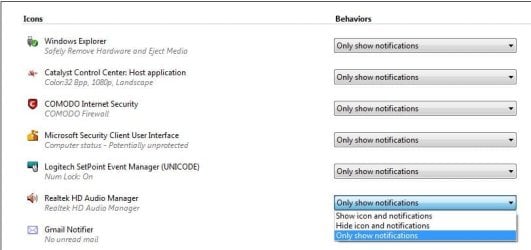
When customizing the Notification Area Icons, did you select "Show icons and notifications" as the behavior for the Realtek HD Audio Manager?

Capture.JPG
 

My Computer

Computer type
PC/Desktop
Computer Manufacturer/Model Number
Custom Build
OS
Windows 7 Home Premium 64 bit
CPU
Intel Core i7-4790
Motherboard
GA-Z87X-D3H
Memory
G.SKILL 8GB (2 x 4GB) DDR3 F3-10666CL9D-8GBNT
Graphics Card(s)
AMD Radeon R7 250
Sound Card
Realtek ALC892
Monitor(s) Displays
Samsung UN32EH5000, Dell 1703FPT
Screen Resolution
1920 x 1080, 1280 x 1024
Hard Drives
WD5003AZEX
WD10EZEX
Samsung HD103SJ
Samsung 128 GB 840 PRO
PSU
SeaSonic M12II SS-500GM
Case
Fractal Design Define R4
Cooling
Zalman CNPS9900ALED
Keyboard
Logitech K800
Mouse
Logitech M705
Internet Speed
16 Mbps
Antivirus
Avast
Browser
Firefox
Other Info
Bose Companion 2 Multimedia Speakers
I do a lot of support on the Dell community support forum, but mainly Desktop Hardware. However, we have found that Dell sound drivers need to be used. Non-Dell either do not work or do not work correctly.

There is a Dell restore partition on the hard drive, accessed by F8 at POST (Power On Self Test) that will allow restoring the PC to the original factory condition and no discs are needed. You can consider this, if it gets to that point. How to run Dell PC Restore

I see you have also posted on the Dell forum. That should be the best place to get an answer.
 

My Computer

Computer type
PC/Desktop
Computer Manufacturer/Model Number
My Own Build
OS
Windows 10 64 bit
CPU
Intel i7 6700K
Motherboard
ASUS ROG Maximus VIII Hero
Memory
16GB Corsair Dominator
Graphics Card(s)
Intel CPU Graphics
Sound Card
RealTek
Monitor(s) Displays
27" Dell S2719dgf
Screen Resolution
2560X1440
Hard Drives
1 TB Samsung 850 EVO SSD for Win 10 Pro
500GB Samsung 850 EVO SSD for Win 10 Insider
2 TB drive for backup
PSU
EVGA Supernova 750G2
Case
BeQuiet Silent Base 600
Cooling
Deepcool Captain 120EX
Keyboard
Microsoft Wireless 2000
Mouse
Microsoft wireless
Internet Speed
100 MB/sec (Cable)
Antivirus
Microsoft Defender and Malwarebytes
Browser
Edge/Firefox
Other Info
Cakewalk (Sonar) by BandLab and Studio One 4.1 Pro recording studio software. MOTU 896Mk3 Hybrid recording interface, Frontier Tranzport wireless control unit, Behringer X-Touch Control Surface.
Five USB connected optical drives for CD Audio production using Nero BurningROM
When customizing the Notification Area Icons, did you select "Show icons and notifications" as the behavior for the Realtek HD Audio Manager?

Yes, I did. It makes no difference. As soon as the cursor is hovered over the icon it disappears.

I appreciate your assistance, Sardonicus. By the way, have you ever heard of a music album by Spirit named "Twelve Dreams of Dr. Sardonicus"?

C.B.
 

My Computer

Computer Manufacturer/Model Number
1.Dell Studio XPS 7100 Desktop; 2.Dell XPS 17 Laptop
OS
1.Windows 7 Ultimate x64; 2.Windows 7 Ultimate x64
CPU
1.AMD Phenom II X6 1075T; 2.Intel Core i7-2720QM 2.20 GHz
Memory
1.8GB DDR3; 2.8GB DDR3
Graphics Card(s)
1.AMD HD 5670 1GB; 2.NVIDIA GeForce GT 555M 3GB
Monitor(s) Displays
1.Samsung SyncMaster; 2.17.3in FHD
Screen Resolution
1.1600X900; 2.1920X1080
Hard Drives
1.1TB; 2.1TB 500GB X2
Keyboard
1.Microsoft Wireless; 2.Backlit
Mouse
Microsoft Wireless; 2.Microsoft Wireless Mobile 3500
Internet Speed
10.0 Mbps
I do a lot of support on the Dell community support forum, but mainly Desktop Hardware. However, we have found that Dell sound drivers need to be used. Non-Dell either do not work or do not work correctly.

There is a Dell restore partition on the hard drive, accessed by F8 at POST (Power On Self Test) that will allow restoring the PC to the original factory condition and no discs are needed. You can consider this, if it gets to that point. How to run Dell PC Restore

I see you have also posted on the Dell forum. That should be the best place to get an answer.

Hello fireberd. The driver from Dell does not help. I have already used the Dell recovery partition via F8 on two occasions. It did not solve the problem.

I appreciate your time and assistance.

C.B.
 

My Computer

Computer Manufacturer/Model Number
1.Dell Studio XPS 7100 Desktop; 2.Dell XPS 17 Laptop
OS
1.Windows 7 Ultimate x64; 2.Windows 7 Ultimate x64
CPU
1.AMD Phenom II X6 1075T; 2.Intel Core i7-2720QM 2.20 GHz
Memory
1.8GB DDR3; 2.8GB DDR3
Graphics Card(s)
1.AMD HD 5670 1GB; 2.NVIDIA GeForce GT 555M 3GB
Monitor(s) Displays
1.Samsung SyncMaster; 2.17.3in FHD
Screen Resolution
1.1600X900; 2.1920X1080
Hard Drives
1.1TB; 2.1TB 500GB X2
Keyboard
1.Microsoft Wireless; 2.Backlit
Mouse
Microsoft Wireless; 2.Microsoft Wireless Mobile 3500
Internet Speed
10.0 Mbps
I havent' checked your post on the Dell forum this morning, but Jim probably responded to you. He is the Laptop audio guru on the forum.

I don't have RealTek so I can't confirm that what you want to do is how it should work.
 

My Computer

Computer type
PC/Desktop
Computer Manufacturer/Model Number
My Own Build
OS
Windows 10 64 bit
CPU
Intel i7 6700K
Motherboard
ASUS ROG Maximus VIII Hero
Memory
16GB Corsair Dominator
Graphics Card(s)
Intel CPU Graphics
Sound Card
RealTek
Monitor(s) Displays
27" Dell S2719dgf
Screen Resolution
2560X1440
Hard Drives
1 TB Samsung 850 EVO SSD for Win 10 Pro
500GB Samsung 850 EVO SSD for Win 10 Insider
2 TB drive for backup
PSU
EVGA Supernova 750G2
Case
BeQuiet Silent Base 600
Cooling
Deepcool Captain 120EX
Keyboard
Microsoft Wireless 2000
Mouse
Microsoft wireless
Internet Speed
100 MB/sec (Cable)
Antivirus
Microsoft Defender and Malwarebytes
Browser
Edge/Firefox
Other Info
Cakewalk (Sonar) by BandLab and Studio One 4.1 Pro recording studio software. MOTU 896Mk3 Hybrid recording interface, Frontier Tranzport wireless control unit, Behringer X-Touch Control Surface.
Five USB connected optical drives for CD Audio production using Nero BurningROM
I havent' checked your post on the Dell forum this morning, but Jim probably responded to you. He is the Laptop audio guru on the forum.

I don't have RealTek so I can't confirm that what you want to do is how it should work.

Hey fireberd,

I've spent hours and hours searching online and through several forums. I appear to be the only one experiencing this problem and Dell (after three attempts via live chat, a motherboard replacement and sound card replacement) seems unable to solve the problem. I'm almost ready to ask Dell to replace the laptop.

C.B.
 

My Computer

Computer Manufacturer/Model Number
1.Dell Studio XPS 7100 Desktop; 2.Dell XPS 17 Laptop
OS
1.Windows 7 Ultimate x64; 2.Windows 7 Ultimate x64
CPU
1.AMD Phenom II X6 1075T; 2.Intel Core i7-2720QM 2.20 GHz
Memory
1.8GB DDR3; 2.8GB DDR3
Graphics Card(s)
1.AMD HD 5670 1GB; 2.NVIDIA GeForce GT 555M 3GB
Monitor(s) Displays
1.Samsung SyncMaster; 2.17.3in FHD
Screen Resolution
1.1600X900; 2.1920X1080
Hard Drives
1.1TB; 2.1TB 500GB X2
Keyboard
1.Microsoft Wireless; 2.Backlit
Mouse
Microsoft Wireless; 2.Microsoft Wireless Mobile 3500
Internet Speed
10.0 Mbps
I was finally able to once again open the Sound Manager after several hours of trying. I have attached a screenshot showing what I see when the Sound Manager is open. I have no access to any of the settings.

I thank everyone for your time and assistance. I appreciate it very much. I'm simply going to have to live with the problem.

C.B.
 

Attachments

  • Realtek 05.PNG
    Realtek 05.PNG
    13 KB · Views: 60

My Computer

Computer Manufacturer/Model Number
1.Dell Studio XPS 7100 Desktop; 2.Dell XPS 17 Laptop
OS
1.Windows 7 Ultimate x64; 2.Windows 7 Ultimate x64
CPU
1.AMD Phenom II X6 1075T; 2.Intel Core i7-2720QM 2.20 GHz
Memory
1.8GB DDR3; 2.8GB DDR3
Graphics Card(s)
1.AMD HD 5670 1GB; 2.NVIDIA GeForce GT 555M 3GB
Monitor(s) Displays
1.Samsung SyncMaster; 2.17.3in FHD
Screen Resolution
1.1600X900; 2.1920X1080
Hard Drives
1.1TB; 2.1TB 500GB X2
Keyboard
1.Microsoft Wireless; 2.Backlit
Mouse
Microsoft Wireless; 2.Microsoft Wireless Mobile 3500
Internet Speed
10.0 Mbps
Any ideas, anyone?
 

My Computer

Computer Manufacturer/Model Number
1.Dell Studio XPS 7100 Desktop; 2.Dell XPS 17 Laptop
OS
1.Windows 7 Ultimate x64; 2.Windows 7 Ultimate x64
CPU
1.AMD Phenom II X6 1075T; 2.Intel Core i7-2720QM 2.20 GHz
Memory
1.8GB DDR3; 2.8GB DDR3
Graphics Card(s)
1.AMD HD 5670 1GB; 2.NVIDIA GeForce GT 555M 3GB
Monitor(s) Displays
1.Samsung SyncMaster; 2.17.3in FHD
Screen Resolution
1.1600X900; 2.1920X1080
Hard Drives
1.1TB; 2.1TB 500GB X2
Keyboard
1.Microsoft Wireless; 2.Backlit
Mouse
Microsoft Wireless; 2.Microsoft Wireless Mobile 3500
Internet Speed
10.0 Mbps
Give this a try.
Start, type in audio/enter. Realtek HD Audio Manger is at the top on my computer.
 

My Computer

Computer type
PC/Desktop
Computer Manufacturer/Model Number
Home made Desktop
OS
Windows 10 Pro. 64/ version 1709 Windows 7 Pro/64
CPU
Intel i7-6800K @ 4.3
Motherboard
ASUS X-99 Deluxe II
Memory
Corsair Platinum 16 gig @2400
Graphics Card(s)
EVGA GTX 1070 OC
Monitor(s) Displays
Asus 27" LED LCD/VE278Q
Screen Resolution
1920-1080 or 1280-720 HDMI
Hard Drives
INTEL SSD 730-240 Gb Sata 3.0/
PSU
EVGA Platium 1200W
Case
Phanteks Luxe Tempered Glass 8 fans/ one radiator
Cooling
XSPC/ Water Cooled CPU
Keyboard
Das 4 Professional
Mouse
Logitech M705/MX Anywhere 2-S
Internet Speed
100 mbits
Antivirus
Microsoft Security Essentials/ Malwarebytes Premium 3.0/ SAS
Browser
I.E. 11 default/Firefox/ ISP Time Warner Cable/Spectrum
Other Info
LG BluRay Burner/
Sound system-KLipsch-THX/
Icy Dock ssd Hot Swap bays.
  • Like
Reactions: CBM
Give this a try.
Start, type in audio/enter. Realtek HD Audio Manger is at the top on my computer.

Thank you for your reply, Layback Bear. The result is the same. The audio manager window will open but it is blank, as shown in my screenshot earlier.

I'm currently checking out the Dell driver downloads to determine if I missed installing a driver. If I find nothing there I'm going to try running the application in compatibility mode, although that's not necessary on my desktop, which has the Realtek HDA and is running the same OS as my laptop, which is Win 7 Ultimate x64.

I'll let you know about the compatibility mode after I exhaust my search in the Dell driver downloads.

C.B.
 

My Computer

Computer Manufacturer/Model Number
1.Dell Studio XPS 7100 Desktop; 2.Dell XPS 17 Laptop
OS
1.Windows 7 Ultimate x64; 2.Windows 7 Ultimate x64
CPU
1.AMD Phenom II X6 1075T; 2.Intel Core i7-2720QM 2.20 GHz
Memory
1.8GB DDR3; 2.8GB DDR3
Graphics Card(s)
1.AMD HD 5670 1GB; 2.NVIDIA GeForce GT 555M 3GB
Monitor(s) Displays
1.Samsung SyncMaster; 2.17.3in FHD
Screen Resolution
1.1600X900; 2.1920X1080
Hard Drives
1.1TB; 2.1TB 500GB X2
Keyboard
1.Microsoft Wireless; 2.Backlit
Mouse
Microsoft Wireless; 2.Microsoft Wireless Mobile 3500
Internet Speed
10.0 Mbps
Give this a try.
Start, type in audio/enter. Realtek HD Audio Manger is at the top on my computer.

Thank you for your reply, Layback Bear. The result is the same. The audio manager window will open but it is blank, as shown in my screenshot earlier.

I'm currently checking out the Dell driver downloads to determine if I missed installing a driver. If I find nothing there I'm going to try running the application in compatibility mode, although that's not necessary on my desktop, which has the Realtek HDA and is running the same OS as my laptop, which is Win 7 Ultimate x64.

I'll let you know about the compatibility mode after I exhaust my search in the Dell driver downloads.

C.B.

Well, there are no new or revised drivers to install. I tried compatibility mode for Vista SP2 and Win 7, to no avail. There are no software compatibility issues involved since the application never worked from day one and during the four reinstalls the Realtek software was installed immediately after the chipset and nic drivers were installed (when doing the reformat and custom, clean install from the installation DVD, which contains no third party software, third party drivers or Dell utilities).

This laptop has been a disaster since the day I received it. The motherboard, sound card, fan, USB 2.0 ports have been replaced. The power adapter plug receptacle in the laptop has been replaced three times. I've never been able to access the sound manager. I have purchased six Dell computers in the past nine years, all of them currently in operation in one location or another. I'm not dissatisfied with Dell by any means. Dell has always quickly and efficiently fixed any problems I've had with the other computers; however, Dell, after four attempts, is incapable of fixing the problem I'm experiencing now. I'm going to ask that the laptop be replaced with a new one of the same configuration. Needless to say, I don't expect Dell to do so.

I thank everyone for their time and assistance. I appreciate it very much.

C.B.
 

My Computer

Computer Manufacturer/Model Number
1.Dell Studio XPS 7100 Desktop; 2.Dell XPS 17 Laptop
OS
1.Windows 7 Ultimate x64; 2.Windows 7 Ultimate x64
CPU
1.AMD Phenom II X6 1075T; 2.Intel Core i7-2720QM 2.20 GHz
Memory
1.8GB DDR3; 2.8GB DDR3
Graphics Card(s)
1.AMD HD 5670 1GB; 2.NVIDIA GeForce GT 555M 3GB
Monitor(s) Displays
1.Samsung SyncMaster; 2.17.3in FHD
Screen Resolution
1.1600X900; 2.1920X1080
Hard Drives
1.1TB; 2.1TB 500GB X2
Keyboard
1.Microsoft Wireless; 2.Backlit
Mouse
Microsoft Wireless; 2.Microsoft Wireless Mobile 3500
Internet Speed
10.0 Mbps
I have a idea. Right click on the sound speaker on Task Bar and select Playback devices. I have 5 selections on my system. If you have a selections, right click the one you want and set as default.
 

My Computer

Computer type
PC/Desktop
Computer Manufacturer/Model Number
Home made Desktop
OS
Windows 10 Pro. 64/ version 1709 Windows 7 Pro/64
CPU
Intel i7-6800K @ 4.3
Motherboard
ASUS X-99 Deluxe II
Memory
Corsair Platinum 16 gig @2400
Graphics Card(s)
EVGA GTX 1070 OC
Monitor(s) Displays
Asus 27" LED LCD/VE278Q
Screen Resolution
1920-1080 or 1280-720 HDMI
Hard Drives
INTEL SSD 730-240 Gb Sata 3.0/
PSU
EVGA Platium 1200W
Case
Phanteks Luxe Tempered Glass 8 fans/ one radiator
Cooling
XSPC/ Water Cooled CPU
Keyboard
Das 4 Professional
Mouse
Logitech M705/MX Anywhere 2-S
Internet Speed
100 mbits
Antivirus
Microsoft Security Essentials/ Malwarebytes Premium 3.0/ SAS
Browser
I.E. 11 default/Firefox/ ISP Time Warner Cable/Spectrum
Other Info
LG BluRay Burner/
Sound system-KLipsch-THX/
Icy Dock ssd Hot Swap bays.
I have a idea. Right click on the sound speaker on Task Bar and select Playback devices. I have 5 selections on my system. If you have a selections, right click the one you want and set as default.

Hey Layback Bear. I've already done that. Realtek is set as the default and all settings are correct in the Properties. All necessary boxes have been checked.

I appreciate your time and assistance.

C.B.
 

My Computer

Computer Manufacturer/Model Number
1.Dell Studio XPS 7100 Desktop; 2.Dell XPS 17 Laptop
OS
1.Windows 7 Ultimate x64; 2.Windows 7 Ultimate x64
CPU
1.AMD Phenom II X6 1075T; 2.Intel Core i7-2720QM 2.20 GHz
Memory
1.8GB DDR3; 2.8GB DDR3
Graphics Card(s)
1.AMD HD 5670 1GB; 2.NVIDIA GeForce GT 555M 3GB
Monitor(s) Displays
1.Samsung SyncMaster; 2.17.3in FHD
Screen Resolution
1.1600X900; 2.1920X1080
Hard Drives
1.1TB; 2.1TB 500GB X2
Keyboard
1.Microsoft Wireless; 2.Backlit
Mouse
Microsoft Wireless; 2.Microsoft Wireless Mobile 3500
Internet Speed
10.0 Mbps
I have put in a request for help from others. So keep a watch for more post to help you.
 

My Computer

Computer type
PC/Desktop
Computer Manufacturer/Model Number
Home made Desktop
OS
Windows 10 Pro. 64/ version 1709 Windows 7 Pro/64
CPU
Intel i7-6800K @ 4.3
Motherboard
ASUS X-99 Deluxe II
Memory
Corsair Platinum 16 gig @2400
Graphics Card(s)
EVGA GTX 1070 OC
Monitor(s) Displays
Asus 27" LED LCD/VE278Q
Screen Resolution
1920-1080 or 1280-720 HDMI
Hard Drives
INTEL SSD 730-240 Gb Sata 3.0/
PSU
EVGA Platium 1200W
Case
Phanteks Luxe Tempered Glass 8 fans/ one radiator
Cooling
XSPC/ Water Cooled CPU
Keyboard
Das 4 Professional
Mouse
Logitech M705/MX Anywhere 2-S
Internet Speed
100 mbits
Antivirus
Microsoft Security Essentials/ Malwarebytes Premium 3.0/ SAS
Browser
I.E. 11 default/Firefox/ ISP Time Warner Cable/Spectrum
Other Info
LG BluRay Burner/
Sound system-KLipsch-THX/
Icy Dock ssd Hot Swap bays.
Hi.

Download the most recent software\driver form Realtek.


Uninstall the realtek software\driver,restart.


Install the realtek software\driver,restart.


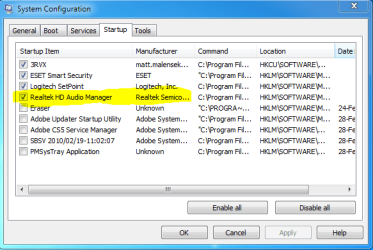
Now,in start search copy paste msconfig and check\ensure that you have\enable in System Configuration Start-up list the Realtek Audio Manager.


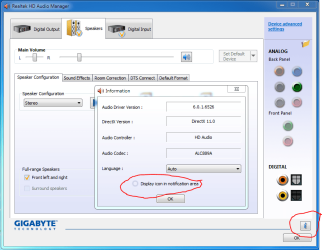
Then,go to start\control panel,click on realtek (hd) Audio Manager,click the explanation mark,enable the Display icon in notification area,click ok and ok.

Restart.
 

Attachments

  • panais.PNG
    panais.PNG
    15.7 KB · Views: 21
  • panais 2.PNG
    panais 2.PNG
    42.2 KB · Views: 36

My Computer

Computer Manufacturer/Model Number
Custom Built by me.
OS
Windows 7 Ultimate 64bit SP1
CPU
Intel Core 2 Quad Q6600
Motherboard
Gigabyte GA-X38-DS4
Memory
2X2GB DDR2 PC6400 800MHZ DUAL CHANNEL
Graphics Card(s)
XFX RADEON HD 6850 1GB GDDR5
Sound Card
2/4/5.1/7.1-channel Realtek High Definition
Monitor(s) Displays
Samsung LE40A656F1 1080p 100Hz LCD HD TV 50,000:1
Screen Resolution
1366x768 in Desktop,1920x1080p in gaming and video
Hard Drives
C:\WD VelociRaptor 150 GB,10,000 RPM
E:\WESTERN DIGITAL WD15EADS 1.5TB CAVIAR GREEN SATA2 F:\WESTERN DIGITAL WD15EADS 1.5TB CAVIAR GREEN SATA2
PSU
THERMALTAKE W0229 TOUGHPOWER XT 750W
Case
A-Case Twin Engine BB
Cooling
3 x thermaltake smart case fan II + 1 arctic cooling fan
Keyboard
Wireless Logitech LX710
Mouse
Logitech Wireless Gaming Mouse G700
Internet Speed
ADSL 12000 plus
Other Info
Mouse Logitech G700,with 13 buttons who needs keyboard in RPG?

D:\Sony high speed sata Dvd Rewriter
Logitech Cordless Rumblepad 2
CBM I noticed you have two System Specs, which computer are we working on?
 

My Computer

Computer type
PC/Desktop
Computer Manufacturer/Model Number
Home made Desktop
OS
Windows 10 Pro. 64/ version 1709 Windows 7 Pro/64
CPU
Intel i7-6800K @ 4.3
Motherboard
ASUS X-99 Deluxe II
Memory
Corsair Platinum 16 gig @2400
Graphics Card(s)
EVGA GTX 1070 OC
Monitor(s) Displays
Asus 27" LED LCD/VE278Q
Screen Resolution
1920-1080 or 1280-720 HDMI
Hard Drives
INTEL SSD 730-240 Gb Sata 3.0/
PSU
EVGA Platium 1200W
Case
Phanteks Luxe Tempered Glass 8 fans/ one radiator
Cooling
XSPC/ Water Cooled CPU
Keyboard
Das 4 Professional
Mouse
Logitech M705/MX Anywhere 2-S
Internet Speed
100 mbits
Antivirus
Microsoft Security Essentials/ Malwarebytes Premium 3.0/ SAS
Browser
I.E. 11 default/Firefox/ ISP Time Warner Cable/Spectrum
Other Info
LG BluRay Burner/
Sound system-KLipsch-THX/
Icy Dock ssd Hot Swap bays.
It's the laptop, XPS-17 L702X. The other is his desktop, XPS 7100, and he states here that he has no problem with that:
I have the same Realtek Audio and Sound Manager on my XPS 7100 desktop, which is also running Win 7 Ultimate x64, and have no problems whatsoever with it.
 

My Computer

Computer type
PC/Desktop
Computer Manufacturer/Model Number
Dwarf Dwf/11/2012 r09/2013
OS
Windows 8.1 Pro RTM x64
CPU
Intel Core-i5-3570K 4-core @ 3.4GHz (Ivy Bridge) (OC 4.4GHz)
Motherboard
ASRock Z77 Extreme4-M
Memory
4 x 4GB DDR3-1600 Corsair Vengeance CMZ8GX3M2A1600C9B (16GB)
Graphics Card(s)
MSI GeForce GTX770 Gaming OC 2GB
Sound Card
Realtek High Definition on board solution (ALC 898)
Monitor(s) Displays
ViewSonic VA1912w Widescreen (VGA)
Screen Resolution
1440x900
Hard Drives
OCZ Agility 3 SSD 120GB SATA III x2 (RAID 0)
Samsung HD501LJ 500GB SATA II x2
Hitachi HDS721010CLA332 1TB SATA II
Iomega 1.5TB Ext USB 2.0
WD 2.0TB Ext USB 3.0
PSU
XFX Pro Series 850W Semi-Modular
Case
Gigabyte IF233
Cooling
1 x 120mm Front Inlet 1 x 120mm Rear Exhaust
Keyboard
Microsoft Comfort Curve Keyboard 3000 (USB)
Mouse
Microsoft Comfort Mouse 3000 for Business (USB)
Internet Speed
NetGear DG834Gv3 ADSL Modem/Router (Ethernet) ~4.0 Mb/s (O2)
Antivirus
Avast! 8.0.1497
Browser
IE 11
Other Info
Optical Drive: HL-DT-ST BD-RE BH10LS30 SATA Bluray
Lexmark S305 Printer/Scanner/Copier (USB)
WEI Score: 8.1/8.1/8.5/8.5/8.25
Asus Eee PC 1011PX Netbook (Windows 7 x86 Starter)
Back
Top