Cannot access windows update (Unknown error)

donkristo

New member
Local time
5:34 PM
Messages
9
Hey. I'm working as a PC technician so I get alot of PC's in with errors, but this one is beyond my knowledge, and i came across this forum, and I assume someone here knows what to do:)
So, this customer has problems with his Dell laptop when trying to run windows update. The error message states that the service is not running, and that i need to try to restart the computer, which i've tried. I tried resetting the windows update and everything. ran MBAM and removed/disabled all AV e.g.
Does anyone know what the problem might be?
I cannot find the service Automatic Updates running, could this be why? and how do i enable it/install it in that case?

Thanks for all help:)
 

My Computer

OS
Windows 7 Home Premium 64-bit + all other OS'

My Computer

Computer type
PC/Desktop
Computer Manufacturer/Model Number
Dell XPS 420
OS
Windows 10, Home Clean Install
CPU
Intel Core2 processsor Q8200(2.33Ghz 1333FSB) Quad Core Tech
Motherboard
Dell
Memory
6 gb
Graphics Card(s)
ATI Radeon 256MB HD3650
Sound Card
Intergrated 7.1 Channel Audio
Monitor(s) Displays
Dell SP2009W 20"
Hard Drives
640 GB Serial ATA Hard drive
Cooling
Fan
Keyboard
Dell USB Keyboard
Mouse
Dell Premium Optical USB
Internet Speed
DSL 2.85
Thanks for the reply, but it didn't solve the problem.
I tried running it on agressive too, but no help there either. The net connection is working as it should, and I really have no clue about what could be causing this.
The computer has recently been done a recovery on from a workshop, and windows haven't been updated since this, since it can't find any updates when the service can't seem to be running.
 

My Computer

OS
Windows 7 Home Premium 64-bit + all other OS'
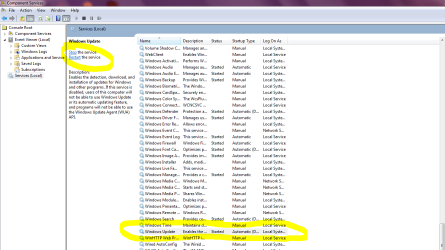
Control panel> Administrative Tools> Services> Windows Update

Make sure it is set as mine in the SNIP- turned on.

Where you see in yellow Stop and Restart towards top left you may need to click Restart or possibly Stop then Restart.
You can also right click Win Updates in the long list I have circled. That gives you a list of options.

Hope that helps.
Mike

Click the picture to enlarge. ;)
 

Attachments

  • Services Win Update.PNG
    Services Win Update.PNG
    152.2 KB · Views: 89

My Computer

Computer Manufacturer/Model Number
Hopalong/ Godzilla
OS
Windows7 Pro 64bit SP-1; Windows XP Pro 32bit
CPU
Intel Core i7-870 Lynnfield 2.93GHz LGA 1156 95W Quad-Core
Motherboard
ASUS P7P55D-E PRO
Memory
8GB@1400MHz Crucial Ballistix DDR3-1600 4x2GB
Graphics Card(s)
ASUS ENGTX460 DirectCU/2DI/1GD5 1GB 256-bit GDDR5
Sound Card
VIA Onboard
Monitor(s) Displays
Asus VS248H-P 24"; Samsung SyncMaster 941BW 19"ws
Screen Resolution
1920x1080; 1440x900
Hard Drives
Samsung 830 120GB SSD
Intel 320 120GB SSD
Western Digital Caviar Black WD7501AALS 750GB 7200 RPM SATA 3.0Gb/s
Western Digital Caviar Black WD6401AALS 640GB 7200 RPM SATA 3.0Gb/s
PSU
COOLER MASTER Silent Pro RS850-AMBAJ3-US 850W Modular
Case
COOLER MASTER HAF 932 RC-932-KKN5-GP Black
Cooling
Scythe "Mugen-2 Rev.B" (2 ScytheKaze-Jyuni PWM fans)
Keyboard
Logitech K-320
Mouse
Kensington
Antivirus
Avast Inernet Suite
Browser
IE 9 ; Chrome
Control panel> Administrative Tools> Services> Windows Update

Make sure it is set as mine in the SNIP- turned on.

Where you see in yellow Stop and Restart towards top left you may need to click Restart or possibly Stop then Restart.
You can also right click Win Updates in the long list I have circled. That gives you a list of options.

Hope that helps.
Mike

Click the picture to enlarge. ;)

Thanks, but I've already tried this, without any result :(
 

My Computer

OS
Windows 7 Home Premium 64-bit + all other OS'
Back
Top