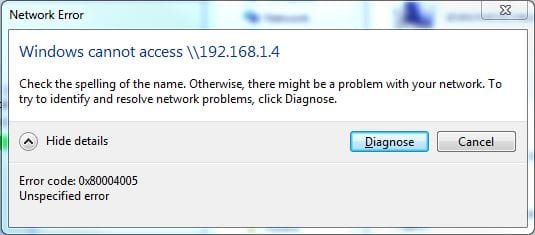
Error Code 0x080004005 Windows Cannot Access \\192.168.1.4

rcsjohnathan

New member
Local time
5:24 PM
Messages
9
I have a small network for work consisting of 3 wireless access points a switch a router some PCs and two file servers. My laptop is acting up in that I cannot access either file server. I have tried accessing by name and by IP and neither connect. Other computers on the network, running the same specs as my laptop, can access no problem. I can ping the servers by name and by IP and can access the Database on one of the servers with third party software. Any help will be greatly appreciated.
 

Attachments
  • Error.JPG
    Error.JPG
    30.3 KB · Views: 47

My Computer

Computer type
Laptop
Computer Manufacturer/Model Number
HP
OS
Windows 7 Professional x64
CPU
AMD A8-7410 APU with AMD Radeon R5 Graphics 2.20 GHz
Browser
Chrome

My Computers

System One System Two

Hey Towns,

Thanks for the reply and I apologize for my delayed response. I have been away from my computer for the Holiday. I tried the solution in the link that you sent and I am still experiencing my issue.
 

My Computer

Computer type
Laptop
Computer Manufacturer/Model Number
HP
OS
Windows 7 Professional x64
CPU
AMD A8-7410 APU with AMD Radeon R5 Graphics 2.20 GHz
Browser
Chrome
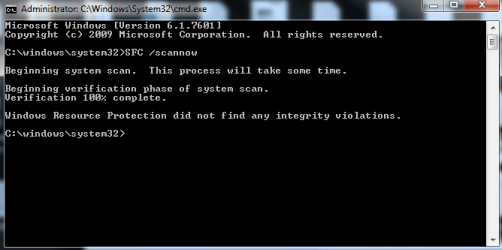
From the start menu type in cmd. RIGHT CLICK on it and select run as administrator. In the command prompt type in SFC /scannow. Hit enter and let that run. Post back the results.
 

My Computers

System One System Two

Here is the result of running SFC /scannow
 

Attachments

  • SFC.PNG
    SFC.PNG
    58 KB · Views: 33

My Computer

Computer type
Laptop
Computer Manufacturer/Model Number
HP
OS
Windows 7 Professional x64
CPU
AMD A8-7410 APU with AMD Radeon R5 Graphics 2.20 GHz
Browser
Chrome
Type regedit and click OK
Navigate to the following path in regedit
HKLM\SOFTWARE\Microsoft\Windows\CurrentVersion\Policies\System
For 32 bit system, create a new DWORD value called LocalAccountTokenFilterPolicy.
For a 64 bit system, make a QWORD (64-bit) called LocalAccountTokenFilterPolicy.
In either case, set the value to numeric 1 (meaning on), and remember to click OK.

You followed this and it didn't work?
 

My Computers

System One System Two

Correct I did this and had no success.
 

My Computer

Computer type
Laptop
Computer Manufacturer/Model Number
HP
OS
Windows 7 Professional x64
CPU
AMD A8-7410 APU with AMD Radeon R5 Graphics 2.20 GHz
Browser
Chrome
Hi rcsjohnathan, welcome to 7F! :)

With 0x080004005 being an unspecified error there are many possibilities for why it was generated, usually you concentrate in the area that's giving you the problem and in your case it is networking or lack of.

My first thought was that switch you have in the network and if that may be bad and I was going to suggest to try plugging it into another port on the switch, if you don't have any extra ports just swap with one of the other networked machines and test, but I'd like you to check for a setting.

Go to your Local Area Network Connection Status window, if you're not sure how to do that follow the instructions in the link but when you get to step 4. click on Properties at the bottom of the context menu instead of create shortcut.

   Note
If you know which connection is for the laptop start with that one.

When properties open do you see "Client for Microsoft Networks" and is it checked?

  • If not check it and test.

  • If it isn't listed click on the Install button, pick Client and then Add, and check if necessary, then test.

  • I don't believe a restart is required unless windows asks for it.

  • Check for the "Client" for all network connections, bridges, switches, etc. that are listed.

  • If no success you may have to remove your earlier registry edit and test.

This could also be a credentials problem i.e. passwords.
 

My Computer

Computer type
PC/Desktop
Computer Manufacturer/Model Number
Gateway DX4831-01e (Mid-Tower Desktop)
OS
Originally Win 7 Hm Prem x64 Ver 6.1.7600 Build 7601-SP1 | Upgraded to Windows 10 December 14, 2019
CPU
Intel i3 530 2.93GHz, 2933MHz 2 Cores 4 Logical Processors
Motherboard
Gateway H57M01 133 megahertz
Memory
6GB of 1,333MHz DDR3 SDRAM
Graphics Card(s)
32MB Intel Graphics Media Accelerator HD IGChip
Sound Card
Realtek High Definition Audio
Monitor(s) Displays
Gateway HX2000 20inch TFT active matrix TN
Screen Resolution
1600 x 900 x 59 hertz
Hard Drives
WDC WD10EADS-00M2B0 [HDD] (1000.20 GB) -- drive 0,
HL-DT-ST DVDRAM GH41N [CD-ROM dr]
Four card readers, and Four USB 2.0
PSU
300watts.
Case
Mid-Tower Desktop
Cooling
Stock from Gateway
Keyboard
Natural Ergonomic Keyboard 4000, see Other Info
Mouse
Orig. Gateway wore out now using Insignia USB wired optical
Internet Speed
Vz FIOS 10ms png 57.64Mbps down 65.53Mbps up Speedtest.org
Antivirus
Zamana Anti-logger with Anti-malware, MSE, Windows Firewall,
Browser
IE11.0.9600.19399-Upd ver11.0.135, Firefox 68.0.1 x64
Other Info
System Specs by Belarc.

BIOS: American Megatrends Inc. P01-A0 11/17/2009

Replaced the MS 'Natural' Standard PS/2 Enhanced 101-102 Keyboard with a new Natural Ergonomic Keyboard 4000 on August 1st 2014.

Canon Pixma MG3222 Printer.

Updated to IE11 on 12102015 | Fios Quantum Router g1100

Additional AV: SpywareBlaster, manual Mbam, SAS
Not by any chance running a 3rd party Firewall, via your AV.

Roy
 

My Computer

Computer type
PC/Desktop
Computer Manufacturer/Model Number
medionl/Aspire 6930G/acer x55a
OS
W7 home premium 32bit/W7HP 64bit/w10 tp insider ring
CPU
E5300 dual core
Motherboard
medion MS7366
Memory
3gb
Graphics Card(s)
Nvidia Geforce 7100 Nforce 630i
Monitor(s) Displays
avixc
Internet Speed
n (isp resticted to 72)
Antivirus
mse/pands
Browser
palemoon
Other Info
Belkin Fd7050 n USB using Railink RT2870 drivers, more upto date
Annak - I have tried different networks and different interfaces and am still having issues getting to any network share. I made sure that Client for Microsoft Networks is running on all interfaces. Password is saved and had worked until my problem began. Verified with the server admin and my credentials are correct.

torchwood - I am running security essentials but I have also tried disabling it.
 

My Computer

Computer type
Laptop
Computer Manufacturer/Model Number
HP
OS
Windows 7 Professional x64
CPU
AMD A8-7410 APU with AMD Radeon R5 Graphics 2.20 GHz
Browser
Chrome
Have you tried disabling Windows Firewall, as that will handle it and not MSE?
 

My Computer

Computer type
PC/Desktop
Computer Manufacturer/Model Number
Custom
OS
10 Pro x64
CPU
Ryzen 9 3900X
Motherboard
Asrock x370 Tachi
Memory
64GB(4x16GB) DDR4
Graphics Card(s)
EVGA 1080ti FTW3
Sound Card
ASUS Xonar Essence STX (V4 Bursons), ODAC rev B, NFB-11, O2
Monitor(s) Displays
3xASUS PB278Q/R, Optoma HD142X
Screen Resolution
3x1440p, 1080p
Hard Drives
512GB 850 EVO(OS, Programs)
4TB (Movies)
3TB (Downloads)
3TB (Programs)
1TB HDD (Games)
2x6TB R1 (videos)
PSU
AX760
Case
Fractal Define R5
Cooling
NH-D15S
Keyboard
Massdrop Ctrl with Box Navy's
Mouse
G903, Alioth XXL Mat
Internet Speed
280/40
Antivirus
MBAM, ESET
Browser
Canary 64 Bit
Other Info
I also own a Thinkpad P50 Xeon 4K, X220T, X1C5
Password is saved and had worked until my problem began.
Try resetting your password. Use one that is entirely different, if that works but you like your old one, go back to it and see if it takes.
 

My Computer

Computer type
PC/Desktop
Computer Manufacturer/Model Number
Gateway DX4831-01e (Mid-Tower Desktop)
OS
Originally Win 7 Hm Prem x64 Ver 6.1.7600 Build 7601-SP1 | Upgraded to Windows 10 December 14, 2019
CPU
Intel i3 530 2.93GHz, 2933MHz 2 Cores 4 Logical Processors
Motherboard
Gateway H57M01 133 megahertz
Memory
6GB of 1,333MHz DDR3 SDRAM
Graphics Card(s)
32MB Intel Graphics Media Accelerator HD IGChip
Sound Card
Realtek High Definition Audio
Monitor(s) Displays
Gateway HX2000 20inch TFT active matrix TN
Screen Resolution
1600 x 900 x 59 hertz
Hard Drives
WDC WD10EADS-00M2B0 [HDD] (1000.20 GB) -- drive 0,
HL-DT-ST DVDRAM GH41N [CD-ROM dr]
Four card readers, and Four USB 2.0
PSU
300watts.
Case
Mid-Tower Desktop
Cooling
Stock from Gateway
Keyboard
Natural Ergonomic Keyboard 4000, see Other Info
Mouse
Orig. Gateway wore out now using Insignia USB wired optical
Internet Speed
Vz FIOS 10ms png 57.64Mbps down 65.53Mbps up Speedtest.org
Antivirus
Zamana Anti-logger with Anti-malware, MSE, Windows Firewall,
Browser
IE11.0.9600.19399-Upd ver11.0.135, Firefox 68.0.1 x64
Other Info
System Specs by Belarc.

BIOS: American Megatrends Inc. P01-A0 11/17/2009

Replaced the MS 'Natural' Standard PS/2 Enhanced 101-102 Keyboard with a new Natural Ergonomic Keyboard 4000 on August 1st 2014.

Canon Pixma MG3222 Printer.

Updated to IE11 on 12102015 | Fios Quantum Router g1100

Additional AV: SpywareBlaster, manual Mbam, SAS
Are you using an account on the server to access the files or accounts on your computers? If the accounts are local to your computer then that could cause a permissions issue because just because your account on one computer has been granted access that doesn't mean that all of them are. If there is a server admin you should work with him especially if this is an enterprise environment. It could for example be that your computer is some how blocked from accessing the server or it may be trying to use a proxy server and is blocked by that. Enterprise environments are more complicated so you really have to work with IT support.
 

My Computers

System One System Two

I have tried disabling all firewalls on my PC with no luck. I have also tried resetting my password on the server. When I go to log into the server it doesn't even get to the point where it asks for my password.

I have an account on the server that I can log into on a different computer on the network but not from mine. We are a small company so IT is more handled by me and my supervisor.
 

My Computer

Computer type
Laptop
Computer Manufacturer/Model Number
HP
OS
Windows 7 Professional x64
CPU
AMD A8-7410 APU with AMD Radeon R5 Graphics 2.20 GHz
Browser
Chrome
Go into your router and make sure your machine's encryption is set the same as the others, and that it matches the server's encryption. There are several versions of encryption; WPA2/PSK, AES or WPA, modern routers should be on at least WPA2 in any event make sure yours is set to what the others are and the only way you can see this is by going into your router.

Since you didn't even get to the point where it asks for your password I would believe it hasn't changed so that should be okay.
 

My Computer

Computer type
PC/Desktop
Computer Manufacturer/Model Number
Gateway DX4831-01e (Mid-Tower Desktop)
OS
Originally Win 7 Hm Prem x64 Ver 6.1.7600 Build 7601-SP1 | Upgraded to Windows 10 December 14, 2019
CPU
Intel i3 530 2.93GHz, 2933MHz 2 Cores 4 Logical Processors
Motherboard
Gateway H57M01 133 megahertz
Memory
6GB of 1,333MHz DDR3 SDRAM
Graphics Card(s)
32MB Intel Graphics Media Accelerator HD IGChip
Sound Card
Realtek High Definition Audio
Monitor(s) Displays
Gateway HX2000 20inch TFT active matrix TN
Screen Resolution
1600 x 900 x 59 hertz
Hard Drives
WDC WD10EADS-00M2B0 [HDD] (1000.20 GB) -- drive 0,
HL-DT-ST DVDRAM GH41N [CD-ROM dr]
Four card readers, and Four USB 2.0
PSU
300watts.
Case
Mid-Tower Desktop
Cooling
Stock from Gateway
Keyboard
Natural Ergonomic Keyboard 4000, see Other Info
Mouse
Orig. Gateway wore out now using Insignia USB wired optical
Internet Speed
Vz FIOS 10ms png 57.64Mbps down 65.53Mbps up Speedtest.org
Antivirus
Zamana Anti-logger with Anti-malware, MSE, Windows Firewall,
Browser
IE11.0.9600.19399-Upd ver11.0.135, Firefox 68.0.1 x64
Other Info
System Specs by Belarc.

BIOS: American Megatrends Inc. P01-A0 11/17/2009

Replaced the MS 'Natural' Standard PS/2 Enhanced 101-102 Keyboard with a new Natural Ergonomic Keyboard 4000 on August 1st 2014.

Canon Pixma MG3222 Printer.

Updated to IE11 on 12102015 | Fios Quantum Router g1100

Additional AV: SpywareBlaster, manual Mbam, SAS
Just checked the encryption. Everything matches across the network. Server, Laptop and Router.
 

My Computer

Computer type
Laptop
Computer Manufacturer/Model Number
HP
OS
Windows 7 Professional x64
CPU
AMD A8-7410 APU with AMD Radeon R5 Graphics 2.20 GHz
Browser
Chrome
I'm beginning to run out of ideas, let me think about this and I'll try to get back later today.
We're getting that snow you had Sunday into Monday and I have to take care of the plowin' an blowin' first, the NWS is forecasting up to 6" for us. Might be a long day. :(

Hey! What about that switch or hub you have? Try swappin' the ports.
 

My Computer

Computer type
PC/Desktop
Computer Manufacturer/Model Number
Gateway DX4831-01e (Mid-Tower Desktop)
OS
Originally Win 7 Hm Prem x64 Ver 6.1.7600 Build 7601-SP1 | Upgraded to Windows 10 December 14, 2019
CPU
Intel i3 530 2.93GHz, 2933MHz 2 Cores 4 Logical Processors
Motherboard
Gateway H57M01 133 megahertz
Memory
6GB of 1,333MHz DDR3 SDRAM
Graphics Card(s)
32MB Intel Graphics Media Accelerator HD IGChip
Sound Card
Realtek High Definition Audio
Monitor(s) Displays
Gateway HX2000 20inch TFT active matrix TN
Screen Resolution
1600 x 900 x 59 hertz
Hard Drives
WDC WD10EADS-00M2B0 [HDD] (1000.20 GB) -- drive 0,
HL-DT-ST DVDRAM GH41N [CD-ROM dr]
Four card readers, and Four USB 2.0
PSU
300watts.
Case
Mid-Tower Desktop
Cooling
Stock from Gateway
Keyboard
Natural Ergonomic Keyboard 4000, see Other Info
Mouse
Orig. Gateway wore out now using Insignia USB wired optical
Internet Speed
Vz FIOS 10ms png 57.64Mbps down 65.53Mbps up Speedtest.org
Antivirus
Zamana Anti-logger with Anti-malware, MSE, Windows Firewall,
Browser
IE11.0.9600.19399-Upd ver11.0.135, Firefox 68.0.1 x64
Other Info
System Specs by Belarc.

BIOS: American Megatrends Inc. P01-A0 11/17/2009

Replaced the MS 'Natural' Standard PS/2 Enhanced 101-102 Keyboard with a new Natural Ergonomic Keyboard 4000 on August 1st 2014.

Canon Pixma MG3222 Printer.

Updated to IE11 on 12102015 | Fios Quantum Router g1100

Additional AV: SpywareBlaster, manual Mbam, SAS
The strange thing is I can access the database on this server with a 3rd party application but I cannot browse the folders or access the shares. It used to work no problem but then one day I started getting this error.
 

My Computer

Computer type
Laptop
Computer Manufacturer/Model Number
HP
OS
Windows 7 Professional x64
CPU
AMD A8-7410 APU with AMD Radeon R5 Graphics 2.20 GHz
Browser
Chrome
What is this 3rd party app?

If you can I'd like to see your ipconfig /all for the problem machine and from one of the ones that work. you can either attach them as files or copy/paste into a code box in your next reply, it's the # in the reply editor menu.

To make this a bit easier type or copy/paste this cmd: ipconfig /all > network.txt & network.txt into an administrator cmd prompt, you'll know your in one when you see C:\WINDOWS\system32>_ It'll look like this:
Code:
C:\WINDOWS\system32>ipconfig /all > network.txt & network.txt
   Note
To differentiate between the two you could place a number or a letter between the k and the period before the t like this:

  • ipconfig /all > network1.txt & network1.txt

  • ipconfig /all > network2.txt & network2.txt
Just be sure to mention which one is the problem machine and which one works okay.
Then tap the enter key.

A notepad file will pop up named network 1 or 2 and you can either attach those files or place them into a code box.


  • That reminds me, is your laptop in the same domain and group? And you can try unhecking the IPv6 box in tcp/ip settings.

  • Then there's the netbios over tcp/ip thing, sometimes you need it sometimes you don't but all machines and servers have to match.

  • Have you tried running the network troubleshooters? See: Control Panel\All Control Panel Items\Troubleshooting\Network and Internet
This the problem with 0x080004005 errors there's nothing definite. :(


My Computer

Computer type
PC/Desktop
Computer Manufacturer/Model Number
Gateway DX4831-01e (Mid-Tower Desktop)
OS
Originally Win 7 Hm Prem x64 Ver 6.1.7600 Build 7601-SP1 | Upgraded to Windows 10 December 14, 2019
CPU
Intel i3 530 2.93GHz, 2933MHz 2 Cores 4 Logical Processors
Motherboard
Gateway H57M01 133 megahertz
Memory
6GB of 1,333MHz DDR3 SDRAM
Graphics Card(s)
32MB Intel Graphics Media Accelerator HD IGChip
Sound Card
Realtek High Definition Audio
Monitor(s) Displays
Gateway HX2000 20inch TFT active matrix TN
Screen Resolution
1600 x 900 x 59 hertz
Hard Drives
WDC WD10EADS-00M2B0 [HDD] (1000.20 GB) -- drive 0,
HL-DT-ST DVDRAM GH41N [CD-ROM dr]
Four card readers, and Four USB 2.0
PSU
300watts.
Case
Mid-Tower Desktop
Cooling
Stock from Gateway
Keyboard
Natural Ergonomic Keyboard 4000, see Other Info
Mouse
Orig. Gateway wore out now using Insignia USB wired optical
Internet Speed
Vz FIOS 10ms png 57.64Mbps down 65.53Mbps up Speedtest.org
Antivirus
Zamana Anti-logger with Anti-malware, MSE, Windows Firewall,
Browser
IE11.0.9600.19399-Upd ver11.0.135, Firefox 68.0.1 x64
Other Info
System Specs by Belarc.

BIOS: American Megatrends Inc. P01-A0 11/17/2009

Replaced the MS 'Natural' Standard PS/2 Enhanced 101-102 Keyboard with a new Natural Ergonomic Keyboard 4000 on August 1st 2014.

Canon Pixma MG3222 Printer.

Updated to IE11 on 12102015 | Fios Quantum Router g1100

Additional AV: SpywareBlaster, manual Mbam, SAS
Code:
Problem Machine
Windows IP Configuration

   Host Name . . . . . . . . . . . . : Service1455
   Primary Dns Suffix  . . . . . . . : 
   Node Type . . . . . . . . . . . . : Hybrid
   IP Routing Enabled. . . . . . . . : No
   WINS Proxy Enabled. . . . . . . . : No
   DNS Suffix Search List. . . . . . : routerd52444.com

Wireless LAN adapter Wireless Network Connection:

   Connection-specific DNS Suffix  . : routerd52444.com
   Description . . . . . . . . . . . : Realtek RTL8723BE 802.11 bgn Wi-Fi Adapter
   Physical Address. . . . . . . . . : 40-49-0F-9D-5C-25
   DHCP Enabled. . . . . . . . . . . : Yes
   Autoconfiguration Enabled . . . . : Yes
   IPv4 Address. . . . . . . . . . . : 192.168.1.190(Preferred) 
   Subnet Mask . . . . . . . . . . . : 255.255.255.0
   Lease Obtained. . . . . . . . . . : Tuesday, January 16, 2018 9:58:42 AM
   Lease Expires . . . . . . . . . . : Wednesday, January 17, 2018 9:58:42 PM
   Default Gateway . . . . . . . . . : 192.168.1.1
   DHCP Server . . . . . . . . . . . : 192.168.1.1
   DNS Servers . . . . . . . . . . . : 192.168.1.1
   Primary WINS Server . . . . . . . : 192.168.1.4
   NetBIOS over Tcpip. . . . . . . . : Enabled

Ethernet adapter Local Area Connection:

   Media State . . . . . . . . . . . : Media disconnected
   Connection-specific DNS Suffix  . : local.tld
   Description . . . . . . . . . . . : Realtek PCIe GBE Family Controller
   Physical Address. . . . . . . . . : EC-8E-B5-4D-5D-E2
   DHCP Enabled. . . . . . . . . . . : Yes
   Autoconfiguration Enabled . . . . : Yes

Tunnel adapter isatap.routerd52444.com:

   Media State . . . . . . . . . . . : Media disconnected
   Connection-specific DNS Suffix  . : routerd52444.com
   Description . . . . . . . . . . . : Microsoft ISATAP Adapter
   Physical Address. . . . . . . . . : 00-00-00-00-00-00-00-E0
   DHCP Enabled. . . . . . . . . . . : No
   Autoconfiguration Enabled . . . . : Yes

Code:
Working Machine

Windows IP Configuration

   Host Name . . . . . . . . . . . . : RCS-FLService2
   Primary Dns Suffix  . . . . . . . : 
   Node Type . . . . . . . . . . . . : Hybrid
   IP Routing Enabled. . . . . . . . : No
   WINS Proxy Enabled. . . . . . . . : No
   DNS Suffix Search List. . . . . . : routerd52444.com

Wireless LAN adapter Wireless Network Connection 2:

   Media State . . . . . . . . . . . : Media disconnected
   Connection-specific DNS Suffix  . : 
   Description . . . . . . . . . . . : Microsoft Virtual WiFi Miniport Adapter
   Physical Address. . . . . . . . . : 20-10-7A-71-73-EE
   DHCP Enabled. . . . . . . . . . . : Yes
   Autoconfiguration Enabled . . . . : Yes

Wireless LAN adapter Wireless Network Connection:

   Connection-specific DNS Suffix  . : routerd52444.com
   Description . . . . . . . . . . . : Realtek RTL8188CE 802.11b/g/n WiFi Adapter
   Physical Address. . . . . . . . . : 20-10-7A-71-73-EE
   DHCP Enabled. . . . . . . . . . . : Yes
   Autoconfiguration Enabled . . . . : Yes
   Link-local IPv6 Address . . . . . : fe80::9469:610d:4ed2:cff2%12(Preferred) 
   IPv4 Address. . . . . . . . . . . : 192.168.1.244(Preferred) 
   Subnet Mask . . . . . . . . . . . : 255.255.255.0
   Lease Obtained. . . . . . . . . . : Tuesday, January 16, 2018 11:01:10 AM
   Lease Expires . . . . . . . . . . : Thursday, January 18, 2018 10:54:17 AM
   Default Gateway . . . . . . . . . : 192.168.1.1
   DHCP Server . . . . . . . . . . . : 192.168.1.1
   DHCPv6 IAID . . . . . . . . . . . : 320868474
   DHCPv6 Client DUID. . . . . . . . : 00-01-00-01-20-52-1F-65-A0-B3-CC-23-DA-1E
   DNS Servers . . . . . . . . . . . : 2001:4888:31:ff00:343:d::
                                       2001:4888:30:ff00:342:d::
                                       192.168.1.1
   Primary WINS Server . . . . . . . : 192.168.1.4
   NetBIOS over Tcpip. . . . . . . . : Enabled

Ethernet adapter Local Area Connection:

   Media State . . . . . . . . . . . : Media disconnected
   Connection-specific DNS Suffix  . : 
   Description . . . . . . . . . . . : Realtek PCIe GBE Family Controller
   Physical Address. . . . . . . . . : A0-B3-CC-23-DA-1E
   DHCP Enabled. . . . . . . . . . . : No
   Autoconfiguration Enabled . . . . : Yes

Tunnel adapter isatap.routerd52444.com:

   Media State . . . . . . . . . . . : Media disconnected
   Connection-specific DNS Suffix  . : 
   Description . . . . . . . . . . . : Microsoft ISATAP Adapter
   Physical Address. . . . . . . . . : 00-00-00-00-00-00-00-E0
   DHCP Enabled. . . . . . . . . . . : No
   Autoconfiguration Enabled . . . . : Yes

Tunnel adapter isatap.{29E46814-AF49-4527-9A5B-9D1B025EB7A8}:

   Media State . . . . . . . . . . . : Media disconnected
   Connection-specific DNS Suffix  . : 
   Description . . . . . . . . . . . : Microsoft ISATAP Adapter #2
   Physical Address. . . . . . . . . : 00-00-00-00-00-00-00-E0
   DHCP Enabled. . . . . . . . . . . : No
   Autoconfiguration Enabled . . . . : Yes

Tunnel adapter Teredo Tunneling Pseudo-Interface:

   Media State . . . . . . . . . . . : Media disconnected
   Connection-specific DNS Suffix  . : 
   Description . . . . . . . . . . . : Teredo Tunneling Pseudo-Interface
   Physical Address. . . . . . . . . : 00-00-00-00-00-00-00-E0
   DHCP Enabled. . . . . . . . . . . : No
   Autoconfiguration Enabled . . . . : Yes

Tunnel adapter isatap.{369B706A-BCE2-4F9D-B0E2-1ADA70906B99}:

   Media State . . . . . . . . . . . : Media disconnected
   Connection-specific DNS Suffix  . : 
   Description . . . . . . . . . . . : Microsoft ISATAP Adapter #3
   Physical Address. . . . . . . . . : 00-00-00-00-00-00-00-E0
   DHCP Enabled. . . . . . . . . . . : No
   Autoconfiguration Enabled . . . . : Yes

I have set NetBios to enabled on all interfaces and also unchecked IPv6 on all interfaces. All computers have been checked and they are all in the same work group. The third party software I have used is a custom program that I wrote which accesses a MySQL Database running on the server. The network troubleshooter is not finding any problems.
 

My Computer

Computer type
Laptop
Computer Manufacturer/Model Number
HP
OS
Windows 7 Professional x64
CPU
AMD A8-7410 APU with AMD Radeon R5 Graphics 2.20 GHz
Browser
Chrome
Back
Top