Cannot backup using Windows 7

Kenrolli

New member
Local time
3:56 PM
Messages
13
Location
South Wales UK
Hi there folks, am new to this forum so would like to say hi to all those helpful people around the world!
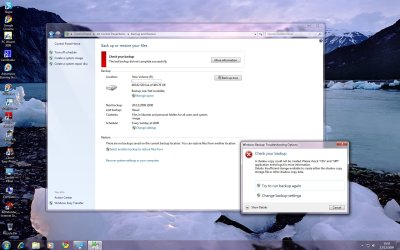
I cannot seem to make an image backup of my C drive onto my new 500Gb drive (R) as it tells me I do not have enough space which I find rather strange as it is new and completely empty but obviously formatted. I would appreciate any help with this, the PC is a new build running Windows 7 Ultimate with 2Gb RAM. I guess it may have something to do with my choice of letter for the drive?
If any more info is needed please ask, thanks guys, Kenrolli...

P.S. I want to backup my complete OS in case of disk failure!!
 

My Computer

Computer Manufacturer/Model Number
Self Build
OS
Windows 7 Ultimate 64 Bit
CPU
Intel Core 2 Duo 2.03Ghz
Motherboard
Asus P5QL/EPU
Memory
2Gb Corsair
Graphics Card(s)
GT 8800
Sound Card
On board
Monitor(s) Displays
Samsung SyncMaster T220
Hard Drives
2x 500Gb
PSU
Arctic Power 7850 Watt
Case
ATX
Cooling
Arctic Cooling
Keyboard
BenQ A800
Mouse
Logitech Laser RX1000
Internet Speed
2-5Mb
Hi there folks, am new to this forum so would like to say hi to all those helpful people around the world!
I cannot seem to make an image backup of my C drive onto my new 500Gb drive (R) as it tells me I do not have enough space which I find rather strange as it is new and completely empty but obviously formatted. I would appreciate any help with this, the PC is a new build running Windows 7 Ultimate with 2Gb RAM. I guess it may have something to do with my choice of letter for the drive?
If any more info is needed please ask, thanks guys, Kenrolli...

P.S. I want to backup my complete OS in case of disk failure!!

Click on the my computer icon. What do you see for your back up partition and how much space did you devote to it?

Personally, I have a 500gb hard drive and I set aside 50 gb for back up. Back up includes system image, backup and restore and system restore.

Back is done on a periodic basis by default.

I just know when you check out your drive, you will realize that you have to increase the size of your recovery partition.

You probably have a back up, already, which is made periodically, by default. It is the back up called system image.

In lieu of that, and probably better off, save to an external hard drive.
 

My Computer

Computer type
PC/Desktop
Computer Manufacturer/Model Number
Dell XPS 420
OS
Windows 10, Home Clean Install
CPU
Intel Core2 processsor Q8200(2.33Ghz 1333FSB) Quad Core Tech
Motherboard
Dell
Memory
6 gb
Graphics Card(s)
ATI Radeon 256MB HD3650
Sound Card
Intergrated 7.1 Channel Audio
Monitor(s) Displays
Dell SP2009W 20"
Hard Drives
640 GB Serial ATA Hard drive
Cooling
Fan
Keyboard
Dell USB Keyboard
Mouse
Dell Premium Optical USB
Internet Speed
DSL 2.85
Hi Richard and thanks for the reply! Am I correct in thinking that I should partition my new drive (R) at say 50Gb specifically for backup only and will this solve the problem that I have? I ask because I cannot understand why it should say that I do not have enough space when in fact I have 500Gb of space?? Sorry if I sound vague but it seems such an strange problem for an easy task, or what should be anyway. Thanks again for your help, Kenrolli..

P.S. I tried to devote the whole 500Gb for backup, maybe that is my problem?
 

My Computer

Computer Manufacturer/Model Number
Self Build
OS
Windows 7 Ultimate 64 Bit
CPU
Intel Core 2 Duo 2.03Ghz
Motherboard
Asus P5QL/EPU
Memory
2Gb Corsair
Graphics Card(s)
GT 8800
Sound Card
On board
Monitor(s) Displays
Samsung SyncMaster T220
Hard Drives
2x 500Gb
PSU
Arctic Power 7850 Watt
Case
ATX
Cooling
Arctic Cooling
Keyboard
BenQ A800
Mouse
Logitech Laser RX1000
Internet Speed
2-5Mb
Hi Richard and thanks for the reply! Am I correct in thinking that I should partition my new drive (R) at say 50Gb specifically for backup only and will this solve the problem that I have? I ask because I cannot understand why it should say that I do not have enough space when in fact I have 500Gb of space?? Sorry if I sound vague but it seems such an strange problem for an easy task, or what should be anyway. Thanks again for your help, Kenrolli..

P.S. I tried to devote the whole 500Gb for backup, maybe that is my problem?

Check out your drives. One was designated as back up, when you installed Wind7. In fact it should have asked for the drive letter and how much space you wanted to devote.
The drive (according to your post it may be r), should be increased in size to an appropriate amount of space. You should then be good to go.

We are here to help, return if you experience any problems.

You can get instructions by going to the help section, by start up button, and putting in the word partition.

When you are done you should have about 400gb for your OS, programs, documents, etc. The backup partition and possibly a third very small partition, which is sometimes installed by Win7
 

My Computer

Computer type
PC/Desktop
Computer Manufacturer/Model Number
Dell XPS 420
OS
Windows 10, Home Clean Install
CPU
Intel Core2 processsor Q8200(2.33Ghz 1333FSB) Quad Core Tech
Motherboard
Dell
Memory
6 gb
Graphics Card(s)
ATI Radeon 256MB HD3650
Sound Card
Intergrated 7.1 Channel Audio
Monitor(s) Displays
Dell SP2009W 20"
Hard Drives
640 GB Serial ATA Hard drive
Cooling
Fan
Keyboard
Dell USB Keyboard
Mouse
Dell Premium Optical USB
Internet Speed
DSL 2.85
Hi Rich I have tried to backup again and have included a screenshot for you to checkout if you don't mind, thanks, Kenrolli.
 

Attachments

  • Backup print screen.jpg
    Backup print screen.jpg
    423 KB · Views: 218

My Computer

Computer Manufacturer/Model Number
Self Build
OS
Windows 7 Ultimate 64 Bit
CPU
Intel Core 2 Duo 2.03Ghz
Motherboard
Asus P5QL/EPU
Memory
2Gb Corsair
Graphics Card(s)
GT 8800
Sound Card
On board
Monitor(s) Displays
Samsung SyncMaster T220
Hard Drives
2x 500Gb
PSU
Arctic Power 7850 Watt
Case
ATX
Cooling
Arctic Cooling
Keyboard
BenQ A800
Mouse
Logitech Laser RX1000
Internet Speed
2-5Mb
Hi there folks, am new to this forum so would like to say hi to all those helpful people around the world!
I cannot seem to make an image backup of my C drive onto my new 500Gb drive (R) as it tells me I do not have enough space which I find rather strange as it is new and completely empty but obviously formatted. I would appreciate any help with this, the PC is a new build running Windows 7 Ultimate with 2Gb RAM. I guess it may have something to do with my choice of letter for the drive?
If any more info is needed please ask, thanks guys, Kenrolli...

P.S. I want to backup my complete OS in case of disk failure!!
Is your new 500 GB drive an internal one or an external drive ? Did you format the new drive and what file system is it formatted as, I take it it's NTFS.

When you start to set up the backup does it recognize the drive as the one where the backup will be stored.?

What size drive is your install of Windows 7 on at the moment ?

I can't really help but I'm just throwing out ideas in case something comes to mind you may have missed.
 

My Computer

Computer type
PC/Desktop
Computer Manufacturer/Model Number
Acer Aspire XC-704 x64 bit/ Asus K55A Notebook PC/HP Envy x360 Convertible 15-bq0xx
OS
Windows 10 64bit/Windows 10 64bit/Windows 10 64bit
CPU
Intel Pentium J3710 @ 60GHz/Intel B820,1.7GHz/AMD A9 Radeon
Motherboard
Acer Aspire XC-704 (SOCKET 0)/Asus/HP 8312 (Socket FP4)
Memory
8.00GB DDR3 @ 1599MHz/8GB 2 x 4GB DDR3/8.00GB Dual-Channel
Graphics Card(s)
Intel HD Graphics/Intel/512MB ATI AMD Radeon R5 Graphics (HP
Sound Card
Realtek High Definition Audio/Onboard/AMD High Definition Au
Monitor(s) Displays
Acer LCD K222HQL /Asus 15.6/Generic PnP Monitor (1920x1080@6
Screen Resolution
1920x1080@59Hz/1366 x 768/1920x1080@60Hz
Hard Drives
1863GBWesternn Digital WDC/Asus/119GB SanDisk SD8SN8U-128G-1006 (SSD)
931GB Hitachi HGST HTS721010A9E630 (SATA)
Keyboard
Microsoft Natural Ergonomic Keyboard 4000 (UK)/Inbuilt/Inbui
Mouse
Microsoft Optical Wheel Mouse/Same plus Touchpad/Same + Pad
Internet Speed
Infinity 2 up to 76 Mbps
Antivirus
MSE/MSE/MSE and all 3 have MalwareBytes Premium
Browser
Edge, Firefox/Edge, Firefox/Edge, Firefox, Chrome
Other Info
Seagate Expansion 500GB External Desktop Drive
Seagate Expansion Portable Drives 500GB and 1TB
Epson XP-332 Wireless Printer
never use an OS back up. its better to use a boot disc back up program, so when your **** fails you can use that disc, with no worries.
 

My Computer

Computer Manufacturer/Model Number
ME
OS
Windows 7 Ultimate 32-bit
CPU
P4 Northwood 3.0 Ghz @ 3.4 Ghz (512kb Cache :( )
Motherboard
Abit IC7-G
Memory
PC-3200 (3.0) 2x512 Kingston 2x1024 Corsair
Graphics Card(s)
Sapphire HD 3850 512mb DDR3 !AGP! Catalyst 9.9 HOTFIX
Sound Card
Onbored
Monitor(s) Displays
Viewsonic G220fb
Screen Resolution
1600x1200
Hard Drives
(2) 3.5 Seagate 74 GB Raid-0 , 1 WD Raptor 10k 150 GB, (2) Seagate 300 GB
PSU
650w Antec
Case
Mid tower
Cooling
Air.
Keyboard
PS2 Generic
Mouse
MX 518
Internet Speed
ComCrap
Other Info
This computer will become a good second computer until the time comes to buy a new computer.
It appears that you do not have a drive to save your backups. The most that I can do is share my expertise with you. You are welcome to take advantage of my experience and that of others that may come along to help, but there is not guarantee that it will work. Furthermore, I do not like making changes without having a back up to fall back on if things get messed up.

I will give you several suggestions. If it were me I would make a copy of my HD on an external HD, first, if you have the equipment.

One solution, if you did not load too many programs is that you can reinstall. When asked make a back up drive of about 50gb.

The second solution is to use the free appl, G parted and make a second partition of about 50gb and designate that as your backup drive.

GParted -- Download

You probably cannot use the partition manager that is included with Win 7, because you will be using the Drive that you want to change.

If you cannot back up your HD to some external, take your time, go slow and come back as many times as your find necessary. I may not always be available, but everyone here is great and look forward to the opportunity to help.

PS I agree 100% with the above poster. If you put your back up on the same HD, if your HD fails, tough luck, so to speak.
 

My Computer

Computer type
PC/Desktop
Computer Manufacturer/Model Number
Dell XPS 420
OS
Windows 10, Home Clean Install
CPU
Intel Core2 processsor Q8200(2.33Ghz 1333FSB) Quad Core Tech
Motherboard
Dell
Memory
6 gb
Graphics Card(s)
ATI Radeon 256MB HD3650
Sound Card
Intergrated 7.1 Channel Audio
Monitor(s) Displays
Dell SP2009W 20"
Hard Drives
640 GB Serial ATA Hard drive
Cooling
Fan
Keyboard
Dell USB Keyboard
Mouse
Dell Premium Optical USB
Internet Speed
DSL 2.85
never use an OS back up. its better to use a boot disc back up program, so when your **** fails you can use that disc, with no worries.

Don't know if you know this but Win7 has this. You make a receovery disk to boot from if your system fails. Win7 restore runs flawlessly from the recovery disk.
 

My Computer

Computer type
PC/Desktop
Computer Manufacturer/Model Number
Self Built
OS
Windows 10 Pro
CPU
Intel i5
Motherboard
I have a fatherboard
Memory
I'm old and lost a few chips
Graphics Card(s)
Yup
Sound Card
Yup
Monitor(s) Displays
Samsung 32" UHD
Screen Resolution
3840 x 2160
Hard Drives
Samsung 860 EVO drives
PSU
450 Watt and some fans that blow
Case
Small tower
Cooling
Yes I am cool. lol
Keyboard
Who needs a keyboard?
Mouse
Logitech Laser G7 wireless
Internet Speed
Zippy fast UP and DOWN
Antivirus
I got a shot
Browser
The new Improved EDGE 2020
In reply to Joan

Thanks Joan for your words, my OS is installed on a 500Gb disk partitioned into two x 250Gb sections. I have installed another 500Gb disk (internal) and formatted that to NTFS and it is recognised ok however when I try to backup onto this disk it says that I do not have enough space? This is my only problem and cannot understand why this should happen.
I'd like to say a big thank you to all that have replied, this has to be the best and most friendliest forum I have been part of, thanks you for you kind help.
 

My Computer

Computer Manufacturer/Model Number
Self Build
OS
Windows 7 Ultimate 64 Bit
CPU
Intel Core 2 Duo 2.03Ghz
Motherboard
Asus P5QL/EPU
Memory
2Gb Corsair
Graphics Card(s)
GT 8800
Sound Card
On board
Monitor(s) Displays
Samsung SyncMaster T220
Hard Drives
2x 500Gb
PSU
Arctic Power 7850 Watt
Case
ATX
Cooling
Arctic Cooling
Keyboard
BenQ A800
Mouse
Logitech Laser RX1000
Internet Speed
2-5Mb
Are you positive you are trying to back up only the C partition of your primary drive? Or are you trying to back up an entire 500 GB drive (both partitions) onto another 500 GB drive?
 

My Computer

Computer type
PC/Desktop
Computer Manufacturer/Model Number
Ignatz Special; 4 speed manual gearbox; factory air conditioning; one of one
OS
Windows 7 Home Premium SP1, 64-bit
CPU
Intel Skylake i5-6600K, not overclocked
Motherboard
AsRock Z170M Extreme 4, micro ATX
Memory
8 GB HyperX DDR4-2666 (2 x 4 GB)
Graphics Card(s)
none; graphics are integrated on CPU
Sound Card
onboard: Realtek ALC1150; external: USB Behringer UF0-202
Monitor(s) Displays
Dell S2340M 23 inch IPS
Screen Resolution
1600 x 900
Hard Drives
System: Crucial MX100 series SSD, 128 GB;
Data: Samsung Spinpoint 103SJ, 1 TB;
Backup: WD Caviar Green WD30EZRX-00D8PB0, 3 TB
PSU
Rosewill SilentNight 500 watt fanless, semi-modular
Case
Antec Solo II
Cooling
Noctua NH-U12S; Noctua F12 intake, Noctua S12A exhaust
Keyboard
Microsoft 200 6JH-00001 USB
Mouse
Dell or Microsoft optical wired; USB
Antivirus
Microsoft Security Essentials and Malwarebytes Premium
Browser
Pale Moon
Other Info
All fans PWM; speeds at idle: CPU circa 500 rpm; intake circa 600 rpm; exhaust circa 600 rpm; CPU temps 27 idle and 47 C load in a warm room (27 C/81 F) when running Intel Extreme Tuning Utility stress test.
Just to add to thsi thread - I have exactly the same problem as described.

New 1.5tb drive formatted fine, can save to HDD and then when try to do a backup it says the same message as the guy says. The backup it is trying to perform is 50gb so why it doesnt have space i DONT KNOW
 

My Computer

Computer Manufacturer/Model Number
Home Built
OS
Win 7 64 bit
CPU
E6320 O/C to 3.1 ghz
Motherboard
Gigabyte GA-DSP4
Memory
ocz 6400
Graphics Card(s)
XFX Nvidia GTX260
Sound Card
Onboard
Hard Drives
2 x various
PSU
Corsair tx750
Case
Antec 900
Cooling
xigmatek
Just to add to thsi thread - I have exactly the same problem as described.

New 1.5tb drive formatted fine, can save to HDD and then when try to do a backup it says the same message as the guy says. The backup it is trying to perform is 50gb so why it doesnt have space i DONT KNOW


Yes this is exactly what I am saying all along, I have a new 500Gb formatted for NTFS and when I try to do a backup of my complete C drive it just says I do not have enough space!!:confused:
 

My Computer

Computer Manufacturer/Model Number
Self Build
OS
Windows 7 Ultimate 64 Bit
CPU
Intel Core 2 Duo 2.03Ghz
Motherboard
Asus P5QL/EPU
Memory
2Gb Corsair
Graphics Card(s)
GT 8800
Sound Card
On board
Monitor(s) Displays
Samsung SyncMaster T220
Hard Drives
2x 500Gb
PSU
Arctic Power 7850 Watt
Case
ATX
Cooling
Arctic Cooling
Keyboard
BenQ A800
Mouse
Logitech Laser RX1000
Internet Speed
2-5Mb
I know it seems like a lot of trouble, but have either of you tried a Repair Install?
 

My Computer

Computer Manufacturer/Model Number
Custom
OS
Windows 7 Professional x64
CPU
Intel i7 2600K OC'd @ 4620 MHz
Motherboard
Asus P8Z68-V Pro
Memory
16GB GSkill Sniper 2133 Mhz (4x4GB)
Graphics Card(s)
EVGA GeForce GTX 480 SuperClocked+
Sound Card
Realtek High Definition Audio
Monitor(s) Displays
2x Acer S273HLbmii 27"
Screen Resolution
2 x 1920x1080
Hard Drives
64GB Crucial M4 SSD

Storage: Hitachi 1TB 5400RPM, Samsung 1.5TB 5400RPM
PSU
Corsair HW Series 750w (modular)
Case
Cooler Master HAF 932 Advanced Blue Edition
Cooling
CM Hyper 212+ CPU cooler, 3x 230mm + 1x 140mm case fans
Keyboard
Logitech MK320 (wireless)
Mouse
Logitech MK320 (wireless)
Internet Speed
30 Mb/s : 2 Mb/s
Hi Johnathan and thanks for the idea but it seems a bit extreme to me as I only built this thing 2 months ago and I didn't think I would have any problem backing up in this way? I don't really fancy going through all that but if all else fails I may have to, thanks again for your comment, cheers, Ken.
 

My Computer

Computer Manufacturer/Model Number
Self Build
OS
Windows 7 Ultimate 64 Bit
CPU
Intel Core 2 Duo 2.03Ghz
Motherboard
Asus P5QL/EPU
Memory
2Gb Corsair
Graphics Card(s)
GT 8800
Sound Card
On board
Monitor(s) Displays
Samsung SyncMaster T220
Hard Drives
2x 500Gb
PSU
Arctic Power 7850 Watt
Case
ATX
Cooling
Arctic Cooling
Keyboard
BenQ A800
Mouse
Logitech Laser RX1000
Internet Speed
2-5Mb
What would a repair install do as I do not have a image or backup to use?
 

My Computer

Computer Manufacturer/Model Number
Home Built
OS
Win 7 64 bit
CPU
E6320 O/C to 3.1 ghz
Motherboard
Gigabyte GA-DSP4
Memory
ocz 6400
Graphics Card(s)
XFX Nvidia GTX260
Sound Card
Onboard
Hard Drives
2 x various
PSU
Corsair tx750
Case
Antec 900
Cooling
xigmatek
If you have a copy of the installation media (thumb drive, DVD, files on the hard drive), you can do a Repair Install. Just run setup.exe.
 

My Computer

Computer Manufacturer/Model Number
Custom
OS
Windows 7 Professional x64
CPU
Intel i7 2600K OC'd @ 4620 MHz
Motherboard
Asus P8Z68-V Pro
Memory
16GB GSkill Sniper 2133 Mhz (4x4GB)
Graphics Card(s)
EVGA GeForce GTX 480 SuperClocked+
Sound Card
Realtek High Definition Audio
Monitor(s) Displays
2x Acer S273HLbmii 27"
Screen Resolution
2 x 1920x1080
Hard Drives
64GB Crucial M4 SSD

Storage: Hitachi 1TB 5400RPM, Samsung 1.5TB 5400RPM
PSU
Corsair HW Series 750w (modular)
Case
Cooler Master HAF 932 Advanced Blue Edition
Cooling
CM Hyper 212+ CPU cooler, 3x 230mm + 1x 140mm case fans
Keyboard
Logitech MK320 (wireless)
Mouse
Logitech MK320 (wireless)
Internet Speed
30 Mb/s : 2 Mb/s
A repair install, using the Win7 DVD, is basically an upgrade. Any corruption or problems that have been introduced to your OS, will be corrected. You do not lose any personal documents, pictures, etc
 

My Computer

Computer type
PC/Desktop
Computer Manufacturer/Model Number
Dell XPS 420
OS
Windows 10, Home Clean Install
CPU
Intel Core2 processsor Q8200(2.33Ghz 1333FSB) Quad Core Tech
Motherboard
Dell
Memory
6 gb
Graphics Card(s)
ATI Radeon 256MB HD3650
Sound Card
Intergrated 7.1 Channel Audio
Monitor(s) Displays
Dell SP2009W 20"
Hard Drives
640 GB Serial ATA Hard drive
Cooling
Fan
Keyboard
Dell USB Keyboard
Mouse
Dell Premium Optical USB
Internet Speed
DSL 2.85
Ok got it - what about programs will they still work or will they need re-installing
 

My Computer

Computer Manufacturer/Model Number
Home Built
OS
Win 7 64 bit
CPU
E6320 O/C to 3.1 ghz
Motherboard
Gigabyte GA-DSP4
Memory
ocz 6400
Graphics Card(s)
XFX Nvidia GTX260
Sound Card
Onboard
Hard Drives
2 x various
PSU
Corsair tx750
Case
Antec 900
Cooling
xigmatek
They will still work.
 

My Computer

Computer Manufacturer/Model Number
Custom
OS
Windows 7 Professional x64
CPU
Intel i7 2600K OC'd @ 4620 MHz
Motherboard
Asus P8Z68-V Pro
Memory
16GB GSkill Sniper 2133 Mhz (4x4GB)
Graphics Card(s)
EVGA GeForce GTX 480 SuperClocked+
Sound Card
Realtek High Definition Audio
Monitor(s) Displays
2x Acer S273HLbmii 27"
Screen Resolution
2 x 1920x1080
Hard Drives
64GB Crucial M4 SSD

Storage: Hitachi 1TB 5400RPM, Samsung 1.5TB 5400RPM
PSU
Corsair HW Series 750w (modular)
Case
Cooler Master HAF 932 Advanced Blue Edition
Cooling
CM Hyper 212+ CPU cooler, 3x 230mm + 1x 140mm case fans
Keyboard
Logitech MK320 (wireless)
Mouse
Logitech MK320 (wireless)
Internet Speed
30 Mb/s : 2 Mb/s
Back
Top