
Cannot Boot from Sata Hard Drive

cricketer187

New member
Local time
10:34 AM
Messages
1
Location
Bournemouth
Greetings Everyone.

I have two hard drives in my pc One IDE 80GB and the second one is a Sata 500 GB

Both hard drives have been working fine and I have been able to bot from either.

The problem I have is the SATA drive was being used the other day and windows installed an update. I shut down as normal after it installed but on trying to boot from it the next day it will not play ball.

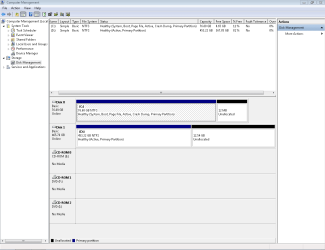
Attached is a screen shot from the disk management screen.

Any assistance would be greatly appreciated. I am a novice so simple instructions would be great.
 

Attachments
  • Disk Management Capture.PNG
    Disk Management Capture.PNG
    19 KB · Views: 3

My Computer

Computer type
PC/Desktop
Computer Manufacturer/Model Number
Evesham
OS
windows 7 ultimate 32 bit
CPU
Intel Pentium 4 2.66Mhz
Memory
2gb
Hard Drives
1 IDE Hard Drive 80gb

1 SATA Hard Drive 500GB
Antivirus
avira
Browser
Google Chrome
Hello and welcome cricketer now mate a few more specs would be good so can you follow this please.
Now before we can help we do need to know what is in your machine so please do this System Info - See Your System Specs
or either enter the specs of your system in your forum profile the specs will appear when we click on that little box bottom left of the post screen it is for me the preferable option as it is easy. As you may appreciate it is very hard when you don’t know what one is working with for example a diesel or petrol engine.
*(pretyped to save time)

So to start I am assuming the large drive cannot be booted from at all?? The other thing I would point out is that the amount of RAM you have is really not enough to run Ultimate and would only be just enough for the Home version. This begs the question why did you install Ultimate on what is to me a fairly low specced machine?? Moreover just where did you get that copy from??
 

My Computer

Computer type
PC/Desktop
Computer Manufacturer/Model Number
Own build (new) Desk1 / Asus ROG Win 7 / Desk2 1st build
OS
Desk1 7 Home Prem / Desk2 10 Pro / Main lap Asus ROG 10 Pro 2 laptop Toshiba 7 Pro Asus P2520 7 & 10
CPU
Desk1 i5 3750K / Laptop i7 GTX 860M / Desk2 i5 2500
Motherboard
Desk1 Asus P877-V / Desk2 Gigabyte H67 UD3H / Laptop ?
Memory
Desk1 8GB (1866) / Desk2 16GB (1333) / Laptop 8Gb DDR3
Graphics Card(s)
Desk 1& 2NVidia GTX 650 & Laptops on board Intel
Sound Card
Desk 1 & 2 -XONAR DG Realtek High Def audio Laptop
Monitor(s) Displays
Desk 1 Benq HD 2450 / Desk2 Philips 24" / Laptop 17.5"
Screen Resolution
1920x1080 D1 & D2 & Laptop 1
Hard Drives
Desk1 Samsung 120GB 830 SSD
Asus ROG 256GB 850 Pro SSD
Desk2 Samsung 840 256 SSD
Toshiba 120GB EVO
PSU
Desk 1 Corsair HX 1050/ Laptop ? / Desk 2 Corsair HX 650
Case
Desk 1 Cooler HAF XM ? Toshiba laptop / Desk2 Coolermaster
Cooling
Fans on all Desk1 -2 Desk2 - all Coolermasters 5 Laptop ?
Keyboard
Desk 1 MS Sidewinder X6 Desk 2 MS Sidewinder X 4
Mouse
Desk 1&2 - Gigabyte MS 900 gamer - laptop - Logitec wireless
Internet Speed
ADSL2+
Other Info
One other Desktop (tester) and spare Toshba laptop both with SSD's
Running Kaspersky 2016 ISS on all machines config'd identically
Logitec audio stereo systems on each machine (x3)
Canon MG5250MFC
Router/modem TP-Link running WPA2SK
Back
Top