
Solved Cannot boot from SSD after windows partition cloning

I wonder if it's got to do with the fact that the original Win7 (on spinner) install was as a "logical" partition, and this wrote something into the Registry or boot files that influences its drive lettering.

Even though the physical partition has now been physically converted from "logical" to "primary" by Partition Wizard, and even though the cloned Win7_New on the SSD is also "primary", I wonder if that internal Windows information about its original installation format as "logical" is somehow coming into play?
 

My Computer My Computer

At a glance

Windows 7 Pro x64 (1), Win7 Pro X64 (2)i5-3350p 3.1Ghz/6MB-cache (1); E8400 3.0Ghz/6...8GB PC3-12800 DDR3 (1); 4GB PC3-10600 DDR3 (2)ATI HD7750 (1), (see TV cards); ATI R7 250 (2)
Computer type
PC/Desktop
Computer Manufacturer/Model Number
Home-built, two systems (1) and (2)
OS
Windows 7 Pro x64 (1), Win7 Pro X64 (2)
CPU
i5-3350p 3.1Ghz/6MB-cache (1); E8400 3.0Ghz/6MB-cache (2)
Motherboard
ASUS P8Z77-V Pro (1); ASUS P5Q3 (2)
Memory
8GB PC3-12800 DDR3 (1); 4GB PC3-10600 DDR3 (2)
Graphics Card(s)
ATI HD7750 (1), (see TV cards); ATI R7 250 (2)
Sound Card
Realtek ALC892 HD Audio (1); Realtek ALC1200 HD Audio (2)
Monitor(s) Displays
Eizo HD2441W LCD, Eizo S2433W (1); Eizo 24" S2433W (2)
Screen Resolution
1920x1200, 1920x1200 (1); 1920x1200 (2)
Hard Drives
(1) 1TB SATA-II (7200RPM), 2x2TB SATA-III (7200RPM), 250GB SATA-III (10000RPM) for OS; 2x2TB external USB 3.0

(2) 320GB SATA-II (7200RPM), 750GB SATA-II (7200RPM), 150GB SATA-II (10000RPM) for OS; 2TB external USB 3.0
PSU
Nesteq ECS-6001 600W (1); Nesteq ECS-5001 500W (2)
Case
Acousti-Case 360 (1) and (2)
Cooling
Noctua NH-U12P SE2 for CPU, 2x120mm case fans (1) and (2)
Keyboard
IBM PS/2 (1) and (2)
Mouse
Logitech MX Revolution wireless (1); Microsoft wired (2)
Internet Speed
100mbps down / 10mbps up
Antivirus
Microsoft Security Essentials; Malwarebyte Anti-Malware Pro
Browser
Firefox
Other Info
Ceton InfiniTV 4-tuner cablecard-enabled TV card as well as Hauppauge HVR-2250 OTA/ATSC 2-tuner TV card in (1), running under Win7 WMC
That suggests it actually is something in the Win7_New partition itself which seems to be the result of an odd Win7 install, where its drive letter was forced to be G!

Isn't that a reason for following the rescue media solution?
 

My Computer My Computer

At a glance

Windows 7 Professional 342it
Computer type
PC/Desktop
OS
Windows 7 Professional 342it
That suggests it actually is something in the Win7_New partition itself which seems to be the result of an odd Win7 install, where its drive letter was forced to be G!

Isn't that a reason for following the rescue media solution?
Seems like a reasonable thought. But then so have all the other ideas we've tried.

But yes, using the standalone boot CD program to do the cloning would seem to eliminate any possibility that it is running the program under the real original Win7 on spinner which is the culprit. I'm certainly interested to hear the results, but at this point I'm less than cautiously optimistic.
 

My Computer My Computer

At a glance

Windows 7 Pro x64 (1), Win7 Pro X64 (2)i5-3350p 3.1Ghz/6MB-cache (1); E8400 3.0Ghz/6...8GB PC3-12800 DDR3 (1); 4GB PC3-10600 DDR3 (2)ATI HD7750 (1), (see TV cards); ATI R7 250 (2)
Computer type
PC/Desktop
Computer Manufacturer/Model Number
Home-built, two systems (1) and (2)
OS
Windows 7 Pro x64 (1), Win7 Pro X64 (2)
CPU
i5-3350p 3.1Ghz/6MB-cache (1); E8400 3.0Ghz/6MB-cache (2)
Motherboard
ASUS P8Z77-V Pro (1); ASUS P5Q3 (2)
Memory
8GB PC3-12800 DDR3 (1); 4GB PC3-10600 DDR3 (2)
Graphics Card(s)
ATI HD7750 (1), (see TV cards); ATI R7 250 (2)
Sound Card
Realtek ALC892 HD Audio (1); Realtek ALC1200 HD Audio (2)
Monitor(s) Displays
Eizo HD2441W LCD, Eizo S2433W (1); Eizo 24" S2433W (2)
Screen Resolution
1920x1200, 1920x1200 (1); 1920x1200 (2)
Hard Drives
(1) 1TB SATA-II (7200RPM), 2x2TB SATA-III (7200RPM), 250GB SATA-III (10000RPM) for OS; 2x2TB external USB 3.0

(2) 320GB SATA-II (7200RPM), 750GB SATA-II (7200RPM), 150GB SATA-II (10000RPM) for OS; 2TB external USB 3.0
PSU
Nesteq ECS-6001 600W (1); Nesteq ECS-5001 500W (2)
Case
Acousti-Case 360 (1) and (2)
Cooling
Noctua NH-U12P SE2 for CPU, 2x120mm case fans (1) and (2)
Keyboard
IBM PS/2 (1) and (2)
Mouse
Logitech MX Revolution wireless (1); Microsoft wired (2)
Internet Speed
100mbps down / 10mbps up
Antivirus
Microsoft Security Essentials; Malwarebyte Anti-Malware Pro
Browser
Firefox
Other Info
Ceton InfiniTV 4-tuner cablecard-enabled TV card as well as Hauppauge HVR-2250 OTA/ATSC 2-tuner TV card in (1), running under Win7 WMC
I don't know, i wonder if it isn't something to do with multiple active partitions.

My test box is a triple boot and i have changed partitions from primary to logical, moved things around, etc. when migrating to a new HD/SSD.
The OS that i boot always gets the C letter.
Worst case, i have to run a startup repair to fix the boot code from my screwing around.

Right now i have
Win 8.1 Primary Active partition
Win 7-64 Logical partition
Win 7-32 Logical partition

I can restore a Win 7-32 image when running Win 8 or Win 7-64, (or a rescue disc)
I can restore a Win 7-64 image when running Win 8 or Win 7-32, (or a rescue disc)
I can only restore the Win 8.1 partition ONLY when booted with the Macrium rescue disc.

I can create backup images for any and all the OS's no matter what OS is booted.
 

My Computer My Computer

At a glance

Multi-Boot W7_Pro_x64 W8.1_Pro_x64 W10_Pro_x6...AMD Athlon II x4 6206GB GSkill DDR2 800AMD 4670 GPU + AMD 4200 IGP
Computer type
PC/Desktop
Computer Manufacturer/Model Number
home built
OS
Multi-Boot W7_Pro_x64 W8.1_Pro_x64 W10_Pro_x64 +Linux_VMs +Chromium_VM
CPU
AMD Athlon II x4 620
Motherboard
Gigabyte GA-MA785G-UD3H
Memory
6GB GSkill DDR2 800
Graphics Card(s)
AMD 4670 GPU + AMD 4200 IGP
Sound Card
on board Realtek ALC889A
Monitor(s) Displays
RCA 40" LCD TV, Insignia 32" LCD TV, HP 15" LCD monitor
Screen Resolution
1680 x 1050
Hard Drives
OCZ Vertex 3 120GB,
Samsung F3 1TB (3),
Several others - WD, Seagate, Hitachi, ...
PSU
Corsair 500 W
Case
Rosewill mid tower
Cooling
CM 90mm rifle
Keyboard
Gyration wireless, Logitech wireless, Dell USB wired
Mouse
Gyration wireless, Logitech wireless, V7 USB wired
Internet Speed
Spectrum - 100Mbps D / 10Mbps U
Antivirus
Avast, MBAM3, EMET, WinPatrol
Browser
Pale Moon, Firefox, IE
Other Info
2 multi-boot PC's
Mainly HTPC/Office/Gen purpose (no gaming).
Trendnet USB KVM.
LG DVD burner/Blue Ray Player.
Tray system for removable SATA backup drives.

Not currently OCd, under-volted.
I use Hybrid sleep, rarely re-boot or shutdown.

Hauppauge HD-PVR, Avermedia PCIe TV Tuner, Hauppauge PCI TV Tuner.
Having booted from a Macrium Reflect cd, I cloned WIN7 to the SSD.
I booted from the HD to WIN7. WIN7_NEW was on H (Primary Partition).
Using EasyBCD I added an entry for WIN7_NEW.
I rebooted from the HD to WIN7_NEW.
WIN7_NEW is still G :(
 

My Computer My Computer

At a glance

Windows 7 Professional 342it
Computer type
PC/Desktop
OS
Windows 7 Professional 342it
I left only the SSD connected and booted from it.
I got DISK BOOT FAILURE, INSERT SYSTEM DISK AND PRESS ENTER.
I rebooted from the HD to WIN7.
I used the "change boot drive" function and saw "EasyBCD has successfully made drive H: the new boot partition" (H is WIN7_NEW).
I will reboot from the SSD now.
 

My Computer My Computer

At a glance

Windows 7 Professional 342it
Computer type
PC/Desktop
OS
Windows 7 Professional 342it
I left only the SSD connected and booted from it.
I again saw the non-gen screen and WIN7_NEW was still G.
What else can I do?
 

My Computer My Computer

At a glance

Windows 7 Professional 342it
Computer type
PC/Desktop
OS
Windows 7 Professional 342it
To sum up (if I remember correctly):
-I cloned using EaseUS Todo Backup
-I cloned using Macrium Reflect
-I imaged using Macrium Reflect
-I cloned using Macrium Reflect rescue disk
 

My Computer My Computer

At a glance

Windows 7 Professional 342it
Computer type
PC/Desktop
OS
Windows 7 Professional 342it
Right now i don't know what else you can try other than wait to see if dsperber hears anything from Macrium.
 

My Computer My Computer

At a glance

Multi-Boot W7_Pro_x64 W8.1_Pro_x64 W10_Pro_x6...AMD Athlon II x4 6206GB GSkill DDR2 800AMD 4670 GPU + AMD 4200 IGP
Computer type
PC/Desktop
Computer Manufacturer/Model Number
home built
OS
Multi-Boot W7_Pro_x64 W8.1_Pro_x64 W10_Pro_x64 +Linux_VMs +Chromium_VM
CPU
AMD Athlon II x4 620
Motherboard
Gigabyte GA-MA785G-UD3H
Memory
6GB GSkill DDR2 800
Graphics Card(s)
AMD 4670 GPU + AMD 4200 IGP
Sound Card
on board Realtek ALC889A
Monitor(s) Displays
RCA 40" LCD TV, Insignia 32" LCD TV, HP 15" LCD monitor
Screen Resolution
1680 x 1050
Hard Drives
OCZ Vertex 3 120GB,
Samsung F3 1TB (3),
Several others - WD, Seagate, Hitachi, ...
PSU
Corsair 500 W
Case
Rosewill mid tower
Cooling
CM 90mm rifle
Keyboard
Gyration wireless, Logitech wireless, Dell USB wired
Mouse
Gyration wireless, Logitech wireless, V7 USB wired
Internet Speed
Spectrum - 100Mbps D / 10Mbps U
Antivirus
Avast, MBAM3, EMET, WinPatrol
Browser
Pale Moon, Firefox, IE
Other Info
2 multi-boot PC's
Mainly HTPC/Office/Gen purpose (no gaming).
Trendnet USB KVM.
LG DVD burner/Blue Ray Player.
Tray system for removable SATA backup drives.

Not currently OCd, under-volted.
I use Hybrid sleep, rarely re-boot or shutdown.

Hauppauge HD-PVR, Avermedia PCIe TV Tuner, Hauppauge PCI TV Tuner.
Right now i don't know what else you can try other than wait to see if dsperber hears anything from Macrium.

Yes, we should wait to hear from Macrium.

Can I somehow change the source drive so as to make it more "normal"? Perhaps by deleting WINXP? Is that possible?
 

My Computer My Computer

At a glance

Windows 7 Professional 342it
Computer type
PC/Desktop
OS
Windows 7 Professional 342it
I'm not sure, your setup is a lot different than anything i've had.
I'd wait till dsperber or gregrocker advises about that.
 

My Computer My Computer

At a glance

Multi-Boot W7_Pro_x64 W8.1_Pro_x64 W10_Pro_x6...AMD Athlon II x4 6206GB GSkill DDR2 800AMD 4670 GPU + AMD 4200 IGP
Computer type
PC/Desktop
Computer Manufacturer/Model Number
home built
OS
Multi-Boot W7_Pro_x64 W8.1_Pro_x64 W10_Pro_x64 +Linux_VMs +Chromium_VM
CPU
AMD Athlon II x4 620
Motherboard
Gigabyte GA-MA785G-UD3H
Memory
6GB GSkill DDR2 800
Graphics Card(s)
AMD 4670 GPU + AMD 4200 IGP
Sound Card
on board Realtek ALC889A
Monitor(s) Displays
RCA 40" LCD TV, Insignia 32" LCD TV, HP 15" LCD monitor
Screen Resolution
1680 x 1050
Hard Drives
OCZ Vertex 3 120GB,
Samsung F3 1TB (3),
Several others - WD, Seagate, Hitachi, ...
PSU
Corsair 500 W
Case
Rosewill mid tower
Cooling
CM 90mm rifle
Keyboard
Gyration wireless, Logitech wireless, Dell USB wired
Mouse
Gyration wireless, Logitech wireless, V7 USB wired
Internet Speed
Spectrum - 100Mbps D / 10Mbps U
Antivirus
Avast, MBAM3, EMET, WinPatrol
Browser
Pale Moon, Firefox, IE
Other Info
2 multi-boot PC's
Mainly HTPC/Office/Gen purpose (no gaming).
Trendnet USB KVM.
LG DVD burner/Blue Ray Player.
Tray system for removable SATA backup drives.

Not currently OCd, under-volted.
I use Hybrid sleep, rarely re-boot or shutdown.

Hauppauge HD-PVR, Avermedia PCIe TV Tuner, Hauppauge PCI TV Tuner.
At any rate, the boot drive letter can be changed:
https://support.microsoft.com/en-us/kb/223188
Have not yet heard back from Macrium yet. But they're 10 hours ahead of me, so it's the middle of the night still in England.

Anyway, sounds like this approach is definitely worth pursuing. It will only take you a minute to accomplish.

Reconnect all three drives again (since it's obvious having the second hard drive connected accomplished nothing, and since you have some system files located on it without which you have problems trying to run Win7). Put back the spinner in the BIOS as boot drive #1, so that you once again boot to "active" WinXP on the spinner.

Then reboot, and select Win7_New (on SSD). You should come up as G, as we know.

Then perform the MS method for changing the Registry DOSDEVICE entries for C to Z, G to C, and Z to G. Don't forget to change the permissions using REGEDIT32 before starting and after finishing as the article shows.

Still with spinner as boot drive #1 (we don't want to boot from the SSD) reboot and once again select Win7_New (on SSD). Does it boot? Or do you have a problem? If it boots, what is the drive letter?

If this is successful, I'd leave it just as it is... since you said you want to retain WinXP on the spinner anyway. So you need that drive connected anyway in order to occasionally boot to WinXP as Windows, so who cares if that's where you boot from for Boot Manager even when you're continuing on to the SSD for Windows itself. As long as you finally can achieve Win7_New lettering itself as C, that's the goal we've been chasing.

I'd certainly follow MS's article instructions. Can't do any harm at all, it seems to me (since you're not bothering the original Win7 partition on the spinner, but only tweaking Win7_New on the SSD), and can only solve the problem we've been unable to overcome until now... no matter what the actual explanation (which currently eludes us all!!) turns out to be.

Go for it!

(Hopefully I'll hear something from Macrium by tomorrow, although it does truly seem like something outside of either Macrium or EaseUS which is truly responsible for this mystery so I don't expect them to do much other than to possibly explain why we're seeing what we are seeing.)
 

My Computer My Computer

At a glance

Windows 7 Pro x64 (1), Win7 Pro X64 (2)i5-3350p 3.1Ghz/6MB-cache (1); E8400 3.0Ghz/6...8GB PC3-12800 DDR3 (1); 4GB PC3-10600 DDR3 (2)ATI HD7750 (1), (see TV cards); ATI R7 250 (2)
Computer type
PC/Desktop
Computer Manufacturer/Model Number
Home-built, two systems (1) and (2)
OS
Windows 7 Pro x64 (1), Win7 Pro X64 (2)
CPU
i5-3350p 3.1Ghz/6MB-cache (1); E8400 3.0Ghz/6MB-cache (2)
Motherboard
ASUS P8Z77-V Pro (1); ASUS P5Q3 (2)
Memory
8GB PC3-12800 DDR3 (1); 4GB PC3-10600 DDR3 (2)
Graphics Card(s)
ATI HD7750 (1), (see TV cards); ATI R7 250 (2)
Sound Card
Realtek ALC892 HD Audio (1); Realtek ALC1200 HD Audio (2)
Monitor(s) Displays
Eizo HD2441W LCD, Eizo S2433W (1); Eizo 24" S2433W (2)
Screen Resolution
1920x1200, 1920x1200 (1); 1920x1200 (2)
Hard Drives
(1) 1TB SATA-II (7200RPM), 2x2TB SATA-III (7200RPM), 250GB SATA-III (10000RPM) for OS; 2x2TB external USB 3.0

(2) 320GB SATA-II (7200RPM), 750GB SATA-II (7200RPM), 150GB SATA-II (10000RPM) for OS; 2TB external USB 3.0
PSU
Nesteq ECS-6001 600W (1); Nesteq ECS-5001 500W (2)
Case
Acousti-Case 360 (1) and (2)
Cooling
Noctua NH-U12P SE2 for CPU, 2x120mm case fans (1) and (2)
Keyboard
IBM PS/2 (1) and (2)
Mouse
Logitech MX Revolution wireless (1); Microsoft wired (2)
Internet Speed
100mbps down / 10mbps up
Antivirus
Microsoft Security Essentials; Malwarebyte Anti-Malware Pro
Browser
Firefox
Other Info
Ceton InfiniTV 4-tuner cablecard-enabled TV card as well as Hauppauge HVR-2250 OTA/ATSC 2-tuner TV card in (1), running under Win7 WMC
Here you go George.

Boot into WIN7, run as admin on nt6repair.exe,Where it says "Fix OS Drive Letter" select your win7_new drive letter and click fix.

View attachment nt6repair.zip
 

My Computers My Computers

  • At a glance

    7 X64i5 84002x8gb 3200mhz
    Computer type
    PC/Desktop
    OS
    7 X64
    CPU
    i5 8400
    Motherboard
    gigabyte b365m ds3h
    Memory
    2x8gb 3200mhz
    Hard Drives
    various
    PSU
    pure power 11 400w cm
    Case
    Coolermaster
    Cooling
    cryorig m9i
  • At a glance

    7x64g54008gb ddr4 2400
    Computer type
    PC/Desktop
    OS
    7x64
    CPU
    g5400
    Motherboard
    ga b365m ds3h
    Memory
    8gb ddr4 2400
    PSU
    xfx pro 450w
I ran SIW2's NT6REPAIREx86.EXE and booted to WIN7_NEW. Now, WIN7_NEW is C. Thanks SIW2!

I'll wait and see if I'll have any problems and then mark it as solved (for example, a folder from my Data partition had been copied to WIN7_NEW for some reason and initially WIN+E to open Windows Explorer was giving the error "Server execution failed", but after some minutes the error stopped appearing).

Thanks to everyone (especially dsperber and gregrocker)
 

My Computer My Computer

At a glance

Windows 7 Professional 342it
Computer type
PC/Desktop
OS
Windows 7 Professional 342it
1)I read that an SSD must have at least 25% free space (or 15% according to others). Does that refer to each partition on the SSD or to the entire SSD?
2)Is it safe now to extend WIN7_NEW and make it 160GB?
 

My Computer My Computer

At a glance

Windows 7 Professional 342it
Computer type
PC/Desktop
OS
Windows 7 Professional 342it
I ran SIW2's NT6REPAIREx86.EXE and booted to WIN7_NEW. Now, WIN7_NEW is C. Thanks SIW2!
Fantastic!!! There's still the mystery of what exactly in the environment was responsible for the symptom, but as long as it's now been reversed and repaired... YOU HAVE EMERGED VICTORIOUS!

So, you're now once again running with all three drives connected? And you're still booting to the first hard drive where WinXP lives, with that drive #1 in the BIOS boot sequence? You're NOT booting from the SSD, right (even though Win7_New is marked "active" and is primary and contains a valid version of Boot Manager put there by EasyBCD)? There's no reason to boot to the SSD, given that you're retaining your first hard drive anyway and also still want to be able to boot to WinXP if you want to.

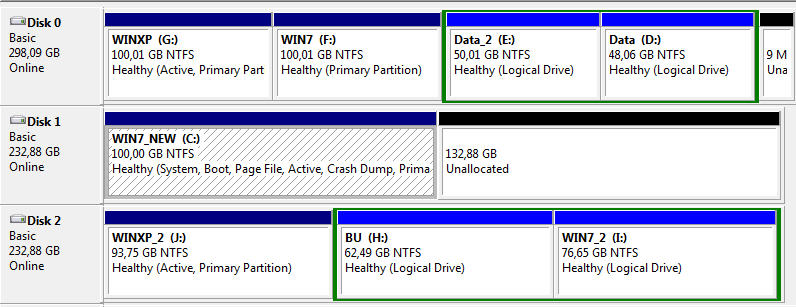
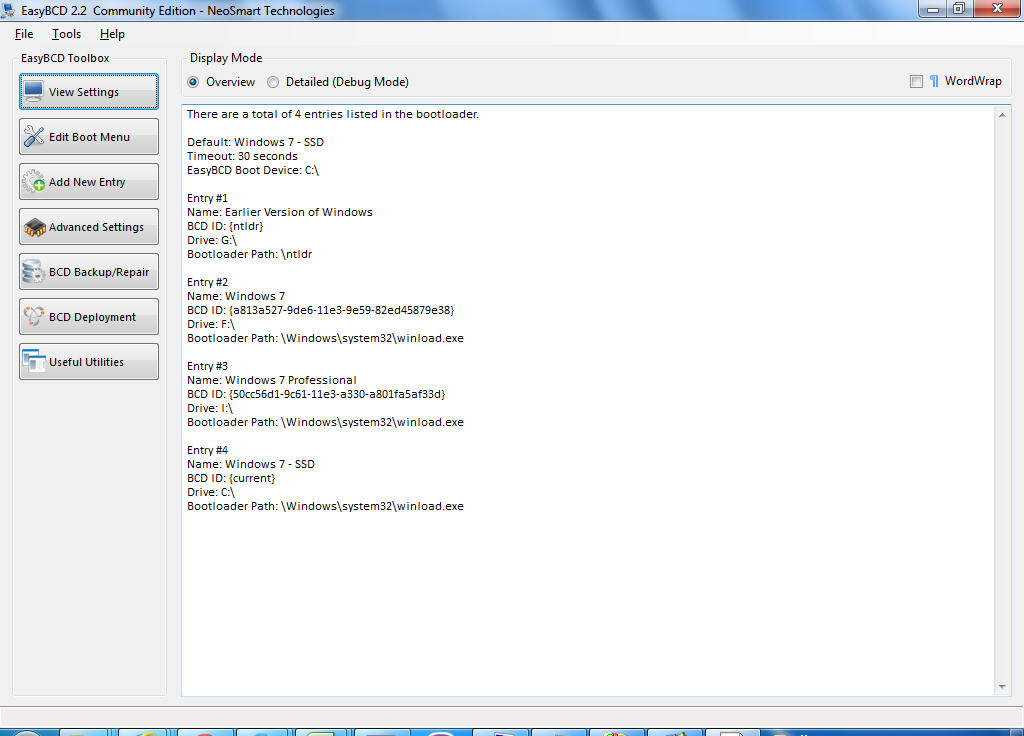
Can you please post final screenshots, from DISKMGMT, Partition Wizard, and EasyBCD... just for closure.

Persistence pays off, and there are lots of helpful experts on this forum anxious to be helpful.
 

My Computer My Computer

At a glance

Windows 7 Pro x64 (1), Win7 Pro X64 (2)i5-3350p 3.1Ghz/6MB-cache (1); E8400 3.0Ghz/6...8GB PC3-12800 DDR3 (1); 4GB PC3-10600 DDR3 (2)ATI HD7750 (1), (see TV cards); ATI R7 250 (2)
Computer type
PC/Desktop
Computer Manufacturer/Model Number
Home-built, two systems (1) and (2)
OS
Windows 7 Pro x64 (1), Win7 Pro X64 (2)
CPU
i5-3350p 3.1Ghz/6MB-cache (1); E8400 3.0Ghz/6MB-cache (2)
Motherboard
ASUS P8Z77-V Pro (1); ASUS P5Q3 (2)
Memory
8GB PC3-12800 DDR3 (1); 4GB PC3-10600 DDR3 (2)
Graphics Card(s)
ATI HD7750 (1), (see TV cards); ATI R7 250 (2)
Sound Card
Realtek ALC892 HD Audio (1); Realtek ALC1200 HD Audio (2)
Monitor(s) Displays
Eizo HD2441W LCD, Eizo S2433W (1); Eizo 24" S2433W (2)
Screen Resolution
1920x1200, 1920x1200 (1); 1920x1200 (2)
Hard Drives
(1) 1TB SATA-II (7200RPM), 2x2TB SATA-III (7200RPM), 250GB SATA-III (10000RPM) for OS; 2x2TB external USB 3.0

(2) 320GB SATA-II (7200RPM), 750GB SATA-II (7200RPM), 150GB SATA-II (10000RPM) for OS; 2TB external USB 3.0
PSU
Nesteq ECS-6001 600W (1); Nesteq ECS-5001 500W (2)
Case
Acousti-Case 360 (1) and (2)
Cooling
Noctua NH-U12P SE2 for CPU, 2x120mm case fans (1) and (2)
Keyboard
IBM PS/2 (1) and (2)
Mouse
Logitech MX Revolution wireless (1); Microsoft wired (2)
Internet Speed
100mbps down / 10mbps up
Antivirus
Microsoft Security Essentials; Malwarebyte Anti-Malware Pro
Browser
Firefox
Other Info
Ceton InfiniTV 4-tuner cablecard-enabled TV card as well as Hauppauge HVR-2250 OTA/ATSC 2-tuner TV card in (1), running under Win7 WMC
1)I read that an SSD must have at least 25% free space (or 15% according to others). Does that refer to each partition on the SSD or to the entire SSD?
I think you're talking about "over-provisioning", which is a function of Samsung Magician (software provided by Samsung if you buy one of their SSD's).

You leave just under 10% of the entire drive capacity unallocated to any partition (it's typically shown as unallocated on the right-side of any graphic of the drive's partitions).

Samsung Magician will automatically carve out that minimum space if you ask it to, but it will also inform you of how much it must be minimum and you can use Partition Wizard to shrink partitions if you have to in order to leave that much room unallocated. You can then enable "over-provisioning" in Samsung Magician and if the unallocated space is at least as large as required the feature will be activated.

This space is used by Samsung's software during normal Windows operation to improve overall efficiency and lifetime of the SSD.

Samsung Magician also provides a second tool named "rapid mode", which uses a portion of your main DRAM (assuming you have lots of extra memory that's just sitting around and not being used by Windows) as an additional "cache buffer" for operations when appropriate. This transparently avoids using the actual SSD itself when not absolutely necessary, and also runs at your DRAM speed. Very very worthwhile feature.

Of course you need to have a Samsung SSD to use this software.


2)Is it safe now to extend WIN7_NEW and make it 160GB?
Sure. Or, you can put a second "data" partition on that drive, if that's what you want to do.
 

My Computer My Computer

At a glance

Windows 7 Pro x64 (1), Win7 Pro X64 (2)i5-3350p 3.1Ghz/6MB-cache (1); E8400 3.0Ghz/6...8GB PC3-12800 DDR3 (1); 4GB PC3-10600 DDR3 (2)ATI HD7750 (1), (see TV cards); ATI R7 250 (2)
Computer type
PC/Desktop
Computer Manufacturer/Model Number
Home-built, two systems (1) and (2)
OS
Windows 7 Pro x64 (1), Win7 Pro X64 (2)
CPU
i5-3350p 3.1Ghz/6MB-cache (1); E8400 3.0Ghz/6MB-cache (2)
Motherboard
ASUS P8Z77-V Pro (1); ASUS P5Q3 (2)
Memory
8GB PC3-12800 DDR3 (1); 4GB PC3-10600 DDR3 (2)
Graphics Card(s)
ATI HD7750 (1), (see TV cards); ATI R7 250 (2)
Sound Card
Realtek ALC892 HD Audio (1); Realtek ALC1200 HD Audio (2)
Monitor(s) Displays
Eizo HD2441W LCD, Eizo S2433W (1); Eizo 24" S2433W (2)
Screen Resolution
1920x1200, 1920x1200 (1); 1920x1200 (2)
Hard Drives
(1) 1TB SATA-II (7200RPM), 2x2TB SATA-III (7200RPM), 250GB SATA-III (10000RPM) for OS; 2x2TB external USB 3.0

(2) 320GB SATA-II (7200RPM), 750GB SATA-II (7200RPM), 150GB SATA-II (10000RPM) for OS; 2TB external USB 3.0
PSU
Nesteq ECS-6001 600W (1); Nesteq ECS-5001 500W (2)
Case
Acousti-Case 360 (1) and (2)
Cooling
Noctua NH-U12P SE2 for CPU, 2x120mm case fans (1) and (2)
Keyboard
IBM PS/2 (1) and (2)
Mouse
Logitech MX Revolution wireless (1); Microsoft wired (2)
Internet Speed
100mbps down / 10mbps up
Antivirus
Microsoft Security Essentials; Malwarebyte Anti-Malware Pro
Browser
Firefox
Other Info
Ceton InfiniTV 4-tuner cablecard-enabled TV card as well as Hauppauge HVR-2250 OTA/ATSC 2-tuner TV card in (1), running under Win7 WMC
So, you're now once again running with all three drives connected?

Yes.

And you're still booting to the first hard drive where WinXP lives, with that drive #1 in the BIOS boot sequence?

I was able to boot from both drives.

I changed the letters of the other partitions:

disks12.jpg


EasyBCD2.jpg


partitionWizard.jpg
 

My Computer My Computer

At a glance

Windows 7 Professional 342it
Computer type
PC/Desktop
OS
Windows 7 Professional 342it
That's great, glad to hear you have it working !!!
I changed the letters of the other partitions:
Did you have to change WINXP from C to G before running the tool, or did the tool make this change when you changed WIN7_NEW from G to C?

This tool may be the best thing since sliced bread ... but some folks might want more understanding of what it does, how it works, etc.

fwiw
With multi-boots i don't assign a drive letter to "other OS partitions", i want them "hidden".
The only OS partition that has a drive letter is the current running OS, and that is always C.
 

My Computer My Computer

At a glance

Multi-Boot W7_Pro_x64 W8.1_Pro_x64 W10_Pro_x6...AMD Athlon II x4 6206GB GSkill DDR2 800AMD 4670 GPU + AMD 4200 IGP
Computer type
PC/Desktop
Computer Manufacturer/Model Number
home built
OS
Multi-Boot W7_Pro_x64 W8.1_Pro_x64 W10_Pro_x64 +Linux_VMs +Chromium_VM
CPU
AMD Athlon II x4 620
Motherboard
Gigabyte GA-MA785G-UD3H
Memory
6GB GSkill DDR2 800
Graphics Card(s)
AMD 4670 GPU + AMD 4200 IGP
Sound Card
on board Realtek ALC889A
Monitor(s) Displays
RCA 40" LCD TV, Insignia 32" LCD TV, HP 15" LCD monitor
Screen Resolution
1680 x 1050
Hard Drives
OCZ Vertex 3 120GB,
Samsung F3 1TB (3),
Several others - WD, Seagate, Hitachi, ...
PSU
Corsair 500 W
Case
Rosewill mid tower
Cooling
CM 90mm rifle
Keyboard
Gyration wireless, Logitech wireless, Dell USB wired
Mouse
Gyration wireless, Logitech wireless, V7 USB wired
Internet Speed
Spectrum - 100Mbps D / 10Mbps U
Antivirus
Avast, MBAM3, EMET, WinPatrol
Browser
Pale Moon, Firefox, IE
Other Info
2 multi-boot PC's
Mainly HTPC/Office/Gen purpose (no gaming).
Trendnet USB KVM.
LG DVD burner/Blue Ray Player.
Tray system for removable SATA backup drives.

Not currently OCd, under-volted.
I use Hybrid sleep, rarely re-boot or shutdown.

Hauppauge HD-PVR, Avermedia PCIe TV Tuner, Hauppauge PCI TV Tuner.
Back
Top