
Karolski
New member
Hi,
My development system is cut off internet at the router. As a consequence it gets no response from the DHCP server. This is no drama as it is configured with a fixed IP address.
It, however, makes Win7 declare connection as "Public". I used to be able to invoke some network function like "Map network drive" which would complain that "Network discovery" was disabled. I would then enable it and after a short while all my computers would show up.
Recently I had to re-install Widows 7 and must have done something wrong because this method does not work.
Communication still works except for "Browsing". I still can map network drive by typing "\\Nas\Photos" but Explorer under "Network" shows only one system - itself. When I tried to change location through "Change homegroup settings" (one shot only) it showed the proper dialog box with three options but it complained that it could not chane it.
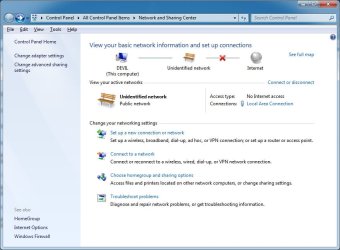
When I look closely on my "Network and Sharing Center" dialog box I can see that "Home network" is not underlined while on most examples IT IS!
Any advice will be appreciated.
My development system is cut off internet at the router. As a consequence it gets no response from the DHCP server. This is no drama as it is configured with a fixed IP address.
It, however, makes Win7 declare connection as "Public". I used to be able to invoke some network function like "Map network drive" which would complain that "Network discovery" was disabled. I would then enable it and after a short while all my computers would show up.
Recently I had to re-install Widows 7 and must have done something wrong because this method does not work.
Communication still works except for "Browsing". I still can map network drive by typing "\\Nas\Photos" but Explorer under "Network" shows only one system - itself. When I tried to change location through "Change homegroup settings" (one shot only) it showed the proper dialog box with three options but it complained that it could not chane it.
When I look closely on my "Network and Sharing Center" dialog box I can see that "Home network" is not underlined while on most examples IT IS!
Any advice will be appreciated.
Attachments
My Computer
- Computer type
- PC/Desktop
- Computer Manufacturer/Model Number
- Custom
- OS
- Win 7 Ultimate 64
- CPU
- i7-2600K
- Motherboard
- Z68MA-D2H-B3
- Memory
- 16GB
- Monitor(s) Displays
- DELL
- Screen Resolution
- 2560 x 1600
- Hard Drives
- WD
- Browser
- Chrome/Firefox


