cannot copy large RAR/ISO files

hatchman

New member
Local time
6:44 PM
Messages
8
Well I've been browsing a lot of these threads, and I've come across topics similar to mine, but none have solved this problem. Basically, I am running Windows 7 64bit on an Intel core duo HP pc. I'm trying to copy RAR or ISO files larger than 4 gb's from a Maxtor external hard drive onto my pc's HDD. Everytime I get an error message saying that certain rar files are unrecognizable and gives me the option to either try again, skip file, or cancel. I had the same problem with Vista 64 bit. It has something to do with a 64 bit system because Vista 32 bit had no problem. I need to use a 64bit system for my 6g's of RAM to be utilized. Please help me out anyone. If you need more info let me know. Thanks.
 

My Computer

Computer Manufacturer/Model Number
HP pavilion d4790y
OS
windows 7 Ultimate 64bit
CPU
intel core 2 duo 667GHz2.2.66 GHz
Motherboard
ASUS P5BW-LA
Memory
6 GB
Graphics Card(s)
NVIDIA GeForce 7950 GT
Sound Card
Creative SB X-Fi
Monitor(s) Displays
22" HP
Screen Resolution
1680 x 1050
Hard Drives
2x 250 GB 7200 rpm RAID 1, SATA-3G
Please update your system specs and provide the complete computer specs. There are a lot of HP computers out there.
 

My Computer

Computer Manufacturer/Model Number
Dell XPS 15 L502x
OS
Windows 7 Ultimate x64 SP1
CPU
Core i7-2670QM
Memory
8GB DDR3 PC3-10600
Graphics Card(s)
Intel HD Graphics 3000 + GeForce GT 540M
Screen Resolution
1920x1080
Hard Drives
1TB 5400RPM Seagate
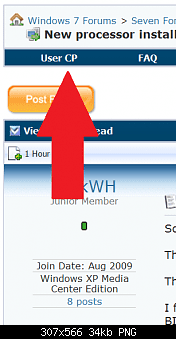
0%20UserCP1.PNG These snips of how to do system specs come courtesy of Antman (Thanks)

0%20UserCP2.PNG
 

My Computer

Computer Manufacturer/Model Number
Self Built
OS
Windows 7 ultimate 64 bit / XP Home sp3
CPU
intel Core 2 Duo E8400 3.0ghz
Motherboard
Asus P5ND bios 1401
Memory
8 gigs 1066 OCZ Fata1ty
Graphics Card(s)
EVGA GTX 580 Call of Duty Black Ops Edition
Sound Card
Creative Soundblaster Audigy 2zs
Monitor(s) Displays
Asus 24in LCD's 2MS X2
Screen Resolution
1920x1080p @60Hz
Hard Drives
WD Caviar 500 Black/ WD Caviar 200 Blue
PSU
OCZ 700W GameXtreme
Case
NZXT Apollo
Cooling
Corsair H50 CPU/120mm x3 /60mm x2 /Corsair Dominator Ram
Keyboard
Logitech Bluetooth Wireless MX5000
Mouse
Logitech Bluetooth Wireless MX1000
Internet Speed
Download 19.83 Upload 0.97
Other Info
Logitech Z2300 Speakers/ Bose Noise Cancelling Headphones/Avermedia PCI-e Hybrid TV Bravo/Epson NX415 all in one/ 4 Port Powered USB Hub/ LG 10x Bluray Burner /TSST Corp DVDRW External
Well I've been browsing a lot of these threads, and I've come across topics similar to mine, but none have solved this problem. Basically, I am running Windows 7 64bit on an Intel core duo HP pc. I'm trying to copy RAR or ISO files larger than 4 gb's from a Maxtor external hard drive onto my pc's HDD. Everytime I get an error message saying that certain rar files are unrecognizable and gives me the option to either try again, skip file, or cancel. I had the same problem with Vista 64 bit. It has something to do with a 64 bit system because Vista 32 bit had no problem. I need to use a 64bit system for my 6g's of RAM to be utilized. Please help me out anyone. If you need more info let me know. Thanks.
Basically you can not copy 4GB files unless your using NTFS format.
Seems you need for format your HDD to NTFS.
 
Well I've been browsing a lot of these threads, and I've come across topics similar to mine, but none have solved this problem. Basically, I am running Windows 7 64bit on an Intel core duo HP pc. I'm trying to copy RAR or ISO files larger than 4 gb's from a Maxtor external hard drive onto my pc's HDD. Everytime I get an error message saying that certain rar files are unrecognizable and gives me the option to either try again, skip file, or cancel. I had the same problem with Vista 64 bit. It has something to do with a 64 bit system because Vista 32 bit had no problem. I need to use a 64bit system for my 6g's of RAM to be utilized. Please help me out anyone. If you need more info let me know. Thanks.
Basically you can not copy 4GB files unless your using NTFS format.
Seems you need for format your HDD to NTFS.

Since Vista x86 didn't have any problems, I'm going to guess that there's nothing wrong with the drive...

It has something to do with a 64 bit system because Vista 32 bit had no problem.
 

My Computer

Computer Manufacturer/Model Number
Dell XPS 15 L502x
OS
Windows 7 Ultimate x64 SP1
CPU
Core i7-2670QM
Memory
8GB DDR3 PC3-10600
Graphics Card(s)
Intel HD Graphics 3000 + GeForce GT 540M
Screen Resolution
1920x1080
Hard Drives
1TB 5400RPM Seagate
Well I've been browsing a lot of these threads, and I've come across topics similar to mine, but none have solved this problem. Basically, I am running Windows 7 64bit on an Intel core duo HP pc. I'm trying to copy RAR or ISO files larger than 4 gb's from a Maxtor external hard drive onto my pc's HDD. Everytime I get an error message saying that certain rar files are unrecognizable and gives me the option to either try again, skip file, or cancel. I had the same problem with Vista 64 bit. It has something to do with a 64 bit system because Vista 32 bit had no problem. I need to use a 64bit system for my 6g's of RAM to be utilized. Please help me out anyone. If you need more info let me know. Thanks.

I'm thinking that maybe the O/S is trying to execute rather than copy the file. In windows explorer, try right clicking on the file and click on copy. Then go to the destination folder and right click and click on paste. Let us know if that worked.

Snarks:cool:
 

My Computer

Computer Manufacturer/Model Number
Dell Precision M4400
OS
Windows 7 Ultimate x64 SP1
CPU
Intel Core 2 Duo @ 2.4 ghz
Motherboard
Intel
Memory
4 GB
Graphics Card(s)
Nvidia Quadro 7700x
Sound Card
Onboard
Monitor(s) Displays
Dell LCD
Screen Resolution
1440x900
PSU
Absolutely! How else would this hunk o' junk run?
Okay, so I updated my system specs. Let me know if what I entered will suffice. I'm unfamiliar with what "PSU" means. If that is important info to help with my problem, let me know what that means and I'll recover that info.
Again, it's important to know that there was no problems when I was running my OS as a 32bit system. The problems occured when I switched to the 64bit OS, (both Vista Ultimate, and now Windows 7 Ultimate 64bit).
I really appreciate your guy's interest in helping out a poor sucker like me. Thanks for your time.
 

My Computer

Computer Manufacturer/Model Number
HP pavilion d4790y
OS
windows 7 Ultimate 64bit
CPU
intel core 2 duo 667GHz2.2.66 GHz
Motherboard
ASUS P5BW-LA
Memory
6 GB
Graphics Card(s)
NVIDIA GeForce 7950 GT
Sound Card
Creative SB X-Fi
Monitor(s) Displays
22" HP
Screen Resolution
1680 x 1050
Hard Drives
2x 250 GB 7200 rpm RAID 1, SATA-3G
I'm thinking that maybe the O/S is trying to execute rather than copy the file. In windows explorer, try right clicking on the file and click on copy. Then go to the destination folder and right click and click on paste. Let us know if that worked.

I tried this, and it looked promising at first but then I got the oh so familiar "can't read from the source file or disk," and gave me the file info to which RAR file could not be copied.
 

My Computer

Computer Manufacturer/Model Number
HP pavilion d4790y
OS
windows 7 Ultimate 64bit
CPU
intel core 2 duo 667GHz2.2.66 GHz
Motherboard
ASUS P5BW-LA
Memory
6 GB
Graphics Card(s)
NVIDIA GeForce 7950 GT
Sound Card
Creative SB X-Fi
Monitor(s) Displays
22" HP
Screen Resolution
1680 x 1050
Hard Drives
2x 250 GB 7200 rpm RAID 1, SATA-3G
I'm thinking that maybe the O/S is trying to execute rather than copy the file. In windows explorer, try right clicking on the file and click on copy. Then go to the destination folder and right click and click on paste. Let us know if that worked.

I tried this, and it looked promising at first but then I got the oh so familiar "can't read from the source file or disk," and gave me the file info to which RAR file could not be copied.

Hmmm... Ok. Try UnRaring the file to an empty directory, then copy the unrared files to the other drive into an empty directory and then rar them back up. I think it may have something to do with the file associations. Either that or the Rar files are corrupt. That's why I suggested unraring them. If they are corrupt, then you wouldn't be able to unrar them.

Good luck!

Snarks:cool:
 

My Computer

Computer Manufacturer/Model Number
Dell Precision M4400
OS
Windows 7 Ultimate x64 SP1
CPU
Intel Core 2 Duo @ 2.4 ghz
Motherboard
Intel
Memory
4 GB
Graphics Card(s)
Nvidia Quadro 7700x
Sound Card
Onboard
Monitor(s) Displays
Dell LCD
Screen Resolution
1440x900
PSU
Absolutely! How else would this hunk o' junk run?
Have you tried using 7zip rather than WinRar, since you seem to be having problems with WinRar??
 

My Computer

Computer type
PC/Desktop
Computer Manufacturer/Model Number
LENOVO K450 @3.0GHZ
OS
64-bit Windows 8.1 Pro
CPU
Core(TM) i5 CPU 4330 Haswell @ 3.20GHz
Motherboard
LENOVO
Memory
12.00 GB
Graphics Card(s)
Intel(R) HD Graphics
Sound Card
Intel HD integtrated
Monitor(s) Displays
HP 25' ISP Monitor
Screen Resolution
1900/1020
Hard Drives
(1) ST1000DM003-1CH162 (2) Generic STORAGE DEVICE USB Device (3) Generic STORAGE DEVICE USB Device
Internet Speed
100mb down/10mb up
Hmmm... Ok. Try UnRaring the file to an empty directory, then copy the unrared files to the other drive into an empty directory and then rar them back up. I think it may have something to do with the file associations. Either that or the Rar files are corrupt. That's why I suggested unraring them. If they are corrupt, then you wouldn't be able to unrar them.

Good luck!

Snarks:cool:

I have tried copying the unrared ISO file with no luck, but I haven't tried running the rar process in another directory. I'll try it and get back to you.
 

My Computer

Computer Manufacturer/Model Number
HP pavilion d4790y
OS
windows 7 Ultimate 64bit
CPU
intel core 2 duo 667GHz2.2.66 GHz
Motherboard
ASUS P5BW-LA
Memory
6 GB
Graphics Card(s)
NVIDIA GeForce 7950 GT
Sound Card
Creative SB X-Fi
Monitor(s) Displays
22" HP
Screen Resolution
1680 x 1050
Hard Drives
2x 250 GB 7200 rpm RAID 1, SATA-3G
Have you tried using 7zip rather than WinRar, since you seem to be having problems with WinRar??

Wouldn't hurt to give it a try. I'll let you know how it goes. Thanks
 
Last edited:

My Computer

Computer Manufacturer/Model Number
HP pavilion d4790y
OS
windows 7 Ultimate 64bit
CPU
intel core 2 duo 667GHz2.2.66 GHz
Motherboard
ASUS P5BW-LA
Memory
6 GB
Graphics Card(s)
NVIDIA GeForce 7950 GT
Sound Card
Creative SB X-Fi
Monitor(s) Displays
22" HP
Screen Resolution
1680 x 1050
Hard Drives
2x 250 GB 7200 rpm RAID 1, SATA-3G
Its defininitely a file system problem. I have the same problem myself . I get it when my hard drive is a fat32 instead of NTFS. NTFS enlimintates the problem. :thumbsup:
 

My Computer

OS
Windows 7
Its defininitely a file system problem. I have the same problem myself . I get it when my hard drive is a fat32 instead of NTFS. NTFS enlimintates the problem. :thumbsup:
I wish that was all I needed to do. Unfortunately all my HDD's are formatted NTFS.
 

My Computer

Computer Manufacturer/Model Number
HP pavilion d4790y
OS
windows 7 Ultimate 64bit
CPU
intel core 2 duo 667GHz2.2.66 GHz
Motherboard
ASUS P5BW-LA
Memory
6 GB
Graphics Card(s)
NVIDIA GeForce 7950 GT
Sound Card
Creative SB X-Fi
Monitor(s) Displays
22" HP
Screen Resolution
1680 x 1050
Hard Drives
2x 250 GB 7200 rpm RAID 1, SATA-3G
Have you tried using 7zip rather than WinRar, since you seem to be having problems with WinRar??

No luck with the 7zip efforts. This sucks.
 

My Computer

Computer Manufacturer/Model Number
HP pavilion d4790y
OS
windows 7 Ultimate 64bit
CPU
intel core 2 duo 667GHz2.2.66 GHz
Motherboard
ASUS P5BW-LA
Memory
6 GB
Graphics Card(s)
NVIDIA GeForce 7950 GT
Sound Card
Creative SB X-Fi
Monitor(s) Displays
22" HP
Screen Resolution
1680 x 1050
Hard Drives
2x 250 GB 7200 rpm RAID 1, SATA-3G
Hi there.

another SIMPLE option is as follows
1) with some sort of Backup software (Acronis etc) choose backup FILES.

2) Backup to a temporary folder.

3) Now using the same program restore to the directory you want to restore to.


I'm not sure why you've got problems - I've copied an 80GB virtual machine file without any hassle. The target drive must of course have enough space and the SOURCE files musn't be corrupt.

If you've got an ISO with some copy protection in it (or a RAR file with a password in it) then tough.

Note also as others have posted a FAT32 individual file can't be bigger than 4GB. The directory size however is not a problem.

Cheers
jimbo
 

My Computer

Computer type
PC/Desktop
Computer Manufacturer/Model Number
Custom built, several laptops HP/ASUS
OS
Linux CENTOS 7 / various Windows OS'es and servers
CPU
Intel i7 Intel i5
Memory
8GB, 16GB
Graphics Card(s)
On Motherboard
Sound Card
Realtek HD audio
Monitor(s) Displays
Apple Cinema display, Samsung LCD
Screen Resolution
1920 X 1080
Hard Drives
4 X 1TB SATA
Mouse
Toshiba wireless laser
Internet Speed
> 20MB up
I'm thinking that maybe the O/S is trying to execute rather than copy the file. In windows explorer, try right clicking on the file and click on copy. Then go to the destination folder and right click and click on paste. Let us know if that worked.
I tried this, and it looked promising at first but then I got the oh so familiar "can't read from the source file or disk," and gave me the file info to which RAR file could not be copied.

Hmmm... Ok. Try UnRaring the file to an empty directory, then copy the unrared files to the other drive into an empty directory and then rar them back up. I think it may have something to do with the file associations. Either that or the Rar files are corrupt. That's why I suggested unraring them. If they are corrupt, then you wouldn't be able to unrar them.

Good luck!

Snarks:cool:

THAT DID IT! You da man Snarks! Thanks a lot, I appreciate it. Thanks to everyone else for your suggestions.
 

My Computer

Computer Manufacturer/Model Number
HP pavilion d4790y
OS
windows 7 Ultimate 64bit
CPU
intel core 2 duo 667GHz2.2.66 GHz
Motherboard
ASUS P5BW-LA
Memory
6 GB
Graphics Card(s)
NVIDIA GeForce 7950 GT
Sound Card
Creative SB X-Fi
Monitor(s) Displays
22" HP
Screen Resolution
1680 x 1050
Hard Drives
2x 250 GB 7200 rpm RAID 1, SATA-3G
Well I've been browsing a lot of these threads, and I've come across topics similar to mine, but none have solved this problem. Basically, I am running Windows 7 64bit on an Intel core duo HP pc. I'm trying to copy RAR or ISO files larger than 4 gb's from a Maxtor external hard drive onto my pc's HDD. Everytime I get an error message saying that certain rar files are unrecognizable and gives me the option to either try again, skip file, or cancel. I had the same problem with Vista 64 bit. It has something to do with a 64 bit system because Vista 32 bit had no problem. I need to use a 64bit system for my 6g's of RAM to be utilized. Please help me out anyone. If you need more info let me know. Thanks.
Basically you can not copy 4GB files unless your using NTFS format.
Seems you need for format your HDD to NTFS.

Since Vista x86 didn't have any problems, I'm going to guess that there's nothing wrong with the drive...

It has something to do with a 64 bit system because Vista 32 bit had no problem.

SEEMS THAT YOU MIGHT NOT REMEMBER what version of FORMAT you used.
It really is simple to see if you formatted with FAT FAT32 or NTFS.
Vista will run on Fat 32 - oh well remember I ask you to check your FORMAT.
you can not copy 4GB files unless your using NTFS format.
Seems you need for format your HDD to NTFS.
 
I tried this, and it looked promising at first but then I got the oh so familiar "can't read from the source file or disk," and gave me the file info to which RAR file could not be copied.

Hmmm... Ok. Try UnRaring the file to an empty directory, then copy the unrared files to the other drive into an empty directory and then rar them back up. I think it may have something to do with the file associations. Either that or the Rar files are corrupt. That's why I suggested unraring them. If they are corrupt, then you wouldn't be able to unrar them.

Good luck!

Snarks:cool:

THAT DID IT! You da man Snarks! Thanks a lot, I appreciate it. Thanks to everyone else for your suggestions.

You're very welcome. Glad to be of assistance.

Snarks:cool:
 

My Computer

Computer Manufacturer/Model Number
Dell Precision M4400
OS
Windows 7 Ultimate x64 SP1
CPU
Intel Core 2 Duo @ 2.4 ghz
Motherboard
Intel
Memory
4 GB
Graphics Card(s)
Nvidia Quadro 7700x
Sound Card
Onboard
Monitor(s) Displays
Dell LCD
Screen Resolution
1440x900
PSU
Absolutely! How else would this hunk o' junk run?
The problem is not with the iso or the rar files, the actual problem is with the file size I guess. Please check that the drive is FAT32 or NTFS. If its FAT32 then I guess I'm right because file size larger than 4GB can't be copied in FAT32. I too had this problem after searching I found that it supported FAT32 file type and more than 4 GB file could not be copied. After trying many software which I didn't found satisfactory I found GS Richcopy 360. Although its a paid software but its just awesome. I copies the file file permissions too. Not only that it also solved my problem of long path name. Its other features include multi threaded file transfer, pre scheduled file transfer, email notification when the transfer is done and many more. Try it, its awesome!
 

My Computer

Computer type
PC/Desktop
OS
Windows 8.1 64 bit
Back
Top