

Today I tried to create OS Recovery Drive of the Win7 HP 32bit on my Toshiba laptop
The Toshiba "Recovery Media Creator" calculated I will need four 4.75 GB DVDs ... not a problem!
while creating disc #1 the Toshiba builtin tool showed this alert
(copied with Ctrl+C while the alert was the focus)
The only option during the stalled create drive process was to "abort"
-----
There is no trace of 020123-F1-00000000 on sevenforums.com so I did a DDG search for 020123-F1-00000000."
... ie, 020123-F1-00000000 at DuckDuckGo
First item on DDG results { toshiba error code 020123-f1-00000000 - Tom's Guide }
took me to toshiba error code 020123-f1-00000000 [Solved] - Laptop Tech Support
"Laptop_Nerd" is of no help at all !
I dont want to (cannot) reinstall Win-7 just yet, it is the ONLY internet PC I have.exposed to the web)
From there I looked at (links from the original "Toms Guide" web page)
http://www.tomsguide.com/us/s/toshiba+error+code+020123+00000000/
and
How To Fix 00000000 Error?
... offering this ...
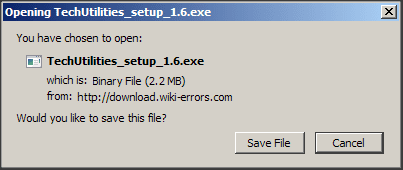
I am really out of my depth now, and don't want to risk damaging the original recovery partition.
-----
EDIT
-----
Just noticed ...
... but "Q:" is my DVD/cd drive ... would that indicate the DVD drive is faulty, because the generic "~00000000" translates as the system does not have an answer ? (I am no expert  )
)
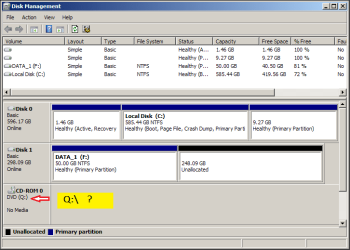
.
I would be very grateful for any help
The Toshiba "Recovery Media Creator" calculated I will need four 4.75 GB DVDs ... not a problem!
while creating disc #1 the Toshiba builtin tool showed this alert
(copied with Ctrl+C while the alert was the focus)
Code:
 ---------------------------
 TOSHIBA Recovery Media Creator
 ---------------------------
 Failed to open the following file. Q:\!V6_00_03.VRP ( Error Code: 020123-F1-00000000 )
 ---------------------------
 OK
--------------------------------
There is no trace of 020123-F1-00000000 on sevenforums.com so I did a DDG search for 020123-F1-00000000."
... ie, 020123-F1-00000000 at DuckDuckGo
First item on DDG results { toshiba error code 020123-f1-00000000 - Tom's Guide }
took me to toshiba error code 020123-f1-00000000 [Solved] - Laptop Tech Support
"Laptop_Nerd" is of no help at all !
I dont want to (cannot) reinstall Win-7 just yet, it is the ONLY internet PC I have.exposed to the web)
From there I looked at (links from the original "Toms Guide" web page)
http://www.tomsguide.com/us/s/toshiba+error+code+020123+00000000/
and
How To Fix 00000000 Error?
... offering this ...
I am really out of my depth now, and don't want to risk damaging the original recovery partition.
-----
EDIT
-----
Just noticed ...
Code:
Failed to open the following file. [COLOR=Red][B]Q:[/B][/COLOR]\!V6_00_03.VRP ( Error Code: 020123-F1-00000000 ).
I would be very grateful for any help
My Computer
- Computer type
- PC/Desktop
- Computer Manufacturer/Model Number
- Toshiba, Lenovo (laptops) + 4 rigs
- OS
- XP Pro (x86) | 7 HP (x86) & (x64) | 7 Pro (x64)


