Solved Why is my C:\Recovery folder empty? (trying to create Recovery Disc)

Marzipan

New member
Local time
5:45 PM
Messages
26
Hi all

I had this in the wrong section earlier and got no help, so trying again here. I'm trying to create a Recovery disc on a USB pen drive for my laptop (Asus Zenbook), as it doesn't have a CDROM. I'm following the instructions here to create the recovery disc on a USB pen drive. The problem I have is that when I look in the C:\Recovery folder, it looks empty to me. And yes, I have run the command prompt as Administrator. I can't proceed without this step in the process.

Can anyone help?
thanks
 

My Computer My Computer

At a glance

Windows 7 64 bit Home
Computer type
Laptop
Computer Manufacturer/Model Number
Asus Zenbook
OS
Windows 7 64 bit Home
That partitcion is hidden. Use backup from controll panel or try mini tool partitcian wizard home edition.
 

My Computer My Computer

At a glance

Windows 7 Home Premium 64 bitIntel core i7 3770 CPU @ 3.4 GHz4096 X 4banks Asint DDR3 SDram 64 Bit 800 MHzOnboard Intel HD 4000
Computer type
PC/Desktop
Computer Manufacturer/Model Number
Asus CM 6870 US3AB
OS
Windows 7 Home Premium 64 bit
CPU
Intel core i7 3770 CPU @ 3.4 GHz
Motherboard
P8H77M Pro CM6870
Memory
4096 X 4banks Asint DDR3 SDram 64 Bit 800 MHz
Graphics Card(s)
Onboard Intel HD 4000
Hard Drives
Sata3 WD 7200 rpm 500 GB
Antivirus
Windows Security
Browser
IE 11
Doesn't ASUS provide a means to create a recovery flash drive?

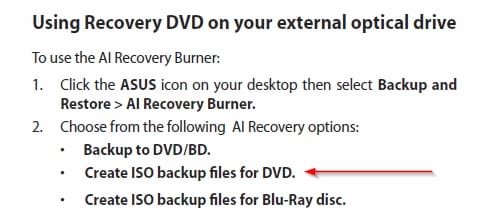
The one Zenbook manual I found had this in it:

ASUSZenbookRecovery.jpg

Create the ISO then use it as input to Rufus to create a bootable flash drive. Once done, boot it and see if the recovery actually starts. Cancel after that so no changes are made.
 

My Computer My Computer

At a glance

Windows 10 Pro X64Intel Quad Core i7-4770 @ 3.4Ghz16.0GB PC3-12800 DDR3 SDRAM 1600 MHzIntel Integrated HD Graphics
Computer type
PC/Desktop
Computer Manufacturer/Model Number
Lenovo IdeaCenter 450
OS
Windows 10 Pro X64
CPU
Intel Quad Core i7-4770 @ 3.4Ghz
Memory
16.0GB PC3-12800 DDR3 SDRAM 1600 MHz
Graphics Card(s)
Intel Integrated HD Graphics
Sound Card
Realtek HD Audio
Monitor(s) Displays
HP 22" LCD
Screen Resolution
1680 x 1050
Hard Drives
250GB Samsung EVO SATA-3 SSD
2TB Seagate ST2000DM001 SATA-2
1.5TB Seagate ST3150041AS SATA
Keyboard
Dell USB
Mouse
Lenovo USB
Internet Speed
Cable via Road Runner 3MB Upload, 30MB Download
Antivirus
Windows Defender, MBAM Pro, MBAE
Browser
Seamonkey
Other Info
UEFI/GPT
PLDS DVD-RW DH16AERSH
Hi Ztruker,

great suggestion. I'll give that a try.

thanks!
 

My Computer My Computer

At a glance

Windows 7 64 bit Home
Computer type
Laptop
Computer Manufacturer/Model Number
Asus Zenbook
OS
Windows 7 64 bit Home
Unfortunately, that fails with an error: "Failed to create the partition image". I suspect I've got some more serious problems....
 

My Computer My Computer

At a glance

Windows 7 64 bit Home
Computer type
Laptop
Computer Manufacturer/Model Number
Asus Zenbook
OS
Windows 7 64 bit Home
I think you are going to have to contact ASUS and get some kind of recovery media. Even a DVD would be okay because you could then create a installable flash drive from it.

What is the full/complete model number?
 

My Computer My Computer

At a glance

Windows 10 Pro X64Intel Quad Core i7-4770 @ 3.4Ghz16.0GB PC3-12800 DDR3 SDRAM 1600 MHzIntel Integrated HD Graphics
Computer type
PC/Desktop
Computer Manufacturer/Model Number
Lenovo IdeaCenter 450
OS
Windows 10 Pro X64
CPU
Intel Quad Core i7-4770 @ 3.4Ghz
Memory
16.0GB PC3-12800 DDR3 SDRAM 1600 MHz
Graphics Card(s)
Intel Integrated HD Graphics
Sound Card
Realtek HD Audio
Monitor(s) Displays
HP 22" LCD
Screen Resolution
1680 x 1050
Hard Drives
250GB Samsung EVO SATA-3 SSD
2TB Seagate ST2000DM001 SATA-2
1.5TB Seagate ST3150041AS SATA
Keyboard
Dell USB
Mouse
Lenovo USB
Internet Speed
Cable via Road Runner 3MB Upload, 30MB Download
Antivirus
Windows Defender, MBAM Pro, MBAE
Browser
Seamonkey
Other Info
UEFI/GPT
PLDS DVD-RW DH16AERSH
Recovery USB

Does it have to be on USB?

I'll just mention another possible option:

One Key Recovery - Create a Factory Restore Partition with AOMEI OneKey Recovery

You should still be able to recover your machine using this method unless it's a case of total hard drive failure.

Note: I do not and have not used this software myself.

Additionally that folder might contain hidden files that you can't usually see!
 

My Computer My Computer

At a glance

Microsoft Windows 7 Home Premium 64-bit 7601 ...AMD C-60 APU with Radeon(tm) HD Graphics4.00 GBAMD Radeon HD 6290 Graphics
Computer type
Laptop
Computer Manufacturer/Model Number
ASUS
OS
Microsoft Windows 7 Home Premium 64-bit 7601 Multiprocessor Free Service Pack 1
CPU
AMD C-60 APU with Radeon(tm) HD Graphics
Motherboard
ASUSTeK COMPUTER INC. X501U
Memory
4.00 GB
Graphics Card(s)
AMD Radeon HD 6290 Graphics
Sound Card
(1) AMD High Definition Audio Device (2) Realtek High Defi
Screen Resolution
1366 x 768 x 32 bits (4294967296 colors) @ 60 Hz
Hard Drives
Hitachi HTS545050A7E380 SATA Disk Device
Antivirus
Comodo CIS & FW, SecureAplus App Whitelisting, Threatfire
Browser
Cyberfox 64bit, Opera 64bit, Airfox
Other Info
Spy-The-Spy, HitmanPro.Alert, Norton Connect Safe, MJRegWatcher, BitDefender TrafficLight, Voodoo Shield, Zemana AntiMalware
C\ Recovery empty

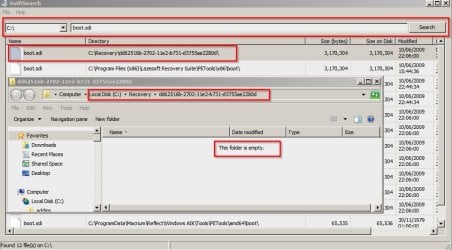
I've just checked my machine by doing a file search for boot.sdi

As you can see the file is detected by the file search utility but opening the folder with Explorer shows an empty folder until folder options is set to "Show hidden system files"

Recovery.jpg
 

My Computer My Computer

At a glance

Microsoft Windows 7 Home Premium 64-bit 7601 ...AMD C-60 APU with Radeon(tm) HD Graphics4.00 GBAMD Radeon HD 6290 Graphics
Computer type
Laptop
Computer Manufacturer/Model Number
ASUS
OS
Microsoft Windows 7 Home Premium 64-bit 7601 Multiprocessor Free Service Pack 1
CPU
AMD C-60 APU with Radeon(tm) HD Graphics
Motherboard
ASUSTeK COMPUTER INC. X501U
Memory
4.00 GB
Graphics Card(s)
AMD Radeon HD 6290 Graphics
Sound Card
(1) AMD High Definition Audio Device (2) Realtek High Defi
Screen Resolution
1366 x 768 x 32 bits (4294967296 colors) @ 60 Hz
Hard Drives
Hitachi HTS545050A7E380 SATA Disk Device
Antivirus
Comodo CIS & FW, SecureAplus App Whitelisting, Threatfire
Browser
Cyberfox 64bit, Opera 64bit, Airfox
Other Info
Spy-The-Spy, HitmanPro.Alert, Norton Connect Safe, MJRegWatcher, BitDefender TrafficLight, Voodoo Shield, Zemana AntiMalware
Does it have to be on USB?

Thanks for the response. Well, I hadn't realised it was going to be so difficult to create the USB recovery disk! I'd prefer to have it on a separate media in the exact case you describe (total failure). I've already been getting some disk errors, which kicked off this entire process, so I'm a little nervous of my disk's condition.
 

My Computer My Computer

At a glance

Windows 7 64 bit Home
Computer type
Laptop
Computer Manufacturer/Model Number
Asus Zenbook
OS
Windows 7 64 bit Home

My Computer My Computer

At a glance

Windows 10 Pro X64Intel Quad Core i7-4770 @ 3.4Ghz16.0GB PC3-12800 DDR3 SDRAM 1600 MHzIntel Integrated HD Graphics
Computer type
PC/Desktop
Computer Manufacturer/Model Number
Lenovo IdeaCenter 450
OS
Windows 10 Pro X64
CPU
Intel Quad Core i7-4770 @ 3.4Ghz
Memory
16.0GB PC3-12800 DDR3 SDRAM 1600 MHz
Graphics Card(s)
Intel Integrated HD Graphics
Sound Card
Realtek HD Audio
Monitor(s) Displays
HP 22" LCD
Screen Resolution
1680 x 1050
Hard Drives
250GB Samsung EVO SATA-3 SSD
2TB Seagate ST2000DM001 SATA-2
1.5TB Seagate ST3150041AS SATA
Keyboard
Dell USB
Mouse
Lenovo USB
Internet Speed
Cable via Road Runner 3MB Upload, 30MB Download
Antivirus
Windows Defender, MBAM Pro, MBAE
Browser
Seamonkey
Other Info
UEFI/GPT
PLDS DVD-RW DH16AERSH
I would not pay to reinstall the Asus crapware which is especially poorly written considering they have such good hardware. Instead I'd do what most tech enthusiasts do to get a vastly superior install and Clean Reinstall - Factory OEM Windows 7.
Everything needed is in the blue link. Delete all partitions during the booted install since none existing will work afterwards anyway.

You'll get and keep a perfect install to the exact extent you stick with the tools, steps and methods in the tutorial.

If you decide to go with the crappy Asus factory install then be sure to Clean Up Factory Bloatware . If you're otherwise happy with your current install then after cleaning it up you can save a Win7 backup image externally to use in place of Recovery. When ready we can even help you delete Recovery and annex its space into C or your data partition.
 
The Restore image on the system hard drive will take you back to install status. If you do a Backup useing the windows 7 utility it will store a disk image of your current state. If you create an ISO of you system you can burn it to a disk. To create on a usb stick you have to use diskpart and then put the iso on a correctly formatted USB stick. There are some tutorials on these forums... You can also make a recovery disk that has restore tools. Lastly sometimes booting into a boot option menu will let you boot from the usb stick and it might work that way.
 

My Computer My Computer

At a glance

Windows 7 Home Premium 64 bitIntel core i7 3770 CPU @ 3.4 GHz4096 X 4banks Asint DDR3 SDram 64 Bit 800 MHzOnboard Intel HD 4000
Computer type
PC/Desktop
Computer Manufacturer/Model Number
Asus CM 6870 US3AB
OS
Windows 7 Home Premium 64 bit
CPU
Intel core i7 3770 CPU @ 3.4 GHz
Motherboard
P8H77M Pro CM6870
Memory
4096 X 4banks Asint DDR3 SDram 64 Bit 800 MHz
Graphics Card(s)
Onboard Intel HD 4000
Hard Drives
Sata3 WD 7200 rpm 500 GB
Antivirus
Windows Security
Browser
IE 11
What Greg said is what I did recently and after clean install and taking a little time to set up system the way I like it and install graphics and othe software. My ASUS is running great without the crapware offerd by ASUS. What I have figuerd out is that most of the Asus software is fake. It just monitors what windows and Intel allready do anyways. And it lets you set some alarms. My system is running great with no Asus software and only a USB3 driver and Graphics and SOund drivers and thats it. The one thing I might do is install Asus Suite 11 And only install the tempiture sensor called Probe. It does install 3 services that report from the bios to the program so you can see CPU temps. These services can be set to only start manuly. I dont recomend any thing else. No fan control or EPU . EPU dosent do anything that Intell Speed step is not allready doing... It just confuses windows. I whould instal another tempiture monitor but all the free ones come bundled with hidden software. If anyone know of a good one let me know.
 

My Computer My Computer

At a glance

Windows 7 Home Premium 64 bitIntel core i7 3770 CPU @ 3.4 GHz4096 X 4banks Asint DDR3 SDram 64 Bit 800 MHzOnboard Intel HD 4000
Computer type
PC/Desktop
Computer Manufacturer/Model Number
Asus CM 6870 US3AB
OS
Windows 7 Home Premium 64 bit
CPU
Intel core i7 3770 CPU @ 3.4 GHz
Motherboard
P8H77M Pro CM6870
Memory
4096 X 4banks Asint DDR3 SDram 64 Bit 800 MHz
Graphics Card(s)
Onboard Intel HD 4000
Hard Drives
Sata3 WD 7200 rpm 500 GB
Antivirus
Windows Security
Browser
IE 11
Check in your BIOS to see if there is a BIOS level temperature control that will shut down the PC if it overheats. Then you don't need to worry about it unless you detect that there is excess heat, in which case I install Core Temp to the System Tray with Protection alert to put system into Hibernation if it exceeds Max temperature.

If you feel that temp monitors are valuable that come with the Asus program then you can install it to see if it interferes or slows Win7 at all. I do this with a Lenovo program for Power Management so I can see Volume level on the screen and throttle the battery charge to 75% while running on AC to preserve battery life. I don't detect it slows anything or interferes in any way.
 
I whould instal another tempiture monitor but all the free ones come bundled with hidden software. If anyone know of a good one let me know.

Well I ran this for a while:

Tthrottle | eFMer

My machine doesn't have overheating problems so I removed it after a couple of months usage. You can set your own rules - it's highly configurable.
 
Last edited:

My Computer My Computer

At a glance

Microsoft Windows 7 Home Premium 64-bit 7601 ...AMD C-60 APU with Radeon(tm) HD Graphics4.00 GBAMD Radeon HD 6290 Graphics
Computer type
Laptop
Computer Manufacturer/Model Number
ASUS
OS
Microsoft Windows 7 Home Premium 64-bit 7601 Multiprocessor Free Service Pack 1
CPU
AMD C-60 APU with Radeon(tm) HD Graphics
Motherboard
ASUSTeK COMPUTER INC. X501U
Memory
4.00 GB
Graphics Card(s)
AMD Radeon HD 6290 Graphics
Sound Card
(1) AMD High Definition Audio Device (2) Realtek High Defi
Screen Resolution
1366 x 768 x 32 bits (4294967296 colors) @ 60 Hz
Hard Drives
Hitachi HTS545050A7E380 SATA Disk Device
Antivirus
Comodo CIS & FW, SecureAplus App Whitelisting, Threatfire
Browser
Cyberfox 64bit, Opera 64bit, Airfox
Other Info
Spy-The-Spy, HitmanPro.Alert, Norton Connect Safe, MJRegWatcher, BitDefender TrafficLight, Voodoo Shield, Zemana AntiMalware
Wow, thanks everyone for the great responses. I actually already tried to create my own recovery install by downloading one of these Windows 7 Direct Download Links, Official Disk Images from Digital River but after finally downloading all 3gB and transferring to the USB, Windows told me it wasn't compatible with my computer. I don't necessarily want a clean install, just wanted to create a recovery disk, in case anything went wrong.
There have been a few problems with failed Windows Updates recently, which (I think) I've traced to a corrupt folder in the dotNet framework. This got me nervous about the integrity of my system, which is why I've started the process of building a recovery disk. I'm not actually bothered by the pre-installed crapware, but I don't like to see corrupt files!

Rich, that Purchase link says they've discontinued the service, unfortunately.

I've sent Asus support a message to see if they can help, but I don't expect much of a response. :-)

Is this an appropriate place to look for help with the failed Windows Updates?

thanks again!
 

My Computer My Computer

At a glance

Windows 7 64 bit Home
Computer type
Laptop
Computer Manufacturer/Model Number
Asus Zenbook
OS
Windows 7 64 bit Home
Download Win7 Home Premium x64 SP1 English Official ISO download and write it to flash stick using http://www.sevenforums.com/tutorials/31541-windows-7-usb-dvd-download-tool.html?filter, unless you have an EFI install in which case you'd write the stick using Option One in UEFI Bootable USB Flash Drive - Create in Windows.

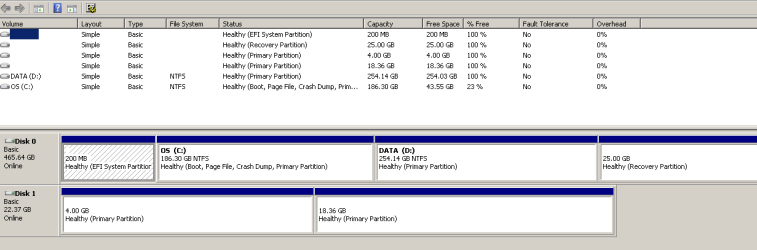
To determine if you have an EFI install, look at Disk Management to see if there is an EFI System partition vs. a System Active "System Reserved" partition which indicates a normal install.

While there post back a screenshot of http://www.sevenforums.com/tutorial...nt-post-screen-capture-image.html#post2261610 so we can look it over to see that it is correct.

Otherwise do a scan for infection using Malwarebytes and SuperAntiSpyware, then check the System File integrity using http://www.sevenforums.com/tutorials/1538-sfc-scannow-command-system-file-checker.html, establish a Clean Boot and go over the logs from the http://www.sevenforums.com/tutorials/220165-troubleshooting-steps-windows-7-a.html.
 
Hi gregrocker

thanks again for the response. I already downloaded that ISO and wrote it to the flash drive (using Rufus) and booted into it, but Windows told me it wasn't compatible with my computer. I'm downloading it again, and will follow your linked instructions word for word.

I've attached my Disk Management screen grab. It looks like I have an EFI install. Disk Management snip.PNG

I already tried the SFC /SCANNOW and it stopped at 71% (with the message 'Windows Resource Protection could not perform the requested operation'), which I think is related to the disk corruption (of 2 folders in C:\Windows\Microsoft.NET\Framework\v2.0.50727 ).

I'll try the rest of your suggestions, and report back.
Thanks!
 

My Computer My Computer

At a glance

Windows 7 64 bit Home
Computer type
Laptop
Computer Manufacturer/Model Number
Asus Zenbook
OS
Windows 7 64 bit Home
Hi again gregrocker.

I thought I'd report back what I've found. Still going through the troubleshooting steps, but already have found an issue.

Ok, the good news is that I've created and tested the flash stick recovery. I think the key part that I was missing was the part about it being an EFI install.

I installed and ran both Malwarebytes and SuperAntiSpyware, no problems reported.

The not-so-good news is that I ran SFC /SCANNOW and it stopped at 71%. Here's the results from sfcdetails.txt (extracted from CBS.log).

Code:
2014-09-10 17:07:15, Info                  CSI    00000009 [SR] Verifying 1 components
2014-09-10 17:07:15, Info                  CSI    0000000a [SR] Beginning Verify and Repair transaction
2014-09-10 17:07:15, Info                  CSI    0000000c [SR] Cannot repair member file [l:22{11}]"autochk.exe" of Microsoft-Windows-Autochk, Version = 6.1.7601.17514, pA = PROCESSOR_ARCHITECTURE_AMD64 (9), Culture neutral, VersionScope = 1 nonSxS, PublicKeyToken = {l:8 b:31bf3856ad364e35}, Type neutral, TypeName neutral, PublicKey neutral in the store, hash mismatch
2014-09-10 17:07:15, Info                  CSI    0000000e [SR] Cannot repair member file [l:22{11}]"autochk.exe" of Microsoft-Windows-Autochk, Version = 6.1.7601.17514, pA = PROCESSOR_ARCHITECTURE_AMD64 (9), Culture neutral, VersionScope = 1 nonSxS, PublicKeyToken = {l:8 b:31bf3856ad364e35}, Type neutral, TypeName neutral, PublicKey neutral in the store, hash mismatch
2014-09-10 17:07:15, Info                  CSI    0000000f [SR] This component was referenced by [l:202{101}]"Microsoft-Windows-Foundation-Package~31bf3856ad364e35~amd64~~6.1.7601.17514.WindowsFoundationDelivery"
2014-09-10 17:07:15, Info                  CSI    00000012 [SR] Could not reproject corrupted file [ml:520{260},l:46{23}]"\??\C:\Windows\System32"\[l:22{11}]"autochk.exe"; source file in store is also corrupted
2014-09-10 17:07:15, Info                  CSI    00000014 [SR] Verify complete
2014-09-10 17:37:00, Info                  CSI    00000009 [SR] Verifying 1 components
2014-09-10 17:37:00, Info                  CSI    0000000a [SR] Beginning Verify and Repair transaction
2014-09-10 17:37:00, Info                  CSI    0000000c [SR] Cannot repair member file [l:22{11}]"autochk.exe" of Microsoft-Windows-Autochk, Version = 6.1.7601.17514, pA = PROCESSOR_ARCHITECTURE_AMD64 (9), Culture neutral, VersionScope = 1 nonSxS, PublicKeyToken = {l:8 b:31bf3856ad364e35}, Type neutral, TypeName neutral, PublicKey neutral in the store, hash mismatch
2014-09-10 17:37:00, Info                  CSI    0000000e [SR] Cannot repair member file [l:22{11}]"autochk.exe" of Microsoft-Windows-Autochk, Version = 6.1.7601.17514, pA = PROCESSOR_ARCHITECTURE_AMD64 (9), Culture neutral, VersionScope = 1 nonSxS, PublicKeyToken = {l:8 b:31bf3856ad364e35}, Type neutral, TypeName neutral, PublicKey neutral in the store, hash mismatch
2014-09-10 17:37:00, Info                  CSI    0000000f [SR] This component was referenced by [l:202{101}]"Microsoft-Windows-Foundation-Package~31bf3856ad364e35~amd64~~6.1.7601.17514.WindowsFoundationDelivery"
2014-09-10 17:37:00, Info                  CSI    00000012 [SR] Could not reproject corrupted file [ml:520{260},l:46{23}]"\??\C:\Windows\System32"\[l:22{11}]"autochk.exe"; source file in store is also corrupted
2014-09-10 17:37:00, Info                  CSI    00000014 [SR] Verify complete

I'll keep going with the Troubleshooting post.

PS what a fantastic resource this website is!
 

My Computer My Computer

At a glance

Windows 7 64 bit Home
Computer type
Laptop
Computer Manufacturer/Model Number
Asus Zenbook
OS
Windows 7 64 bit Home
Back
Top