Cannot delete an active system partition?

Grant1219

New member
Local time
2:11 AM
Messages
5
Hello,
I know this might be a very silly question, but I am trying to format one of my storage drives, and it seems like Windows does not want me to.

I have always only used it to store data, so why is Windows 7 telling me it is a system partition? Did Windows put data on the drive and start using it without even asking me?

At first I tried just unplugging the drive, but then Windows would not boot, so clearly it needs it for some reason.

I'm really confused as to why Windows needs this storage drive so badly. Could anyone help me figure this out? I would really appreciate it! Thanks~
 

My Computer

OS
Windows 7 Ultimate 64bit
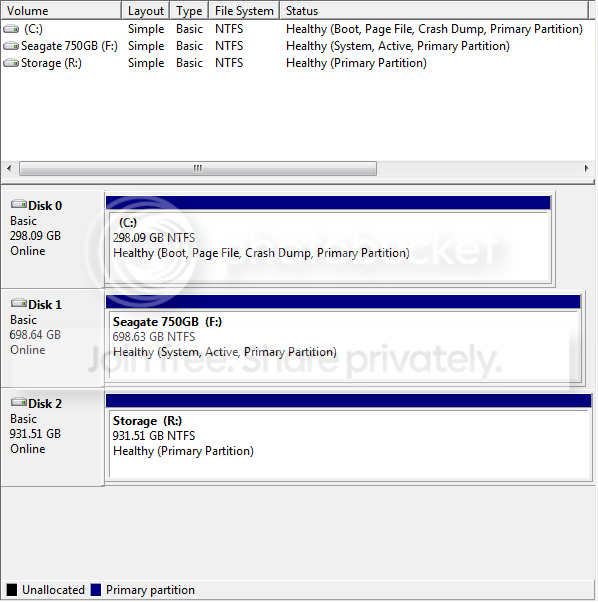
Please post back a screenshot of maximized full Disk Mgmt drive map and listings with all drives plugged. Use Snipping Tool in Start Menu.
 
Here it is. "Seagate 750GB" is the drive I want to reformat.

drives.png
 

My Computer

OS
Windows 7 Ultimate 64bit
Use the DiskPart Inactive command.

You will use the following DiskPart commands:
List Volume
Select Volume 2 (here I've used the letter 2. You use the correct one for your system)
Inactive (will mark the selected volume as inactive)
EXIT
(which will exit from DiskPart)

To run DiskPart, you must go to an elevated command prompt.

Command Prompt - Elevated command prompt

Elevated command prompt = Run CMD.EXE as administrator
· WIN key
· Type CMD.EXE (do not hit Enter key)
· In the Programs list, Right-Click on CMD.EXE
· Click on Run as administrator
· YES button

OR for keyboard fans:
· WIN key
· Type CMD.EXE (do not hit Enter key)
· Press CTRL + SHIFT + ENTER key combo
· Press ALT + y in response to UAC (User Access Control) prompt asking to “allow program …”


Now to get to diskpart, simply
type Diskpart
hit ENTER

run the diskpart commands mentioned above and then type
EXIT to exit from CMD
 

My Computer

Computer Manufacturer/Model Number
Toshiba Satellite S875D-S7239 laptop
OS
MS Windows 7 Ultimate SP1 64-bit
CPU
AMD A10-4600M
Motherboard
AMD Pumori (Socket FT1)
Memory
6.00 GB Dual-Channel DDR3 @ 798MHz (11-11-12-28)
Graphics Card(s)
AMD Radeon HD 7660G
Sound Card
High Definition Audio Device
Monitor(s) Displays
Generic PnP Monitor (1600x900@60Hz)
Screen Resolution
1600x900@60Hz
Hard Drives
SSD 119GB Corsair CSSD-V128GB2 ATA Device
Keyboard
Standard PS/2 Keyboard
Mouse
HP Wireless Optical Mobile Mouse Model FHA-3410
Internet Speed
What the local pub, local coffee shop offers.
Other Info
Optical Drive:MATSHITA BD-CMB UJ160B ATA Device


Also have an Asus ha1002xp netbook with Win 7 Ultimate installed.
Thanks, you helped me get to the format menu, but I still cannot format the disk because it is still marked as "System."

Now the error is "Format is not allowed on the current boot, system, pagefile, crashdump, or hibernation volume."

I'll try to figure out how to switch the system volume I guess.
 

My Computer

OS
Windows 7 Ultimate 64bit
Well, I went to what I thought was my storage drive and found that there is indeed a hidden "boot" folder. I have no idea why Windows 7 put that on the storage drive. It's not the first hard drive connected in my system.

Is there a quick and easy way to move that folder?
 

My Computer

OS
Windows 7 Ultimate 64bit
Hi Grant -

The problem as you've guessed is that the boot critical files were placed on the Seagate.

To fix this boot into BIOS setup to set the Win7 HD as first HD to boot in BIOS setup.

Next boot the Win7 DVD Repair console or Repair CD, press Shift F10 to open a Command Line and use the Diskpart commands given here to mark Win7 partition Active while marking the Seagate Inactive: http://www.sevenforums.com/tutorials/71432-partition-mark-active.html

Next power down to unplug the Seagate, boot into DVD Repair console, accept any offered repair. If it fails to start at reboot, boot back into DVD Repair, click through to Recovery Tools list to run Startup Repair up to 3 separate times with reboots until Win7 starts. http://www.sevenforums.com/tutorials/105541-startup-repair-run-3-separate-times.html

You can then power down to plug the Seagate back in, make sure it is not marked Active in Disk Mgmt.
 
Grant,
Go back to the diskpart command.
use following commands:
LIST DISK
SELECT DISK n where n is the number of the disk you want to format.
DETAIL DISK (just to make sure you picked the correct disk)
CLEAN (this will zero out the first and last sectors)
CREATE PARTITION PRIMARY
LIST PARTITION
SELECT PARTITION 1
FORMAT FS=NTFS QUICK (this will format the partition)
ASSIGN (win 7 will assign next available letter; you can change later if you don't like)
EXIT
 

My Computer

Computer Manufacturer/Model Number
Toshiba Satellite S875D-S7239 laptop
OS
MS Windows 7 Ultimate SP1 64-bit
CPU
AMD A10-4600M
Motherboard
AMD Pumori (Socket FT1)
Memory
6.00 GB Dual-Channel DDR3 @ 798MHz (11-11-12-28)
Graphics Card(s)
AMD Radeon HD 7660G
Sound Card
High Definition Audio Device
Monitor(s) Displays
Generic PnP Monitor (1600x900@60Hz)
Screen Resolution
1600x900@60Hz
Hard Drives
SSD 119GB Corsair CSSD-V128GB2 ATA Device
Keyboard
Standard PS/2 Keyboard
Mouse
HP Wireless Optical Mobile Mouse Model FHA-3410
Internet Speed
What the local pub, local coffee shop offers.
Other Info
Optical Drive:MATSHITA BD-CMB UJ160B ATA Device


Also have an Asus ha1002xp netbook with Win 7 Ultimate installed.
The procedure I gave you will make that storage drive look like a normal virgin drive.

The procedure Greg gave you will make your C the "active" drive which you need.

In other words, both procedures.
 
Last edited:

My Computer

Computer Manufacturer/Model Number
Toshiba Satellite S875D-S7239 laptop
OS
MS Windows 7 Ultimate SP1 64-bit
CPU
AMD A10-4600M
Motherboard
AMD Pumori (Socket FT1)
Memory
6.00 GB Dual-Channel DDR3 @ 798MHz (11-11-12-28)
Graphics Card(s)
AMD Radeon HD 7660G
Sound Card
High Definition Audio Device
Monitor(s) Displays
Generic PnP Monitor (1600x900@60Hz)
Screen Resolution
1600x900@60Hz
Hard Drives
SSD 119GB Corsair CSSD-V128GB2 ATA Device
Keyboard
Standard PS/2 Keyboard
Mouse
HP Wireless Optical Mobile Mouse Model FHA-3410
Internet Speed
What the local pub, local coffee shop offers.
Other Info
Optical Drive:MATSHITA BD-CMB UJ160B ATA Device


Also have an Asus ha1002xp netbook with Win 7 Ultimate installed.
If you clean the data drive it will lose any data, so back it up first.

You'll need to wait until after it is marked Inactive, or in Diskpart bring the Seagate drive Partition 1 into focus and write "Delete Partition Override" to delete it while still a System drive.

You can then run the Repair on C once marked Active without having to unplug the Seagate since it can't interfere.

Remember to set C HD as first to boot in BIOS setup.

Questions?
 
Thanks a lot for the help everyone! I've got everything the way I want it now.

I've already backup everything; that's why I wanted to wipe that drive, heh.

Thanks again.
 

My Computer

OS
Windows 7 Ultimate 64bit
Glad that you've got everything like you wanted now.
 

My Computer

Computer Manufacturer/Model Number
Toshiba Satellite S875D-S7239 laptop
OS
MS Windows 7 Ultimate SP1 64-bit
CPU
AMD A10-4600M
Motherboard
AMD Pumori (Socket FT1)
Memory
6.00 GB Dual-Channel DDR3 @ 798MHz (11-11-12-28)
Graphics Card(s)
AMD Radeon HD 7660G
Sound Card
High Definition Audio Device
Monitor(s) Displays
Generic PnP Monitor (1600x900@60Hz)
Screen Resolution
1600x900@60Hz
Hard Drives
SSD 119GB Corsair CSSD-V128GB2 ATA Device
Keyboard
Standard PS/2 Keyboard
Mouse
HP Wireless Optical Mobile Mouse Model FHA-3410
Internet Speed
What the local pub, local coffee shop offers.
Other Info
Optical Drive:MATSHITA BD-CMB UJ160B ATA Device


Also have an Asus ha1002xp netbook with Win 7 Ultimate installed.
Thanks karlsnooks. That worked perfectly. I had the same problem.
 

My Computer

Computer Manufacturer/Model Number
Home Build
OS
Windows 7 Professional x86
CPU
Intel Core i5 750 @ 2.67 GHz
Motherboard
Gigabyte P55-GD65
Memory
4GB DDR3 1600 MHz PC3
Graphics Card(s)
nVidia GeForce GT 240
Sound Card
Onboard Sound
Monitor(s) Displays
Samsung 51" Plasma HDTV
Screen Resolution
1920x1080
Hard Drives
Seagate Barracuda LP 2TB 5900 RPM
PSU
Antec EarthWatts EA-500D
Case
Antec Sonata III Mid ATX
Cooling
120mm Antec 3 Speed Fan, Intel E41759-002 1156 Heatsink Fan
I recently had a similar situation which I could not resolve and called Microsoft. After being moved to a tier 3 tech, the following was attempted - with no promise of success - but it did succeed. They downloaded the Easus Partition Manager as a trial or something, they then chose the drive that wouldn't format as if to change its partitioning. However, they then left it as one partition. In this scenario, Easus gave the option to format the new partition. In this very round-about way, the drive was formatted as a regular drive again.

I write this in case the suggestions above do not work. This might.

MLG
 

My Computer

Computer Manufacturer/Model Number
Desktop made to order - Asus P6x58D Premium
OS
Win 7 64 Prof
CPU
i7 930
Motherboard
Asus P6x58D Premium
Memory
24 gig 1333
Graphics Card(s)
HIS ATI Radeon HD 6850
Sound Card
Creative
Monitor(s) Displays
NEC Multisync P241W
Screen Resolution
1920 x 1200
Hard Drives
2 WD 1tb each black caviar
1 WD black caviar 2tb
1 Plextor SSD SATA 6 256 gig
1 Intel generation 2 SSD 160 gig
PSU
i7 930
Case
Antec 183 (?)
Cooling
Zalman fan and heat pipe
Keyboard
Goldtouch
Mouse
Logitech G 700 used wirelessly
Internet Speed
19.6 Mbps up and 2.00 Mbps down
Other Info
5 usb 3 hard drives used for backup. Until recently also backed up with Crashplan but discovered it was the cause of endless VSS errors and open programs stopping responding. HP Laserjet and large Epson inkjet for photography. Very old Epson Scanner. Cyberpower UPS.
Hi there. I've just started having this problem. My secondary drive started reporting a "S.M.A.R.T. Status Bad, Backup and replace" error. Now before I replace the physical drive I wanted to try completely wiping it and reformatting it first to see if that fixes the problem. However when I try to delete the partition from Disk Management is says it cannot because the partition is active.

Note. In my BIOS my secondary drive is listed to boot after my blu-ray/dvd drive. Should I change it so my C drive hosting windows boots after my dvd drive before I try anything else? (Or would my secondary drive likely still be 'active'?)

If so what should I do next? If windows launches should I try the diskpart command below? : -
LIST DISK
SELECT DISK n where n is the number of the disk you want to format.
DETAIL DISK (just to make sure you picked the correct disk)
CLEAN (this will zero out the first and last sectors)
CREATE PARTITION PRIMARY
LIST PARTITION
SELECT PARTITION 1
FORMAT FS=NTFS QUICK (this will format the partition)
ASSIGN (win 7 will assign next available letter; you can change later if you don't like)
EXIT

Or will I still have a problem? I'm just a bit confused on the order of how to fix this? When to use the dispart/when to boot from windows cd? Will I really need to unplug my secondary drive afterwards? etc?

Can I not just partition/format the secondary drive by booting from my windows dvd without using the diskpart commands?

Thanks!

i5-3570K @ 4.0GHz | 3GB AMD Radeon HD 7970 | ASUS P8Z77-I Deluxe | 16GB (2x8GB) Corsair Vengeance DDR3 1600Mhz | 240GB Corsair Force GT SSD |
1.5 TB Western Digital 7200RPM| 1KW Silverstone Strider PSU | NZXT Vulcan
 

My Computer

OS
Windows 7 Home Premium 64bit
If you clean the data drive it will lose any data, so back it up first.

You'll need to wait until after it is marked Inactive, or in Diskpart bring the Seagate drive Partition 1 into focus and write "Delete Partition Override" to delete it while still a System drive.

You can then run the Repair on C once marked Active without having to unplug the Seagate since it can't interfere.

Remember to set C HD as first to boot in BIOS setup.

Questions?

Hi there. I have this problem and want to be able to format/re-partition my secondary drive without having to remove it from my case. Please can you confirm the steps to do this? Will the following work? : -

Step 1. Make sure my 'C' drive (Windows) drive is the second drive to boot from my BIOs after my dvd drive? (Currently it's my problematic storage drive which is the second drive to boot in the bios which i thought was strange).

Step 2. (Assuming Windows starts) run the following Diskpart cmds: -

First to make the drive inactive: -

List Volume
Select Volume 2 (here I've used the letter 2. You use the correct one for your system)
Inactive

and then to format it: -

LIST DISK
SELECT DISK n where n is the number of the disk you want to format.
DETAIL DISK (just to make sure you picked the correct disk)
CLEAN (this will zero out the first and last sectors)
CREATE PARTITION PRIMARY
LIST PARTITION
SELECT PARTITION 1
FORMAT FS=NTFS QUICK (this will format the partition)
ASSIGN (win 7 will assign next available letter; you can change later if you don't like)
EXIT

When do I run the '"Delete Partition Override"' you mention?

Step 3. - Reboot and see if Windows launches and all is well? If not should I reboot with the windows dvd and go through the Startup Repair steps 3 times? This is the part I'm getting confused about. (And the order of the diskpart cmds above).

Thanks a lot
 

My Computer

OS
Windows 7 Home Premium 64bit
FYI I managed to get the drive into a non-acitive, non-system state by booting from the Windows disk, making it inactive via diskpart and then running Startup Repair a couple of times.

However I'm going to have to replace the hard disk anyway because I still get the "S.M.A.R.T Status Bad, Backup & Replace error" on startup. That seems like a hardware failure and a topic for another thread.
 

My Computer

OS
Windows 7 Home Premium 64bit
Back
Top