cannot detect HDMI cable

fantazos

New member
Local time
8:35 AM
Messages
6
I have spent last week following various advice for fixing it but I am still stuck.Installing and re installing,enabling and disabling-and now I have nothing on the TV set and ATI does not see the HDMI cable.
Is there a clear understanding regarding this,or it's more like "try a bit of this but add a pinch of that and who knows -it may work...
I have Dell Dimension E521 with ADM Sempron,Windows 7 pro 32
Any good advice on getting bach the HDMI output?
 

My Computer

Computer type
PC/Desktop
Computer Manufacturer/Model Number
Dell Dimension E521
OS
Professional 32
Hi Fantazos, Welcome to Seven forums.

You mentioned that ATI does not see the HDMI cable. Can you let us know what card are you using? Because, Dell E521 itself does not have HDMI port.

Have you updated the drivers for the card you are using? Please update you complete system specs.
 

My Computer

Computer type
PC/Desktop
Computer Manufacturer/Model Number
Custom Bulid/Self made
OS
Windows 11 x64
CPU
i5 2500K @ 3.3 GHz
Motherboard
ASUS P8 Z77 V pro
Memory
16 GB DDR 3 @ 1600Mhz
Graphics Card(s)
MSI 1050TI 4GB OC version
Sound Card
On Board (Realtek HD audio)
Monitor(s) Displays
Samsung 22" LCD
Screen Resolution
1920*1080
Hard Drives
Seagate 1 TB, WD 1TB, Seagate 2 TB ( I use a lot of space)
PSU
coolermaster 750 W
Case
Coolermaster HAF912
Cooling
Coolermaster hyper 212 EVO
Keyboard
Samsung
Mouse
Dell Wireless
Internet Speed
Wireless 50 Mbps
Antivirus
AVG 2016 Internet Security
Browser
Google Chrome
does the hdmi cable work on other devices?!
would be the first thing I check!
 

My Computer

Computer type
PC/Desktop
Computer Manufacturer/Model Number
Built by badgers!!!
OS
Windows 7 Ultimate x64, & Mac OS X 10.9.2
CPU
Intel Core i5 2500k
Motherboard
Asus P8z68 LE
Memory
Corsair Vengence 8gb 1866mhz
Graphics Card(s)
Nvidia GTX 770 OC
Monitor(s) Displays
2x ASUS LED 22" IPS
Screen Resolution
3840x1080
Hard Drives
240GB Crucial M500 SSD
120gb Corsair Force 3 SSD
1TB Western Digital
PSU
Corsair HX650w Modular
Case
Corsair Air 540
Cooling
Corsair H60 Push/Pull
Keyboard
Corsair K70/ Logitech G27 wheel
Mouse
Saitek R.A.T 9
Internet Speed
Too slow!
Other Info
AMD fusion E350N Home server-Windows Home Server 2011 (also made by badgers!)
2011 Macbook 2.4ghz Core2Duo, 4gb ddr3, 120gb Ocz Vertex SSD
I added Gigabyte ATi HD 4550/4350 Graphics Accelerator to my computer to have HDMI port and at first {two years by now} it worked flawlessly. Then I lost sound and now any signal from TV to PC,as if they were not connected by this fat coil of DHMI cable. I believe I screw up something by adding all kinds of drivers that were recomended for downloading by the good offices of DriverMax.Kind of "driver-greed"-more drivers piled high will solve my problems,,,
I cannot check if the cable is the culprit of the failure because the TV is the only device with HDMI port I have.
 

My Computer

Computer type
PC/Desktop
Computer Manufacturer/Model Number
Dell Dimension E521
OS
Professional 32
have you tried a system retore to a point when it all last worked?
also I suggest you uninstall all the inessential drivers and guff that have been added.

lastly just ask a mate or someone you know if they can test it on an xbox or ps3 or bluray player ect.. if not a new hdmi cable only cost like 99p/99c
 

My Computer

Computer type
PC/Desktop
Computer Manufacturer/Model Number
Built by badgers!!!
OS
Windows 7 Ultimate x64, & Mac OS X 10.9.2
CPU
Intel Core i5 2500k
Motherboard
Asus P8z68 LE
Memory
Corsair Vengence 8gb 1866mhz
Graphics Card(s)
Nvidia GTX 770 OC
Monitor(s) Displays
2x ASUS LED 22" IPS
Screen Resolution
3840x1080
Hard Drives
240GB Crucial M500 SSD
120gb Corsair Force 3 SSD
1TB Western Digital
PSU
Corsair HX650w Modular
Case
Corsair Air 540
Cooling
Corsair H60 Push/Pull
Keyboard
Corsair K70/ Logitech G27 wheel
Mouse
Saitek R.A.T 9
Internet Speed
Too slow!
Other Info
AMD fusion E350N Home server-Windows Home Server 2011 (also made by badgers!)
2011 Macbook 2.4ghz Core2Duo, 4gb ddr3, 120gb Ocz Vertex SSD
Dear Badger 906,
Thank you most kindly for your suggestions. I thought of installing my graphics card on another computer but then I saw that Dell computers I have [Dimension]have to use right side slots on M.board.No go! Now I am about to start on stripping all the gunk&guff in drivers and start afresh,as you suggested.
 

My Computer

Computer type
PC/Desktop
Computer Manufacturer/Model Number
Dell Dimension E521
OS
Professional 32
you can still fit standard components into a dell. the only difference is they invert the motherboard. so basically everything is upside down to normal.

so your gpu will work fine in another computer/another computers gpu in yours.
 

My Computer

Computer type
PC/Desktop
Computer Manufacturer/Model Number
Built by badgers!!!
OS
Windows 7 Ultimate x64, & Mac OS X 10.9.2
CPU
Intel Core i5 2500k
Motherboard
Asus P8z68 LE
Memory
Corsair Vengence 8gb 1866mhz
Graphics Card(s)
Nvidia GTX 770 OC
Monitor(s) Displays
2x ASUS LED 22" IPS
Screen Resolution
3840x1080
Hard Drives
240GB Crucial M500 SSD
120gb Corsair Force 3 SSD
1TB Western Digital
PSU
Corsair HX650w Modular
Case
Corsair Air 540
Cooling
Corsair H60 Push/Pull
Keyboard
Corsair K70/ Logitech G27 wheel
Mouse
Saitek R.A.T 9
Internet Speed
Too slow!
Other Info
AMD fusion E350N Home server-Windows Home Server 2011 (also made by badgers!)
2011 Macbook 2.4ghz Core2Duo, 4gb ddr3, 120gb Ocz Vertex SSD
I tried just that: upside down graphics card-it was brilliant as a sly concept but the poor thing does not fit when upside down.I also wonder if the card is alive or burned:the tiny fan is not moving : wouldn't it indicate demise?
Now I am ready to buy new cable and new graphics card.Either one or both could be bad.
 

My Computer

Computer type
PC/Desktop
Computer Manufacturer/Model Number
Dell Dimension E521
OS
Professional 32
wait you said you tried it upside down and now its not?? the graphics card can only go one way round..

any graphics card will fit in a dell pc, it just has to be mounted with the pci plate on the right hand side.

if youve forced it in the other way around then youve probably broken something.
 

My Computer

Computer type
PC/Desktop
Computer Manufacturer/Model Number
Built by badgers!!!
OS
Windows 7 Ultimate x64, & Mac OS X 10.9.2
CPU
Intel Core i5 2500k
Motherboard
Asus P8z68 LE
Memory
Corsair Vengence 8gb 1866mhz
Graphics Card(s)
Nvidia GTX 770 OC
Monitor(s) Displays
2x ASUS LED 22" IPS
Screen Resolution
3840x1080
Hard Drives
240GB Crucial M500 SSD
120gb Corsair Force 3 SSD
1TB Western Digital
PSU
Corsair HX650w Modular
Case
Corsair Air 540
Cooling
Corsair H60 Push/Pull
Keyboard
Corsair K70/ Logitech G27 wheel
Mouse
Saitek R.A.T 9
Internet Speed
Too slow!
Other Info
AMD fusion E350N Home server-Windows Home Server 2011 (also made by badgers!)
2011 Macbook 2.4ghz Core2Duo, 4gb ddr3, 120gb Ocz Vertex SSD
Unless there is some magical way to do it I cannot mount the card upside down. The yellow row of tiny teeth has a break and then continues with few teeth more. Once you flip the card you will end up with the break in front and there is no known way to avoid it.Now,out of growing frustration I ordered new video card and new HDMI cable. My prediction is that video card is dead and not because I have misstreated it but simply because it wanted to join the mournfull cortege of entropy.
Thank you for trying to help.Crazy about kindness!
 

My Computer

Computer type
PC/Desktop
Computer Manufacturer/Model Number
Dell Dimension E521
OS
Professional 32
i think your trying to fit it into a pci slot not a PCIe slot which will explain the issue.


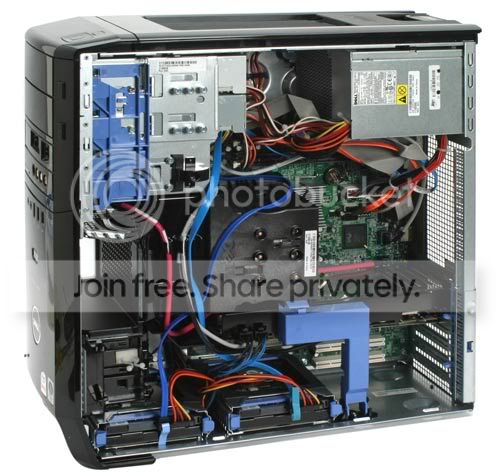
the second slot down is the one you want to put it in. on your dell it will be upside down, but still the same port.

heres an example in a dell xps 420
DellXPS420.jpg
 

My Computer

Computer type
PC/Desktop
Computer Manufacturer/Model Number
Built by badgers!!!
OS
Windows 7 Ultimate x64, & Mac OS X 10.9.2
CPU
Intel Core i5 2500k
Motherboard
Asus P8z68 LE
Memory
Corsair Vengence 8gb 1866mhz
Graphics Card(s)
Nvidia GTX 770 OC
Monitor(s) Displays
2x ASUS LED 22" IPS
Screen Resolution
3840x1080
Hard Drives
240GB Crucial M500 SSD
120gb Corsair Force 3 SSD
1TB Western Digital
PSU
Corsair HX650w Modular
Case
Corsair Air 540
Cooling
Corsair H60 Push/Pull
Keyboard
Corsair K70/ Logitech G27 wheel
Mouse
Saitek R.A.T 9
Internet Speed
Too slow!
Other Info
AMD fusion E350N Home server-Windows Home Server 2011 (also made by badgers!)
2011 Macbook 2.4ghz Core2Duo, 4gb ddr3, 120gb Ocz Vertex SSD
pieces of antiquity

Dear Badger,
Well- thanks for making me aware of the difference between PCI slots and PCI-e slots. After another trip to the store I know that my computers are pieces of antiquity,almost extinct and they certainly don't carry cards older than 5 years.E-bay to the rescue!
 

My Computer

Computer type
PC/Desktop
Computer Manufacturer/Model Number
Dell Dimension E521
OS
Professional 32
Back
Top