Cannot Download Files - Internet Explorer

oOIanOo

New member
Local time
2:57 PM
Messages
7
Hello

I've just carried out fresh install of Windows. During the process I moved the user profiles to another drive and I'm wondering if this has caused my problem. For some reason I can't download any files although I have no problem browsing. The error message I receive is as follows:

Unable to download [Filename] from [Web Site]

Unable to open this Internet site. The requested site is either unavailable or cannot be found. Please try again later.


I've read somewhere that deleting the index.dat file would rectify the problem, but there is no index.dat file. Infact I can't file the Temporary Internet Files folder at all which is supposed to be located in D:\Users\[Username]\AppData\Local\Microsoft\Windows\Temporary Internet Files

In the Windows folder only the following folders are displayed (and I've turned on show hidden files and folders):
  • 1033
  • Burn
  • Caches
  • Explorer
  • GameExplorer
  • Ringtones
  • Themes
  • WER
Any help would be greatly appreciated.

Thank you.
 

My Computer My Computer

OS
Windows 7 Home Premium 64bit
CPU
Intel Core i7 980X 3.33Ghz Extreme Edition
Motherboard
Asus Rampage III Extreme
Memory
6GB (3x2GB) DDR3 15000C9 1866MHz Triple Channel
Graphics Card(s)
Asus GeForce GTX 480 1536MB GDDR5 PCI-Express Graphics Card
Monitor(s) Displays
Dell 2407WFP
Screen Resolution
1920 x 1200
Hard Drives
Crucial C300 SSD 256GB
2 x Western Digital Cavier Black 2TB SATA II RAID 1
PSU
Corsair HX 1000W
Case
CoolerMaster HAF X
Keyboard
Keysonic ACK-5000HL (UK)
Mouse
Logitech MX510
Internet Speed
Virgin Media 50mbit
Hi and welcome to the forums :)

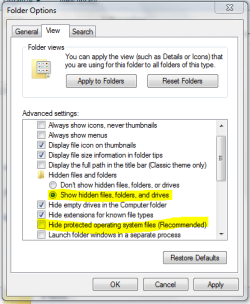
In order to access the temporary internet files folder you need to enable 'hidden files, folder and drives' and 'Hidden system files'.

Capture.PNG
   Tip
In explorer, click 'Organize', 'Folder and Search options' then click the 'View' tab


OS
 

My Computer My Computer

Computer Manufacturer/Model Number
Compaq Desktop
OS
Windows 7 Ultimate x64
CPU
AMD Sempron Dual Core
Memory
3GB
Graphics Card(s)
NVIDIA GeForce 6150SE nForce 430
Screen Resolution
1024x768
Hard Drives
150GB Sata
Thank you OS

I can see the folder structure now.

Unfortunately deleting the index.dat file didn't correct the problem so I'm back to square one :(

I just can't download anything from anywhere. I always get the same error message.

This may be of some relevance. Everytime I start Internet Explorer I always revceive the message that "You last browsing session closed unexpectedly" when it didn't appear to.
 

My Computer My Computer

OS
Windows 7 Home Premium 64bit
CPU
Intel Core i7 980X 3.33Ghz Extreme Edition
Motherboard
Asus Rampage III Extreme
Memory
6GB (3x2GB) DDR3 15000C9 1866MHz Triple Channel
Graphics Card(s)
Asus GeForce GTX 480 1536MB GDDR5 PCI-Express Graphics Card
Monitor(s) Displays
Dell 2407WFP
Screen Resolution
1920 x 1200
Hard Drives
Crucial C300 SSD 256GB
2 x Western Digital Cavier Black 2TB SATA II RAID 1
PSU
Corsair HX 1000W
Case
CoolerMaster HAF X
Keyboard
Keysonic ACK-5000HL (UK)
Mouse
Logitech MX510
Internet Speed
Virgin Media 50mbit
Hello Ian,

From the error message about your downloads, it appears to be a issue at the website that you are trying to download from. Are you able to download from any other site?

If not, then you might see if resetting IE may help.
 

My Computer My Computer

Computer type
PC/Desktop
Computer Manufacturer/Model Number
Self built custom
OS
64-bit Windows 11 Pro for Workstations
CPU
Intel i7-8700K OC'd to 5 GHz
Motherboard
ASUS ROG Maximus XI Formula Z390
Memory
64 GB (4x16GB) G.SKILL TridentZ RGB DDR4 3600 MHz
Graphics Card(s)
ASUS ROG-STRIX-GTX1080TI-O11G-GAMING
Sound Card
Integrated
Monitor(s) Displays
2 x Samsung Odyssey G7 27"
Screen Resolution
2560x1440
Hard Drives
1TB Samsung 990 PRO M.2,
4TB Samsung 990 PRO PRO M.2,
TerraMaster F8 SSD Plus NAS
PSU
Seasonic Prime Titanium 850W
Case
Thermaltake Core P3
Cooling
Corsair Hydro H115i
Keyboard
Logitech wireless K800
Mouse
Logitech MX Master 4
Internet Speed
2 Gb/s Download and 100 Mb/s Upload
Antivirus
Malwarebyte Anti-Malware Premium
Browser
Google Chrome
Other Info
Logitech Z625 speaker system,
Logitech BRIO 4K Pro webcam,
HP Color LaserJet Pro MFP M477fdn,
APC SMART-UPS RT 1000 XL - SURT1000XLI,
Galaxy S23 Plus phone
Hiya

I thought it may have been a website issue too so I visited a few web sites to download something but I always received the same message. To ensure, once and for all, that it was my Windows 7 box I visited the same sites with my Win Xp box and the downloads worked.

Resetting Internet Explorer was one of the fixes I tried but with no luck. I also tried deleting the index.dat file but after a restart it was never recreated.

I just completed another reinstall and everything is working as expected again. I did try transferring one of my user profiles over but it resulted in the same error again so I put it back as it was.

Could it be that profiles don't like being on a RAID 1 configuration?

This is most odd.

Thank you.
 

My Computer My Computer

OS
Windows 7 Home Premium 64bit
CPU
Intel Core i7 980X 3.33Ghz Extreme Edition
Motherboard
Asus Rampage III Extreme
Memory
6GB (3x2GB) DDR3 15000C9 1866MHz Triple Channel
Graphics Card(s)
Asus GeForce GTX 480 1536MB GDDR5 PCI-Express Graphics Card
Monitor(s) Displays
Dell 2407WFP
Screen Resolution
1920 x 1200
Hard Drives
Crucial C300 SSD 256GB
2 x Western Digital Cavier Black 2TB SATA II RAID 1
PSU
Corsair HX 1000W
Case
CoolerMaster HAF X
Keyboard
Keysonic ACK-5000HL (UK)
Mouse
Logitech MX510
Internet Speed
Virgin Media 50mbit
That is odd. I wouldn't think that is would not matter if it was RAID or not as long as Windows 7 could see and access it.

Do you have another location that you could move the profile to that isn't RAID to see how it does there?

I'll do some more testing later tonight to see what happens as well.
 

My Computer My Computer

Computer type
PC/Desktop
Computer Manufacturer/Model Number
Self built custom
OS
64-bit Windows 11 Pro for Workstations
CPU
Intel i7-8700K OC'd to 5 GHz
Motherboard
ASUS ROG Maximus XI Formula Z390
Memory
64 GB (4x16GB) G.SKILL TridentZ RGB DDR4 3600 MHz
Graphics Card(s)
ASUS ROG-STRIX-GTX1080TI-O11G-GAMING
Sound Card
Integrated
Monitor(s) Displays
2 x Samsung Odyssey G7 27"
Screen Resolution
2560x1440
Hard Drives
1TB Samsung 990 PRO M.2,
4TB Samsung 990 PRO PRO M.2,
TerraMaster F8 SSD Plus NAS
PSU
Seasonic Prime Titanium 850W
Case
Thermaltake Core P3
Cooling
Corsair Hydro H115i
Keyboard
Logitech wireless K800
Mouse
Logitech MX Master 4
Internet Speed
2 Gb/s Download and 100 Mb/s Upload
Antivirus
Malwarebyte Anti-Malware Premium
Browser
Google Chrome
Other Info
Logitech Z625 speaker system,
Logitech BRIO 4K Pro webcam,
HP Color LaserJet Pro MFP M477fdn,
APC SMART-UPS RT 1000 XL - SURT1000XLI,
Galaxy S23 Plus phone
Alas, I don't have another drive. I have my main Windows 7 boot drive and 2 x 2Tb drives in RAID 1 for all my data.

I suppose I could try a different location on my boot drive.

Update: Just tried on my boot drive and again on my RAID drives with no luck.

Thank you.
 
Last edited:

My Computer My Computer

OS
Windows 7 Home Premium 64bit
CPU
Intel Core i7 980X 3.33Ghz Extreme Edition
Motherboard
Asus Rampage III Extreme
Memory
6GB (3x2GB) DDR3 15000C9 1866MHz Triple Channel
Graphics Card(s)
Asus GeForce GTX 480 1536MB GDDR5 PCI-Express Graphics Card
Monitor(s) Displays
Dell 2407WFP
Screen Resolution
1920 x 1200
Hard Drives
Crucial C300 SSD 256GB
2 x Western Digital Cavier Black 2TB SATA II RAID 1
PSU
Corsair HX 1000W
Case
CoolerMaster HAF X
Keyboard
Keysonic ACK-5000HL (UK)
Mouse
Logitech MX510
Internet Speed
Virgin Media 50mbit
Back
Top