
I have an HP Pavilion DM1-3100sa laptop. AFAIK, it's pretty much the British/European version of the American DM1z, and is more or less identical.
I installed a pair of VPN clients on it: Hamachi and Watchguard Mobile VPN 10.10. I noticed that the wireless connection started to behave erratically (dropping in and out, refusing to connect), so I uninstalled them both. This made both my network adaptors (wired and wireless) refuse to work at all any more.
In an attempt to get them going again, I opened up device manager, turned on "Show hidden devices" and just uninstalled everything under the Network Adaptors tab and rebooted, on the grounds that Windows would be smart enough to just re-detect and re-install the drivers again.
And it worked! Mostly. Both devices now appear in device manager (and report that they are "working properly"). The wired connection works fine (I'm posting this over it). The wireless connection, however, appears "disabled" in Network Connections, and trying to "enable" it does nothing.
"Diagnose this connection" tells me that there "might be a problem with the driver", specifically that "Windows couldn't automatically bind the IP protocol stack to the network adapter".
The laptop has a keyboard button to turn the wireless adaptor on and off to save battery. That appears to work fine: the LED on the key flicks between white (on) and orange (off) when I press it. There's no obvious effect on the network adaptor in Windows, however.
I've tried installing the drivers for the adaptor (a Ralink RT5390) from HP's site, and I've tried forcibly changing the drivers to the Windows generic wireless adaptor ones. Neither had any effect.
I've tried hunting through the BIOS options to see if there's an option in there to enable/disable the WiFi adaptor (I can't see one), and I've tried updating my BIOS to the newer version on the HP website (also no effect).
Often, in forum threads with similar problems it turns out to have been the fault of AV software or a firewall. I'm not using Kapersky, Norton, ZoneAlarm, AVG, etc. (the laptop shipped with a trial version of Norton installed, but I uninstalled that as soon as it arrived, with no ill effects). I do have MSE installed, and I am using Windows Firewall, but neither of those has been flagged as a problem in forum threads before... Should I try uninstalling / disabling them anyway?
I've more or less run out of ideas, now, and most forum threads I can find suggest one or more of the above. Does anyone have any ideas for anything else I could try?
Some info:
ipconfig /all reports:
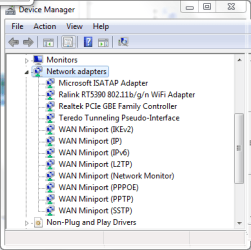
And below I've attached a screenshot of my device manager's network adaptor section with "show hidden devices" turned on.
I installed a pair of VPN clients on it: Hamachi and Watchguard Mobile VPN 10.10. I noticed that the wireless connection started to behave erratically (dropping in and out, refusing to connect), so I uninstalled them both. This made both my network adaptors (wired and wireless) refuse to work at all any more.
In an attempt to get them going again, I opened up device manager, turned on "Show hidden devices" and just uninstalled everything under the Network Adaptors tab and rebooted, on the grounds that Windows would be smart enough to just re-detect and re-install the drivers again.
And it worked! Mostly. Both devices now appear in device manager (and report that they are "working properly"). The wired connection works fine (I'm posting this over it). The wireless connection, however, appears "disabled" in Network Connections, and trying to "enable" it does nothing.
"Diagnose this connection" tells me that there "might be a problem with the driver", specifically that "Windows couldn't automatically bind the IP protocol stack to the network adapter".
The laptop has a keyboard button to turn the wireless adaptor on and off to save battery. That appears to work fine: the LED on the key flicks between white (on) and orange (off) when I press it. There's no obvious effect on the network adaptor in Windows, however.
I've tried installing the drivers for the adaptor (a Ralink RT5390) from HP's site, and I've tried forcibly changing the drivers to the Windows generic wireless adaptor ones. Neither had any effect.
I've tried hunting through the BIOS options to see if there's an option in there to enable/disable the WiFi adaptor (I can't see one), and I've tried updating my BIOS to the newer version on the HP website (also no effect).
Often, in forum threads with similar problems it turns out to have been the fault of AV software or a firewall. I'm not using Kapersky, Norton, ZoneAlarm, AVG, etc. (the laptop shipped with a trial version of Norton installed, but I uninstalled that as soon as it arrived, with no ill effects). I do have MSE installed, and I am using Windows Firewall, but neither of those has been flagged as a problem in forum threads before... Should I try uninstalling / disabling them anyway?
I've more or less run out of ideas, now, and most forum threads I can find suggest one or more of the above. Does anyone have any ideas for anything else I could try?
Some info:
ipconfig /all reports:
Code:
Windows IP Configuration

   Host Name . . . . . . . . . . . . : Zarniwoop
   Primary Dns Suffix  . . . . . . . :
   Node Type . . . . . . . . . . . . : Hybrid
   IP Routing Enabled. . . . . . . . : No
   WINS Proxy Enabled. . . . . . . . : No

Ethernet adapter Local Area Connection:

   Connection-specific DNS Suffix  . :
   Description . . . . . . . . . . . : Realtek PCIe GBE Family Controller
   Physical Address. . . . . . . . . : 68-B5-99-E2-A4-48
   DHCP Enabled. . . . . . . . . . . : Yes
   Autoconfiguration Enabled . . . . : Yes
   Link-local IPv6 Address . . . . . : fe80::1569:7f57:307e:5589%13(Preferred)
   IPv4 Address. . . . . . . . . . . : 192.168.0.11(Preferred)
   Subnet Mask . . . . . . . . . . . : 255.255.255.0
   Lease Obtained. . . . . . . . . . : 23 August 2011 19:17:48
   Lease Expires . . . . . . . . . . : 23 August 2011 20:47:50
   Default Gateway . . . . . . . . . : 192.168.0.1
   DHCP Server . . . . . . . . . . . : 192.168.0.1
   DHCPv6 IAID . . . . . . . . . . . : 292074905
   DHCPv6 Client DUID. . . . . . . . : 00-01-00-01-15-22-2B-61-68-B5-99-E2-A4-48
   DNS Servers . . . . . . . . . . . : 194.168.4.100
                                       194.168.8.100
   NetBIOS over Tcpip. . . . . . . . : Enabled

Tunnel adapter isatap.{2089BBA3-B632-43D3-8BAB-A2E7753A3961}:

   Media State . . . . . . . . . . . : Media disconnected
   Connection-specific DNS Suffix  . :
   Description . . . . . . . . . . . : Microsoft ISATAP Adapter
   Physical Address. . . . . . . . . : 00-00-00-00-00-00-00-E0
   DHCP Enabled. . . . . . . . . . . : No
   Autoconfiguration Enabled . . . . : Yes

Tunnel adapter Teredo Tunneling Pseudo-Interface:

   Connection-specific DNS Suffix  . :
   Description . . . . . . . . . . . : Teredo Tunneling Pseudo-Interface
   Physical Address. . . . . . . . . : 00-00-00-00-00-00-00-E0
   DHCP Enabled. . . . . . . . . . . : No
   Autoconfiguration Enabled . . . . : Yes
   IPv6 Address. . . . . . . . . . . : 2001:0:5ef5:79fd:1896:1c33:3f57:fff4(Preferred)
   Link-local IPv6 Address . . . . . : fe80::1896:1c33:3f57:fff4%16(Preferred)
   Default Gateway . . . . . . . . . : ::
NetBIOS over Tcpip. . . . . . . . : DisabledAttachments
My Computer
- Computer Manufacturer/Model Number
- HP Pavilion dm1-3100sa
- OS
- Windows 7 Home Premium 32-bit
- CPU
- AMD E-350 1.6GHz
- Memory
- 3 GB
- Graphics Card(s)
- AMD Radeon HD 6300


 Dont forget to mark as solved

