
xLilMissRhi
New member
- Local time
- 9:02 PM
- Messages
- 2
Hi,
Not sure where to post this, sorry if in wrong place.
I am trying to extend my C Drive as i have a large amount of free space
However the option to do so is greyed out

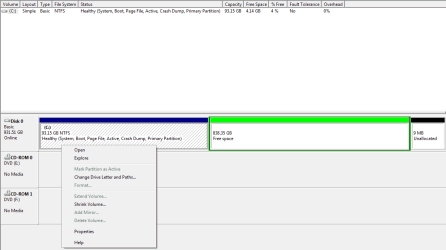
Anyone have any ideas on how I can do this?
Thanks.
Not sure where to post this, sorry if in wrong place.
I am trying to extend my C Drive as i have a large amount of free space
However the option to do so is greyed out
Anyone have any ideas on how I can do this?
Thanks.
My Computer
- OS
- Windows 7 Ultimate x64


