
Cannot extend volume (disk management) although "free space" exists

errolgreer

New member
Local time
12:49 PM
Messages
21
Cannot extend volume (disk management) although "free space" exists

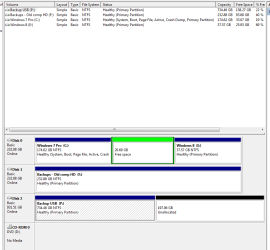
I have a C: drive which I want to increase in size. Under disk management there is 20GB of "Free space" - (right next to the C: partition). But neither disk management or EASUES partition manager will allow the partition to use this space. How to I change "free space" to "unallocated" so that it can be used ?
 

My Computer My Computer

Computer Manufacturer/Model Number
Self Build
OS
XP/VISTA/WIN7 RC1
CPU
Athlon64 +3200
Motherboard
Gigabyte
Memory
2GB
Graphics Card(s)
Nvidia 7600 XS
Monitor(s) Displays
Phillips 109P and 107P
Hard Drives
Western Digital 250 GB SATA and Seagate 40GB
Can you post a snip showing what you have? An image makes it easier for us to help you. For example, you said that there was 20GB of free space next to your C: partition. What you didn't say was whether it was to the left or right of it.
 

My Computer My Computer

Computer type
PC/Desktop
Computer Manufacturer/Model Number
Dwarf Dwf/11/2012 r09/2013
OS
Windows 8.1 Pro RTM x64
CPU
Intel Core-i5-3570K 4-core @ 3.4GHz (Ivy Bridge) (OC 4.4GHz)
Motherboard
ASRock Z77 Extreme4-M
Memory
4 x 4GB DDR3-1600 Corsair Vengeance CMZ8GX3M2A1600C9B (16GB)
Graphics Card(s)
MSI GeForce GTX770 Gaming OC 2GB
Sound Card
Realtek High Definition on board solution (ALC 898)
Monitor(s) Displays
ViewSonic VA1912w Widescreen (VGA)
Screen Resolution
1440x900
Hard Drives
OCZ Agility 3 SSD 120GB SATA III x2 (RAID 0)
Samsung HD501LJ 500GB SATA II x2
Hitachi HDS721010CLA332 1TB SATA II
Iomega 1.5TB Ext USB 2.0
WD 2.0TB Ext USB 3.0
PSU
XFX Pro Series 850W Semi-Modular
Case
Gigabyte IF233
Cooling
1 x 120mm Front Inlet 1 x 120mm Rear Exhaust
Keyboard
Microsoft Comfort Curve Keyboard 3000 (USB)
Mouse
Microsoft Comfort Mouse 3000 for Business (USB)
Internet Speed
NetGear DG834Gv3 ADSL Modem/Router (Ethernet) ~4.0 Mb/s (O2)
Antivirus
Avast! 8.0.1497
Browser
IE 11
Other Info
Optical Drive: HL-DT-ST BD-RE BH10LS30 SATA Bluray
Lexmark S305 Printer/Scanner/Copier (USB)
WEI Score: 8.1/8.1/8.5/8.5/8.25
Asus Eee PC 1011PX Netbook (Windows 7 x86 Starter)
If you delete a Logical partition it leaves it's container as Free Space, which can also then be deleted in Disk Mgmt: Rightclick to Delete Volume. You now have Unallocated Space which can be used to create a Primary partition or to extend into from another Primary Partition.

Only Partition Wizard treats Unallocated and Free space the same for all functions. You will need the PW boot disk if you want to resize to the left: Partition Wizard Move/Resize Partition Video Help.
 
Last edited:
Please post a snip. Here's how.

Please follow this procedure perfectly, no deviations. Thanks, karl

HOW TO POST A SNAPSHOT OF DISK MANAGEMENT DISPLAY
Run disk management:
WIN |
type DISKMGMT.MSC | ENTER
This method gives you a display without the unneeded navigation pane.
WIN=key with Microsoft logo on top.


Maximize the output of Disk Management:
ALT-Spacebar
key combo | X key (selects Maximize) |
Drag the field separators (such as between Status and Capacity) to show entire field.


Make a snapshot:
WIN |
type SNIPPING | ENTER | New
Drag the cursor around the area you want to snip.
File | Save as | select save location and name | Save


Post the snapshot:
Post a File or Screenshot in Seven Forums

=================================
 

My Computer My Computer

Computer Manufacturer/Model Number
Toshiba Satellite S875D-S7239 laptop
OS
MS Windows 7 Ultimate SP1 64-bit
CPU
AMD A10-4600M
Motherboard
AMD Pumori (Socket FT1)
Memory
6.00 GB Dual-Channel DDR3 @ 798MHz (11-11-12-28)
Graphics Card(s)
AMD Radeon HD 7660G
Sound Card
High Definition Audio Device
Monitor(s) Displays
Generic PnP Monitor (1600x900@60Hz)
Screen Resolution
1600x900@60Hz
Hard Drives
SSD 119GB Corsair CSSD-V128GB2 ATA Device
Keyboard
Standard PS/2 Keyboard
Mouse
HP Wireless Optical Mobile Mouse Model FHA-3410
Internet Speed
What the local pub, local coffee shop offers.
Other Info
Optical Drive:MATSHITA BD-CMB UJ160B ATA Device


Also have an Asus ha1002xp netbook with Win 7 Ultimate installed.
I think the file capture.png is attached. Not sure if I have uploaded it correctly.
 

Attachments

  • Capture.PNG
    Capture.PNG
    16.5 KB · Views: 672

My Computer My Computer

Computer Manufacturer/Model Number
Self Build
OS
XP/VISTA/WIN7 RC1
CPU
Athlon64 +3200
Motherboard
Gigabyte
Memory
2GB
Graphics Card(s)
Nvidia 7600 XS
Monitor(s) Displays
Phillips 109P and 107P
Hard Drives
Western Digital 250 GB SATA and Seagate 40GB
Excellent!

Now follow GregRocker's advice given in post #3.

this should give you what you want.
 

My Computer My Computer

Computer Manufacturer/Model Number
Toshiba Satellite S875D-S7239 laptop
OS
MS Windows 7 Ultimate SP1 64-bit
CPU
AMD A10-4600M
Motherboard
AMD Pumori (Socket FT1)
Memory
6.00 GB Dual-Channel DDR3 @ 798MHz (11-11-12-28)
Graphics Card(s)
AMD Radeon HD 7660G
Sound Card
High Definition Audio Device
Monitor(s) Displays
Generic PnP Monitor (1600x900@60Hz)
Screen Resolution
1600x900@60Hz
Hard Drives
SSD 119GB Corsair CSSD-V128GB2 ATA Device
Keyboard
Standard PS/2 Keyboard
Mouse
HP Wireless Optical Mobile Mouse Model FHA-3410
Internet Speed
What the local pub, local coffee shop offers.
Other Info
Optical Drive:MATSHITA BD-CMB UJ160B ATA Device


Also have an Asus ha1002xp netbook with Win 7 Ultimate installed.
Free space problem

Thank you guys.

I did right click the gree space but when selecting the remove choice I got a warning that that space would then become unusable. That's why I held back and asked for your help. Why do they say "unusable" ? Anyway, I have gone ahead and all is fine ! The C partition has beed extended.
 

My Computer My Computer

Computer Manufacturer/Model Number
Self Build
OS
XP/VISTA/WIN7 RC1
CPU
Athlon64 +3200
Motherboard
Gigabyte
Memory
2GB
Graphics Card(s)
Nvidia 7600 XS
Monitor(s) Displays
Phillips 109P and 107P
Hard Drives
Western Digital 250 GB SATA and Seagate 40GB
errolgreer,
Thanks for feedback and glad to hear that all went well.
karl
 

My Computer My Computer

Computer Manufacturer/Model Number
Toshiba Satellite S875D-S7239 laptop
OS
MS Windows 7 Ultimate SP1 64-bit
CPU
AMD A10-4600M
Motherboard
AMD Pumori (Socket FT1)
Memory
6.00 GB Dual-Channel DDR3 @ 798MHz (11-11-12-28)
Graphics Card(s)
AMD Radeon HD 7660G
Sound Card
High Definition Audio Device
Monitor(s) Displays
Generic PnP Monitor (1600x900@60Hz)
Screen Resolution
1600x900@60Hz
Hard Drives
SSD 119GB Corsair CSSD-V128GB2 ATA Device
Keyboard
Standard PS/2 Keyboard
Mouse
HP Wireless Optical Mobile Mouse Model FHA-3410
Internet Speed
What the local pub, local coffee shop offers.
Other Info
Optical Drive:MATSHITA BD-CMB UJ160B ATA Device


Also have an Asus ha1002xp netbook with Win 7 Ultimate installed.
Back
Top