Cannot find ethernet controller windows 7

middleastalex

New member
Local time
8:12 PM
Messages
9
Dear all,

I've just done a fresh install of the OS on a computer which is changing homes. It now claims it cannot find the ethernet controller. Could someone help?

The details of the ethernet controller are:
PCI\VEN_1969&dev_2062&subsys_20621849&rev_c1
PCI\VEN_1969&DEV_2062&SUBSYS_20621849
PCI\VEN_1969&DEV_2062&CC_020000
PCI\VEN_1969&DEV_2062&CC_0200

I would really appreciate some help!
 

My Computer

Computer type
PC/Desktop
OS
windows 7 32bit
Hello and welcome,

Is this a laptop or PC?

If it's a laptop then you need to head to the manufacturers website and download the Ethernet drivers for your model.
If it's a PC then you need to find out your motherboard model and head to their website to download the Ethernet drivers.

Paul
 

My Computer

OS
Windows 7 Professional 64 bit
Thanks for replying!

It's a pc. How do I find the specs of the motherboard? Sorry for the dense questions!
 

My Computer

Computer type
PC/Desktop
OS
windows 7 32bit
That's ok, well some people use software to find the model, but I am guessing seeing as you have no internet then you won't be able to download a program.

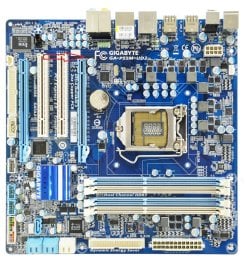
The easiest way is to take the side panel off the PC and have a look inside for a make and model number, I have attached a pic of one to give you an idea.

Paul.
 

Attachments

  • Gigabyte_GA-P55M-UD2_top.jpg
    Gigabyte_GA-P55M-UD2_top.jpg
    227.1 KB · Views: 4

My Computer

OS
Windows 7 Professional 64 bit
Once you have the make and model we should be able to find the correct drivers for you.

Paul.
 

My Computer

OS
Windows 7 Professional 64 bit
Okay. Thanks for the reply.

I've taken it apart.

So far I have

ASRRock G41M-VS3

Or

FSB1333
DDR3 1333 Dual channel
I'll leave it open in case this is wrong
 

My Computer

Computer type
PC/Desktop
OS
windows 7 32bit
Ok, this should take you to the correct page - ASRock > G41M-VS3 R2.0

You need to download the Atheros Lan driver ver:1.0.0.45 it should be the 3rd driver down.

If you have no internet on the PC then you will need to download it on another PC and put it onto a USB stick or CD and then transfer it to your PC and open and install it.

Edit and that should be for 32bit Windows 7.

Paul.
 

My Computer

OS
Windows 7 Professional 64 bit
Thanks very much Paul, very helpful.
 

My Computer

Computer type
PC/Desktop
OS
windows 7 32bit
No worries, let us know how you get on.

Paul
 

My Computer

OS
Windows 7 Professional 64 bit
Yes it worked a treat!

I'm now online and ready to move it to its new home.
 

My Computer

Computer type
PC/Desktop
OS
windows 7 32bit
Excellent, I am pleased you are up and running again.

Paul
 

My Computer

OS
Windows 7 Professional 64 bit
OP is on the internet replying, have pen drive will travel... muhahaha!
:D
 

My Computer

Computer type
PC/Desktop
Computer Manufacturer/Model Number
Self Built Custom
OS
Windows 7 Ultimate Retail Box (64-bit installed) + Service Pack 1
CPU
AMD FX-8350 CPU v1.15 (or 1.0F) BIOS was required!
Motherboard
MSI 890FXA-GD70
Memory
8G CAS-7 G-Skill DDR3 @1333 (2 fours) [mobo nonOC max rec'd]
Graphics Card(s)
Radeon HD 7950 [3 gigs of GDDR5] MSI Twin Frozr model
Sound Card
Realtek High Definition Audio (onboard mobo, ALC-889 chip)
Monitor(s) Displays
2 WS LED Monitors: One LG One Viewsonic
Screen Resolution
1920 by 1080
Hard Drives
SSD for OS: Samsung 840 Pro
SSD for VM and utilities: Adata SX900
7200 RPM SATA HDs for the rest: Hitachi and Seagate
PSU
Corsair TX850 - 850W max, in service since August 2010.
Case
Thermaltake Armor A90
Cooling
Thermaltake Spin Q CPU Cooler, in service since August 2010
Keyboard
Logitech G11
Mouse
Logitech M310 Wireless
Internet Speed
100 Megabit broadband supposedly upgraded from 50 (Cable)
Antivirus
Bitdefender Internet Security 2014 suite
Browser
Pale Moon 64-bit main, also IceDragon, Opera, and Maxthon.
Other Info
CompTIA A+ certified (220-800 series) in July 2013.
Back
Top