Cannot Format Hard Disk

jradicle11

New member
So my hard drive would show in up bios but wouldn't show up in the windows 7 disk selection screen even after loading the drivers numerous times. I tried to format it in my brothers working computer, it said it could not format the disk. I tried to install xp, it recognized the hard disk, but again I couldn't format. I tried to boot the GParted Live and delete/create some partitions, the disk doesn't even find my hard drive.

My question is:

Is this a semi-common problem or do I have a faulty hard drive?

My hard drive is in my specs.
 

My Computer

OS
windows 7/windows xp/windows vista
CPU
AMD Phenom II X2 550 Black Edition Callisto 3.1GHz
Motherboard
Gigabyte AM3 785G ATX
Memory
Mushkin Enhanced Silverline 2GB 240-Pin DDR3
Hard Drives
Western Digitial Cavier Blue 500GB
PSU
Earthwatts 500w
Case
Antec Sonata III
have you tried Diskpart?
 

My Computer

Computer Manufacturer/Model Number
Custom (Self Build)
OS
Windows 7 Home Premium 64bit
CPU
Intel Core i7 2700k
Motherboard
eVGA P67 SLI
Memory
8GB Mushkin Redline Ridgebacks @1866
Graphics Card(s)
EVGA GTX570 SC
Sound Card
XiFi Titanium HD
Monitor(s) Displays
LG W2453V
Screen Resolution
1920x1080
Hard Drives
Intel 320 80GB -- Intel X25-V 40GB --WD Black 1TB x2 -- WD Blue 640GB
PSU
Seasonic x750
Case
Corsair 600T SE White
Cooling
eVGA Superclocked CPU Cooler
Keyboard
Saitek Cyborg
Antivirus
Kaspersky
Browser
IE
Other Info
LG BD/DVD
Well, I think I want to completely wipe it of all partitions, then try to create one. Would that be able to completely wipe it?
 

My Computer

OS
windows 7/windows xp/windows vista
CPU
AMD Phenom II X2 550 Black Edition Callisto 3.1GHz
Motherboard
Gigabyte AM3 785G ATX
Memory
Mushkin Enhanced Silverline 2GB 240-Pin DDR3
Hard Drives
Western Digitial Cavier Blue 500GB
PSU
Earthwatts 500w
Case
Antec Sonata III
It should yes.

open a elevated CMD promp

type the following commands:
1.disk part
2. list disk
take note of the disk number it gives the disk you want formated

3. Select Disk <target disk number> I/E if it shows it as disk 3; Select Disk 3
4. clean
5.create primary partition size=
6.format fs=ntfs quick
7.exit

See if this might work. If it does, you can likely go into disk management now, delete the main partition and create them however you choose, or keep just the 1

Also, Have you tried running the LifeGuard diagnostics utility?
 

My Computer

Computer Manufacturer/Model Number
Custom (Self Build)
OS
Windows 7 Home Premium 64bit
CPU
Intel Core i7 2700k
Motherboard
eVGA P67 SLI
Memory
8GB Mushkin Redline Ridgebacks @1866
Graphics Card(s)
EVGA GTX570 SC
Sound Card
XiFi Titanium HD
Monitor(s) Displays
LG W2453V
Screen Resolution
1920x1080
Hard Drives
Intel 320 80GB -- Intel X25-V 40GB --WD Black 1TB x2 -- WD Blue 640GB
PSU
Seasonic x750
Case
Corsair 600T SE White
Cooling
eVGA Superclocked CPU Cooler
Keyboard
Saitek Cyborg
Antivirus
Kaspersky
Browser
IE
Other Info
LG BD/DVD
Wait, do this in command prompt? This is a clean hard drive, I just bought it and have yet to use it.

Are the steps you're describing with diskpart?
 

My Computer

OS
windows 7/windows xp/windows vista
CPU
AMD Phenom II X2 550 Black Edition Callisto 3.1GHz
Motherboard
Gigabyte AM3 785G ATX
Memory
Mushkin Enhanced Silverline 2GB 240-Pin DDR3
Hard Drives
Western Digitial Cavier Blue 500GB
PSU
Earthwatts 500w
Case
Antec Sonata III
You can access diskpart by pressing shift and F10 keys early in the Win 7 install--when you come to the screen where you would select language, keyboard, and location.

I think the command to run it is diskpart rather than disk part.
 

My Computer

Computer type
PC/Desktop
Computer Manufacturer/Model Number
Ignatz Special; 4 speed manual gearbox; factory air conditioning; one of one
OS
Windows 7 Home Premium SP1, 64-bit
CPU
Intel Skylake i5-6600K, not overclocked
Motherboard
AsRock Z170M Extreme 4, micro ATX
Memory
8 GB HyperX DDR4-2666 (2 x 4 GB)
Graphics Card(s)
none; graphics are integrated on CPU
Sound Card
onboard: Realtek ALC1150; external: USB Behringer UF0-202
Monitor(s) Displays
Dell S2340M 23 inch IPS
Screen Resolution
1600 x 900
Hard Drives
System: Crucial MX100 series SSD, 128 GB;
Data: Samsung Spinpoint 103SJ, 1 TB;
Backup: WD Caviar Green WD30EZRX-00D8PB0, 3 TB
PSU
Rosewill SilentNight 500 watt fanless, semi-modular
Case
Antec Solo II
Cooling
Noctua NH-U12S; Noctua F12 intake, Noctua S12A exhaust
Keyboard
Microsoft 200 6JH-00001 USB
Mouse
Dell or Microsoft optical wired; USB
Antivirus
Microsoft Security Essentials and Malwarebytes Premium
Browser
Pale Moon
Other Info
All fans PWM; speeds at idle: CPU circa 500 rpm; intake circa 600 rpm; exhaust circa 600 rpm; CPU temps 27 idle and 47 C load in a warm room (27 C/81 F) when running Intel Extreme Tuning Utility stress test.
Yes it is, my erro. thanks ignatzatsonic.

diskpart not disk part

i was thinking you were trying to do this from within windows, my fault.
if its the only and your trying to install Win7 on it, It would be as ignatzatsonic suggested.

by Shift + F10
 

My Computer

Computer Manufacturer/Model Number
Custom (Self Build)
OS
Windows 7 Home Premium 64bit
CPU
Intel Core i7 2700k
Motherboard
eVGA P67 SLI
Memory
8GB Mushkin Redline Ridgebacks @1866
Graphics Card(s)
EVGA GTX570 SC
Sound Card
XiFi Titanium HD
Monitor(s) Displays
LG W2453V
Screen Resolution
1920x1080
Hard Drives
Intel 320 80GB -- Intel X25-V 40GB --WD Black 1TB x2 -- WD Blue 640GB
PSU
Seasonic x750
Case
Corsair 600T SE White
Cooling
eVGA Superclocked CPU Cooler
Keyboard
Saitek Cyborg
Antivirus
Kaspersky
Browser
IE
Other Info
LG BD/DVD
New Drive.

You need to make ACTIVE, before formating.
 

My Computer

OS
ME/XP/Vista/Win7
Yeah.

Jradicle11: insert the command active after create primary partition size and before format.
 

My Computer

Computer type
PC/Desktop
Computer Manufacturer/Model Number
Ignatz Special; 4 speed manual gearbox; factory air conditioning; one of one
OS
Windows 7 Home Premium SP1, 64-bit
CPU
Intel Skylake i5-6600K, not overclocked
Motherboard
AsRock Z170M Extreme 4, micro ATX
Memory
8 GB HyperX DDR4-2666 (2 x 4 GB)
Graphics Card(s)
none; graphics are integrated on CPU
Sound Card
onboard: Realtek ALC1150; external: USB Behringer UF0-202
Monitor(s) Displays
Dell S2340M 23 inch IPS
Screen Resolution
1600 x 900
Hard Drives
System: Crucial MX100 series SSD, 128 GB;
Data: Samsung Spinpoint 103SJ, 1 TB;
Backup: WD Caviar Green WD30EZRX-00D8PB0, 3 TB
PSU
Rosewill SilentNight 500 watt fanless, semi-modular
Case
Antec Solo II
Cooling
Noctua NH-U12S; Noctua F12 intake, Noctua S12A exhaust
Keyboard
Microsoft 200 6JH-00001 USB
Mouse
Dell or Microsoft optical wired; USB
Antivirus
Microsoft Security Essentials and Malwarebytes Premium
Browser
Pale Moon
Other Info
All fans PWM; speeds at idle: CPU circa 500 rpm; intake circa 600 rpm; exhaust circa 600 rpm; CPU temps 27 idle and 47 C load in a warm room (27 C/81 F) when running Intel Extreme Tuning Utility stress test.
So during installation, around the language select screen, press SHIFT + F10,

Wishmaster said:
type the following commands:
1.disk part
2. list disk
take note of the disk number it gives the disk you want formated

3. Select Disk <target disk number> I/E if it shows it as disk 3; Select Disk 3
4. clean
5.create primary partition size=
6.format fs=ntfs quick
7.exit

then the command: active
 

My Computer

OS
windows 7/windows xp/windows vista
CPU
AMD Phenom II X2 550 Black Edition Callisto 3.1GHz
Motherboard
Gigabyte AM3 785G ATX
Memory
Mushkin Enhanced Silverline 2GB 240-Pin DDR3
Hard Drives
Western Digitial Cavier Blue 500GB
PSU
Earthwatts 500w
Case
Antec Sonata III
No.

Active immediately after create primary partition and before format.

The first command is diskpart not disk part.

If you want to make just a single partition for the entire drive, the create partition command would just be:

create primary partition


without any reference to size.

You of course can later resize partitions in Windows Disk Management.
 

My Computer

Computer type
PC/Desktop
Computer Manufacturer/Model Number
Ignatz Special; 4 speed manual gearbox; factory air conditioning; one of one
OS
Windows 7 Home Premium SP1, 64-bit
CPU
Intel Skylake i5-6600K, not overclocked
Motherboard
AsRock Z170M Extreme 4, micro ATX
Memory
8 GB HyperX DDR4-2666 (2 x 4 GB)
Graphics Card(s)
none; graphics are integrated on CPU
Sound Card
onboard: Realtek ALC1150; external: USB Behringer UF0-202
Monitor(s) Displays
Dell S2340M 23 inch IPS
Screen Resolution
1600 x 900
Hard Drives
System: Crucial MX100 series SSD, 128 GB;
Data: Samsung Spinpoint 103SJ, 1 TB;
Backup: WD Caviar Green WD30EZRX-00D8PB0, 3 TB
PSU
Rosewill SilentNight 500 watt fanless, semi-modular
Case
Antec Solo II
Cooling
Noctua NH-U12S; Noctua F12 intake, Noctua S12A exhaust
Keyboard
Microsoft 200 6JH-00001 USB
Mouse
Dell or Microsoft optical wired; USB
Antivirus
Microsoft Security Essentials and Malwarebytes Premium
Browser
Pale Moon
Other Info
All fans PWM; speeds at idle: CPU circa 500 rpm; intake circa 600 rpm; exhaust circa 600 rpm; CPU temps 27 idle and 47 C load in a warm room (27 C/81 F) when running Intel Extreme Tuning Utility stress test.
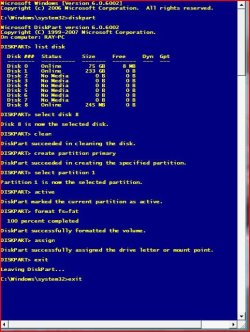
where it reads format=fat replace with format=ntfs.
 

Attachments

  • Capture001.JPG
    Capture001.JPG
    87.7 KB · Views: 569

My Computer

OS
ME/XP/Vista/Win7
I can do this in XP?
 

My Computer

OS
windows 7/windows xp/windows vista
CPU
AMD Phenom II X2 550 Black Edition Callisto 3.1GHz
Motherboard
Gigabyte AM3 785G ATX
Memory
Mushkin Enhanced Silverline 2GB 240-Pin DDR3
Hard Drives
Western Digitial Cavier Blue 500GB
PSU
Earthwatts 500w
Case
Antec Sonata III
I have no idea if it can be done in XP.

I thought you wanted to format and install Windows 7 on a particular partition. The instructions from all of us have been based on that assumption.

Maybe we were wrong and you are trying to do something else.

Maybe you can go back to square one and explain your intentions.
 

My Computer

Computer type
PC/Desktop
Computer Manufacturer/Model Number
Ignatz Special; 4 speed manual gearbox; factory air conditioning; one of one
OS
Windows 7 Home Premium SP1, 64-bit
CPU
Intel Skylake i5-6600K, not overclocked
Motherboard
AsRock Z170M Extreme 4, micro ATX
Memory
8 GB HyperX DDR4-2666 (2 x 4 GB)
Graphics Card(s)
none; graphics are integrated on CPU
Sound Card
onboard: Realtek ALC1150; external: USB Behringer UF0-202
Monitor(s) Displays
Dell S2340M 23 inch IPS
Screen Resolution
1600 x 900
Hard Drives
System: Crucial MX100 series SSD, 128 GB;
Data: Samsung Spinpoint 103SJ, 1 TB;
Backup: WD Caviar Green WD30EZRX-00D8PB0, 3 TB
PSU
Rosewill SilentNight 500 watt fanless, semi-modular
Case
Antec Solo II
Cooling
Noctua NH-U12S; Noctua F12 intake, Noctua S12A exhaust
Keyboard
Microsoft 200 6JH-00001 USB
Mouse
Dell or Microsoft optical wired; USB
Antivirus
Microsoft Security Essentials and Malwarebytes Premium
Browser
Pale Moon
Other Info
All fans PWM; speeds at idle: CPU circa 500 rpm; intake circa 600 rpm; exhaust circa 600 rpm; CPU temps 27 idle and 47 C load in a warm room (27 C/81 F) when running Intel Extreme Tuning Utility stress test.
Well I want to install Windows 7 but it wasn't even recognizing my hard drive.
 

My Computer

OS
windows 7/windows xp/windows vista
CPU
AMD Phenom II X2 550 Black Edition Callisto 3.1GHz
Motherboard
Gigabyte AM3 785G ATX
Memory
Mushkin Enhanced Silverline 2GB 240-Pin DDR3
Hard Drives
Western Digitial Cavier Blue 500GB
PSU
Earthwatts 500w
Case
Antec Sonata III
Your system specs say you have 3 operating systems: XP, Vista, and Windows 7.

True?

Not true?

How many hard drives?

One?

Two?

Three?

We need more detail as confusion reigns.

Post a screen shot of Windows Disk Management if any of your operating systems will show the disk in question.
 

My Computer

Computer type
PC/Desktop
Computer Manufacturer/Model Number
Ignatz Special; 4 speed manual gearbox; factory air conditioning; one of one
OS
Windows 7 Home Premium SP1, 64-bit
CPU
Intel Skylake i5-6600K, not overclocked
Motherboard
AsRock Z170M Extreme 4, micro ATX
Memory
8 GB HyperX DDR4-2666 (2 x 4 GB)
Graphics Card(s)
none; graphics are integrated on CPU
Sound Card
onboard: Realtek ALC1150; external: USB Behringer UF0-202
Monitor(s) Displays
Dell S2340M 23 inch IPS
Screen Resolution
1600 x 900
Hard Drives
System: Crucial MX100 series SSD, 128 GB;
Data: Samsung Spinpoint 103SJ, 1 TB;
Backup: WD Caviar Green WD30EZRX-00D8PB0, 3 TB
PSU
Rosewill SilentNight 500 watt fanless, semi-modular
Case
Antec Solo II
Cooling
Noctua NH-U12S; Noctua F12 intake, Noctua S12A exhaust
Keyboard
Microsoft 200 6JH-00001 USB
Mouse
Dell or Microsoft optical wired; USB
Antivirus
Microsoft Security Essentials and Malwarebytes Premium
Browser
Pale Moon
Other Info
All fans PWM; speeds at idle: CPU circa 500 rpm; intake circa 600 rpm; exhaust circa 600 rpm; CPU temps 27 idle and 47 C load in a warm room (27 C/81 F) when running Intel Extreme Tuning Utility stress test.
Well, I have this laptop I'm currently on that is Vista, another computer which I use that is XP, and then I was trying to install 7 on my new computer, the one mentioned in my specs. This is the computer with the issues.
 

My Computer

OS
windows 7/windows xp/windows vista
CPU
AMD Phenom II X2 550 Black Edition Callisto 3.1GHz
Motherboard
Gigabyte AM3 785G ATX
Memory
Mushkin Enhanced Silverline 2GB 240-Pin DDR3
Hard Drives
Western Digitial Cavier Blue 500GB
PSU
Earthwatts 500w
Case
Antec Sonata III
I apologize.
I am confused as well, and likely my misunderstanding getting everything started.
I thought this was a secondary drive he was having issues with and was attempting to format from within a running Windows. .


im confused and tired ;-/

When you start the Win7 disk, and boot from the CD..

exactly what happens?
Can you choose Custom install etc?

if the bios is listing the HD, then Win Setup should see it as well at that point, regardless of if its partitioned, formatted or whatever.
 

My Computer

Computer Manufacturer/Model Number
Custom (Self Build)
OS
Windows 7 Home Premium 64bit
CPU
Intel Core i7 2700k
Motherboard
eVGA P67 SLI
Memory
8GB Mushkin Redline Ridgebacks @1866
Graphics Card(s)
EVGA GTX570 SC
Sound Card
XiFi Titanium HD
Monitor(s) Displays
LG W2453V
Screen Resolution
1920x1080
Hard Drives
Intel 320 80GB -- Intel X25-V 40GB --WD Black 1TB x2 -- WD Blue 640GB
PSU
Seasonic x750
Case
Corsair 600T SE White
Cooling
eVGA Superclocked CPU Cooler
Keyboard
Saitek Cyborg
Antivirus
Kaspersky
Browser
IE
Other Info
LG BD/DVD
Assuming your new PC has just one hard drive, you would begin the Windows 7 installation, press Shift F10 as was explained earlier in this thread, run diskpart as explained earlier in this thread, and see if it helps your situation.

Is there a particular reason you can't or won't try that?
 

My Computer

Computer type
PC/Desktop
Computer Manufacturer/Model Number
Ignatz Special; 4 speed manual gearbox; factory air conditioning; one of one
OS
Windows 7 Home Premium SP1, 64-bit
CPU
Intel Skylake i5-6600K, not overclocked
Motherboard
AsRock Z170M Extreme 4, micro ATX
Memory
8 GB HyperX DDR4-2666 (2 x 4 GB)
Graphics Card(s)
none; graphics are integrated on CPU
Sound Card
onboard: Realtek ALC1150; external: USB Behringer UF0-202
Monitor(s) Displays
Dell S2340M 23 inch IPS
Screen Resolution
1600 x 900
Hard Drives
System: Crucial MX100 series SSD, 128 GB;
Data: Samsung Spinpoint 103SJ, 1 TB;
Backup: WD Caviar Green WD30EZRX-00D8PB0, 3 TB
PSU
Rosewill SilentNight 500 watt fanless, semi-modular
Case
Antec Solo II
Cooling
Noctua NH-U12S; Noctua F12 intake, Noctua S12A exhaust
Keyboard
Microsoft 200 6JH-00001 USB
Mouse
Dell or Microsoft optical wired; USB
Antivirus
Microsoft Security Essentials and Malwarebytes Premium
Browser
Pale Moon
Other Info
All fans PWM; speeds at idle: CPU circa 500 rpm; intake circa 600 rpm; exhaust circa 600 rpm; CPU temps 27 idle and 47 C load in a warm room (27 C/81 F) when running Intel Extreme Tuning Utility stress test.
Can Vista see the HD?

Go to Vista Disk Management - if it says the drive is offline - rt click it ( on the left where it says Disk #) and select Online.

Then rt click it and select intialize to mbr - follow instructions.

Then you can create partitions.
 

My Computers

System One System Two

  • Computer type
    PC/Desktop
    OS
    7 X64
    CPU
    i5 8400
    Motherboard
    gigabyte b365m ds3h
    Memory
    2x8gb 3200mhz
    Hard Drives
    various
    PSU
    pure power 11 400w cm
    Case
    Coolermaster
    Cooling
    cryorig m9i
  • Computer type
    PC/Desktop
    OS
    7x64
    CPU
    g5400
    Motherboard
    ga b365m ds3h
    Memory
    8gb ddr4 2400
    PSU
    xfx pro 450w
Back
Top