Cannot Format Hard Disk

My Computers

System One System Two

  • Computer type
    PC/Desktop
    OS
    7 X64
    CPU
    i5 8400
    Motherboard
    gigabyte b365m ds3h
    Memory
    2x8gb 3200mhz
    Hard Drives
    various
    PSU
    pure power 11 400w cm
    Case
    Coolermaster
    Cooling
    cryorig m9i
  • Computer type
    PC/Desktop
    OS
    7x64
    CPU
    g5400
    Motherboard
    ga b365m ds3h
    Memory
    8gb ddr4 2400
    PSU
    xfx pro 450w
Yea, I'm getting the same results.

I think I just have a damaged hard drive :(.
 

My Computer

OS
windows 7/windows xp/windows vista
CPU
AMD Phenom II X2 550 Black Edition Callisto 3.1GHz
Motherboard
Gigabyte AM3 785G ATX
Memory
Mushkin Enhanced Silverline 2GB 240-Pin DDR3
Hard Drives
Western Digitial Cavier Blue 500GB
PSU
Earthwatts 500w
Case
Antec Sonata III
Alright, I put in the hard drive from one of my old computer that didn't work (an IDE device) and ran the windows 7 installation. Installed Windows 7 perfectly. I guess my hard drive was just broken.
 

My Computer

OS
windows 7/windows xp/windows vista
CPU
AMD Phenom II X2 550 Black Edition Callisto 3.1GHz
Motherboard
Gigabyte AM3 785G ATX
Memory
Mushkin Enhanced Silverline 2GB 240-Pin DDR3
Hard Drives
Western Digitial Cavier Blue 500GB
PSU
Earthwatts 500w
Case
Antec Sonata III
4.1 windows rating because of my integrated graphics. Runs swimmingly, I LOVE Windows 7 and I've only been using it for an hour.
 

My Computer

OS
windows 7/windows xp/windows vista
CPU
AMD Phenom II X2 550 Black Edition Callisto 3.1GHz
Motherboard
Gigabyte AM3 785G ATX
Memory
Mushkin Enhanced Silverline 2GB 240-Pin DDR3
Hard Drives
Western Digitial Cavier Blue 500GB
PSU
Earthwatts 500w
Case
Antec Sonata III

My Computer

OS
ME/XP/Vista/Win7
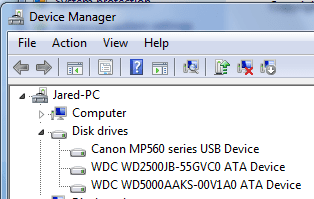
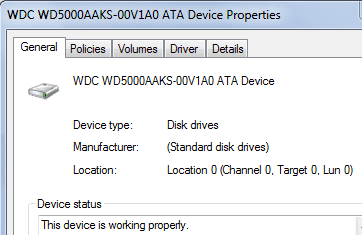
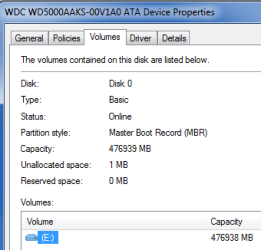
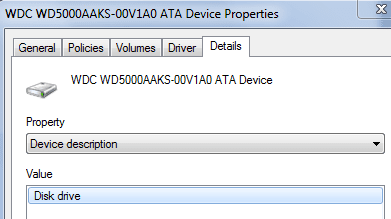
Sorry, I've been really busy lately. Finally got around to taking the screenies.
 

Attachments

  • device manager.PNG
    device manager.PNG
    28.3 KB · Views: 304
  • hdd.PNG
    hdd.PNG
    19.8 KB · Views: 4
  • mas.PNG
    mas.PNG
    27 KB · Views: 4
  • mass.PNG
    mass.PNG
    19.5 KB · Views: 3
  • mucho mas.PNG
    mucho mas.PNG
    49.3 KB · Views: 6

My Computer

OS
windows 7/windows xp/windows vista
CPU
AMD Phenom II X2 550 Black Edition Callisto 3.1GHz
Motherboard
Gigabyte AM3 785G ATX
Memory
Mushkin Enhanced Silverline 2GB 240-Pin DDR3
Hard Drives
Western Digitial Cavier Blue 500GB
PSU
Earthwatts 500w
Case
Antec Sonata III
None of those are Disk Management.:confused:
 

My Computers

System One System Two

  • Computer type
    PC/Desktop
    OS
    7 X64
    CPU
    i5 8400
    Motherboard
    gigabyte b365m ds3h
    Memory
    2x8gb 3200mhz
    Hard Drives
    various
    PSU
    pure power 11 400w cm
    Case
    Coolermaster
    Cooling
    cryorig m9i
  • Computer type
    PC/Desktop
    OS
    7x64
    CPU
    g5400
    Motherboard
    ga b365m ds3h
    Memory
    8gb ddr4 2400
    PSU
    xfx pro 450w
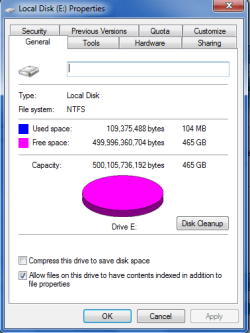
Well... hah. Which would be disk management?

I just posted a bunch of things that looked like they were slightly relevant.

Edit:

Found disk management, the search feature on windows is a magical thing :D.
 

Attachments

  • disk.PNG
    disk.PNG
    79.2 KB · Views: 20

My Computer

OS
windows 7/windows xp/windows vista
CPU
AMD Phenom II X2 550 Black Edition Callisto 3.1GHz
Motherboard
Gigabyte AM3 785G ATX
Memory
Mushkin Enhanced Silverline 2GB 240-Pin DDR3
Hard Drives
Western Digitial Cavier Blue 500GB
PSU
Earthwatts 500w
Case
Antec Sonata III
control panel/administrative tools/computer management/disk management on the left side of the screen.
 

My Computer

Computer type
PC/Desktop
Computer Manufacturer/Model Number
Ignatz Special; 4 speed manual gearbox; factory air conditioning; one of one
OS
Windows 7 Home Premium SP1, 64-bit
CPU
Intel Skylake i5-6600K, not overclocked
Motherboard
AsRock Z170M Extreme 4, micro ATX
Memory
8 GB HyperX DDR4-2666 (2 x 4 GB)
Graphics Card(s)
none; graphics are integrated on CPU
Sound Card
onboard: Realtek ALC1150; external: USB Behringer UF0-202
Monitor(s) Displays
Dell S2340M 23 inch IPS
Screen Resolution
1600 x 900
Hard Drives
System: Crucial MX100 series SSD, 128 GB;
Data: Samsung Spinpoint 103SJ, 1 TB;
Backup: WD Caviar Green WD30EZRX-00D8PB0, 3 TB
PSU
Rosewill SilentNight 500 watt fanless, semi-modular
Case
Antec Solo II
Cooling
Noctua NH-U12S; Noctua F12 intake, Noctua S12A exhaust
Keyboard
Microsoft 200 6JH-00001 USB
Mouse
Dell or Microsoft optical wired; USB
Antivirus
Microsoft Security Essentials and Malwarebytes Premium
Browser
Pale Moon
Other Info
All fans PWM; speeds at idle: CPU circa 500 rpm; intake circa 600 rpm; exhaust circa 600 rpm; CPU temps 27 idle and 47 C load in a warm room (27 C/81 F) when running Intel Extreme Tuning Utility stress test.
Attached it again, not sure if you noticed the previous post.
 

Attachments

  • disk.PNG
    disk.PNG
    79.2 KB · Views: 9

My Computer

OS
windows 7/windows xp/windows vista
CPU
AMD Phenom II X2 550 Black Edition Callisto 3.1GHz
Motherboard
Gigabyte AM3 785G ATX
Memory
Mushkin Enhanced Silverline 2GB 240-Pin DDR3
Hard Drives
Western Digitial Cavier Blue 500GB
PSU
Earthwatts 500w
Case
Antec Sonata III
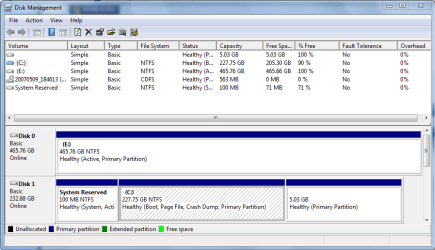
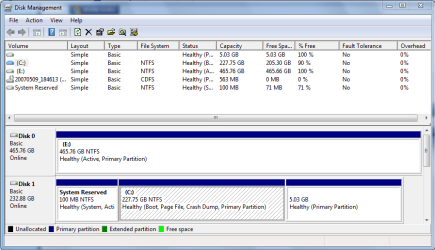
Looks pretty good.

Are you having any problems?

You should be able to add that 5.03 GB partition to C if you want to.
 

My Computer

Computer type
PC/Desktop
Computer Manufacturer/Model Number
Ignatz Special; 4 speed manual gearbox; factory air conditioning; one of one
OS
Windows 7 Home Premium SP1, 64-bit
CPU
Intel Skylake i5-6600K, not overclocked
Motherboard
AsRock Z170M Extreme 4, micro ATX
Memory
8 GB HyperX DDR4-2666 (2 x 4 GB)
Graphics Card(s)
none; graphics are integrated on CPU
Sound Card
onboard: Realtek ALC1150; external: USB Behringer UF0-202
Monitor(s) Displays
Dell S2340M 23 inch IPS
Screen Resolution
1600 x 900
Hard Drives
System: Crucial MX100 series SSD, 128 GB;
Data: Samsung Spinpoint 103SJ, 1 TB;
Backup: WD Caviar Green WD30EZRX-00D8PB0, 3 TB
PSU
Rosewill SilentNight 500 watt fanless, semi-modular
Case
Antec Solo II
Cooling
Noctua NH-U12S; Noctua F12 intake, Noctua S12A exhaust
Keyboard
Microsoft 200 6JH-00001 USB
Mouse
Dell or Microsoft optical wired; USB
Antivirus
Microsoft Security Essentials and Malwarebytes Premium
Browser
Pale Moon
Other Info
All fans PWM; speeds at idle: CPU circa 500 rpm; intake circa 600 rpm; exhaust circa 600 rpm; CPU temps 27 idle and 47 C load in a warm room (27 C/81 F) when running Intel Extreme Tuning Utility stress test.
Yes, it looks fine.

I've lost track of the question - are you saying 7 won't install on Disk 0?
 

My Computers

System One System Two

  • Computer type
    PC/Desktop
    OS
    7 X64
    CPU
    i5 8400
    Motherboard
    gigabyte b365m ds3h
    Memory
    2x8gb 3200mhz
    Hard Drives
    various
    PSU
    pure power 11 400w cm
    Case
    Coolermaster
    Cooling
    cryorig m9i
  • Computer type
    PC/Desktop
    OS
    7x64
    CPU
    g5400
    Motherboard
    ga b365m ds3h
    Memory
    8gb ddr4 2400
    PSU
    xfx pro 450w
Yea it wouldn't install on Disk 0 so I put in my old hard drive and it installed on that. Disk 0 is SATA, Disk 1 is IDE. Could I install 7 to Disk 0 while running 7 on Disk 1?
 

My Computer

OS
windows 7/windows xp/windows vista
CPU
AMD Phenom II X2 550 Black Edition Callisto 3.1GHz
Motherboard
Gigabyte AM3 785G ATX
Memory
Mushkin Enhanced Silverline 2GB 240-Pin DDR3
Hard Drives
Western Digitial Cavier Blue 500GB
PSU
Earthwatts 500w
Case
Antec Sonata III
Yes, put the dvd in the drive and run setup - point it at Disk 0.

You will end up with the drive letter that is currently on Disk 0 - if that bothers you.

After you have installed - if you want to use that instead of your current installation - you need to make it the boot drive.

Easiest is to let Easybcd 2.0 do it for you. EasyBCD 2.0 Beta Builds - The NeoSmart Forums

Then make sure Disk 0 is the first HD in bios boot order.
 

My Computers

System One System Two

  • Computer type
    PC/Desktop
    OS
    7 X64
    CPU
    i5 8400
    Motherboard
    gigabyte b365m ds3h
    Memory
    2x8gb 3200mhz
    Hard Drives
    various
    PSU
    pure power 11 400w cm
    Case
    Coolermaster
    Cooling
    cryorig m9i
  • Computer type
    PC/Desktop
    OS
    7x64
    CPU
    g5400
    Motherboard
    ga b365m ds3h
    Memory
    8gb ddr4 2400
    PSU
    xfx pro 450w
"Windows cannot copy files required for installation. The files may be corrupt or missing. Make sure all files required for installation are available, and restart the installation. Error code: 0x80070241"

When I try to install to Disk 0.

I'm using the same disc as before so I don't think that's the problem.

I need to get this figured out, I'm probably past return policy with newegg on my hard drive.
 

My Computer

OS
windows 7/windows xp/windows vista
CPU
AMD Phenom II X2 550 Black Edition Callisto 3.1GHz
Motherboard
Gigabyte AM3 785G ATX
Memory
Mushkin Enhanced Silverline 2GB 240-Pin DDR3
Hard Drives
Western Digitial Cavier Blue 500GB
PSU
Earthwatts 500w
Case
Antec Sonata III
This is a slight gravedig but I figure I should post the solution

I came to the conclusion (after trying every single thing you guys suggested and realizing there was nothing wrong with my motherboard) that my hard drove was broken. I was 3 months past the warranty with newegg and didn't want to exchange with western digital. Newegg said they would make an exception this one time and allowed me to return my 500gb caviar blue. I replace that with a 750gb caviar black and windows 7 installed perfectly.

Currently in the process of transferring 400gb of data, boy is it awful.
 

My Computer

OS
windows 7/windows xp/windows vista
CPU
AMD Phenom II X2 550 Black Edition Callisto 3.1GHz
Motherboard
Gigabyte AM3 785G ATX
Memory
Mushkin Enhanced Silverline 2GB 240-Pin DDR3
Hard Drives
Western Digitial Cavier Blue 500GB
PSU
Earthwatts 500w
Case
Antec Sonata III
Back
Top