Cannot get backup to work. Help.

gerry629

New member
Local time
8:17 PM
Messages
4
I try to backup again to my external HD (20GHz) but not enough space so it fails. I buy another HD (200GHz) but backup cannot find the location where my backup are being saved! I try to change settings but always get ' the backup could not start due to an internal error. No such interface supported 0x80004002'.
On connecting the external HDs I get 'cannot load the driver software - failed', but in device manager and computer it says they are working properly. My system as USB 2.
How do I get out of this? Help :(
 

My Computer

Computer Manufacturer/Model Number
Mesh
OS
w7 home premium 64bit
CPU
intel i3
Motherboard
ASUS P7H55-M
Memory
4M
What antivirus program are you running on your PC? Temporarily disable the program and then try to backup.

If you still get the error message, then

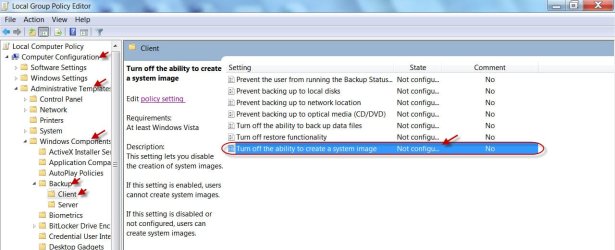
Open Local Group Policy Editor. ( Click the Windows Start Menu icon located in the lower left corner of your Windows 7 screen, type “gpedit.msc” in the “Search programs and files” box, and click on gpedit.msc which will appear underneath Programs in the search results.)

Computer Configuration > Administrative Templates > Windows Components > Backup > Client > Turn off the ability to create a system image

Make sure that it is "Disabled" or "Not configured"

01-01-2013 19-11-13.jpg
 

My Computer

OS
Windows 7 Home Premium 32 bit
Hi. Am using security essentials as antivirus. switching off made no difference.
Sorry. clicking on gpedit.msc only gave me windows explorer so I never got to computer configuration. Sorry I could not follow.
 

My Computer

Computer Manufacturer/Model Number
Mesh
OS
w7 home premium 64bit
CPU
intel i3
Motherboard
ASUS P7H55-M
Memory
4M
OK, I had overlooked the fact that only the professional, enterprise and ultimate editions have group policy editor.

IMO, the only other option left is to do a repair install. I haven't come across any other suggested solutions to the problem on the web.

Hang on to see whether any other relatively easy solution/s come through other experts here.
 

My Computer

OS
Windows 7 Home Premium 32 bit
Thanks. I cannot do a repair install as my disk is an older issue than the one on my pc. Under warranty I had the main hard disk replaced about 2 years ago. This leaves me sort of stuck!

I tried to use a free paragon backup whlist waiting, but it failed to find the external HD. So I will concentrate on getting the USB to load drivers.

Thanks again for your help.
 

My Computer

Computer Manufacturer/Model Number
Mesh
OS
w7 home premium 64bit
CPU
intel i3
Motherboard
ASUS P7H55-M
Memory
4M
Why not try the Free Macrium Reflect, which is most recommended here and used by many?

If you have any problems using it, you may find ample hands and heads here to see you through. ( I do not use Macrium Reflect)

And it will be preferable to create a backup from the bootable Recovery CD rather than doing it from within Windows.

If you are inclined to do an experiment, there is a way to get the Group Policy Editor on other Windows editions. I refrained mentioning it earlier since it is extraneous to the editions and planted.

How to Enable “Group Policy Editor” (gpedit.msc) in Windows 7 Home Premium, Home Basic and Starter Editions? - Tweaking with Vishal

Please do read the disclaimer at the beginning of the article.

If you decide to give it a try be sure to create a system restore point prior to planting it. ( You must also be absolutely sure that you have no problems with system restore on your PC.) In case it does not help, you can restore the system back to the previous state.
 

My Computer

OS
Windows 7 Home Premium 32 bit
I found Macrium difficult to download, so I used Paragon Backup which seems to have worked fine. I am still getting 'drivers not loading' when I connect via USB, but I can live with that.

I was not brave enough to try your experiment. Many thanks all the same.
 

My Computer

Computer Manufacturer/Model Number
Mesh
OS
w7 home premium 64bit
CPU
intel i3
Motherboard
ASUS P7H55-M
Memory
4M
Back
Top