
Cannot install KB4534310 on standalone OR Windows Update itself

interwebsites

New member
Local time
3:38 PM
Messages
5
OS: Windows 7 SP1 x64
Storage? well above enough

Tried installing KB4534310 for the last few months already, no luck.
The Windows Update GUI (control panel, if you may) keeps giving me the error 8024200D. The standalone installer fails and gives no error.
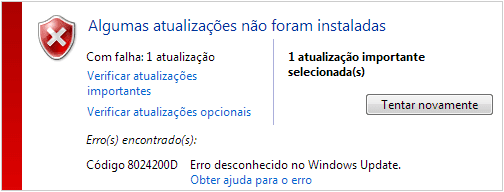
image.png
(Windows Update GUI. Some updates were not installed. Error(s) found:
Code 8024200D Unknown error in Windows Update.)
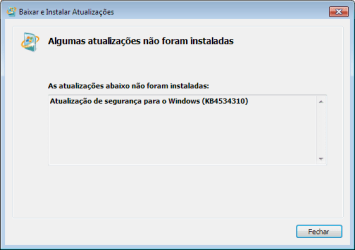
image.png
(Standalone installer, downloaded from the Windows Update Catalog. Some updates were not installed.
The updates below were not installed: Security update for Windows. (KB4534310))

i was so cloose to keeping this machine updated, i'd appreciate some help
 

My Computers My Computers

System One System Two

  • Computer type
    PC/Desktop
    Computer Manufacturer/Model Number
    Dell Optiplex 780
    OS
    Windows 7 Ultimate SP1 x64
    CPU
    Intel Core 2 Duo CPU E7400
    Memory
    2x 2GB DDR3 Kingston
    Graphics Card(s)
    Intel Q43/45 Integrated Chipset
    Monitor(s) Displays
    Samsung SyncMaster P2470HN
    Screen Resolution
    1920x1080
    Mouse
    Logitech M190 Wireless
    Internet Speed
    100Mbps
    Antivirus
    Microsoft Security Essentials
    Browser
    Google Chrome
  • Computer type
    PC/Desktop
    Antivirus
    none
Install KB4490628 first
 

My Computers My Computers

System One System Two

  • Computer type
    PC/Desktop
    Computer Manufacturer/Model Number
    ASUS
    OS
    Windows 7 Home Premium x64
    CPU
    i5 9400F
    Motherboard
    ASUS Prime Z390-P
    Memory
    16GB DDR4 4X4GB 3200MHz
    Graphics Card(s)
    Nvidia GeForce GTX 970
    Monitor(s) Displays
    Dell Ultrasharp 2007WFPb
    Screen Resolution
    1600x1200
    Hard Drives
    1TB Samsung 870 evo
    PSU
    EVGA Supernova 1000 GT
    Case
    Viper GX ATX
    Cooling
    Noctua NH-D15
    Keyboard
    Frutiger Aero
    Mouse
    HP M-UAE96
    Internet Speed
    900 MBPS download l 880 MBPS upload
    Antivirus
    Microsoft Security Essentials
    Browser
    Supermium
  • Computer type
    PC/Desktop
Already installed.

- - - Updated - - -

the error ain't gone and KB4490628 is already installed
same error as before, 8024200D
 

My Computers My Computers

System One System Two

  • Computer type
    PC/Desktop
    Computer Manufacturer/Model Number
    Dell Optiplex 780
    OS
    Windows 7 Ultimate SP1 x64
    CPU
    Intel Core 2 Duo CPU E7400
    Memory
    2x 2GB DDR3 Kingston
    Graphics Card(s)
    Intel Q43/45 Integrated Chipset
    Monitor(s) Displays
    Samsung SyncMaster P2470HN
    Screen Resolution
    1920x1080
    Mouse
    Logitech M190 Wireless
    Internet Speed
    100Mbps
    Antivirus
    Microsoft Security Essentials
    Browser
    Google Chrome
  • Computer type
    PC/Desktop
    Antivirus
    none
what about KB4474419? need to have both KB4490628 AND KB4474419 updates installed first

maybe also install convenience rollup like KB3125574 first, reboot and then install KB4534310 rollup

oh wait - KB4534310 rollup has a "known issue" or bug

Known issues in this update

[TABLE="class: banded"]
[TR]
[TD] Symptom [/TD]
[TD] Workaround [/TD]
[/TR]
[TR]
[TD] After installing KB4534310, your desktop wallpaper might display as black when set to Stretch.[/TD]
[TD] This issue is resolved in KB4539601 if you are using Monthly Rollups. If you are using Security-only updates, see KB4539602. These updates are available for all customers running Windows 7 SP1 and Windows Server 2008 R2 SP1.[/TD]
[/TR]
[/TABLE]

install KB4539601 instead of KB4534310
 

My Computer My Computer

Computer type
PC/Desktop
Computer Manufacturer/Model Number
Dell Inspiron 620
OS
Windows 7 SP1 Home Premium 64bit [x64]
CPU
Intel(R) Core(TM) i5-2310 CPU @ 2.90GHz
Memory
6 GB
Graphics Card(s)
Intel HD Graphics 2000
Sound Card
Conexant CX20641 HD Audio
Hard Drives
Western Digital 1TB (1024GB) WD10EALX-759BA1
Internet Speed
Spectrum Cable Internet up to 100Mbps

My Computers My Computers

System One System Two

  • Computer type
    PC/Desktop
    Computer Manufacturer/Model Number
    Dell Optiplex 780
    OS
    Windows 7 Ultimate SP1 x64
    CPU
    Intel Core 2 Duo CPU E7400
    Memory
    2x 2GB DDR3 Kingston
    Graphics Card(s)
    Intel Q43/45 Integrated Chipset
    Monitor(s) Displays
    Samsung SyncMaster P2470HN
    Screen Resolution
    1920x1080
    Mouse
    Logitech M190 Wireless
    Internet Speed
    100Mbps
    Antivirus
    Microsoft Security Essentials
    Browser
    Google Chrome
  • Computer type
    PC/Desktop
    Antivirus
    none
Back
Top