Solved Cannot Install Office 2010

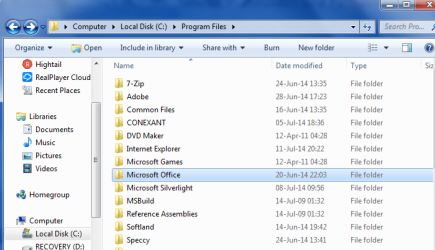
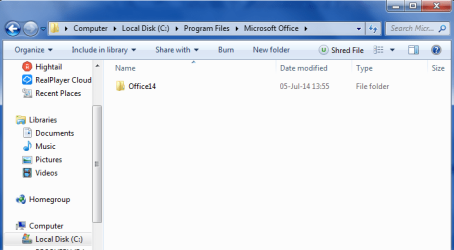
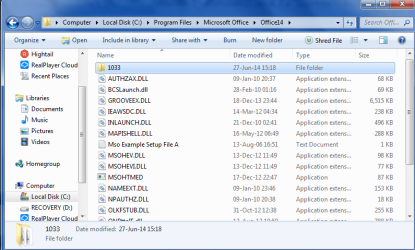
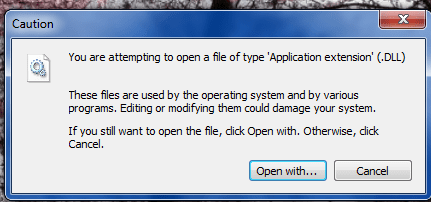
I am not sure if this is what you are referring to, but here are a few screenshots.
 

Attachments

  • Local_Disk_C.png
    Local_Disk_C.png
    27.9 KB · Views: 32
  • Local_Disk_C2.png
    Local_Disk_C2.png
    23.6 KB · Views: 1
  • Local_Disk_C3.png
    Local_Disk_C3.png
    36.8 KB · Views: 2

My Computer

Computer type
Laptop
Computer Manufacturer/Model Number
HP G70t-200
OS
Windows 7 Home Premium 64 bit
CPU
Intel(R) Core(TM)2 Duo CPU
Memory
4GB RAM
Graphics Card(s)
Mobile Intel(R) Series Express Chipset Family
Sound Card
Conexant High Def SmartAudio221;Intel(R) High Def Audio HDMI
Monitor(s) Displays
Generic PnP Monitor
Screen Resolution
1400 x 900
Hard Drives
HGST HTS721010A9E630 ATA Device - 1TB
Antivirus
Panda Global Protection 2014
Browser
Firefox 29
Good Job

Yes that is what I was referring to. You need to take possession of that Program File directory.

Before you delete those files lets discuss it. Do you use regedit? because if you delete those files manually all the entries remain in the register.

Otherwise I have a good suggestion. There is a program called "Revo Uninstaller". You may be familiar with it, but I will explain it anyhow. This program has a download that when you install it, it asks if you want the trial or free version. I would take the trial and at the appropriate time you can either buy or uninstall. Meanwhile you can us the "force" uninstall feature to take out Office. You can read the help about how to use it. After the forced uninstall if you run it in the advanced mode it will scan the registry and directory tree for left over framgments and give you the option to delete. Hopefully this will wipe traces of Office from your operating system.

Once you use this you should be ready for an install attempt. Dont forget to take ownership of the program files directory. If this install attempt fails, you will have to go through the whole thing again and then manually search the registry for "office", "office14" and any other referernce you can think of (deleting each one you find). To do this you will need to back up the registry prior to any changes. That is case you screw up, you can restore it.

Download "Revo Uninstaller" and Install. Revo will save you a restore point.

If you have to resort to the manual edit of the registry, here is a tutorial for backing it up.

http://www.sevenforums.com/tutorials/4230-registry-backup-restore.html

If you have more question don't be afraid to ask.

 

My Computer

Computer Manufacturer/Model Number
BGC (Bob's Garage Crew)
OS
win 7 X64 Ultimate SP1
CPU
I3770K
Motherboard
Asus P8Z77-V Deluxe
Memory
G Skill F3-14900CL9-4GBXL x 4
Graphics Card(s)
NVIDIA GeForce GTX670 + Intel 4000
Sound Card
Realtek HD 5.1 (MOB)
Monitor(s) Displays
Asus VW224T (1)
Screen Resolution
1920 x 1080
Hard Drives
SATA Corsair Force GT 2.5" 180GB (System) Sata 3
OCZ Vertex3 120GB
OCZ Vertex 2 120GB 2.5" SATA II
ST31000524AS 1000.2GB
WD15EARS (External)
PSU
CoolerMaster 1000 Watt
Case
CoolerMaster HAF X
Cooling
CPU -- CoolerMaster 520N
Keyboard
MS Wireless 3000 V2
Mouse
MS Wireless 3000 V2
Internet Speed
Cable
Antivirus
Norton Internet Security
Browser
IE9
Other Info
AMI Bios 1805
OC'd 3%
In order to take ownership, do I just click on it?
 

My Computer

Computer type
Laptop
Computer Manufacturer/Model Number
HP G70t-200
OS
Windows 7 Home Premium 64 bit
CPU
Intel(R) Core(TM)2 Duo CPU
Memory
4GB RAM
Graphics Card(s)
Mobile Intel(R) Series Express Chipset Family
Sound Card
Conexant High Def SmartAudio221;Intel(R) High Def Audio HDMI
Monitor(s) Displays
Generic PnP Monitor
Screen Resolution
1400 x 900
Hard Drives
HGST HTS721010A9E630 ATA Device - 1TB
Antivirus
Panda Global Protection 2014
Browser
Firefox 29
Focus

Focus on the directory, right click, select "take ownership". The registry hack should have added that choice to the context menu.
 

My Computer

Computer Manufacturer/Model Number
BGC (Bob's Garage Crew)
OS
win 7 X64 Ultimate SP1
CPU
I3770K
Motherboard
Asus P8Z77-V Deluxe
Memory
G Skill F3-14900CL9-4GBXL x 4
Graphics Card(s)
NVIDIA GeForce GTX670 + Intel 4000
Sound Card
Realtek HD 5.1 (MOB)
Monitor(s) Displays
Asus VW224T (1)
Screen Resolution
1920 x 1080
Hard Drives
SATA Corsair Force GT 2.5" 180GB (System) Sata 3
OCZ Vertex3 120GB
OCZ Vertex 2 120GB 2.5" SATA II
ST31000524AS 1000.2GB
WD15EARS (External)
PSU
CoolerMaster 1000 Watt
Case
CoolerMaster HAF X
Cooling
CPU -- CoolerMaster 520N
Keyboard
MS Wireless 3000 V2
Mouse
MS Wireless 3000 V2
Internet Speed
Cable
Antivirus
Norton Internet Security
Browser
IE9
Other Info
AMI Bios 1805
OC'd 3%
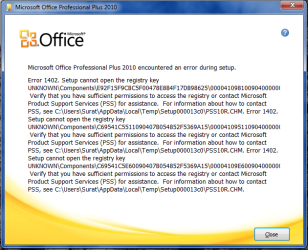
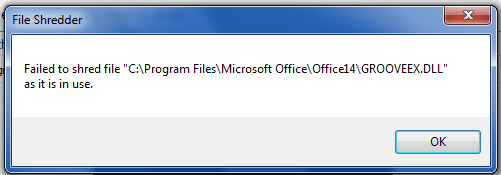
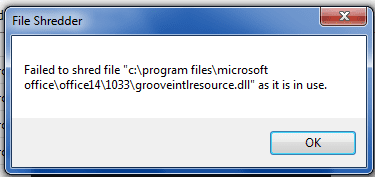
I followed your instructions but was unable to delete all of the files.
I attempted another installation, but more errors occurred.
I have attached screenshots of everything.
 

Attachments

  • Office_Errors.png
    Office_Errors.png
    36.4 KB · Views: 27
  • Office_Tree_3.png
    Office_Tree_3.png
    13.9 KB · Views: 27
  • Office_Tree_2.png
    Office_Tree_2.png
    6.9 KB · Views: 27
  • Office_Tree_1.png
    Office_Tree_1.png
    6.1 KB · Views: 27

My Computer

Computer type
Laptop
Computer Manufacturer/Model Number
HP G70t-200
OS
Windows 7 Home Premium 64 bit
CPU
Intel(R) Core(TM)2 Duo CPU
Memory
4GB RAM
Graphics Card(s)
Mobile Intel(R) Series Express Chipset Family
Sound Card
Conexant High Def SmartAudio221;Intel(R) High Def Audio HDMI
Monitor(s) Displays
Generic PnP Monitor
Screen Resolution
1400 x 900
Hard Drives
HGST HTS721010A9E630 ATA Device - 1TB
Antivirus
Panda Global Protection 2014
Browser
Firefox 29
Revo Uninstaller

Did you use Revo to uninstall all of those files? You must completely wipe out all traces of Office before you will be able to install. Revo will clean the registry entries. You are loading dll files that still exist when you boot. They must be cleaned out. Use Revo to do a force uninstall.

Mean while here is a solution to file that are locked.

Download Unlocker - MajorGeeks
 

My Computer

Computer Manufacturer/Model Number
BGC (Bob's Garage Crew)
OS
win 7 X64 Ultimate SP1
CPU
I3770K
Motherboard
Asus P8Z77-V Deluxe
Memory
G Skill F3-14900CL9-4GBXL x 4
Graphics Card(s)
NVIDIA GeForce GTX670 + Intel 4000
Sound Card
Realtek HD 5.1 (MOB)
Monitor(s) Displays
Asus VW224T (1)
Screen Resolution
1920 x 1080
Hard Drives
SATA Corsair Force GT 2.5" 180GB (System) Sata 3
OCZ Vertex3 120GB
OCZ Vertex 2 120GB 2.5" SATA II
ST31000524AS 1000.2GB
WD15EARS (External)
PSU
CoolerMaster 1000 Watt
Case
CoolerMaster HAF X
Cooling
CPU -- CoolerMaster 520N
Keyboard
MS Wireless 3000 V2
Mouse
MS Wireless 3000 V2
Internet Speed
Cable
Antivirus
Norton Internet Security
Browser
IE9
Other Info
AMI Bios 1805
OC'd 3%
I managed to uninstall the entire Microsoft and Office 14 folders.
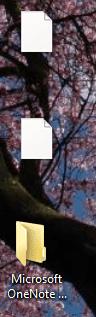
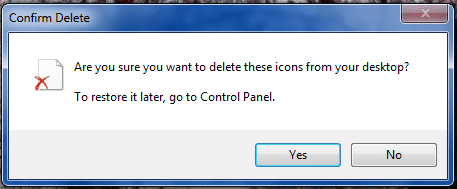
However, now when I attempt installation, I am still receiving an error message and 3 phantom icons appear on my desktop.
Nothing else is
When I attempt to delete them I get a confirm delete message.

How do I access the icons?
 

Attachments

  • Office_Error.png
    Office_Error.png
    15.8 KB · Views: 26
  • Desktop.png
    Desktop.png
    22 KB · Views: 26
  • Revo_Results.png
    Revo_Results.png
    21.6 KB · Views: 1
  • Desktop_Delete.png
    Desktop_Delete.png
    10.1 KB · Views: 25

My Computer

Computer type
Laptop
Computer Manufacturer/Model Number
HP G70t-200
OS
Windows 7 Home Premium 64 bit
CPU
Intel(R) Core(TM)2 Duo CPU
Memory
4GB RAM
Graphics Card(s)
Mobile Intel(R) Series Express Chipset Family
Sound Card
Conexant High Def SmartAudio221;Intel(R) High Def Audio HDMI
Monitor(s) Displays
Generic PnP Monitor
Screen Resolution
1400 x 900
Hard Drives
HGST HTS721010A9E630 ATA Device - 1TB
Antivirus
Panda Global Protection 2014
Browser
Firefox 29
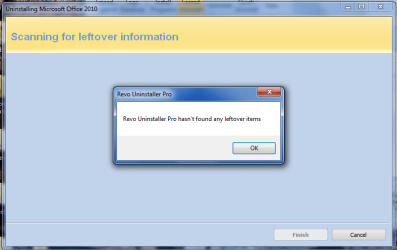
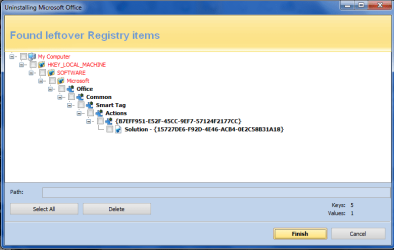
After repeated attempts to delete as many Microsoft Office and Office 14 folders I could find, there is still one that Revo does not delete; it just keeps showing up.
I am unable to locate it to take ownership.
I have located an Office14 folder that has one item (MSOXMLMF.DLL) which cannot be deleted.

I have included a screenshot of thr revo result.
How do I access that tree?
 

Attachments

  • Revo_Results_2.png
    Revo_Results_2.png
    17.7 KB · Views: 3

My Computer

Computer type
Laptop
Computer Manufacturer/Model Number
HP G70t-200
OS
Windows 7 Home Premium 64 bit
CPU
Intel(R) Core(TM)2 Duo CPU
Memory
4GB RAM
Graphics Card(s)
Mobile Intel(R) Series Express Chipset Family
Sound Card
Conexant High Def SmartAudio221;Intel(R) High Def Audio HDMI
Monitor(s) Displays
Generic PnP Monitor
Screen Resolution
1400 x 900
Hard Drives
HGST HTS721010A9E630 ATA Device - 1TB
Antivirus
Panda Global Protection 2014
Browser
Firefox 29
Hi there

My suggestion with this is probably to go for a BRUTE FORCE method -- it will probably be quicker in the long run. Messing about with 3rd party registry hacks and uninstallers invariably leads to grief in the future.

1) Just re-install Windows again - ensure this time you install the OS on a separate partition to your private data - so if you have to re-install in the future (or upgrade to say W8.1 / W9 later) you don't lose any of your data.

2) Now Office 2010 should install from the DVD without any problem whatsoever -- it will ask again for activation - but that's fine since it's on the same computer.

3) When done and its all working DO take a backup of the OS - Free macrium works and it doesn't take long to backup a system. Saves no end of problems too if you want to restore a clean image.

(Office 2010 from the DVD usually installs without a squeak of trouble so there IMO must be something seriously wrong with your current system -- and trying to fix that I'm sure will take a LOT longer than the re-install I've suggested - BUT DO TAKE BACKUPS when its all fixed - I can't emphasize that enough).

Cheers
jimbo
 

My Computer

Computer type
PC/Desktop
Computer Manufacturer/Model Number
Custom built, several laptops HP/ASUS
OS
Linux CENTOS 7 / various Windows OS'es and servers
CPU
Intel i7 Intel i5
Memory
8GB, 16GB
Graphics Card(s)
On Motherboard
Sound Card
Realtek HD audio
Monitor(s) Displays
Apple Cinema display, Samsung LCD
Screen Resolution
1920 X 1080
Hard Drives
4 X 1TB SATA
Mouse
Toshiba wireless laser
Internet Speed
> 20MB up
Agreed

Looks like a clean install of Win is the shortest and best route.
 

My Computer

Computer Manufacturer/Model Number
BGC (Bob's Garage Crew)
OS
win 7 X64 Ultimate SP1
CPU
I3770K
Motherboard
Asus P8Z77-V Deluxe
Memory
G Skill F3-14900CL9-4GBXL x 4
Graphics Card(s)
NVIDIA GeForce GTX670 + Intel 4000
Sound Card
Realtek HD 5.1 (MOB)
Monitor(s) Displays
Asus VW224T (1)
Screen Resolution
1920 x 1080
Hard Drives
SATA Corsair Force GT 2.5" 180GB (System) Sata 3
OCZ Vertex3 120GB
OCZ Vertex 2 120GB 2.5" SATA II
ST31000524AS 1000.2GB
WD15EARS (External)
PSU
CoolerMaster 1000 Watt
Case
CoolerMaster HAF X
Cooling
CPU -- CoolerMaster 520N
Keyboard
MS Wireless 3000 V2
Mouse
MS Wireless 3000 V2
Internet Speed
Cable
Antivirus
Norton Internet Security
Browser
IE9
Other Info
AMI Bios 1805
OC'd 3%
Do you mean a clean install of Windows? I just did that about 3 weeks ago; that's when the problem started.
I had deleted all of the programs on the hard drive before the installation, because the system kept crashing.
 

My Computer

Computer type
Laptop
Computer Manufacturer/Model Number
HP G70t-200
OS
Windows 7 Home Premium 64 bit
CPU
Intel(R) Core(TM)2 Duo CPU
Memory
4GB RAM
Graphics Card(s)
Mobile Intel(R) Series Express Chipset Family
Sound Card
Conexant High Def SmartAudio221;Intel(R) High Def Audio HDMI
Monitor(s) Displays
Generic PnP Monitor
Screen Resolution
1400 x 900
Hard Drives
HGST HTS721010A9E630 ATA Device - 1TB
Antivirus
Panda Global Protection 2014
Browser
Firefox 29
To: HammerHead and Jimbo45,
I went ahead and did the reinstall.
Office went in smoothly.
Thanks for your patient assistance.
 

My Computer

Computer type
Laptop
Computer Manufacturer/Model Number
HP G70t-200
OS
Windows 7 Home Premium 64 bit
CPU
Intel(R) Core(TM)2 Duo CPU
Memory
4GB RAM
Graphics Card(s)
Mobile Intel(R) Series Express Chipset Family
Sound Card
Conexant High Def SmartAudio221;Intel(R) High Def Audio HDMI
Monitor(s) Displays
Generic PnP Monitor
Screen Resolution
1400 x 900
Hard Drives
HGST HTS721010A9E630 ATA Device - 1TB
Antivirus
Panda Global Protection 2014
Browser
Firefox 29
Good Show

Really glad to hear you got Office installed. For some reason Office can really be hard to install. I know I fought it once myself. Good for you.
 

My Computer

Computer Manufacturer/Model Number
BGC (Bob's Garage Crew)
OS
win 7 X64 Ultimate SP1
CPU
I3770K
Motherboard
Asus P8Z77-V Deluxe
Memory
G Skill F3-14900CL9-4GBXL x 4
Graphics Card(s)
NVIDIA GeForce GTX670 + Intel 4000
Sound Card
Realtek HD 5.1 (MOB)
Monitor(s) Displays
Asus VW224T (1)
Screen Resolution
1920 x 1080
Hard Drives
SATA Corsair Force GT 2.5" 180GB (System) Sata 3
OCZ Vertex3 120GB
OCZ Vertex 2 120GB 2.5" SATA II
ST31000524AS 1000.2GB
WD15EARS (External)
PSU
CoolerMaster 1000 Watt
Case
CoolerMaster HAF X
Cooling
CPU -- CoolerMaster 520N
Keyboard
MS Wireless 3000 V2
Mouse
MS Wireless 3000 V2
Internet Speed
Cable
Antivirus
Norton Internet Security
Browser
IE9
Other Info
AMI Bios 1805
OC'd 3%
Hi there
Good news.

Thanks for posting back -- it's quite frustrating when someone posts a problem - you try and help and get no response back - whether GOOD or BAD.

Cheers
jimbo
 

My Computer

Computer type
PC/Desktop
Computer Manufacturer/Model Number
Custom built, several laptops HP/ASUS
OS
Linux CENTOS 7 / various Windows OS'es and servers
CPU
Intel i7 Intel i5
Memory
8GB, 16GB
Graphics Card(s)
On Motherboard
Sound Card
Realtek HD audio
Monitor(s) Displays
Apple Cinema display, Samsung LCD
Screen Resolution
1920 X 1080
Hard Drives
4 X 1TB SATA
Mouse
Toshiba wireless laser
Internet Speed
> 20MB up
Back
Top