
Solved Cannot install Security Essentials - error 656

Rassi

New member
Local time
12:04 PM
Messages
7
Several days ago my Win7 Home Premium x64 install started having an issue where the update for Security Essentials wouldn't install. This started carrying over for every other windows update, so I ended up following the posts here about repairing your installation. I've been able to get everything else working, but I still cannot reinstall security essentials.

I'm now getting error 0x80070656 when I attempt a reinstall.

Need some help, please....
 

My Computer

Computer Manufacturer/Model Number
Self-Built
OS
Windows 7 Home Premium
CPU
Intel Core i7 930 @ 2.80GHz
Motherboard
Gigabyte Technology Co., Ltd. X58A-UD3R (Socket 1366)
Memory
18.0 GB Triple-Channel DDR3 @ 539MHz (8-8-8-20)
Graphics Card(s)
1280MB GeForce GTX 470 (EVGA)
Screen Resolution
1920 x 1200
Hard Drives
Maxtor 6B200P0 ATA Device (189.9 GB)
ST3500630AS ATA Device (465.8 GB)
ST3750640AS ATA Device (698.6 GB)
WDC WD10EACS-00ZJB0 ATA Device (931.5 GB)
WD3200JD-60KLB0 ATA Device (298.1 GB)
WDC WD6400AAKS-00A7B0 ATA Device (596.2 GB)
Keyboard
Logitech G15 (ver 1)
Mouse
Logitech G500
Internet Speed
Time Warner 8mb
Other Info
TSSTcorp CD/DVDW SH-S183L ATA Device

My Computer

Computer type
PC/Desktop
Computer Manufacturer/Model Number
Golden Mk. I.4
OS
Windows 10 Pro x64 ; Xubuntu x64
CPU
Intel i7 860 @ 2.80 GHz O/C'ed to 4.0GHz
Motherboard
Gigabyte P55A-UD3R Rev.1. Award BIOS F13
Memory
16GB Corsair Vengance DDR3 @ 661 MHz Dual Channel (9-9-9-24)
Graphics Card(s)
EVGA NVidia GTX 560 1024MB
Sound Card
Realtek Integrated
Monitor(s) Displays
Dual Samsung SyncMaster 2494HS
Screen Resolution
1920*1080 and 1920*1080
Hard Drives
1*Samsung 840 EVO 120GB SSD;
1*OCZ Vertex 2 60GB SSD;
2*Samsung F3 SpinPoint 1TB in RAID0;
1*Samsung F1 SpinPoint 1TB;
2*Western Digital 1TB External USB 3.0
1*Western Digital 500GB External USB 3.0
1*Seagate 500GB External USB 2.0
PSU
Thermaltake ToughPower QFan 750W
Case
Thermaltake Element S VK60001W2Z
Cooling
Corsair H60 Water Cooling, 2*230mm and 2*80mm case fans
Keyboard
Logitech G110
Mouse
Logitech MX518
There are 5 main reasons for running into an installation error with the MS Security Essentials. While the reference here is from a 2010 blog the 5 items would still seem to apply even more to the latest version which sees some rather well needed improvements.

Can't Install Microsoft Security Essentials – Possible Causes

You shouldn't get any Microsoft Security Essentials installation error if everything is fine. You can't install Microsoft Security Essentials if:
  1. You have another antivirus installed
  2. You could not remove the previous antivirus properly
  3. Your Windows Installation is not genuine
  4. Your copy of Windows Installer is lower than 3.1
  5. The Windows Installer Service is not running
The blog for this is seen at Microsoft Security Essentials Installation Error - Can't Install Microsoft Security Essentials


Items #1 and #2 are certainly factors to look at as well as the #4 and #5. As for the error 656 problem you may want to run the MS FixIt tool to reset the Windows Update components. Since you may have updates pending or only partially downloaded and installed that would be a second item to look at as far as troubleshooting problems seen when installing any updates where this error is seen the most.


The two other MS references here can be a help with this.


Troubleshoot problems with installing updates


How do I reset Windows Update components?
 

My Computers

System One System Two

  • Computer type
    PC/Desktop
    Computer Manufacturer/Model Number
    Custom builds = 2
    OS
    W7 Ultimate x64/W10 Pro x64/W11 Pro Triple Boot - Main PC W7 Remote PC Micro ATX W7 Pro x64/W11 Pro
    CPU
    AMD Phenom II X4 975 Deneb 3.6ghz - 965 2nd remote pc
    Motherboard
    Gigabyte GA-790XTA-UD4-Gigabyte GA-880GM-D2H remote pc
    Memory
    Kingston Hyper X DDR3 1600 1.5v 16gb - Hyper X Fury 8gb 2nd
    Graphics Card(s)
    MSI HD Radeon 5750 1gb - MSI HD Radeon 6450 on mini tower
    Sound Card
    Creative Labs X-Fi Xtreme Audio P - Realtek onooard 2nd case
    Monitor(s) Displays
    ASUS VW199T-P 19" HP 2082a Main-HP 2082a 20" remote pc
    Screen Resolution
    Asus 1440x900 - HP 1600x900
    Hard Drives
    WD Black 1TB HD per OS W7, W10, and pending W11 presently on 500gb OS Drive - Pending Triple 1TB HDs for Spanned Storage/backup volume
    Single 2TB external USB enclosure, single 1TB System 7 Host/Boot drive, Pending 8TB external HD for system image b
    PSU
    Corsair 750TX - primary / Corsair CX600 - second
    Case
    Antec 900-2 - SSD compatible / NZXT Vulcan mini tower
    Cooling
    Zalman CNPS9900A
    Keyboard
    AZIO L70 Backlit Letters Gaming - ONN Cordless/USB
    Mouse
    MSI DS200 Programmable, Logitech Cordless
    Internet Speed
    30mbps upgrade - primary hard wired - mini tower usb WiFi
    Antivirus
    GFI VIPRE Internet Security 2014 on W7 2016 beta on W10,
    Browser
    Cyberfox, WaterFox 64bit FF variants, FireFox x64, Pale Moon
    Other Info
    Accomdata fan cooled usb 2.0 PIDE/Sata II, III external enclosure.
    Sambient usb/eSata PATA/Sata II, III external enclosure.
  • Computer type
    PC/Desktop
    System Manufacturer/Model Number
    CUSTOM ASSEMBLY
    OS
    W7 Pro x64/W11 Pro
    CPU
    AMD Deneb 3.6ghz - 965
    Motherboard
    Gigabyte GA-880GM-D2H remote pc
    Memory
    Kingston Hyper X Fury 8gb
    Graphics Card(s)
    MSI HD Radeon 6450 DVI Output
    Sound Card
    Realtek onooard Creative or Other separate PENDING
    Monitor(s) Displays
    VIZIO 32" LCD TV Separate LCD Pending
    Screen Resolution
    1600x1080
    Hard Drives
    WD 500GB OS Host/Boot WD Green 1TB Storage/Backup
    PSU
    Corsair 600W - THERMALTAKE 600W spare case
    Case
    NZXT Vulcan mini tower
    Cooling
    Twin 120mm Top Fans - 240mm Side Cover
    Keyboard
    ONN Cordless/USB Logitech Cordless
    Mouse
    ONN USB/Cordless - Logitech Cordless
    Internet Speed
    DSL 5G
    Browser
    MS Edge, FireFox, WaterFox x64, FireFox Nightly
    Other Info
    OS Testing-Remote Access to Main TeamViewer
Night Hawk,

I looked at all the 5 reasons they suggested, and I don't think any of them apply. Windows Installer is running, it's version 5.x.

The only one I have a question about is antivirus - would Windows Defender or Malwarebytes count for either of those? I do see Windows Defender listed when I look at services, but it's not running. Malwarebytes isn't running at all that i can see.

I tried the selective startup mode, but that didn't make any difference. I looked for the install logs, but i don't have an exact match for the path they speak of. The closest I can come would be either:


  • Program Data ~ Microsoft ~ Microsoft Security Client ~ Support
  • Program Data ~ Microsoft ~ Windows Defender
Neither has the exact log file they talk about....so I can't find the errors they speak of.


Would love some more help please....
 

My Computer

Computer Manufacturer/Model Number
Self-Built
OS
Windows 7 Home Premium
CPU
Intel Core i7 930 @ 2.80GHz
Motherboard
Gigabyte Technology Co., Ltd. X58A-UD3R (Socket 1366)
Memory
18.0 GB Triple-Channel DDR3 @ 539MHz (8-8-8-20)
Graphics Card(s)
1280MB GeForce GTX 470 (EVGA)
Screen Resolution
1920 x 1200
Hard Drives
Maxtor 6B200P0 ATA Device (189.9 GB)
ST3500630AS ATA Device (465.8 GB)
ST3750640AS ATA Device (698.6 GB)
WDC WD10EACS-00ZJB0 ATA Device (931.5 GB)
WD3200JD-60KLB0 ATA Device (298.1 GB)
WDC WD6400AAKS-00A7B0 ATA Device (596.2 GB)
Keyboard
Logitech G15 (ver 1)
Mouse
Logitech G500
Internet Speed
Time Warner 8mb
Other Info
TSSTcorp CD/DVDW SH-S183L ATA Device
The Windows Defender comes with 7 and wouldn't be any problem unlike what you would be more likely to run into with a 3rd party software like AVG, Avast, Nod32, Avira, or other av programs. Did you look over the link Golden posted at all?

The reference there explains the need to first remove any present av program which you apparently don't have presently. ok! That does also include any internet security and firewall programs as well which could be interfering as one other thing to note.

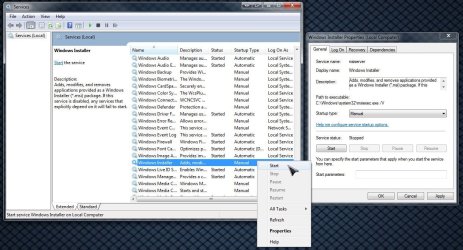
Booting up in safe mode(Selective Startup) after seeing if the Windows installer service is running and found stopped. To bring up the main services screen simply go to the Start>Run command line and type in "services.msc" without the quotes and press enter or click the ok button to bring up that screen.

Once you are in there all you need to do is locate the Windows Installer service item and right click on that to see what the setting is as far as manual(default, automatic, automatic(delayed), or disabled.


Attachments

  • Windows Services Starting One Up.jpg
    Windows Services Starting One Up.jpg
    143.2 KB · Views: 92

My Computers

System One System Two

  • Computer type
    PC/Desktop
    Computer Manufacturer/Model Number
    Custom builds = 2
    OS
    W7 Ultimate x64/W10 Pro x64/W11 Pro Triple Boot - Main PC W7 Remote PC Micro ATX W7 Pro x64/W11 Pro
    CPU
    AMD Phenom II X4 975 Deneb 3.6ghz - 965 2nd remote pc
    Motherboard
    Gigabyte GA-790XTA-UD4-Gigabyte GA-880GM-D2H remote pc
    Memory
    Kingston Hyper X DDR3 1600 1.5v 16gb - Hyper X Fury 8gb 2nd
    Graphics Card(s)
    MSI HD Radeon 5750 1gb - MSI HD Radeon 6450 on mini tower
    Sound Card
    Creative Labs X-Fi Xtreme Audio P - Realtek onooard 2nd case
    Monitor(s) Displays
    ASUS VW199T-P 19" HP 2082a Main-HP 2082a 20" remote pc
    Screen Resolution
    Asus 1440x900 - HP 1600x900
    Hard Drives
    WD Black 1TB HD per OS W7, W10, and pending W11 presently on 500gb OS Drive - Pending Triple 1TB HDs for Spanned Storage/backup volume
    Single 2TB external USB enclosure, single 1TB System 7 Host/Boot drive, Pending 8TB external HD for system image b
    PSU
    Corsair 750TX - primary / Corsair CX600 - second
    Case
    Antec 900-2 - SSD compatible / NZXT Vulcan mini tower
    Cooling
    Zalman CNPS9900A
    Keyboard
    AZIO L70 Backlit Letters Gaming - ONN Cordless/USB
    Mouse
    MSI DS200 Programmable, Logitech Cordless
    Internet Speed
    30mbps upgrade - primary hard wired - mini tower usb WiFi
    Antivirus
    GFI VIPRE Internet Security 2014 on W7 2016 beta on W10,
    Browser
    Cyberfox, WaterFox 64bit FF variants, FireFox x64, Pale Moon
    Other Info
    Accomdata fan cooled usb 2.0 PIDE/Sata II, III external enclosure.
    Sambient usb/eSata PATA/Sata II, III external enclosure.
  • Computer type
    PC/Desktop
    System Manufacturer/Model Number
    CUSTOM ASSEMBLY
    OS
    W7 Pro x64/W11 Pro
    CPU
    AMD Deneb 3.6ghz - 965
    Motherboard
    Gigabyte GA-880GM-D2H remote pc
    Memory
    Kingston Hyper X Fury 8gb
    Graphics Card(s)
    MSI HD Radeon 6450 DVI Output
    Sound Card
    Realtek onooard Creative or Other separate PENDING
    Monitor(s) Displays
    VIZIO 32" LCD TV Separate LCD Pending
    Screen Resolution
    1600x1080
    Hard Drives
    WD 500GB OS Host/Boot WD Green 1TB Storage/Backup
    PSU
    Corsair 600W - THERMALTAKE 600W spare case
    Case
    NZXT Vulcan mini tower
    Cooling
    Twin 120mm Top Fans - 240mm Side Cover
    Keyboard
    ONN Cordless/USB Logitech Cordless
    Mouse
    ONN USB/Cordless - Logitech Cordless
    Internet Speed
    DSL 5G
    Browser
    MS Edge, FireFox, WaterFox x64, FireFox Nightly
    Other Info
    OS Testing-Remote Access to Main TeamViewer
I did look at the link Golden posted - checked over what both of you guys posted and tried all the suggestions, but it wasn't making any progress, so I threw in the towel and did a complete reinstall. Not what i wanted to do, but it fixed things.

Thank you both for your suggestions....
 

My Computer

Computer Manufacturer/Model Number
Self-Built
OS
Windows 7 Home Premium
CPU
Intel Core i7 930 @ 2.80GHz
Motherboard
Gigabyte Technology Co., Ltd. X58A-UD3R (Socket 1366)
Memory
18.0 GB Triple-Channel DDR3 @ 539MHz (8-8-8-20)
Graphics Card(s)
1280MB GeForce GTX 470 (EVGA)
Screen Resolution
1920 x 1200
Hard Drives
Maxtor 6B200P0 ATA Device (189.9 GB)
ST3500630AS ATA Device (465.8 GB)
ST3750640AS ATA Device (698.6 GB)
WDC WD10EACS-00ZJB0 ATA Device (931.5 GB)
WD3200JD-60KLB0 ATA Device (298.1 GB)
WDC WD6400AAKS-00A7B0 ATA Device (596.2 GB)
Keyboard
Logitech G15 (ver 1)
Mouse
Logitech G500
Internet Speed
Time Warner 8mb
Other Info
TSSTcorp CD/DVDW SH-S183L ATA Device
Back
Top