Cannot Install Windows 7

sparkoz

New member
Local time
4:59 AM
Messages
3
Hey guys,

I'm currently running Windows XP Professional 32-bit. I want to format my computer so I can install Windows 7 Pro x64 onto it.

However when I insert my Windows 7 DVD, it says 'This installation disc isn't compatible with your version of Windows. To upgrade, you need the correct installation disc."

So I restart my computer and try to boot the DVD from start-up, but it never works. Im sure I set my BIOS to boot from the DVD drive because I get the black screen which has the (_____) but the words: 'press any key to boot from CD' never appears.

But when I put in my Windows XP Pro DVD, and try to boot it from there, it works, the words "press any key to boot from CD" does appear. So I'm sure I set my BIOS correctly.

What is wrong? And any solutions on how to fix this problem?
Below is a link of my computer specs.

dgnzae.jpg
 
Last edited by a moderator:

My Computer

OS
Windows XP 32-Bit
Welcome to Seven Forums.
What build # & Version of the Win_7 ?
x86 (32 bit) or x64 (64 bit) ?
Where did you get the iso file from ?
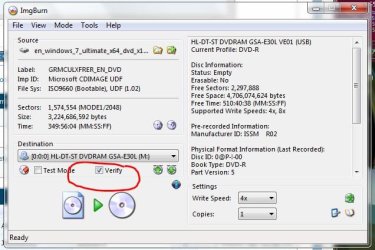
How did you burn the DVD ? At a slow x4 speed ? with Verify checked !
Any Over Clocking of ram or cpu ?
Best to have 2gb ram or less for initial install !
Suggestion, remove everything not essential to loading Win_7, from the system.
No printers, gamepads, second monitors, scanners, external devices, flash drives etc...
Connection between Video card & Monitor works best for install with a standard VGA cable !
Do you have a single OS on your computer or are you multi-booting ?
Are you using USB or eSATA to connect to any external HD's ?
How many HD's are connected to you system ? IDE or SATA ?
How many DVD drives are connected to your systen ? IDE or SATA Drives ?
When you see HD's in Disk Management is there a yellow triangle and explanation point ?
Do you have a single OS on your computer already or are you planing on multi-booting?
Or is this a New Clean HD ? Have you pre-formatted the HD ?


" Doc "
 

My Computer

Computer type
PC/Desktop
Computer Manufacturer/Model Number
Built them myself, Science Experiments !
OS
Win7 Enterprise, Win7 x86 (Ult 7600), Win7 x64 Ult 7600, TechNet RTM on AMD x64 (2.8Ghz)
CPU
AMD fx8350 4ghz, AMD-32 2400mhz, AMD-64 3200mhz, AMDx64 2.8G
Motherboard
SIS 755, ECS-K8M890M-M (Ult 7600), GigaByte & others
Memory
2gb, 4gb on the Ult 7600, 4gb on Technet RTM, 32gb on FX8350
Graphics Card(s)
Draw my own Graphics, several nVidia cards
Sound Card
on motherboard
Monitor(s) Displays
19" flat scr, 28" I-Inc widescr,22" Emprex Widescr, 23" Acer
Screen Resolution
1280 x 1024, 1440 x 900, 1920 x 1080
Hard Drives
6 pata Ide HD's & 2 Sata HD's
added 80gb external on Ult 7600 computer,
numerous extra 1tb, 2TB, 3Tb SATA HD's
A collection of ext HD Docks w/ HDs
PSU
430w, 550w, 600w, 700, 800, etc
Case
All Generic Full Towers
Cooling
Open Air & a few fans, some w/ colored LEDs
Keyboard
Compaq & Dell recycled from GoodWill
Mouse
Made in China Optical Wired Mouse
Internet Speed
Fast Cable InterNet
Antivirus
AVG Free on 24 different Desktops, NO Problems!
Browser
IE 8 is preferred, but use FireFox sometimes
Other Info
Linksys Routers, switches, & Hubs
Too Many USB Flash Drives to count, Biggest is 64GB !
Eight computers in my home network.
Sixteen computers at my business network.
Linked via TeamViewer !
Lots of old used spare computer parts everywhere!
Welcome to Seven Forums.
What build # & Version of the Win_7 ?
x86 (32 bit) or x64 (64 bit) ?
Where did you get the iso file from ?
How did you burn the DVD ? At a slow x4 speed ? with Verify checked !
Any Over Clocking of ram or cpu ?
Best to have 2gb ram or less for initial install !
Suggestion, remove everything not essential to loading Win_7, from the system.
No printers, gamepads, second monitors, scanners, external devices, flash drives etc...
Connection between Video card & Monitor works best for install with a standard VGA cable !
Do you have a single OS on your computer or are you multi-booting ?
Are you using USB or eSATA to connect to any external HD's ?
How many HD's are connected to you system ? IDE or SATA ?
How many DVD drives are connected to your systen ? IDE or SATA Drives ?
When you see HD's in Disk Management is there a yellow triangle and explanation point ?
Do you have a single OS on your computer already or are you planing on multi-booting?
Or is this a New Clean HD ? Have you pre-formatted the HD ?


" Doc "


Build 7600.
The windows 7 i have is x64
im not sure if it's a .iso file.
Any Over Clocking of ram or cpu ? None
I only have the single Windows XP Pro running on my computer.
Are you using USB or eSATA to connect to any external HD's ? No, I'm not using any of those.
Only 1 DVD-drive is connected to my system. IDE. But I also have a Virtual DVD drive.
not sure what you mean by the yellow triangle, but i have provided you with an ss of it.
Code:
[url=http://tinypic.com/r/4gx7b/4]Image - TinyPic - Free Image Hosting, Photo Sharing & Video Hosting[/url]
disregard the fact that the elements external hdd is there, it's an external and im just copying some stuff over. (before i tried to install, i already unplugged my external, so that's not the problem)
I just want to get rid of Windows XP on my computer and install windows 7.
the hard drive is partitioned into 2 parts. C drive and D drive.
C drive is 40 gigs, and i plan to install my windows 7 onto that.
regarding the copy of my windows 7. when i click on it from my computer it says. File system: UDF. would that be right?

and here is a screen shot of the files inside my windows 7 DVD.

Code:
http://tinypic.com/r/4u80e9/4

i just wanted to ask, when i install windows 7, do i have to install my drivers manually or will they automatically install after i install windows 7?
 

My Computer

OS
Windows XP 32-Bit
I would get the 90 day trial of the RTM version and burn it slowly to a DVD. The fact that you can boot from one disc, but not another tells you right away what the problem is.

As for the drivers, you should always install them manually if possible, but if you can't find a driver, Windows Update might have it. Drivers aren't an issue with Windows 7.
 

My Computer

OS
Windows 7 Ultimate x64 SP1
CPU
Intel Core i7-2600
Motherboard
Gigabyte GA-P67A-UD3P-B3
Memory
12 GB Patriot Extreme DDR3-1333
Graphics Card(s)
Nvidia GTX 470
Monitor(s) Displays
Dell UltraSharp 2209WA
Hard Drives
OCZ Agility3 240 GB, WD5001AALS, WD7501AALS
PSU
OCZ ModStream 700W
Case
CoolerMaster HAF 912 Advanced
Cooling
CoolerMaster Hyper 212 Plus
I do know that if you try and install x64 while you are logged onto an x86 install, it will tell you that it can not install. You have to do it from boot and not within Windows.

When you cold boot the PC, does it allow you to hit an F key to get a boot menu?

I also second what Frost says. You may just have a bad burn. Also just check to make sure the DVD is not scratched or something.
 

My Computer

Computer Manufacturer/Model Number
Home Built
OS
Win 7 Ultimate x64 & x86
CPU
AMD Anthalon 64 XT 6000+ 3.0Ghz
Motherboard
Asus M2N-eE
Memory
4 GB
Graphics Card(s)
Nvidia GeForce 8500 GT
I think Windows 7 will only install if you have Windows Vista.

But I am not for sure

Except of burning the Windows 7 on disc try USB memory stick or external hard drive.
 
Last edited:

My Computer

OS
Windows 7
CPU
Intel E6600 2.4 @ 3.0
Motherboard
ECS G31 M7
Memory
3gb 667 @900 mhz
Graphics Card(s)
ATI Iceq HIS 4670 1gb
Sound Card
Via HD
Monitor(s) Displays
Suyama 17"
Hard Drives
Seagate 250 GB
Maxtor 160 GB
PSU
Storm 600 Watt
Case
Coolermaster Scout
I think Windows 7 will only install if you have Windows Vista.
How would you install it on a new, blank system then? All the released discs are full versions, meaning they have no previous OS requirements for installing.
 

My Computer

OS
Windows 7 Ultimate x64 SP1
CPU
Intel Core i7-2600
Motherboard
Gigabyte GA-P67A-UD3P-B3
Memory
12 GB Patriot Extreme DDR3-1333
Graphics Card(s)
Nvidia GTX 470
Monitor(s) Displays
Dell UltraSharp 2209WA
Hard Drives
OCZ Agility3 240 GB, WD5001AALS, WD7501AALS
PSU
OCZ ModStream 700W
Case
CoolerMaster HAF 912 Advanced
Cooling
CoolerMaster Hyper 212 Plus
Wait, he burnt the Windows 7 onto a disc right ? If he had it on the disc he would start installing windows 7 from the disc by going in My computer than DVD RW (or whatever it is ) when I downloaded Windows 7 RC I had one file which you just had to double click and the installation would begin.
 

My Computer

OS
Windows 7
CPU
Intel E6600 2.4 @ 3.0
Motherboard
ECS G31 M7
Memory
3gb 667 @900 mhz
Graphics Card(s)
ATI Iceq HIS 4670 1gb
Sound Card
Via HD
Monitor(s) Displays
Suyama 17"
Hard Drives
Seagate 250 GB
Maxtor 160 GB
PSU
Storm 600 Watt
Case
Coolermaster Scout
If you choose to do it that way, but I never start an OS install from within another OS. I always, always do it with a blank, unformatted disc, and by booting from the DVD. I want a clean disc to start, with all traces, including the MBR, gone from the previous OS.
 

My Computer

OS
Windows 7 Ultimate x64 SP1
CPU
Intel Core i7-2600
Motherboard
Gigabyte GA-P67A-UD3P-B3
Memory
12 GB Patriot Extreme DDR3-1333
Graphics Card(s)
Nvidia GTX 470
Monitor(s) Displays
Dell UltraSharp 2209WA
Hard Drives
OCZ Agility3 240 GB, WD5001AALS, WD7501AALS
PSU
OCZ ModStream 700W
Case
CoolerMaster HAF 912 Advanced
Cooling
CoolerMaster Hyper 212 Plus
Wait, he burnt the Windows 7 onto a disc right ? If he had it on the disc he would start installing windows 7 from the disc by going in My computer than DVD RW (or whatever it is ) when I downloaded Windows 7 RC I had one file which you just had to double click and the installation would begin.
But he is trying to install 64 bit from a 32 bit OS, and it will not let him. He needs to boot from the DVD to install. And as Frost already stated, it is always preferable to do an install from a booted DVD/CD than from the OS. Much, much cleaner.
 

My Computer

Computer Manufacturer/Model Number
Home Built
OS
Win 7 Ultimate x64 & x86
CPU
AMD Anthalon 64 XT 6000+ 3.0Ghz
Motherboard
Asus M2N-eE
Memory
4 GB
Graphics Card(s)
Nvidia GeForce 8500 GT
ohh... my fault just dont listen to me
 

My Computer

OS
Windows 7
CPU
Intel E6600 2.4 @ 3.0
Motherboard
ECS G31 M7
Memory
3gb 667 @900 mhz
Graphics Card(s)
ATI Iceq HIS 4670 1gb
Sound Card
Via HD
Monitor(s) Displays
Suyama 17"
Hard Drives
Seagate 250 GB
Maxtor 160 GB
PSU
Storm 600 Watt
Case
Coolermaster Scout
I'm guessing he has an iso and has burnt the image to disc instead of unpacking it. If the OP is still around, how did you you burn the file to disc? When you put the disc in the drive and open it from my computer, what files show in the explorer window?
 

My Computer

Computer Manufacturer/Model Number
tw33k
OS
Windows 7 Ultimate (x64) SP1
CPU
Intel 3770k 4.6GHz
Motherboard
ASUS Maximus V Formula
Memory
8GB (2x 4GB) Crucial Ballistix
Graphics Card(s)
Sapphire 7950 (1060/1600)
Sound Card
On Board Realtek HD Audio
Monitor(s) Displays
27" Acer B273HU (via HDMI)
Screen Resolution
2048 x 1152
Hard Drives
Crucial M4 128GB
2TB WD Black
1TB Samsung F3 SATA
1TB WD Elite External
2TB WD USB 3.0
PSU
Corsair AX750 Gold
Case
Corsair Obsidian 800DW
Cooling
Corsair H100 (2x AP-121/2x UK-3000 push/pull)
Keyboard
Microsoft Wireless 5000
Mouse
Microsoft Wireless 5000
Internet Speed
5mb/s
Other Info
Logitech z-2300 2.1 speakers
Lamptron FC-5 v2
I'm guessing he has an iso and has burnt the image to disc instead of unpacking it. If the OP is still around, how did you you burn the file to disc? When you put the disc in the drive and open it from my computer, what files show in the explorer window?

i did provide a link of the files from my Windows 7 DVD.

Image - TinyPic - Free Image Hosting, Photo Sharing & Video Hosting

would it be a good idea for me to upgrade my windows XP to windows vista before trying to install Windows 7 again?
 
Last edited:

My Computer

OS
Windows XP 32-Bit
@ sparkoz,

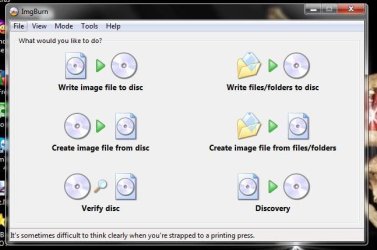
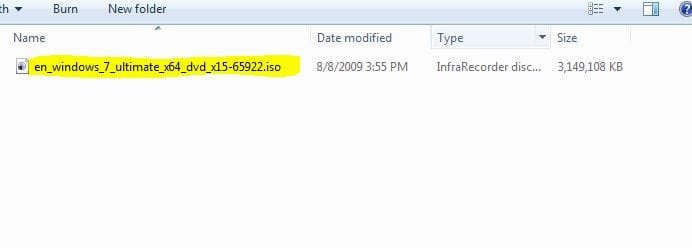
If your DVD is UDF format, I think that is wrong. It sounds like you just copied the files to to a DVD. You need to have the download .iso image file and burn it to a DVD as the image bootable DVD. I use ImgBurn ( a FreeWare Program) Here are some screen snips of what things should look like. ;)


" Doc "
 

Attachments

  • ImgBurn_Verify.JPG
    ImgBurn_Verify.JPG
    54.5 KB · Views: 17
  • ImgBurn.JPG
    ImgBurn.JPG
    40.3 KB · Views: 8
  • Iso_Win7_x64_RTM_TechNet_DownLoad.JPG
    Iso_Win7_x64_RTM_TechNet_DownLoad.JPG
    16.6 KB · Views: 8

My Computer

Computer type
PC/Desktop
Computer Manufacturer/Model Number
Built them myself, Science Experiments !
OS
Win7 Enterprise, Win7 x86 (Ult 7600), Win7 x64 Ult 7600, TechNet RTM on AMD x64 (2.8Ghz)
CPU
AMD fx8350 4ghz, AMD-32 2400mhz, AMD-64 3200mhz, AMDx64 2.8G
Motherboard
SIS 755, ECS-K8M890M-M (Ult 7600), GigaByte & others
Memory
2gb, 4gb on the Ult 7600, 4gb on Technet RTM, 32gb on FX8350
Graphics Card(s)
Draw my own Graphics, several nVidia cards
Sound Card
on motherboard
Monitor(s) Displays
19" flat scr, 28" I-Inc widescr,22" Emprex Widescr, 23" Acer
Screen Resolution
1280 x 1024, 1440 x 900, 1920 x 1080
Hard Drives
6 pata Ide HD's & 2 Sata HD's
added 80gb external on Ult 7600 computer,
numerous extra 1tb, 2TB, 3Tb SATA HD's
A collection of ext HD Docks w/ HDs
PSU
430w, 550w, 600w, 700, 800, etc
Case
All Generic Full Towers
Cooling
Open Air & a few fans, some w/ colored LEDs
Keyboard
Compaq & Dell recycled from GoodWill
Mouse
Made in China Optical Wired Mouse
Internet Speed
Fast Cable InterNet
Antivirus
AVG Free on 24 different Desktops, NO Problems!
Browser
IE 8 is preferred, but use FireFox sometimes
Other Info
Linksys Routers, switches, & Hubs
Too Many USB Flash Drives to count, Biggest is 64GB !
Eight computers in my home network.
Sixteen computers at my business network.
Linked via TeamViewer !
Lots of old used spare computer parts everywhere!
Back
Top