Solved Cannot leave Homegroup

Dr GRIM

New member
Local time
10:19 AM
Messages
6
Location
Saginaw MI
I have tried to leave the homegroup, but i have not be able to.

I have seen several threads on this issue but none of which have fixed this.

Even in the threads that i have seen, the issue still was not resolved.

I have two Computers, both running windows 7. One (Desktop) I can join and leave the homegroup with out a hitch. But this computer (Desktop hooked to TV) I can't.

I hit the "leave homegroup" and it says that "windows couldn't remove you from the homegroup"

I hit "view and print Homegroup Password" and nothing, as if it isn't even a link, just words on the screen.

I try to change the password, I am able to see a new password, and type my own in. When i hit enter, it says "Windows cannot set up a homegroup on this computer"

Other then hardware between these two machines there is no settings different between them. This computer does not have anti virus on it, however my desktop does.

Homegroup provider - shows up on the task manager and is running
Homegroup listener - does not show up, but it was started, so i restarted it and nothing happened.

Firewalls, on or off nothing happened

Homegroup troubleshooter - issues found - PeerNetworking Grouping service isn't running. "start the Peer Networking Grouping service"
Yet it doesn't say how to do that....

SO PLEASE I AM FREAKING LOST!!!! HELP!!!!!!!
 

My Computer

Computer Manufacturer/Model Number
Custom Build (Both Mchines)
OS
Windows 7 Pro (Both Mchines)
CPU
AMD Phenom Quad Core (Both Mchines)
Motherboard
Asus M3A-H /HDMI (Asus M4N72-E)
Memory
Corsair 5GB (Both Mchines)
Graphics Card(s)
Nvidia 8800 GT (Nvidia 9 800 GTX)
Sound Card
Mobo Built in (Both Mchines)
Monitor(s) Displays
32inc Insignia HDTV (2X ACER 22 inch LCD)
Screen Resolution
MAX
Hard Drives
1 TB (1.56 TB)
PSU
450 Watt (680 Watt Hyper)
Keyboard
Logitech Wireless Wave (Saitek Cyborg)
Mouse
Logitech Wireless Wave (Razor Lachnis)
Internet Speed
16MB/S
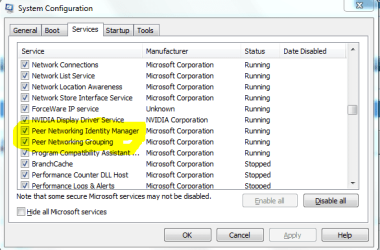
To enable peer networking just go to start/search then type in 'system config' hit enter then go to 'services' scroll down to peer networking and set too enable then hit the 'apply' button to turn on the peer networking functions, like I have highlighted in the picture below.

You can join a homegroup in any edition of Windows 7, but you can only create one in Home Premium, Professional, Ultimate, or Enterprise.
 

Attachments

  • system configuration peer networking enabled.PNG
    system configuration peer networking enabled.PNG
    15.8 KB · Views: 1,624

My Computer

Computer type
PC/Desktop
Computer Manufacturer/Model Number
Home built
OS
Windows 7 Ult, Windows 8.1 Pro,
CPU
Q9650-4.275GHz, E8600 4.5GHz, E6750-3.8GHz
Motherboard
Evga 780i FTW
Memory
G.Skill PC2 9600 1200Mhz 5 5 5 15 2T
Graphics Card(s)
GTX480
Sound Card
Asus Xonar D2
Monitor(s) Displays
HannsG
Screen Resolution
1680X1050
Hard Drives
GSkill Phoenix Pro 120GB SSD
PSU
ThermalTake Toughpower 1000Watt modular
Case
ThermalTake XaserV
Cooling
Xigmatek S1283
Keyboard
Logitech G15
Mouse
Logitech G9
Internet Speed
T1
To enable peer networking just go to start/search then type in 'system config' hit enter then go to 'services' scroll down to peer networking and set too enable then hit the 'apply' button to turn on the peer networking functions, like I have highlighted in the picture below.

You can join a homegroup in any edition of Windows 7, but you can only create one in Home Premium, Professional, Ultimate, or Enterprise.


Ok i found where they are... they are all checked (everything on the list is checked) however next to Peer networking Grouping, it is checked but says it is stopped.... how do i get it to run?
 

My Computer

Computer Manufacturer/Model Number
Custom Build (Both Mchines)
OS
Windows 7 Pro (Both Mchines)
CPU
AMD Phenom Quad Core (Both Mchines)
Motherboard
Asus M3A-H /HDMI (Asus M4N72-E)
Memory
Corsair 5GB (Both Mchines)
Graphics Card(s)
Nvidia 8800 GT (Nvidia 9 800 GTX)
Sound Card
Mobo Built in (Both Mchines)
Monitor(s) Displays
32inc Insignia HDTV (2X ACER 22 inch LCD)
Screen Resolution
MAX
Hard Drives
1 TB (1.56 TB)
PSU
450 Watt (680 Watt Hyper)
Keyboard
Logitech Wireless Wave (Saitek Cyborg)
Mouse
Logitech Wireless Wave (Razor Lachnis)
Internet Speed
16MB/S
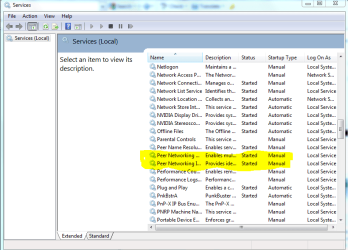
Ok go to start/search and type in 'services' then hit enter, scroll down and find and click to highlight peer networking and restart the service, it might help to set it to automatic start up but usually the manual start up works.

To enable automatic start up just right click on it than choose properties, then where it says "start up type' it might help if you change to automatic start up. I'm not sure why it would be disabled in the first place but maybe the manual start up isn't working because of your AV software.
 

Attachments

  • services peer networking enabled set to automatic.PNG
    services peer networking enabled set to automatic.PNG
    26.6 KB · Views: 1,308

My Computer

Computer type
PC/Desktop
Computer Manufacturer/Model Number
Home built
OS
Windows 7 Ult, Windows 8.1 Pro,
CPU
Q9650-4.275GHz, E8600 4.5GHz, E6750-3.8GHz
Motherboard
Evga 780i FTW
Memory
G.Skill PC2 9600 1200Mhz 5 5 5 15 2T
Graphics Card(s)
GTX480
Sound Card
Asus Xonar D2
Monitor(s) Displays
HannsG
Screen Resolution
1680X1050
Hard Drives
GSkill Phoenix Pro 120GB SSD
PSU
ThermalTake Toughpower 1000Watt modular
Case
ThermalTake XaserV
Cooling
Xigmatek S1283
Keyboard
Logitech G15
Mouse
Logitech G9
Internet Speed
T1
Ok go to start/search and type in 'services' then hit enter, scroll down and find and click to highlight peer networking and restart the service, it might help to set it to automatic start up but usually the manual start up works.

To enable automatic start up just right click on it than choose properties, then where it says "start up type' it might help if you change to automatic start up. I'm not sure why it would be disabled in the first place but maybe the manual start up isn't working because of your AV software.

Alright, went and did that.... it was on automatic, and i tried to hit start.... didn't work came up with en error. Went to manual... didn't work got an error

The error was this

"Windows could not start the Peer Networking Grouping service on Local Computer

Error 1068: The dependency service or group failed to start."

:(

GRIM
 

My Computer

Computer Manufacturer/Model Number
Custom Build (Both Mchines)
OS
Windows 7 Pro (Both Mchines)
CPU
AMD Phenom Quad Core (Both Mchines)
Motherboard
Asus M3A-H /HDMI (Asus M4N72-E)
Memory
Corsair 5GB (Both Mchines)
Graphics Card(s)
Nvidia 8800 GT (Nvidia 9 800 GTX)
Sound Card
Mobo Built in (Both Mchines)
Monitor(s) Displays
32inc Insignia HDTV (2X ACER 22 inch LCD)
Screen Resolution
MAX
Hard Drives
1 TB (1.56 TB)
PSU
450 Watt (680 Watt Hyper)
Keyboard
Logitech Wireless Wave (Saitek Cyborg)
Mouse
Logitech Wireless Wave (Razor Lachnis)
Internet Speed
16MB/S
Try going to Start/search type cmd, then right click on the little dos icon and run as admin. Type sfc/scannow into the command prompt then hit enter, give it some time to complete the scan. That should fix any file problems you might have.

I can't imagine why Peer networking wouldn't be working for you unless some files were corrupted or a rouge file needs to be delated, read on...

If that doesn't fix the problem try this TechNet fix for the problem.

The fix seems to be Deleting all files that reside in the PeerNetworking folder> C:\windows\serviceProfiles\LocalService\AppData\Roaming\PeerNetworking


You may need to go back into services and enable Peernetworking again after the fix. Don't forget to restart all machines after the fix.

http://social.answers.microsoft.com...k/thread/647907b2-5ba6-4fc5-b724-266bdfaddd37

http://social.technet.microsoft.com...g/thread/a85eaa65-d73a-4324-ad0c-e9a2c1469bd7
 
Last edited:

My Computer

Computer type
PC/Desktop
Computer Manufacturer/Model Number
Home built
OS
Windows 7 Ult, Windows 8.1 Pro,
CPU
Q9650-4.275GHz, E8600 4.5GHz, E6750-3.8GHz
Motherboard
Evga 780i FTW
Memory
G.Skill PC2 9600 1200Mhz 5 5 5 15 2T
Graphics Card(s)
GTX480
Sound Card
Asus Xonar D2
Monitor(s) Displays
HannsG
Screen Resolution
1680X1050
Hard Drives
GSkill Phoenix Pro 120GB SSD
PSU
ThermalTake Toughpower 1000Watt modular
Case
ThermalTake XaserV
Cooling
Xigmatek S1283
Keyboard
Logitech G15
Mouse
Logitech G9
Internet Speed
T1
  • Like
Reactions: Dom
Ok I have managed to get the Networking grouping to start... had to delete file idstore.sst in location

C:\windows\serviceProfiles\LocalService\AppData\Roaming\PeerNetworking.

but still nothing....can not leave the homegroup
 

My Computer

Computer Manufacturer/Model Number
Custom Build (Both Mchines)
OS
Windows 7 Pro (Both Mchines)
CPU
AMD Phenom Quad Core (Both Mchines)
Motherboard
Asus M3A-H /HDMI (Asus M4N72-E)
Memory
Corsair 5GB (Both Mchines)
Graphics Card(s)
Nvidia 8800 GT (Nvidia 9 800 GTX)
Sound Card
Mobo Built in (Both Mchines)
Monitor(s) Displays
32inc Insignia HDTV (2X ACER 22 inch LCD)
Screen Resolution
MAX
Hard Drives
1 TB (1.56 TB)
PSU
450 Watt (680 Watt Hyper)
Keyboard
Logitech Wireless Wave (Saitek Cyborg)
Mouse
Logitech Wireless Wave (Razor Lachnis)
Internet Speed
16MB/S
Sounds like the PeerNetworking problem is fixed. Do not forget to restart all machines after you delete that file from both of your Win 7 machines.

After that, Go to the control panel and click on the HomeGroups icon there you should see this.


Click on that and should see the password...;)
If you want them to leave then scroll down a little lower and you should see the "leave the homegroup" link...
That should remove the computer from that homegroup and once that is done to all the computers then you should be able to create a new one...
 
Last edited:

My Computer

Computer type
PC/Desktop
Computer Manufacturer/Model Number
Home built
OS
Windows 7 Ult, Windows 8.1 Pro,
CPU
Q9650-4.275GHz, E8600 4.5GHz, E6750-3.8GHz
Motherboard
Evga 780i FTW
Memory
G.Skill PC2 9600 1200Mhz 5 5 5 15 2T
Graphics Card(s)
GTX480
Sound Card
Asus Xonar D2
Monitor(s) Displays
HannsG
Screen Resolution
1680X1050
Hard Drives
GSkill Phoenix Pro 120GB SSD
PSU
ThermalTake Toughpower 1000Watt modular
Case
ThermalTake XaserV
Cooling
Xigmatek S1283
Keyboard
Logitech G15
Mouse
Logitech G9
Internet Speed
T1
GOT IT!!!!! SWEEET!!!!!! HERE IS WHAT TO DO!!!!!

Once everything peer Networking Grouping is running all you have to do is this

start the Task Manager
Click on the service Tab
Find the "HomeGroupProvider"
AND STOP IT!!!!

Once you stop it... try to leave the homegroup...... worked for me!!!!

GRIM


Thanks CHEV!!!!!!
 

My Computer

Computer Manufacturer/Model Number
Custom Build (Both Mchines)
OS
Windows 7 Pro (Both Mchines)
CPU
AMD Phenom Quad Core (Both Mchines)
Motherboard
Asus M3A-H /HDMI (Asus M4N72-E)
Memory
Corsair 5GB (Both Mchines)
Graphics Card(s)
Nvidia 8800 GT (Nvidia 9 800 GTX)
Sound Card
Mobo Built in (Both Mchines)
Monitor(s) Displays
32inc Insignia HDTV (2X ACER 22 inch LCD)
Screen Resolution
MAX
Hard Drives
1 TB (1.56 TB)
PSU
450 Watt (680 Watt Hyper)
Keyboard
Logitech Wireless Wave (Saitek Cyborg)
Mouse
Logitech Wireless Wave (Razor Lachnis)
Internet Speed
16MB/S
Thats great, I think that a restart might have gotten rid of that HomeGroupProvider also but not sure. In any event that file had to be deleted or nothing works right for some reason. I can't even figure out how that file gets there in the first place but it's a common problem apparently.

I have two of those Homegroup services running in my taskmanager one for system and one for services. I guess that once it gets associated with the disabled process it keeps homegroups from working. I'm still wondering how it got messed up in the first place. Maybe an AntiVirus installation or something.

I have no such problems with my Homegroup LOL, works absolutely perfectly for me.
I shall mark this as solved!

If you found this post to be useful please don't forget to Rep. :)
 
Last edited:

My Computer

Computer type
PC/Desktop
Computer Manufacturer/Model Number
Home built
OS
Windows 7 Ult, Windows 8.1 Pro,
CPU
Q9650-4.275GHz, E8600 4.5GHz, E6750-3.8GHz
Motherboard
Evga 780i FTW
Memory
G.Skill PC2 9600 1200Mhz 5 5 5 15 2T
Graphics Card(s)
GTX480
Sound Card
Asus Xonar D2
Monitor(s) Displays
HannsG
Screen Resolution
1680X1050
Hard Drives
GSkill Phoenix Pro 120GB SSD
PSU
ThermalTake Toughpower 1000Watt modular
Case
ThermalTake XaserV
Cooling
Xigmatek S1283
Keyboard
Logitech G15
Mouse
Logitech G9
Internet Speed
T1
CAn't leave home group

I have the exact same problem as described. All the answers I have seen on the web don't provide anything beyond the normal windows procedures Help
 

My Computer

Computer Manufacturer/Model Number
HP
OS
windows 7 64 bit
CPU
Intel T6600 Dual core
Motherboard
HP
Memory
4 GB
Graphics Card(s)
NA
Sound Card
Integrated
Monitor(s) Displays
LCD
Hard Drives
500 GB
For that type of problem you can read the "Cannot Leave Homegroup" thread below which talks about fixing the same problem.

I will show you the more direct approach to fixing the problem here. This is another Windows 7 bug apparently so you need to delete some files.

The fix for this problem seems to be Deleting ALL FILES which reside at C:\windows\serviceProfiles\LocalService\AppData\Roaming\PeerNetworking

Once everything at peer Networking Grouping is running you may also need to do this...

Start the Task Manager
Click on the service Tab
Find the "HomeGroupProvider"
and then stop the service.


You may need to go back into services and enable Peernetworking again after the fix. Don't forget to restart all machines making the adjustments.

Cannot leave Homegroup


For more help try my Homegroup trouble shooter list.
http://www.sevenforums.com/network-sharing/20211-homegroup-issues-3.html#post436715
 
Last edited:

My Computer

Computer type
PC/Desktop
Computer Manufacturer/Model Number
Home built
OS
Windows 7 Ult, Windows 8.1 Pro,
CPU
Q9650-4.275GHz, E8600 4.5GHz, E6750-3.8GHz
Motherboard
Evga 780i FTW
Memory
G.Skill PC2 9600 1200Mhz 5 5 5 15 2T
Graphics Card(s)
GTX480
Sound Card
Asus Xonar D2
Monitor(s) Displays
HannsG
Screen Resolution
1680X1050
Hard Drives
GSkill Phoenix Pro 120GB SSD
PSU
ThermalTake Toughpower 1000Watt modular
Case
ThermalTake XaserV
Cooling
Xigmatek S1283
Keyboard
Logitech G15
Mouse
Logitech G9
Internet Speed
T1
CAn't leave homegroup solved

Thanks to Dr Grim I finally was able to leave the homegroup by stopping the "HomeGroupProvider" service as he suggested.

Thanks:D
 

My Computer

Computer Manufacturer/Model Number
HP
OS
windows 7 64 bit
CPU
Intel T6600 Dual core
Motherboard
HP
Memory
4 GB
Graphics Card(s)
NA
Sound Card
Integrated
Monitor(s) Displays
LCD
Hard Drives
500 GB
Thanks to Dr Grim I finally was able to leave the homegroup by stopping the "HomeGroupProvider" service as he suggested.

Thanks:D

Yes that part of the fix is highlighted in bold in the above post, seems like I was the one helping out here?
 
Last edited:

My Computer

Computer type
PC/Desktop
Computer Manufacturer/Model Number
Home built
OS
Windows 7 Ult, Windows 8.1 Pro,
CPU
Q9650-4.275GHz, E8600 4.5GHz, E6750-3.8GHz
Motherboard
Evga 780i FTW
Memory
G.Skill PC2 9600 1200Mhz 5 5 5 15 2T
Graphics Card(s)
GTX480
Sound Card
Asus Xonar D2
Monitor(s) Displays
HannsG
Screen Resolution
1680X1050
Hard Drives
GSkill Phoenix Pro 120GB SSD
PSU
ThermalTake Toughpower 1000Watt modular
Case
ThermalTake XaserV
Cooling
Xigmatek S1283
Keyboard
Logitech G15
Mouse
Logitech G9
Internet Speed
T1
unable to leave homegroup fix works

I can confirm you do NOT need to reboot after getting rid of that id file and stopping the homegroup provider service. I was just able to do it- had the same problem. I would reboot anyway when all finished before trying to start a new homegroup.
 

My Computer

OS
32 and 64 bit win7hp
I am having this same problem. I deleted the entries in C:\windows\serviceProfiles\LocalService\AppData\Roaming\PeerNetworking. But the peer networking services will not start, due to getting the error 1068 described. Please help.
 

My Computer

OS
Windows 7 x64 Ultimate
Try this it worked for me

At first i deleted
C:\windows\serviceProfiles\LocalService\AppData\Roaming\PeerNetworking

Stopped HomeGroup in services through task manager and tried to leave the homegroup - no luck - restarted - still couldnt leave - so in desperation i just DELETED THE ENITRE ROAMING FOLDER.
Stopped HomeGroup in services through task manager and tried to leave the homegroup -

SUCESS!!!

THANKS TO ALL FOR THE HELP
 

My Computer

OS
windows 7 home 64-bit
Thank you Chev65, your advice has worked on my computers;

delete the file from the C:\windows\serviceProfiles\LocalService\AppData\Roaming\PeerNetworking folder on all computers on the network. (if you can't open this folder, navigate to the 'localservice' folder manually and then type in \AppData this will open the folder). Then stopped HomeGroup in services through task manager and left the homegroup on all computers. I went into Services and everything was running once more, even the 'internet protocol version 6 ipv6' was enabled.

You have saved me hours of frustration - thank you so much!

Paul
 

My Computer

OS
Windows 7
At first i deleted
C:\windows\serviceProfiles\LocalService\AppData\Roaming\PeerNetworking

Stopped HomeGroup in services through task manager and tried to leave the homegroup - no luck - restarted - still couldnt leave - so in desperation i just DELETED THE ENITRE ROAMING FOLDER.
Stopped HomeGroup in services through task manager and tried to leave the homegroup -

SUCESS!!!

THANKS TO ALL FOR THE HELP

Holy Crap Ola! jcmayartist, Thank you so much! I created a account just to thank you personally. I spent the past 2-3 hours trying to Leave Homegroup! I followed all the forums and their steps. I ran accross yours that said DELETE THE ENITRE ROAMING FOLDER and presto I can leave Homegroup. I easily created another and have new password. Thanks a bunch!
 

My Computer

Computer type
PC/Desktop
OS
Windows 7 Ultimate
Back
Top