Cannot open Clipboard Error

shadowminx69

New member
Local time
7:37 AM
Messages
26
Things were going great and all the sudden I kept on getting Cannot Open Clipboard Error messages. Any way I can view my Clipboard or Know why its happening?
 

My Computer

OS
Windows 7 Build 7000
It seems that an application you're using has locked the clipboard temporarily, or permanently if it also crashed.

A restart should fix the problem. If the problem persists, please post back.
 

My Computer

Computer Manufacturer/Model Number
ENIAC
OS
Windows 7 RC 7100 32bit/64bit
CPU
Intel Core2Duo E4500 2.20 GHz
Motherboard
ASUS P5LD2-X/1333
Memory
2x1GB Kinsgston DDR2 800MHz
Graphics Card(s)
Nvidia 8500GT
Sound Card
Onboard High Definition Audio Device
Monitor(s) Displays
Sony Bravia 42"
Case
LINKW 2222
Cooling
Standard Intel
Keyboard
Some cheap one
Mouse
Microsoft Intellimouse something
Internet Speed
24MBps ADSL
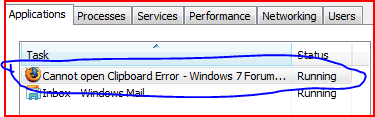
I cannot open clipboard viewer either. Just a flash of a window, just an outline really. Reboot no help. First time I tried it I opened Task manager and found this. Haven't seen it on subsequent attempts.

cliperror.PNG

Any ideas?

Gary
 

My Computer

Computer Manufacturer/Model Number
Dell XPS420
OS
Vista Ult 64 bit Seven Ult RTM x64
CPU
Intel Core2 Quad Q6600 2.40 gigahertz
Memory
Crucial Ballistix 4x2GB PC2 6400
Graphics Card(s)
NVIDIA GeForce 8600 GTS 256 MB
Sound Card
Creative SB X-Fi audio
Monitor(s) Displays
HP w2207 + HPvs15
Screen Resolution
1680x1050 + 1024x768
Hard Drives
2-WD5000AAKS-500 GB
WD5000AAV-500 GB external
Keyboard
Microsoft Comfort Curve
Mouse
MX Revolution
Other Info
Wacom Intuos 2 Graphics Tablet
Experience Index=5.5
Wow when It Rains It pours. Every time I start a Thread about a Bug or crash everyone starts getting them. Maby I am bad luck or something
 

My Computer

OS
Windows 7 Build 7000
I hadn't ever tried to open clipboard viewer before I saw this thread. May have existed since install for all I know. Bad luck. No. Just pointing it out. Could be a bug. Not enough info gathered yet.

Gary
 

My Computer

Computer Manufacturer/Model Number
Dell XPS420
OS
Vista Ult 64 bit Seven Ult RTM x64
CPU
Intel Core2 Quad Q6600 2.40 gigahertz
Memory
Crucial Ballistix 4x2GB PC2 6400
Graphics Card(s)
NVIDIA GeForce 8600 GTS 256 MB
Sound Card
Creative SB X-Fi audio
Monitor(s) Displays
HP w2207 + HPvs15
Screen Resolution
1680x1050 + 1024x768
Hard Drives
2-WD5000AAKS-500 GB
WD5000AAV-500 GB external
Keyboard
Microsoft Comfort Curve
Mouse
MX Revolution
Other Info
Wacom Intuos 2 Graphics Tablet
Experience Index=5.5
Hello all.


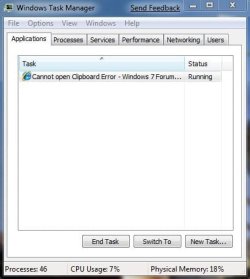
Well same here, but like Gary I haven't tried to open the clipboard; I do use the clipboard a lot though and have had no problems with it. Maybe this tutorial from x64 will have some impact.

Clear Clipboard Shortcut - Vista Forums

Update: using the "Clear Clipboard" has no effect, I still get the error.


Clipboard Error.JPG


Later :shock: Ted
 

My Computer

Computer Manufacturer/Model Number
* BFK Customs *
OS
W 7 64-bit Ultimate
CPU
Intel Q9550 Yorkfield
Motherboard
ASUS P5Q Pro
Memory
8GB Dominator 8500C5D
Graphics Card(s)
ATI : XFX 5870
Sound Card
Realtek HD Audio 7-1
Monitor(s) Displays
1x 47" LCD HDMI & 3x 26" LCD HDMI
Screen Resolution
1920x1080P & 1920x1200
Hard Drives
1x 80GB Intel X25-M G2 SSD : 1x 500GB & 1x 640GB WD Caviar Black(s)
PSU
Corsair 620HX
Case
Cooler Master RC-690
Cooling
Tuniq Tower 120, 2x 140mm and 3x 120mm case fans
Keyboard
Microsoft 500
Mouse
Razer Diamondback 3G
Internet Speed
14 Mb/s
Other Info
1x Koutech 3Gb/s SATA HDD Hot Swap Rack
Hi Ted,

Yea, I have no problems with using the clipboard either. Just can't open it. Maybe they've decided to kill that option. You used to be able to save clips. Haven't done that in several years, but used to use it on occasion.

Gary
 

My Computer

Computer Manufacturer/Model Number
Dell XPS420
OS
Vista Ult 64 bit Seven Ult RTM x64
CPU
Intel Core2 Quad Q6600 2.40 gigahertz
Memory
Crucial Ballistix 4x2GB PC2 6400
Graphics Card(s)
NVIDIA GeForce 8600 GTS 256 MB
Sound Card
Creative SB X-Fi audio
Monitor(s) Displays
HP w2207 + HPvs15
Screen Resolution
1680x1050 + 1024x768
Hard Drives
2-WD5000AAKS-500 GB
WD5000AAV-500 GB external
Keyboard
Microsoft Comfort Curve
Mouse
MX Revolution
Other Info
Wacom Intuos 2 Graphics Tablet
Experience Index=5.5

My Computer

Computer Manufacturer/Model Number
* BFK Customs *
OS
W 7 64-bit Ultimate
CPU
Intel Q9550 Yorkfield
Motherboard
ASUS P5Q Pro
Memory
8GB Dominator 8500C5D
Graphics Card(s)
ATI : XFX 5870
Sound Card
Realtek HD Audio 7-1
Monitor(s) Displays
1x 47" LCD HDMI & 3x 26" LCD HDMI
Screen Resolution
1920x1080P & 1920x1200
Hard Drives
1x 80GB Intel X25-M G2 SSD : 1x 500GB & 1x 640GB WD Caviar Black(s)
PSU
Corsair 620HX
Case
Cooler Master RC-690
Cooling
Tuniq Tower 120, 2x 140mm and 3x 120mm case fans
Keyboard
Microsoft 500
Mouse
Razer Diamondback 3G
Internet Speed
14 Mb/s
Other Info
1x Koutech 3Gb/s SATA HDD Hot Swap Rack
No, I don't think it was me, but that would be a replacement.

Gary
 

My Computer

Computer Manufacturer/Model Number
Dell XPS420
OS
Vista Ult 64 bit Seven Ult RTM x64
CPU
Intel Core2 Quad Q6600 2.40 gigahertz
Memory
Crucial Ballistix 4x2GB PC2 6400
Graphics Card(s)
NVIDIA GeForce 8600 GTS 256 MB
Sound Card
Creative SB X-Fi audio
Monitor(s) Displays
HP w2207 + HPvs15
Screen Resolution
1680x1050 + 1024x768
Hard Drives
2-WD5000AAKS-500 GB
WD5000AAV-500 GB external
Keyboard
Microsoft Comfort Curve
Mouse
MX Revolution
Other Info
Wacom Intuos 2 Graphics Tablet
Experience Index=5.5
Back
Top